

The pack file, field by field
This is the reference for a homebrew pack's file: every top-level field, how keys and slugs work, what a pack can refer to, and how to change, rename or remove rows safely once players have them.
A homebrew pack is one JSON file: a few fields that describe the pack, then a list of rows, each one thing such as a weapon or a value. RollQuest's checker, the validator, reads the whole file before it accepts it, and the rules on this page are the ones it applies to every pack, whatever is inside the rows. The pages for each kind of content (weapons, spells, subclasses and the rest) cover the inside of a row. If you haven't made a pack yet, start with Your first homebrew pack, step by step. This page is for the Game Master (GM) writing the file.
Plan: writing homebrew is on Pro.
A pack at a glance
Here is the outside of the Thornwhip pack from Your first homebrew pack, with its one row taken out. RollQuest accepts it as it is: a pack with no rows is valid, but offers nothing.
{
  "slug": "my-thornwhip",
  "name": "Thornwhip (homebrew weapon)",
  "system": "5.5e Compatible",
  "derivedFrom": "5-5e-core",
  "category": "addon",
  "version": "1.0.0",
  "license": "USER_HOMEBREW",
  "source": "My table's homebrew.",
  "attribution": "",
  "description": "",
  "requiredDecisions": [],
  "items": []
}
Each row in items has three parts:
kind: what sort of row it is, such asinventoryItemfor something a character holds.key: the row's own ID, such asWEAPON_THORNWHIP.spec: the row's content. What goes in it depends on the kind.
A row copied with Fork has a fourth, forkedFrom, which records where it came from. Keep it as it is.
The top-level fields
| Field | Needed | What it does |
|---|---|---|
name |
Yes | The pack's name in My Homebrew, on builder cards and in + From pack. A pack with no name is refused: This pack was not created: name is required. |
slug |
Yes, in practice | The pack's short ID, such as my-thornwhip. Your packs and grants name each other by slug, so a pack without one can't refer to its own rows. It can't be the slug of one of RollQuest's built-in packs. |
system |
Yes, in practice | The system the pack is for, spelt exactly: 5e Compatible, 5.5e Compatible, Ashfall (d100), Brightline (d20 heroes), Tidewrack (d6 pool), No System, or the system of a game system of your own. |
derivedFrom |
Yes, in practice | The slug of the pack yours builds on: a system's core pack, such as 5-5e-core, or one of your own packs. See What your pack can refer to. Leave it empty only for a game system of your own. |
items |
Yes | The rows. Leave it out and the pack is empty. If it's there but isn't a list, the pack is refused with ITEMS_NOT_ARRAY. |
version |
No | A label for you, such as 1.0.0. RollQuest never changes it. Revisions are what count (see Revisions). |
category |
No | addon for an add-on to a system, which is most homebrew; base for a game system of your own; subclass is also accepted. Anything else is saved as base when you create the pack, and refused with CATEGORY_INVALID when you save an edit. |
license |
No | USER_HOMEBREW (the default) for your own content. A pack copied from RollQuest's rules keeps the licence of what it copied. |
attribution |
No | Credit text. Sheets that took something from the pack show it behind an (i). |
source, description |
No | Free text for your notes. |
retired |
No | Keys of rows you've withdrawn. See Remove or rename a row. |
requiredDecisions |
No | The character builder's steps. Only a game system of your own declares them; leave it as []. |
systemRules |
No | A game system's whole rule set: damage types, conditions, rest buttons and more. Only for a game system of your own. In an add-on it would replace the sheet's entire rule set when applied, so leave it out. |
idPrefix |
No | Leave it empty. It adds letters to the front of every value and roll ID on the sheet, but the checker doesn't apply it, so a pack that passes the check can still point at IDs that don't exist. |
currencyGroups, resourcePools, triggerButtons, mobileGroups, terminology, rowTemplates, combatRules, canvasEnabled, powerList, defaultTextColor |
No | Settings for a game system's own core pack. An add-on doesn't need them. A currencyGroups that isn't a list of well-formed coin groups is refused with CURRENCY_GROUPS_INVALID. For uses that run out, give the item maxUses instead of a resource pool: see Magic items and consumables. |
applyAtCreation |
No | false keeps an add-on out of the packs put on a new character when it's created, for content meant for another kind of sheet. Only a pack with a derivedFrom may set it, and only to true or false; anything else is refused with APPLY_AT_CREATION_INVALID. |
RollQuest decides who owns a pack and who can see it. If your file sets scope, visibility, ownedBy or createdBy, those are removed before the check and a note says so.
Keys, IDs and slugs
A pack has three kinds of name, and each has its own job:
| Name | Example | Where it's used |
|---|---|---|
The pack's slug |
my-thornwhip |
Grants and choices that name a pack, such as "give the item X from pack my-thornwhip". |
A row's key |
WEAPON_THORNWHIP |
The row's identity. The sheet remembers which row a copy came from by its key, so re-stamping can update it. |
A row's spec.id |
WEAPON_THORNWHIP |
What formulas and effects use to point at it, and the ID of the copy on the sheet. Keep it the same as the key. |
Rules for keys:
- Unique within the pack. Two rows with one key are refused.
- Unique against the packs yours sits beside. A key can't match a row in RollQuest's packs for your system, or in your own other packs of the same system:
WEAPON_LONGSWORDis refused on 5.5e, because the 5.5e weapons pack has one. Start every key in a pack with the same word of your own, such asTHORN_, and they won't clash. - Always written. A row with no
keyis refused withITEM_MISSING_KEY. - Fixed once players have the row. Renaming or removing a key is refused unless you declare it: see Remove or rename a row.
Slugs are lower case, with words joined by hyphens. RollQuest refuses a slug that belongs to one of its built-in packs, such as 5-5e-srd-weapons. It doesn't stop two of your own packs sharing a slug, so keep them different yourself: a grant that names a slug two packs share can reach the wrong one.
What your pack can refer to
A pack can only point at things RollQuest knows are there. derivedFrom decides most of that.
| Your system | system |
derivedFrom |
|---|---|---|
| 5e (2014, SRD 5.1) | 5e Compatible |
5e-core |
| 5.5e (2024, SRD 5.2.1) | 5.5e Compatible |
5-5e-core |
| Ashfall | Ashfall (d100) |
ashfall-core |
| Brightline | Brightline (d20 heroes) |
brightline-core |
| Tidewrack | Tidewrack (d6 pool) |
tidewrack-core |
| No system | No System |
no-system-core |
| A game system of your own | Its system |
Its slug |
What the checker lets your pack use:
- Everything in the core pack it derives from: its values (such as
AC,STR_MODandPROF), its rolls (such asPERC_ROLL, the Perception check), theATK_ROLLtag, its damage types, its coins, its kinds of item, its rest buttons and its builder steps. The authoring contract lists them all. - Another of your own packs, as
derivedFrom. Name one of your packs that isn't retired, rather than the core pack, and your pack builds on it: the values and rolls that pack declares are usable too, along with everything it builds on in turn. If two of your packs share the slug, the older one is used. - Your own pack's rows. A value your pack declares can be used by its own items, and an action you tag
DMG_ROLLmakes that tag usable by your own effects. - The other packs of your system, by key only. RollQuest's other packs for your system (its weapons, spells, feats and so on) and your own packs of the same system can be named in a grant, a bundle or a choice, by pack slug and row key. Their values and tags aren't usable:
DMG_ROLLandHEAL_ROLLbelong to the built-in weapon and spell packs, so an effect can only target them once your own pack has an action with that tag. - Class levels and choices to add to. A homebrew subclass or class feature can add to RollQuest's class features pack for your system, or to a class in one of your own packs of that system, with
derivedFromleft as the core pack. See Subclasses and class features.
What it can't use:
- A
derivedFromthat's neither a system nor yours. A slug that isn't a game system's core pack or one of your own packs is refused: derivedFrom names pack "...", which is neither a curated game system nor one of your own packs. - Values declared in a pack yours sits beside. A value in another of your packs is usable only when your pack derives from that one. Give each pack the values it needs, keep them in one pack, or derive one pack from the other.
- Anything from another system. A 5.5e pack can't name a 5e row.
The kinds of row
kind |
What it is | How it reaches a sheet |
|---|---|---|
inventoryItem |
Anything a character holds: a weapon, armour, gear, a magic item, a spell, a feat, a species, a background, a class feature or a class level | Players take it: in a builder step, at Level Up or with + From pack. Class levels, and class features that name their class in meta.class, come only with the builder and Level Up, never from + From pack. |
classContribution |
A feature or a choice added to an existing class level | At Level Up and in the builder, inside that class level. See Subclasses and class features. |
valueField |
A number on the sheet, such as a Sanity score | Apply to N sheets or a re-stamp. See What binding delivers. |
calculation |
A roll built from values, such as a Sanity check | The same as a value. |
effect |
A bonus that applies to the whole sheet, not to one item | The same as a value. An effect on an item goes in that item's spec.effects instead: see Effects. |
toggle, slot |
A switch or a row of markers on a Canvas sheet | Apply to N sheets. |
creature |
A monster's stat block | Your game's creature list, never a character sheet. See Creatures. |
clickableRegion |
A clickable area on a Canvas sheet | Accepted, but nothing puts it on a sheet. |
textBox |
Text with its own HTML | Refused in a homebrew pack. |
An inventoryItem's spec.subType says what sort of item it is, which decides the tab it goes on and when its effects count:
| System | subType values |
|---|---|
| 5e and 5.5e | weapon (Weapons tab, effects count while equipped), item (gear, armour and magic items on the Items tab, while equipped), power (spells on the Spells tab, while prepared), feat (Feats, always on), background (species, backgrounds and class features, always on) |
| Ashfall | archetype, skill, weapon, talent, corruption, armour, kit, rite, cinderbook, horror |
| Brightline | basic, superpower, archetype, edge, rule, item |
| Tidewrack | calling, ability, gear, fracture, undertow, crew |
| No System | item, whatever the row says |
Write a subType on every item. One that's missing is refused with ITEM_SUBTYPE_MISSING, and one the system doesn't have with SUBTYPE_UNDECLARED. A No System pack is the exception: neither is checked, and every item is filed under item. The authoring contract's Inventory subTypes section lists the ones your system has.
Revisions
- Create pack saves revision 1 (r1).
- Every Save changes that changes something saves the next revision: r2, r3 and so on. Each revision is kept as it was saved.
- A game you've bound the pack to stays on the revision it was bound with, its pin, until you move it. Editing the pack never changes a game on its own. See Put your pack on a table.
- A sheet keeps a copy of what it took. Moving the pin changes what's offered from then on; re-stamping updates the copies.
The panel shows the newest revision on the pack's row (Revision 3), and each game's pin on its binding (Pinned r2 · pack is now at r3).
Change a pack
Click Edit on the pack's row. The Edit window shows the pack as it's saved:
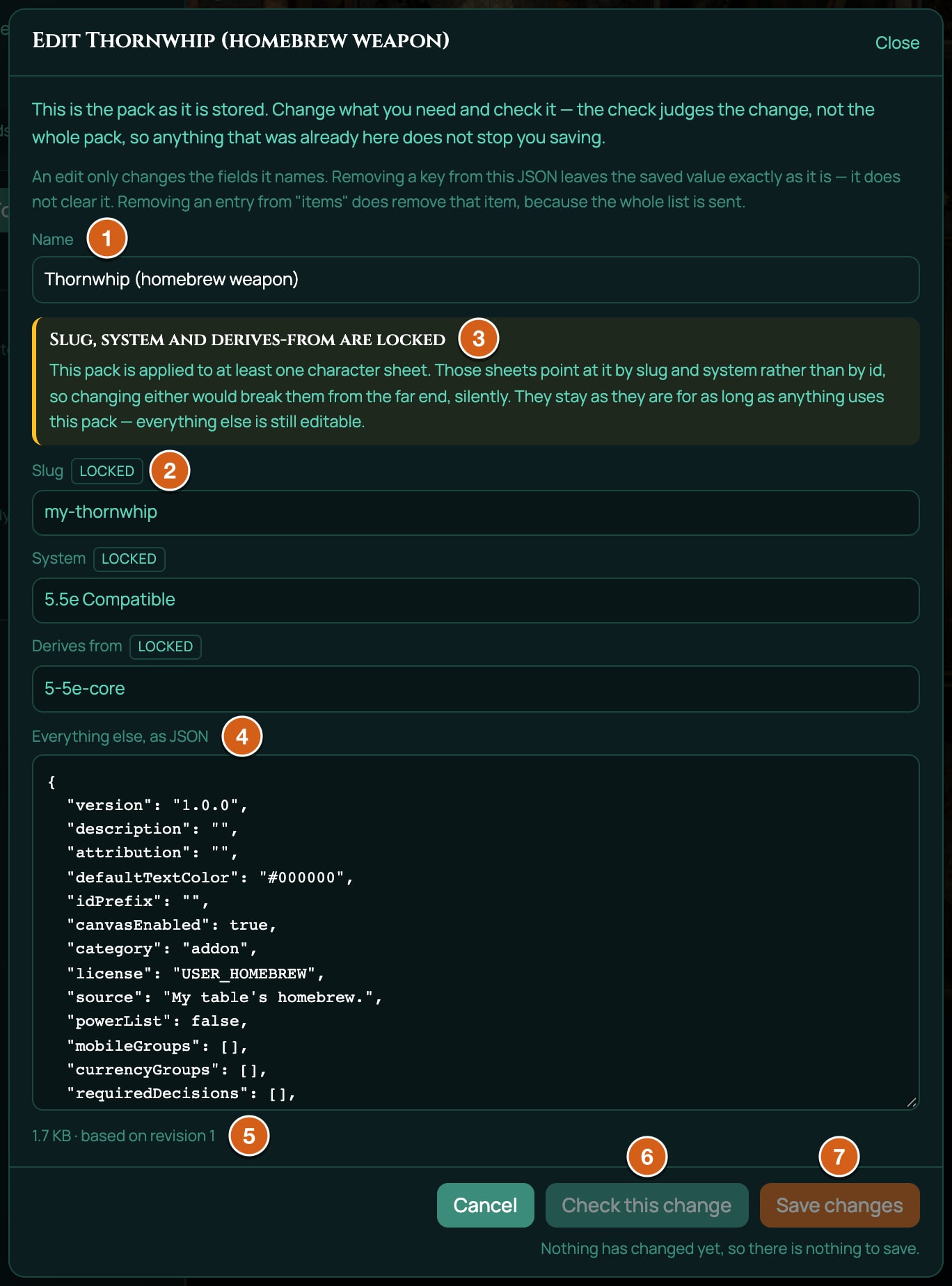
| Part | What it does |
|---|---|
| Name | The pack's name. |
| Slug, System, Derives from | The pack's slug, system and derivedFrom. Once any character sheet has taken something from the pack, they're marked locked and a note says Slug, system and derives-from are locked: sheets find the pack by these, so they can't change while anything uses it. |
| Everything else, as JSON | Every other field, items included. |
| The size line | The pack's size and based on revision with the revision you opened. |
| Check this change | Checks your change. It reads Check again while the box still matches what it last checked. Greyed out until you've changed something. |
| Save changes | Saves the change as a new revision. It only works after a check of the current text that found nothing blocking. If the pack is bound to this game, its binding then shows the new revision, such as Pinned r1 · pack is now at r2. |
| Cancel or Close | Closes the window. Unsaved changes are lost: the next Edit opens the saved pack. Once you've changed something, Esc and clicking outside the window don't close it, so a change isn't lost by accident. |
How an edit is judged:
- Only what you change is judged. The check lists problems your change introduces under Introduced by this change, and these block the save. Problems the pack already had are listed under Already in this pack and don't block, so an older pack can still be edited.
- A field you leave out keeps its saved value. Deleting a top-level field from the JSON doesn't clear it.
itemsis replaced as a whole, so a row you delete from the list is removed from the pack. The check refuses that unless you declare it: see the next section.- Name in two places. If the JSON also has
name,slug,systemorderivedFrom, the fields above the box win and a note says the JSON copy was ignored.
If the pack was saved somewhere else while you were editing, saving is refused with This pack changed somewhere else after you opened it. Click Reload the pack to load the saved version; copy anything you want to keep first, because reloading replaces everything in the window. A message that says Your change WAS saved means the change went in and only its revision number clashed: reload before editing again.
A retired pack can't be edited.
Remove or rename a row
Once players have a row, removing its key from the pack would leave their copies stranded, so every edit that takes a key away is refused with ITEM_KEY_REMOVED until you say what happened to it.
To withdraw a row, keep it in items and add its key to retired at the top of the pack:
"retired": ["WEAPON_THORNWHIP"]
Characters who have it keep it, and re-stamping still updates it, but it stops being offered in the builder and + From pack, and adding it again is refused with "WEAPON_THORNWHIP" has been retired from this pack and can no longer be added. Characters that already have it keep it. You can also delete the row and list its key in retired; then re-stamping can't update the copies any more.
To rename a row, change its key and spec.id, and add the old key to its spec:
"renamedFrom": "WEAPON_THORNWHIP"
The save goes through with a note, RENAME_NOT_YET_MIGRATED: new characters get the new key, but sheets that already have the row keep the old key, and RollQuest doesn't rewrite them yet. Rename only when you need to.
Rules for both:
retiredmust be a list of keys, even for one key:["OLD_KEY"], not"OLD_KEY".renamedFromis a key, or a list of keys.- You can't rename onto a key that's still in the pack, and two rows can't claim the same old key. To shift names along (A to B, and B to C), do it as two saves: B to C first, then A to B.
Limits
| Limit | Value |
|---|---|
| Packs on Pro | 20 at a time. Copies made with Fork count. A retired pack counts while any character still has something from it, and stops counting once none does: see Retire a pack. |
| Pack size | 2 MB, measured as compact JSON without spaces and line breaks. Over 1 MB the check warns, PACK_SIZE_WARNING. Split a big pack into two. |
| A file in Choose a file | Up to 16 MB is opened into the box; the 2 MB limit then applies to what's in it. |
| Formula length | 1,000 characters |
| Brackets inside brackets | 12 deep |
| Different names in one formula | 50 |
| Dice in one formula | 10 separate dice terms, such as 1d20 and 2d6; up to 100 dice in a term, each up to a d1000 |
| Functions | About 400 spreadsheet functions are allowed, such as FLOOR, MAX, MIN and IF. RAND, RANDBETWEEN, NOW and TODAY are refused, because a value must work out the same every time. The contract lists them all. |
What the checker doesn't check
A pack that passes the check can still do nothing on a sheet. The checker refuses an item with no name or no subType, an effect with no id, and a choice a player couldn't answer, but it doesn't look at these, so they're rules you keep yourself:
| Rule | What happens if you break it |
|---|---|
Spell meta fields correctly, such as rarity or damage. |
They're labels: a misspelt one shows nothing. |
Write bonusDie, onCritDice and setFormula values as real dice, such as 1d4. |
A malformed one rolls nothing. Test it on a sheet. |
Give uses with maxUses, not resourcePools. |
A resource pool in an add-on isn't checked and doesn't work as you'd expect. |
| Set a row's uses right the first time. | uses and maxUses are copied when a player takes the item, and re-stamping never changes them. The one exception: if the item had no uses when it was taken and you give it maxUses later, a re-stamp adds them, full. |
| Only make an item's effect depend on a value from your own pack if you'll stamp it. | The check passes, but on a game where the pack is only bound, the value isn't on the sheet, so the effect never applies. See What binding delivers. |
Mind license and attribution. |
They're free text. |
The authoring contract
Download the contract in the New homebrew window gives you a Markdown document generated for the system you pick, at that moment, from the same checker that judges your pack. Its first line says what it's for: paste the whole document into an AI assistant before asking it to write a pack. It's also the most complete list there is of what your pack can use.
| Section | What it tells you |
|---|---|
| Provenance | Which version of the checker and the system it was made from. If a fresh download differs here, your saved copy is out of date. |
| The system you are extending | The core pack (such as 5-5e-core) and the system's other packs, which your keys must not clash with, and the category values. |
| Item kinds | The ten kinds of row, that textBox is refused, and the 2 MB limit. |
| Item shapes | What every row, every item, every effect and every choice must carry to be accepted, then example rows built for your system, such as a value, a roll, two items (one that asks a choice) and a sheet-wide effect, checked together when the contract was made. |
| Effect ops, and what each may target | Every effect operation, such as add or advantage, and which kind of target it works on. See Effects. |
| Legal effect targets | Every value ID, roll ID and action tag your effects can point at, with a count of each. |
| Damage types | The system's damage types, plus healing and varies. |
| Currency groups | The coin group for prices: coinage on 5e and 5.5e. |
| Cross-pack references | The packs your grants and choices can name. |
| Shaping character creation | Three optional settings that change what a new character is offered: a builder step that only offers options matching an earlier pick (filterBy), a limit on picks in a step (maxPicks), and applyAtCreation. |
| Inventory subTypes | The subType values the system has. |
| Scope of the VALUE_FIELD_UNRENDERABLE_GROUP warning | Which groups of values each sheet layout shows. A value in a group no layout shows never appears. |
| Formulas | The limits above and every allowed function. |
| Traps | About 50 mistakes that look right and never work, each with the checker's own evidence. |
| Error codes you may see back | Every code the checker can return. See When a pack is refused. |
The example rows show the shape of each kind of row; giving an assistant a whole working pack from these pages as well shows it how the parts fit together. What the contract doesn't say is which rows reach a sheet by binding; Put your pack on a table does.
Download a fresh contract for each pack. It's generated on every download, and it includes your own packs of that system, so it changes as you add packs and as RollQuest changes.
Copy rows (Fork)
Copying rows is the quickest way to start a pack from something that already works, such as one of RollQuest's 5.5e weapons, or to make a variant of one of your own packs. Every copied row gets a new key, and every reference between the copied rows is rewritten to follow, so nothing clashes with the original.
There are two ways in:
- New homebrew > Copy rows that already exist > Pick rows: copy from RollQuest's packs or your own, for the system you picked.
- Fork on one of your packs: copy from that pack.
- Under Which pack are you copying from?, choose a pack in Source pack. Each shows its system and how many rows it holds.
- Under Which rows?, tick the rows you want. Filter by key, name or kind narrows the list; Choose these 12 (with the real count) ticks every row the filter shows, and Clear unticks them all. The line above the list counts your choice, such as 3 of 412 rows chosen.
- Under The pack they go into, check the Name (it starts as the source's name with (fork) after it), the Slug (optional), and the Key prefix. The prefix goes on the front of every key and ID the copied rows use, so pick something short of your own, such as
THORN. - Click Prepare the copy. Nothing is created yet. The window shows what it did:
- Nothing was left behind, or a count of things the fork could not carry across safely, with each row and the reason. Read these: the check below doesn't repeat them.
- What was changed: every reference that was rewritten, from the old name to the new one.
- What the validator says about the pack this makes: the same check as any new pack.
- Click Create the pack. A message says your pack was created from the rows you picked. It is private to you.
Changing the source, the rows, the name, the slug or the prefix throws the preparation away: click Prepare the copy again. Then edit the copy as JSON with Edit.
Good to know:
- The copy is an add-on of the source's system, deriving from the same core pack, and it keeps the source's licence and attribution.
- A copy counts towards your 20 packs.
- You can copy from RollQuest's packs and your own, never from a pack you can only see because it's bound to a game you play in.
- The check after preparing covers the new pack as a whole, not the copying. A reference the copy missed can still pass the check by pointing at the original row, so read What was changed.
- Keep each copied row's
forkedFromwhen you edit the JSON. A row that loses it gets the noteFORK_PROVENANCE_DROPPED.
If the copy can't be made, the window says why: Choose at least one row to fork., a prefix that's empty or starts with a digit, rows that are no longer in the source, or rows with different licence terms, which can't go in one pack.
Related
Your first homebrew pack, step by step · Put your pack on a table · Effects · Choices and grants · When a pack is refused