

A game system of your own
Write a whole game system of your own, with its own numbers, rolls, damage, tokens and character builder, as a homebrew base pack modelled on Ashfall.
A game system is the set of rules a game plays by: what a character sheet holds, how a roll works, where damage goes, what a rest does. In RollQuest a system is data, not code: a pack of numbers, rolls and rules that RollQuest reads to build every sheet, token and character builder in a game. RollQuest's own Ashfall, Brightline and Tidewrack are built this way, and so can yours be. This page takes a system apart block by block, using real pieces of Ashfall, then builds Cinder, a tiny d100 system in one pack, shows how to test it and how to add packs to it, and ends with a reference to every engine piece a system can switch on.
Experimental: a system of your own is accepted, and it appears in the Game System list when you create a game, but it hasn't been tested with players at the table. Try it with a second account, playing as a player, before your group relies on it.
Plan: homebrew is on Pro, with up to 20 homebrew packs. A system of your own is one pack, and each add-on pack you build on it is one more.
Extend a system, or build your own?
Most homebrew extends a system RollQuest already has. Build your own only when you need different rules.
| You want | Do this |
|---|---|
| New weapons, talents, archetypes or corruptions for Ashfall | Build on Ashfall. Supported. |
| New items, spells, subclasses or classes for 5e or 5.5e | Start at Homebrew: what you can build. Supported. |
| Different characteristics, meters, rolls, damage, rests or builder steps | A system of your own, on this page. Experimental. |
| New items for a system of your own | An add-on pack built on it: see Add-on packs for your system. |
A pack that extends a system can't change its rules: it adds items, and the rules stay in the system's own pack. That's why new rules need a system of your own.
How a system is put together
A system is one base pack: a pack that builds on nothing and carries the rules. Here's what each part of it becomes in a game:
flowchart LR
  pack["Your base pack"] --> numbers["Value fields and calculations"]
  pack --> items["Items"]
  pack --> money["Money and pools"]
  pack --> rules["systemRules"]
  pack --> steps["requiredDecisions"]
  numbers --> sheet["Every character sheet"]
  items --> sheet
  money --> sheet
  rules --> sheet
  rules --> board["Tokens and damage on the board"]
  steps --> builder["The character builder"]
| Part | What it is | Ashfall has |
|---|---|---|
| The envelope | The pack's name, ID, system name, version and licence. | ashfall-core, "Ashfall (d100)" |
| Value fields | The numbers on a sheet. | 150: eight characteristics, the vitals, 42 skills and the points and ticks behind them |
| Calculations | The rolls. | 52 tests |
| Items | The things a character can hold. | Kept in four add-on packs: archetypes, gear, talents and corruptions, and a bestiary |
| Money and pools | Coins, and points a character spends, such as Fate. | Pennies, Shillings, Crowns; Fate |
systemRules |
How the game behaves: kinds of item, results, damage, tokens, rests, conditions. | 26 rules |
requiredDecisions |
The character builder's steps. | 6 steps |
Ashfall keeps its items in four add-on packs (see Build on Ashfall). A system of yours can do the same: an add-on pack can build on your own base pack, so your system can grow pack by pack. See Add-on packs for your system.
The rest of this section goes through each part with Ashfall's real JSON.
The envelope
The top of the pack says what it is.
| Field | For a system of your own |
|---|---|
name |
What the Game System list shows, such as Cinder. |
slug |
A short ID, unique among your packs, such as cinder-core. The builder's steps and your add-on packs name the pack by it. |
system |
The system's family name, such as Cinder (d100). Any text, kept the same in every pack of the system. The System list in New homebrew shows it. |
category |
base. |
derivedFrom |
"", empty: a system builds on nothing. |
version, license, description |
Your version text, USER_HOMEBREW, and a line describing it. |
canvasEnabled |
false unless you have sheet artwork. With it off, sheets use the Form View, built from your value fields. |
Every other top-level field is described in The pack file, field by field.
Value fields: the numbers
A value field is one number on the sheet: a characteristic, a skill, a meter. Ashfall's Brawn:
{
  "kind": "valueField",
  "key": "BRAWN",
  "spec": {
    "id": "BRAWN",
    "label": "Brawn",
    "value": 30,
    "min": 0,
    "max": 250,
    "width": 60,
    "group": "characteristics",
    "order": 0,
    "notes": "Strength and the force behind a blow.",
    "calculationId": "BRAWN_CHECK"
  }
}
A value can also be a formula. Ashfall's Max Wounds is a tenth of Vigour plus Frame, rounded down:
{
  "kind": "valueField",
  "key": "WOUNDS_MAX",
  "spec": {
    "width": 60,
    "group": "vitals",
    "order": 1,
    "id": "WOUNDS_MAX",
    "label": "Max Wounds",
    "value": "=FLOOR((VIGOUR+FRAME)/10)",
    "min": 1,
    "max": 99,
    "notes": "A tenth of Vigour plus Frame, rounded down."
  }
}
| Field | What it does |
|---|---|
id |
The name formulas and effects use, in capitals by habit, such as BRAWN. Set it the same as key. |
label |
What the sheet shows. |
value |
The starting number, or a formula starting with =, worked out live. |
min, max |
The lowest and highest it can be set to. |
group |
Which block of the Form View it sits in. Give every field one: a field with no group is left out of the sheet's blocks. Ashfall's blocks are Characteristics, Vitals and Skills, named from its groups. |
order |
Its place inside the group. |
calculationId |
The calculation it rolls when clicked. Leave it out for a number that isn't rolled, such as Wounds. |
notes |
A line saying what the field is for. |
width |
Its width if you place it on Canvas artwork. Not needed without artwork. |
control |
"dots" or "boxes" to draw it as a track. See Track controls. |
engineOnly |
true for a number the rules keep for themselves, with no group, such as the points behind a skill. It tells the checker the field is meant to stay off the sheet. |
Each Ashfall skill is a base plus the points bought for it at creation: Melee is =25+MELEE_PTS, and MELEE_PTS is an engineOnly field the builder's Spend Skill Points step fills in (see Point-budget steps).
Calculations: the rolls
A calculation is a roll. Ashfall's Melee test:
{
  "kind": "calculation",
  "key": "MELEE_CHECK",
  "spec": {
    "id": "MELEE_CHECK",
    "name": "Melee",
    "formula": "=1d100<=MELEE"
  }
}
name titles the roll's result. The formula is a spreadsheet formula with dice: it starts with =, can use dice such as 1d100 or 2d10+30, value field names, and functions such as FLOOR, MIN, MAX and IF. A comparison with the dice on the left, such as =1d100<=MELEE, makes it a test: the result shows the roll, the target and Success or Failure, or the named result your system declares (see Roll outcome bands). The number of dice can be a field too, for a dice pool: =(CLIMB)d6kh1 (see Dice pools).
The checker refuses a formula that names something your pack doesn't declare, because RollQuest would read it as 0. It also refuses RAND, RANDBETWEEN, NOW and TODAY. A calculation no value field points at can't be rolled from anywhere, and the checker says so.
See Calculations and values for how values and calculations behave on a sheet.
Items: what characters hold
Archetypes, talents, weapons and corruptions are all items. Each has a subType, the kind of item it is, which must be one of the kinds the system declares in systemRules.categories (below). Ashfall's Hardened talent:
{
  "kind": "inventoryItem",
  "key": "TAL_HARDENED",
  "spec": {
    "subType": "talent",
    "name": "Hardened",
    "meta": {
      "tier": "1",
      "effect": "+2 Armour against the first hit each scene."
    },
    "actions": [],
    "effects": [
      {
        "id": "TAL_HARDENED_ARMOUR",
        "target": "ARMOUR",
        "op": "add",
        "value": 2,
        "condition": "",
        "trigger": ""
      }
    ]
  }
}
meta holds what the item's row says, actions its buttons, and effects what it changes on the sheet. Its effect adds 2 to Armour, all the time: RollQuest has no "first hit each scene", so that part is words for the Game Master (GM). Every item field is in the pages for each kind, starting with Weapons and armour, and every effect in Effects: what an item can change.
Money and pools
Ashfall's money, from the smallest coin up:
"currencyGroups": [
  {
    "id": "coinage",
    "label": "Coinage",
    "primaryDenomId": "c",
    "denominations": [
      { "id": "p", "label": "Penny", "abbr": "p", "minorUnits": 1 },
      { "id": "s", "label": "Shilling", "abbr": "s", "minorUnits": 12 },
      { "id": "c", "label": "Crown", "abbr": "Cr", "minorUnits": 240 }
    ]
  }
]
minorUnits says how many of the smallest coin each is worth, and one coin must be worth 1. Prices are written in the smallest coin: 36 pennies is 3 shillings. primaryDenomId is the largest coin used when amounts are shown.
A pool is a set of points a character spends and gets back, such as Fate:
"resourcePools": [
  { "id": "fate", "label": "Fate", "max": 3, "used": 0, "group": "fate", "level": null }
]
The sheet shows the pool's label with − to spend a point and + to give one back. max is a fixed number. A new sheet gets the pool once; applying the system again never resets points already spent.
systemRules: the rules
systemRules is one block on the base pack that says how the game behaves. Each rule you set replaces RollQuest's own default for that rule completely, and a rule RollQuest doesn't know is dropped without a word. Ashfall sets 26:
| Rule | What it controls | Ashfall |
|---|---|---|
vocabulary |
Renames RollQuest's own words: the tab for each kind of item, the rest buttons, the word on a test someone is asked to make. | Archetypes, Skills, Weapons, Talents, Corruptions, Armour, Kit, Rites, Cinderbooks, Horrors; Recuperate, Catch Breath, Tempering; Test, Defend |
categories |
The kinds of item: their tab, their row columns, when their effects count and their button verb. | archetype, skill, weapon, talent, corruption, armour, kit, rite, cinderbook, horror |
damageTypes |
The damage types, each with the dice effect it plays. | Cutting, Impact, Rending, Toxic, Warp |
rollModes |
Ways to roll beside a plain roll, such as advantage. | Fortune, Misfortune, Fortune ×2, Misfortune ×2 |
rollOutcomes |
The named results a roll can land on, and the buttons under them. | Triumph, Disaster, Sharp, Solid, Success, Failure; Press the test, Spend Ember, Spend Fate to reroll |
crit |
What makes a critical. | The result: Triumph is a critical, Disaster a fumble |
damagePipeline |
Where each type of damage goes, and what one hit means for a meter. | 2 rules (below) |
roundChecks |
A test a creature makes at the end of its turn while it holds a condition. | Vigour each turn while Dying |
tables |
Rollable tables the rules roll on, added to a game when it's created. | Shaken Bout, Haunted |
contests |
How a defender answers an attack. | Dodge or Fight back against a melee weapon |
scalingFields |
The numbers a token publishes for the rules' tests to read. | Vigour, Wits, Dodge, Melee and the Sanity test bonus |
tokenBindings |
What a token shows on the board. | Wounds, Sanity, Corruption, Armour |
conditions |
The game's conditions, copied into a new game's condition library. | Broken, Dead, Grievous, Dying, Unconscious, Shaken, Lost, Haunted |
incapacitatedConditions |
Conditions put on a token automatically when its life meter runs out. | Broken |
healingDenialConditions |
Conditions that stop healing. | Dead |
triggerButtons |
The rest buttons, and other buttons that fire effects. | Recuperate, Catch Breath, Tempering |
abilityScores |
How the builder sets the characteristics. | Rolled: 3d6 × 5, or (2d6+6) × 5 for Frame, Wits and Learning; Sanity starts at Resolve |
environmentEffects |
What weather does to rolls. | Misfortune on Spot tests in mist, heavy rain, heavy snow and thick ashfall |
macroTemplates |
The ready-made macros a game on the system is offered. | Weapon strike, Melee strike, Dodge, Steady your nerves |
maxLevel |
The highest level. 1 means no levels and no Starting Level in the builder. | 1 |
maxPowerTier |
The highest spell or power tier. | 0 |
combatRuleDefs |
5e's rules switches on the sheet. An empty list hides them. | none |
initiative |
The die a battle rolls for turn order. | d10 |
roundSeconds |
How much game time a battle round takes. | 30 |
distance |
How far one grid square is. | 1 yard |
calendar |
The in-world calendar for the journal. | The Ash Reckoning: 12 months of 28 days and one extra day, The Long Dark; 6-day weeks; year 998 |
The rules Ashfall leaves out get RollQuest's defaults, which are mostly "none": no action economy, no resistances, no carrying limits, no extra roll options. The defaults that do carry a choice: each grid square is 5 ft unless distance says otherwise, and lighting is Bright, Dim and Darkness. Weather changes a roll only with a roll mode your own system declares, so a d100 system can use it: see Weather.
Here are the ones you're most likely to write, as Ashfall has them.
The words. Each subType.<kind> names a kind of item, .plural its tab, trigger.<button> a rest or other trigger button, resourcePool.group.<group> a pool in the rest preview, and prompt.check and prompt.contest the word on a test or a defence the rules ask someone to make:
"vocabulary": {
  "subType.archetype": "Archetype",
  "subType.archetype.plural": "Archetypes",
  "subType.skill": "Skill",
  "subType.weapon": "Weapon",
  "subType.talent": "Talent",
  "subType.corruption": "Corruption",
  "subType.skill.plural": "Skills",
  "subType.weapon.plural": "Weapons",
  "subType.talent.plural": "Talents",
  "subType.corruption.plural": "Corruptions",
  "trigger.longRest": "Recuperate",
  "trigger.shortRest": "Catch Breath",
  "resourcePool.group.fate": "Fate Points",
  "trigger.tempering": "Tempering",
  "subType.armour": "Armour",
  "subType.armour.plural": "Armour",
  "subType.kit": "Kit",
  "subType.kit.plural": "Kit",
  "subType.rite": "Rite",
  "subType.rite.plural": "Rites",
  "subType.cinderbook": "Cinderbook",
  "subType.cinderbook.plural": "Cinderbooks",
  "prompt.check": "Test",
  "prompt.contest": "Defend",
  "subType.horror": "Horror",
  "subType.horror.plural": "Horrors"
}
A kind of item. flags.activeGate decides when its effects count: trait means always, equipped only while equipped, prepared only while prepared. activateVerb is its button's word. Two more flags give a kind a role: see Category roles.
{
  "id": "talent",
  "label": "Talent",
  "displayMode": "row",
  "columns": [
    { "key": "tier", "label": "Tier" },
    { "key": "effect", "label": "Effect" }
  ],
  "flags": { "activeGate": "trait", "activateVerb": "Invoke" }
}
columns name the meta keys an item of this kind fills in. Don't count on them all showing as columns: the Form View's Items page is where a system's own kinds show best.
A damage type and a roll mode. effect is the dice animation a hit of that type plays. A roll mode's rewrite replaces the first die of a formula, so Fortune turns =1d100<=MELEE into =2d100kl1<=MELEE, two d100s keeping the lower. Ashfall also has Fortune ×2 and Misfortune ×2, which roll three d100s (3d100kl1 and 3d100kh1):
{ "id": "cutting", "label": "Cutting", "effect": "slashing", "fallback": "neutral" }
{ "id": "fortune", "label": "Fortune", "target": "primary", "rewrite": "2d100kl1", "keep": "lowest" }
An item's effect can apply any roll mode its system declares: on Ashfall the effect op is fortune, fortune2, misfortune or misfortune2, and advantage is refused.
Criticals. Ashfall's is { "mode": "band" }: the result's own tone decides it, so a roll that lands Triumph is a critical and one that lands Disaster a fumble (see Roll outcome bands). { "mode": "doublesRollUnder" } makes doubles on a passed d100 a critical and on a failed one a fumble; Cinder, below, uses it to stay small. For a d20 game, { "range": 19 } makes 19 and 20 criticals.
Characteristics in the builder. fields lists the value fields to set. A method's id decides how: dice rolls formula (one dice term and plain numbers, such as 2d10+30 or 3d6*5) for each field, count times, or rolls each field with its own formula from formulas; array and pointBuy exist for 5e-style sets. startingValues seeds another field from a characteristic once it's set: Ashfall's Sanity starts at Resolve.
"abilityScores": {
  "fields": [
    { "id": "BRAWN", "label": "Brawn" },
    { "id": "VIGOUR", "label": "Vigour" },
    { "id": "FRAME", "label": "Frame" },
    { "id": "REFLEX", "label": "Reflex" },
    { "id": "PRESENCE", "label": "Presence" },
    { "id": "WITS", "label": "Wits" },
    { "id": "RESOLVE", "label": "Resolve" },
    { "id": "LEARNING", "label": "Learning" },
    { "id": "EMBER", "label": "Ember" }
  ],
  "range": { "min": 1, "max": 100 },
  "resetTo": 30,
  "methods": [
    {
      "id": "dice",
      "label": "Rolled",
      "formula": "3d6*5",
      "formulas": {
        "BRAWN": "3d6*5",
        "VIGOUR": "3d6*5",
        "FRAME": "(2d6+6)*5",
        "REFLEX": "3d6*5",
        "PRESENCE": "3d6*5",
        "WITS": "(2d6+6)*5",
        "RESOLVE": "3d6*5",
        "LEARNING": "(2d6+6)*5",
        "EMBER": "3d6*5"
      }
    }
  ],
  "startingValues": [ { "field": "SANITY", "from": "RESOLVE" } ]
}
Every fields ID must be a value field of yours, or its rolled number is thrown away. The checker doesn't check any of these IDs yet, in fields, formulas or startingValues, so spell each one exactly. The builder counts the step done once any characteristic differs from resetTo, so set resetTo to the starting value and, when you can, to a number the dice can't roll (Cinder's 2d10+30 gives 32 to 50). Always declare range.
Rests and other buttons. A trigger button does nothing by itself. What it does is the effects on a character's items whose trigger matches the button's (Ashfall puts them on every archetype; see Build on Ashfall):
"triggerButtons": [
  {
    "trigger": "longRest",
    "label": "Recuperate",
    "kind": "primary",
    "hint": "A night somewhere the ash cannot reach. Fate and Kindling return in full and 3 Wounds close. Sanity and Corruption never come back."
  },
  {
    "trigger": "shortRest",
    "label": "Catch Breath",
    "kind": "secondary",
    "hint": "A few stolen minutes. 1 Wound closes and 1 Kindling returns."
  },
  {
    "trigger": "tempering",
    "label": "Tempering",
    "kind": "secondary",
    "rest": false,
    "hint": "Between stories, take stock of what you learned the hard way. Roll d100 for each ticked skill: over the skill, or 96 and up, and it gains 1d10. Roll d100 against Ember: over it, and Ember gains 1d10. Every tick clears."
  }
]
hint is what the button's preview says. "rest": false marks a button that isn't a rest, such as Ashfall's Tempering between stories: its preview is worded for what it is.
Conditions. Each is a badge with a description; only the base pack can declare them. id is lower case with hyphens and never changes; kind is condition or state. Ashfall's Broken:
{
  "id": "broken",
  "name": "Broken",
  "kind": "condition",
  "description": "Your Wounds have reached their maximum. You fall and can take no actions. Any further hit that deals Wounds kills you outright. Spend a Fate point to stagger back to your feet with Wounds one below maximum. Healing that closes even one Wound ends this.",
  "color": "#8B1A1A",
  "iconColor": "#FFFFFF",
  "iconType": "svg-library",
  "iconKey": "system-assets/condition-icons/v2/critical-condition-life-support.svg",
  "iconKey16": null
}
"incapacitatedConditions": ["broken"],
"healingDenialConditions": ["dead"]
A condition does nothing by itself beyond the badge and its words. What RollQuest does with Broken and Dead comes from the two lists and the meter rules: it puts Broken on a token whose Wounds are full, takes it off when one is healed, and refuses to heal a Dead token; a further hit on a Broken token makes it Dead (see Meter rules). See Conditions.
requiredDecisions: the builder's steps
requiredDecisions lists the character builder's steps, in order. Ashfall's last two:
{ "id": "starting_funds", "label": "Starting Funds", "prompt": "What did you scrape together before the ash came down? Roll for the coin in your purse. It pays for your starting gear.", "kind": "startingFunds", "dependsOn": ["pick_archetype"],
  "spec": { "default": [ { "kind": "roll", "groupId": "coinage", "formula": "3d6", "multiplier": 12, "label": "Roll 3d6 shillings" } ] } },
{ "id": "starting_gear", "label": "Starting Gear", "prompt": "Take your starting weapons.", "kind": "pickFromPacks", "skippable": true, "satisfiedBy": { "packSlugs": ["ashfall-gear"] }, "dependsOn": ["starting_funds"] }
| Field | What it does |
|---|---|
id |
The step's ID. Never change it once characters exist. |
label |
The step's heading in the builder. |
prompt |
The line under the heading. |
kind |
What the step does (below). |
dependsOn |
Steps that must come first. Each must be a real step, never itself. |
satisfiedBy.packSlugs |
For a pick step: the packs whose items it offers. |
skippable |
true lets players skip the step, and lets them take any number of items. |
spec |
Settings for the step's kind, such as the money roll. |
filterBy, maxPicks |
Narrow what a pick step offers, and how many a player takes there. See Creation shaping. |
kind |
The step | Ashfall's |
|---|---|---|
characterName |
A name, and a Starting Level when maxLevel is above 1. |
Name Your Character |
abilityScoreAllocation |
Sets the characteristics with systemRules.abilityScores. |
Allocate Characteristics |
pickFromPacks |
Cards for every item in the named packs. | Choose an Archetype, Starting Gear |
pointBudget |
Points to spend on value fields, such as skills. See Point-budget steps. | Spend Skill Points |
startingFunds |
Money: a roll of plain dice times multiplier in the smallest coin, or a fixed amount. |
Starting Funds (3d6 × 12 pennies: 3d6 shillings) |
Rules the builder holds you to:
- One pick or many. A pick step without
skippable: truelets a character hold one item from its packs: picking another replaces it. Withskippable: truethey take as many as they like, or skip.maxPickssets a number in between. - One pack, one step. A one-pick step's packs must hold only the things it chooses between, and two pick steps never name the same pack.
- Spell the kind right. The checker doesn't check
kind, and a step of a kind RollQuest doesn't know shows nothing and never lets the player past, unless it's skippable. - Money before gear. Put a money step before a priced gear step, and make the lowest roll afford the cheapest item.
Damage: where it goes
damagePipeline sends each type of damage to the right meter. Here is Ashfall's, with its meter rules taken out (they're in Meter rules, below):
"damagePipeline": [
  {
    "types": ["cutting", "impact", "rending", "toxic"],
    "steps": [
      { "stat": "armour", "mode": "soak" },
      { "stat": "wounds", "mode": "accumulate", "floorRole": "vitality" }
    ]
  },
  { "types": ["warp"], "steps": [ { "stat": "sanity", "mode": "deplete" } ] }
]
flowchart LR
  hit["A hit, with its type"] --> which{"Which type?"}
  which -->|"Cutting, Impact, Rending, Toxic"| armour["Armour takes its share off"]
  armour --> wounds["The rest is added to Wounds"]
  which -->|"Warp"| sanity["Taken off Sanity"]
  wounds -->|"Wounds full"| broken["Token marked Broken"]
- One rule handles each hit: the first whose
typeslists the damage type. A rule with notypescatches every type no other rule lists. Without one, a type that no rule lists does nothing at all, so route every type you declare. - Damage or healing with no type goes to a rule with no
typesif there is one, and otherwise to the rule with the life meter: on Ashfall, through Armour to Wounds. statnames a token binding (below), not a value field:armour, notARMOUR.- Healing runs backwards: it closes Wounds, or fills Sanity when its type is Warp. A heal can also name the meter it restores (see Meter rules).
mode |
What it does with the damage |
|---|---|
soak |
Takes the stat's value off the damage, without using the stat up. Armour. |
deplete |
Takes the damage off the stat and passes any left over to the next step. Sanity, or hit points. |
absorb |
The same, for a buffer such as temporary hit points. |
accumulate |
Adds the damage to the stat, up to its maximum. Wounds. |
overflow |
Puts whatever is left into the stat. |
resist |
Turns the hit into a check the target makes, and lands conditions when it fails. See Resist damage. |
floorRole: "vitality" marks the life meter: emptying a deplete meter, or filling an accumulate one, puts the incapacitatedConditions on the token.
The numbers, from Ashfall's own tests, for a character with Max Wounds 10: a hit of 6 Cutting through Armour 2 adds 4 Wounds. A hit of 5 or more that reaches Wounds is grave: the token is marked Grievous and asked a Vigour test. A hit that fills Wounds marks it Broken, and a further hit that gets past its Armour while it's Broken marks it Dead. Losing 5 Sanity in one go asks a Wits test, and Sanity reaching 0 marks the character Lost.
Token bindings: what a token shows
tokenBindings decides which numbers a character's token carries on the board, and the vitals at the top of the sheet. Ashfall's:
"tokenBindings": [
  {
    "id": "wounds",
    "label": "Wounds",
    "kind": "pips",
    "source": "WOUNDS",
    "max": "WOUNDS_MAX",
    "role": "vitality"
  },
  {
    "id": "sanity",
    "label": "Sanity",
    "kind": "bar",
    "source": "SANITY",
    "max": "SANITY_MAX",
    "color": "#8b5cf6"
  },
  {
    "id": "corruption",
    "label": "Corruption",
    "kind": "pips",
    "source": "CORRUPTION",
    "max": "CORRUPTION_MAX"
  },
  { "id": "armour", "label": "Armour", "kind": "number", "source": "ARMOUR", "role": "soak" }
]
| Field | What it does |
|---|---|
id |
The stat's ID on the token, and the name the damage rules use. |
label |
Shown on the board and in the token's Edit window. |
kind |
bar (a bar captioned like "25/30 Sanity"), pips (a row of dots), number (a label and a number) or badge (shown only when it isn't 0). |
source, max |
The value fields that hold the number and its maximum. |
role |
vitality for the life meter, defense for the number an attack has to reach, tempBuffer for temporary points. Ashfall marks Armour soak: damage takes it off, and no attack is compared with it. |
color |
A bar's colour, as a hex code. |
appliesTo |
On a defense: melee, ranged or any. See Defences by range. |
maxPips |
On pips: the most dots it draws. See Token pips. |
A pips meter draws one dot per point up to 20; above that it draws the same reading as a bar. That's why Ashfall's Corruption, out of 100, shows as a bar.
Every stat starts hidden on the board. The GM turns each one on for themselves, the token's player and the other players, in the token's Edit Character window under On the board (see Damage and healing). The bindings also decide which vitals the Stat Blocks window offers when you write a creature for the system.
Build Cinder, step by step
Cinder is the smallest system that works like Ashfall: two characteristics (Grit and Wits), one skill (Fight), Wounds up to 6, Armour, 2 Fate points, one damage type, two archetypes, three builder steps and one rest. It's one pack, cinder-core, and it passes the checker. Build it in this order.
1. The envelope, money and Fate
  "name": "Cinder",
  "slug": "cinder-core",
  "system": "Cinder (d100)",
  "category": "base",
  "derivedFrom": "",
  "version": "0.1.0",
  "license": "USER_HOMEBREW",
  "description": "A tiny d100 roll-under system, modelled on Ashfall.",
  "canvasEnabled": false,
  "currencyGroups": [
    {
      "id": "coinage",
      "label": "Coinage",
      "primaryDenomId": "s",
      "denominations": [
        { "id": "p", "label": "Penny", "abbr": "p", "minorUnits": 1 },
        { "id": "s", "label": "Shilling", "abbr": "s", "minorUnits": 12 }
      ]
    }
  ],
  "resourcePools": [
    { "id": "fate", "label": "Fate", "max": 2, "used": 0, "group": "fate", "level": null }
  ],
A base pack (category: "base") that builds on nothing (derivedFrom: ""), with no Canvas artwork. Pennies and shillings give every sheet a purse, ready for prices later. Fate has 2 points.
2. The numbers and the rolls
    { "kind": "valueField", "key": "GRIT", "spec": { "id": "GRIT", "label": "Grit", "value": 30, "min": 0, "max": 100, "group": "characteristics", "order": 0, "calculationId": "GRIT_CHECK" } },
    { "kind": "valueField", "key": "WITS", "spec": { "id": "WITS", "label": "Wits", "value": 30, "min": 0, "max": 100, "group": "characteristics", "order": 1, "calculationId": "WITS_CHECK" } },
    { "kind": "valueField", "key": "FIGHT", "spec": { "id": "FIGHT", "label": "Fight", "value": "=GRIT", "min": 0, "max": 100, "group": "skills", "order": 0, "calculationId": "FIGHT_CHECK" } },
    { "kind": "valueField", "key": "WOUNDS", "spec": { "id": "WOUNDS", "label": "Wounds", "value": 0, "min": 0, "max": 99, "group": "vitals", "order": 0 } },
    { "kind": "valueField", "key": "WOUNDS_MAX", "spec": { "id": "WOUNDS_MAX", "label": "Max Wounds", "value": 6, "min": 1, "max": 99, "group": "vitals", "order": 1 } },
    { "kind": "valueField", "key": "ARMOUR", "spec": { "id": "ARMOUR", "label": "Armour", "value": 0, "min": 0, "max": 20, "group": "vitals", "order": 2 } },
    { "kind": "calculation", "key": "GRIT_CHECK", "spec": { "id": "GRIT_CHECK", "name": "Grit", "formula": "=1d100<=GRIT" } },
    { "kind": "calculation", "key": "WITS_CHECK", "spec": { "id": "WITS_CHECK", "name": "Wits", "formula": "=1d100<=WITS" } },
    { "kind": "calculation", "key": "FIGHT_CHECK", "spec": { "id": "FIGHT_CHECK", "name": "Fight", "formula": "=1d100<=FIGHT" } },
- Grit and Wits start at 30 and each rolls its own test when clicked.
- Fight is always equal to Grit (
"=GRIT") and rolls its own test. - Wounds start at 0 and fill up to Max Wounds, 6. Armour starts at 0.
- Three groups make three blocks on the sheet: Characteristics, Skills and Vitals.
3. The archetypes
    {
      "kind": "inventoryItem",
      "key": "ARCH_WARDEN",
      "spec": {
        "subType": "archetype",
        "name": "Warden",
        "meta": { "role": "Guard", "grants": "+2 Armour", "description": "You stood on the wall when the cinders fell." },
        "actions": [],
        "effects": [
          { "id": "ARCH_WARDEN_ARMOUR", "target": "ARMOUR", "op": "add", "value": 2, "condition": "", "trigger": "" },
          { "id": "REST_FATE", "target": "POOL(\"fate\")", "op": "reset", "value": "", "condition": "", "trigger": "longRest" },
          { "id": "REST_WOUNDS", "target": "VF(\"WOUNDS\")", "op": "increment", "value": -2, "condition": "", "trigger": "longRest" }
        ]
      }
    },
    {
      "kind": "inventoryItem",
      "key": "ARCH_SCHOLAR",
      "spec": {
        "subType": "archetype",
        "name": "Scholar",
        "meta": { "role": "Reader", "grants": "+10 Wits", "description": "You kept the books when nobody else would." },
        "actions": [],
        "effects": [
          { "id": "ARCH_SCHOLAR_WITS", "target": "WITS", "op": "add", "value": 10, "condition": "", "trigger": "" },
          { "id": "REST_FATE", "target": "POOL(\"fate\")", "op": "reset", "value": "", "condition": "", "trigger": "longRest" },
          { "id": "REST_WOUNDS", "target": "VF(\"WOUNDS\")", "op": "increment", "value": -2, "condition": "", "trigger": "longRest" }
        ]
      }
    }
Each archetype carries its own benefit as an effect (+2 Armour, or +10 Wits) and the rest rules: on a rest, Fate refills and 2 Wounds close. Every character has exactly one archetype, so every character rests the same way.
These are Cinder's only items. Anything else you put in cinder-core itself (a weapon, a talent) would be offered in the archetype step and picked instead of an archetype, so keep the rest in a second pack built on it: see Add-on packs for your system.
4. The builder's steps
  "requiredDecisions": [
    { "id": "set_name", "label": "Name Your Character", "kind": "characterName" },
    { "id": "allocate_characteristics", "label": "Roll Characteristics", "kind": "abilityScoreAllocation", "dependsOn": ["set_name"] },
    { "id": "pick_archetype", "label": "Choose an Archetype", "kind": "pickFromPacks", "satisfiedBy": { "packSlugs": ["cinder-core"] }, "dependsOn": ["allocate_characteristics"] }
  ],
Three steps: a name, the characteristics, and one archetype picked from the pack itself (cinder-core). Without skippable, the archetype step is a one-pick step.
5. The rules
  "systemRules": {
    "vocabulary": {
      "subType.archetype": "Archetype",
      "subType.archetype.plural": "Archetypes",
      "trigger.longRest": "Rest"
    },
    "categories": [
      { "id": "archetype", "label": "Archetype", "displayMode": "row", "columns": [ { "key": "role", "label": "Role" }, { "key": "grants", "label": "Grants" } ], "flags": { "activeGate": "trait" } }
    ],
    "damageTypes": [
      { "id": "cutting", "label": "Cutting", "effect": "slashing", "fallback": "neutral" }
    ],
    "rollModes": [
      { "id": "fortune", "label": "Fortune", "target": "primary", "rewrite": "2d100kl1", "keep": "lowest" },
      { "id": "misfortune", "label": "Misfortune", "target": "primary", "rewrite": "2d100kh1", "keep": "highest" }
    ],
    "abilityScores": {
      "fields": [ { "id": "GRIT", "label": "Grit" }, { "id": "WITS", "label": "Wits" } ],
      "range": { "min": 1, "max": 100 },
      "resetTo": 30,
      "methods": [ { "id": "dice", "label": "Rolled (2d10+30)", "formula": "2d10+30", "count": 2 } ]
    },
    "crit": { "mode": "doublesRollUnder" },
    "initiative": { "die": "d10" },
    "maxLevel": 1,
    "maxPowerTier": 0,
    "combatRuleDefs": [],
    "damagePipeline": [
      {
        "types": ["cutting"],
        "steps": [
          { "stat": "armour", "mode": "soak" },
          { "stat": "wounds", "mode": "accumulate", "floorRole": "vitality" }
        ]
      }
    ],
    "tokenBindings": [
      { "id": "wounds", "label": "Wounds", "kind": "pips", "source": "WOUNDS", "max": "WOUNDS_MAX", "role": "vitality" },
      { "id": "armour", "label": "Armour", "kind": "number", "source": "ARMOUR", "role": "defense" }
    ],
    "triggerButtons": [
      { "trigger": "longRest", "label": "Rest", "kind": "primary", "hint": "Fate returns and 2 Wounds close." }
    ],
    "conditions": [
      { "id": "broken", "name": "Broken", "kind": "condition", "description": "Your Wounds are at their maximum. You cannot act. Healing one Wound ends this.", "color": "#8B1A1A", "iconColor": "#FFFFFF" }
    ],
    "incapacitatedConditions": ["broken"]
  }
How each rule fits the rest:
- One kind of item,
archetype, always on (trait). The archetypes'subTypemust match it. - One damage type, Cutting. Its pipeline rule takes Armour off and adds the rest to Wounds, the life meter.
- Every pipeline
stat(armour,wounds) is a token bindingid, and every binding'ssourceandmaxis a value field. abilityScoreslists exactly the two characteristics, rollscount: 2times, and resets to 30, which 2d10+30 can never roll.maxLevel: 1andmaxPowerTier: 0switch off levels and spell tiers, which RollQuest would otherwise give you up to 20 and 9.combatRuleDefs: []hides 5e's rules switches.- One rest button,
longRest, labelled Rest. The archetypes' rest effects use the sametrigger. incapacitatedConditionsnamesbroken, a condition the pack declares.
6. The whole file
Put the parts together:
{
  "name": "Cinder",
  "slug": "cinder-core",
  "system": "Cinder (d100)",
  "category": "base",
  "derivedFrom": "",
  "version": "0.1.0",
  "license": "USER_HOMEBREW",
  "description": "A tiny d100 roll-under system, modelled on Ashfall.",
  "canvasEnabled": false,
  "currencyGroups": [
    {
      "id": "coinage",
      "label": "Coinage",
      "primaryDenomId": "s",
      "denominations": [
        { "id": "p", "label": "Penny", "abbr": "p", "minorUnits": 1 },
        { "id": "s", "label": "Shilling", "abbr": "s", "minorUnits": 12 }
      ]
    }
  ],
  "resourcePools": [
    { "id": "fate", "label": "Fate", "max": 2, "used": 0, "group": "fate", "level": null }
  ],
  "items": [
    { "kind": "valueField", "key": "GRIT", "spec": { "id": "GRIT", "label": "Grit", "value": 30, "min": 0, "max": 100, "group": "characteristics", "order": 0, "calculationId": "GRIT_CHECK" } },
    { "kind": "valueField", "key": "WITS", "spec": { "id": "WITS", "label": "Wits", "value": 30, "min": 0, "max": 100, "group": "characteristics", "order": 1, "calculationId": "WITS_CHECK" } },
    { "kind": "valueField", "key": "FIGHT", "spec": { "id": "FIGHT", "label": "Fight", "value": "=GRIT", "min": 0, "max": 100, "group": "skills", "order": 0, "calculationId": "FIGHT_CHECK" } },
    { "kind": "valueField", "key": "WOUNDS", "spec": { "id": "WOUNDS", "label": "Wounds", "value": 0, "min": 0, "max": 99, "group": "vitals", "order": 0 } },
    { "kind": "valueField", "key": "WOUNDS_MAX", "spec": { "id": "WOUNDS_MAX", "label": "Max Wounds", "value": 6, "min": 1, "max": 99, "group": "vitals", "order": 1 } },
    { "kind": "valueField", "key": "ARMOUR", "spec": { "id": "ARMOUR", "label": "Armour", "value": 0, "min": 0, "max": 20, "group": "vitals", "order": 2 } },
    { "kind": "calculation", "key": "GRIT_CHECK", "spec": { "id": "GRIT_CHECK", "name": "Grit", "formula": "=1d100<=GRIT" } },
    { "kind": "calculation", "key": "WITS_CHECK", "spec": { "id": "WITS_CHECK", "name": "Wits", "formula": "=1d100<=WITS" } },
    { "kind": "calculation", "key": "FIGHT_CHECK", "spec": { "id": "FIGHT_CHECK", "name": "Fight", "formula": "=1d100<=FIGHT" } },
    {
      "kind": "inventoryItem",
      "key": "ARCH_WARDEN",
      "spec": {
        "subType": "archetype",
        "name": "Warden",
        "meta": { "role": "Guard", "grants": "+2 Armour", "description": "You stood on the wall when the cinders fell." },
        "actions": [],
        "effects": [
          { "id": "ARCH_WARDEN_ARMOUR", "target": "ARMOUR", "op": "add", "value": 2, "condition": "", "trigger": "" },
          { "id": "REST_FATE", "target": "POOL(\"fate\")", "op": "reset", "value": "", "condition": "", "trigger": "longRest" },
          { "id": "REST_WOUNDS", "target": "VF(\"WOUNDS\")", "op": "increment", "value": -2, "condition": "", "trigger": "longRest" }
        ]
      }
    },
    {
      "kind": "inventoryItem",
      "key": "ARCH_SCHOLAR",
      "spec": {
        "subType": "archetype",
        "name": "Scholar",
        "meta": { "role": "Reader", "grants": "+10 Wits", "description": "You kept the books when nobody else would." },
        "actions": [],
        "effects": [
          { "id": "ARCH_SCHOLAR_WITS", "target": "WITS", "op": "add", "value": 10, "condition": "", "trigger": "" },
          { "id": "REST_FATE", "target": "POOL(\"fate\")", "op": "reset", "value": "", "condition": "", "trigger": "longRest" },
          { "id": "REST_WOUNDS", "target": "VF(\"WOUNDS\")", "op": "increment", "value": -2, "condition": "", "trigger": "longRest" }
        ]
      }
    }
  ],
  "requiredDecisions": [
    { "id": "set_name", "label": "Name Your Character", "kind": "characterName" },
    { "id": "allocate_characteristics", "label": "Roll Characteristics", "kind": "abilityScoreAllocation", "dependsOn": ["set_name"] },
    { "id": "pick_archetype", "label": "Choose an Archetype", "kind": "pickFromPacks", "satisfiedBy": { "packSlugs": ["cinder-core"] }, "dependsOn": ["allocate_characteristics"] }
  ],
  "systemRules": {
    "vocabulary": {
      "subType.archetype": "Archetype",
      "subType.archetype.plural": "Archetypes",
      "trigger.longRest": "Rest"
    },
    "categories": [
      { "id": "archetype", "label": "Archetype", "displayMode": "row", "columns": [ { "key": "role", "label": "Role" }, { "key": "grants", "label": "Grants" } ], "flags": { "activeGate": "trait" } }
    ],
    "damageTypes": [
      { "id": "cutting", "label": "Cutting", "effect": "slashing", "fallback": "neutral" }
    ],
    "rollModes": [
      { "id": "fortune", "label": "Fortune", "target": "primary", "rewrite": "2d100kl1", "keep": "lowest" },
      { "id": "misfortune", "label": "Misfortune", "target": "primary", "rewrite": "2d100kh1", "keep": "highest" }
    ],
    "abilityScores": {
      "fields": [ { "id": "GRIT", "label": "Grit" }, { "id": "WITS", "label": "Wits" } ],
      "range": { "min": 1, "max": 100 },
      "resetTo": 30,
      "methods": [ { "id": "dice", "label": "Rolled (2d10+30)", "formula": "2d10+30", "count": 2 } ]
    },
    "crit": { "mode": "doublesRollUnder" },
    "initiative": { "die": "d10" },
    "maxLevel": 1,
    "maxPowerTier": 0,
    "combatRuleDefs": [],
    "damagePipeline": [
      {
        "types": ["cutting"],
        "steps": [
          { "stat": "armour", "mode": "soak" },
          { "stat": "wounds", "mode": "accumulate", "floorRole": "vitality" }
        ]
      }
    ],
    "tokenBindings": [
      { "id": "wounds", "label": "Wounds", "kind": "pips", "source": "WOUNDS", "max": "WOUNDS_MAX", "role": "vitality" },
      { "id": "armour", "label": "Armour", "kind": "number", "source": "ARMOUR", "role": "defense" }
    ],
    "triggerButtons": [
      { "trigger": "longRest", "label": "Rest", "kind": "primary", "hint": "Fate returns and 2 Wounds close." }
    ],
    "conditions": [
      { "id": "broken", "name": "Broken", "kind": "condition", "description": "Your Wounds are at their maximum. You cannot act. Healing one Wound ends this.", "color": "#8B1A1A", "iconColor": "#FFFFFF" }
    ],
    "incapacitatedConditions": ["broken"]
  }
}
7. Check and create it
- In a game you created, open the menu (three lines, top left) and click My Homebrew under Game Master tools.
- Click + New homebrew. Under Which system are you extending?, any system will do for a new base pack: the choice only decides which contract downloads. Choose I already have the JSON, then Continue.
- Paste the whole file into the box in Check and create and click Check this pack.
- The report reads Nothing here stops this pack being created. and Nothing to report.: nothing is listed under Blocking or Advice.
- Click Create pack. A message says Cinder was created. It is private to you.
Once Cinder exists, it has a contract and a seed of its own. Click + New homebrew again: under Which system are you extending?, the System list now has Cinder (d100) after RollQuest's own systems. Choose it, then:
- Download the contract gives you an authoring contract generated from Cinder itself: the IDs, kinds and rules an add-on pack for Cinder may use. It's the file to give an AI assistant when it writes packs for your system.
- Download the seed pack gives you
cinder-core-seed-pack.json, a small add-on for Cinder with two items that work as soon as the pack is bound: one with charges a rest refills, one that asks the player a choice. Rename its keys before you create it.
8. Start a game on it
- On your dashboard, click New Game. The Create New Game window opens.
- Type a Game Name and choose Start from Scratch if it's offered.
- Under Game System, choose Cinder.
- Click Create Game.
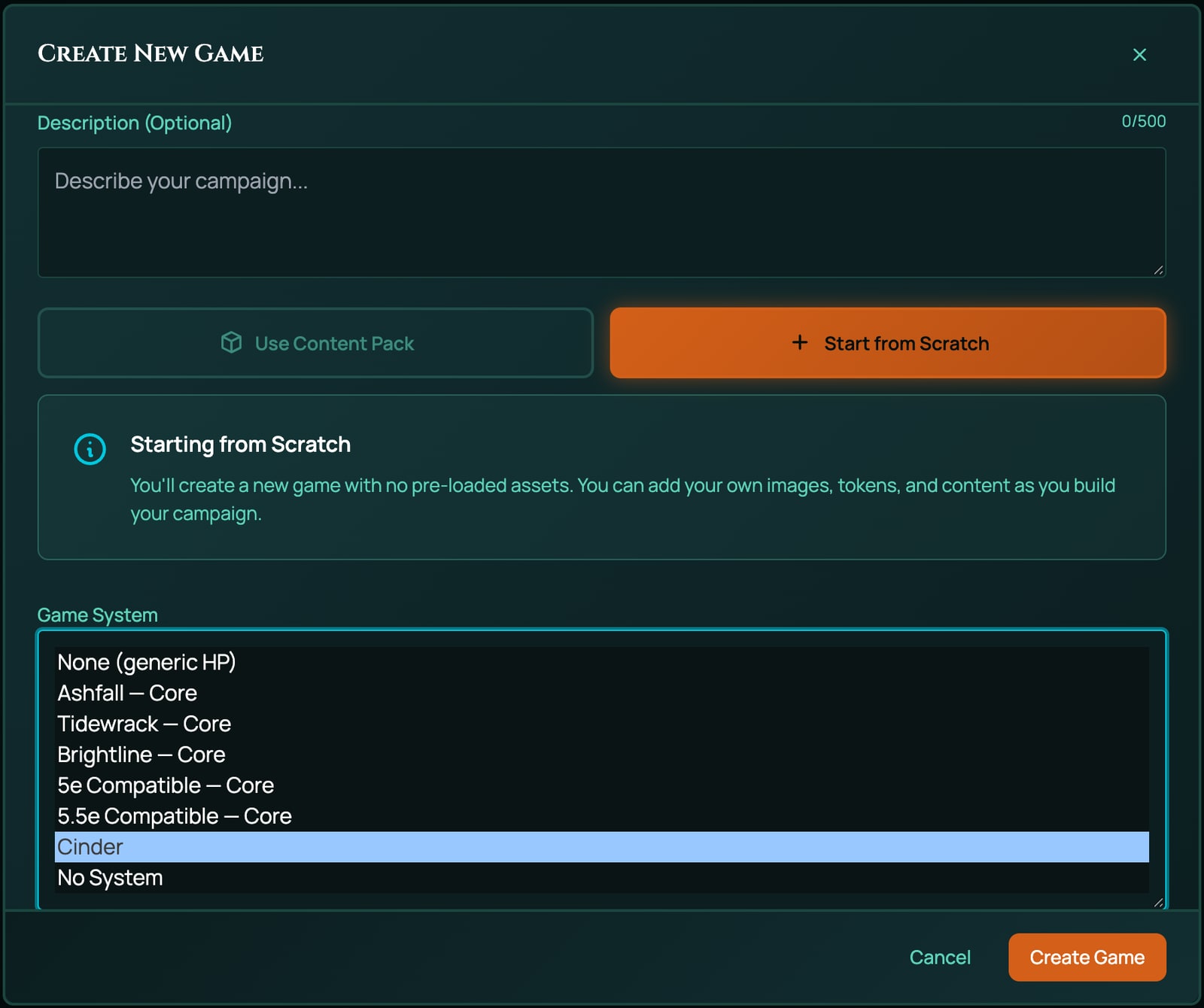
Choose carefully: once the game has a character sheet, its system can't be changed. See Game systems.
9. Make a character
- Click Character Sheets on the tool rail, then New Sheet. Choose Build your own, type a Title and click Create Sheet. The builder opens.
- On Roll Characteristics, click Open Ability Allocator. The Set Ability Scores window opens. Roll, give each number to Grit or Wits, and click Confirm, then Next.
- On Choose an Archetype, click Warden. The builder adds it and finishes.
If the builder opens on Roll Characteristics, that's because the sheet already has its name.
Test it
The checker catches mistakes in names and references: every formula, effect, damage type, kind of item, rest, builder step and condition is checked when you click Check this pack. It can't see how the system plays. Run through these by hand, the same checks Ashfall's own tests make:
| Check | How | With Cinder you should see |
|---|---|---|
| The builder | Make a character, as above. | Three steps to the end. Choose an Archetype offers Warden and Scholar, nothing else. |
| What the character holds | Open the sheet. | The archetype on the Items page; a Warden's Armour reads 2, a Scholar's Wits is 10 higher. |
| The sheet | Look at the Form View. | Wounds and Armour at the top, with no hit points or armour class; blocks for Characteristics, Skills and Vitals. |
| A test | Click Grit. | A d100 against Grit, reading Success or Failure. |
| Damage | In the vitals tile, type 5, choose Cutting, click Damage. | A Warden takes 3 Wounds: Armour took 2. |
| The life meter | On a Warden with no Wounds, type 9, choose Cutting, click Damage. | Wounds stop at 6 and the token is marked Broken. |
| Healing | Type 1, choose No type, click Heal. | Wounds drop to 5 and Broken is lifted. |
| The rest | Spend a Fate point with −, then click Rest. | The preview reads "Fate returns and 2 Wounds close." Confirm it: Fate is full again and Wounds drop by 2. |
| The board | Put the character's token on the board, right-click it, choose Edit Character. | On the board lists Wounds and Armour with a switch for the GM, the player and the other players. Turned on, Wounds show as pips. |
| Damage on the board | Right-click the token, choose Apply Damage. | The type list offers No type and Cutting. |
| Enemies | Open a token's Stat block, then New creature. | Vitals offers Wounds and Armour. |
| A player | Invite a second account of yours to the game (see Invite players), sign in with it and make a character. | The same as above, with nothing refused. |
The damage numbers are the real results of Cinder's rules: Armour 2 against 5 Cutting leaves 3 Wounds; 9 Cutting would be 7, capped at 6.
Add-on packs for your system
An add-on pack adds items to a system without touching its rules, the way Ashfall's gear and archetypes sit in packs of their own. For a system of yours, the add-on names your base pack in derivedFrom, and it may use everything the base declares: its kinds of item, value fields, damage types and conditions. Here is a third archetype for Cinder:
{
  "name": "Cinder Archetypes",
  "slug": "cinder-archetypes",
  "system": "Cinder (d100)",
  "category": "addon",
  "derivedFrom": "cinder-core",
  "version": "0.1.0",
  "license": "USER_HOMEBREW",
  "description": "A third archetype for Cinder.",
  "items": [
    {
      "kind": "inventoryItem",
      "key": "ARCH_SMITH",
      "spec": {
        "subType": "archetype",
        "name": "Smith",
        "meta": {
          "role": "Maker",
          "grants": "+10 Grit",
          "description": "You kept the forge lit through the long dark."
        },
        "actions": [],
        "effects": [
          {
            "id": "ARCH_SMITH_GRIT",
            "target": "GRIT",
            "op": "add",
            "value": 10,
            "condition": "",
            "trigger": ""
          },
          {
            "id": "SMITH_REST_FATE",
            "target": "POOL(\"fate\")",
            "op": "reset",
            "value": "",
            "condition": "",
            "trigger": "longRest"
          },
          {
            "id": "SMITH_REST_WOUNDS",
            "target": "VF(\"WOUNDS\")",
            "op": "increment",
            "value": -2,
            "condition": "",
            "trigger": "longRest"
          }
        ]
      }
    }
  ]
}
derivedFrom: "cinder-core"names your base pack by its slug. RollQuest looks for it among its own systems first, then among your own packs (the oldest one with that slug, if you have copies). Nobody else's pack can be a parent.systemis the same text as the base pack's.categoryisaddon, and an add-on carries nosystemRules: the rules stay in the base.
To use it:
- Create the base pack first, then the add-on. Checked before its parent exists, the add-on is refused: derivedFrom names pack "cinder-core", which is neither a curated game system nor one of your own packs.
- Create the add-on the same way as Cinder, choosing Cinder (d100) under Which system are you extending?.
- In your Cinder game, bind it to the table. Under Where should its items appear?, tick Choose an Archetype, so the builder offers the Smith beside the Warden and the Scholar. The window warns that this step lets a player hold only one choice. Left unticked, the pack's items are still offered to players with + From pack on their sheets.
See Put your pack on a table for binding, routing and moving a table to a new revision. Your base pack can also name an add-on in one of its own builder steps once the add-on exists, as the gift step in Creation shaping does.
What a system of your own can't do yet
- Packs come in order. An add-on can only be created once its base exists, and a base step that names an add-on can only be added once the add-on exists. Create the base, then the add-on, then edit the base.
- No sheet layout or artwork. Sheets use the Form View, built from your value field groups. Don't declare
mobileGroups(named Form View tabs) unless it lists every group: a field whose group isn't listed disappears. - Private to you. Nobody else can choose your system for a game of theirs, and it can't be published or sold.
- Fixed once a game uses it. A game's system can't change after its first character sheet. Changes to the pack reach new sheets; sheets already made keep what they were built with.
- Only the pieces RollQuest has. Much of what used to need a change to RollQuest is now data any system can declare: the next section lists every piece. Something none of them covers, such as a new kind of token display or a new damage mode, still needs a change to RollQuest itself.
Design rules worth copying from Ashfall
- Give every characteristic a
calculationId, so it's clickable, and make a skill a value field whose value is a formula: of its characteristic, or a base plus the points bought for it. - List exactly your characteristics in
abilityScores.fields, and aresetTothe dice are unlikely to roll on every field. - Route every damage type you declare, name token bindings (not value fields) in the pipeline, and mark the life meter
vitalityin both. - Put rest effects on the item every character has exactly one of, and match their
triggerto a rest button. - Keep a one-pick step's pack to the things it chooses between, and put the rest in add-on packs.
- Set
maxLevel: 1andmaxPowerTier: 0unless your system has levels and spells. - Never rename an
idorkeyonce characters exist: sheets find things by them.
Engine pieces a system can declare
RollQuest's own systems are built from pieces any base pack can switch on: named results, buttons under a result, dice pools, point budgets in the builder, tracks, tiered statuses, clocks and more. Each one is data: declare it in your base pack, and the sheets, the builder and the board do the rest. Leave it out, and nothing of it shows.
The examples come from three made-up systems, and each is part of a complete pack that passes Check this pack:
- Cinder, from this page, grown with a weapon, three charms, a Nerve meter, a Doubt track and Scars, a Sneak skill and a gift step.
- Mossback, a d6 pool system: roll as many d6s as a knack's dots and read the highest.
- Kestrel, a d20 system where a hit is resisted rather than counted off hit points.
| Piece | What it does at the table | Where it goes |
|---|---|---|
| Roll outcome bands | Names what a roll landed on, such as Hard success | systemRules.rollOutcomes |
| Follow-ups | Buttons under a result: reroll, or spend points to pass | a band's or an item's followUps |
| Roll tags and marks | A choice made with a roll, and a field marked after it | systemRules.rollTags, rollMarks |
| Track controls | A number drawn as dots or boxes | a value field's control |
| Track overflow | A full track resets and marks another | systemRules.trackOverflow |
| Token pips | How many dots a token meter draws | a token binding's maxPips |
| Meter rules | What one big hit, an empty meter or a held condition does | the damage pipeline, roundChecks, tables, contests |
| Category roles | Which kinds of item are weapons or spend power slots | a category's flags |
| Weather | What rain or mist does to a roll | systemRules.environmentEffects |
| Ready-made macros | The macros a game on your system is offered | systemRules.macroTemplates |
| Point-budget steps | Points to spend in the builder | a pointBudget builder step |
| Creation shaping | A pick step that depends on an earlier pick | filterBy, maxPicks, applyAtCreation |
| Dice pools | Rolling as many dice as a field says | a formula, and systemRules.diceRules |
| The pool builder | A short build step before a pool roll | systemRules.poolBuilder |
| Tag sets | Tags the players write, worth dice | systemRules.tagSets |
| Tiered statuses | A condition with a tier from 1 up | systemRules.statusTiers |
| Clocks and party sheets | Progress clocks, and a sheet the whole party plays | systemRules.clocks, partySheets |
| Defences by range | One defence against melee, another against ranged | a defence's appliesTo, systemRules.defenseBase |
| Resist damage | A hit becomes a check that lands conditions | a resist damage step |
| Ranked items | Items a player builds by rank and modifiers | an item's meta.ranked, systemRules.rankedItems |
Every piece is checked when you click Check this pack: a key it doesn't know, a field ID in the wrong case or a test it can't read is refused with a code that names the piece, such as ROLL_OUTCOME_INVALID, so a typo can't make a piece that quietly never works. See When a pack is refused.
Roll outcome bands
A band names what a roll landed on. After a roll, the result that pops up and the chat card show the band's label, such as Hard success, in place of a plain Success or Failure. Cinder's, with crit set to read them:
"crit": { "mode": "band" }
"rollOutcomes": {
  "bands": [
    {
      "id": "blaze",
      "label": "Blaze",
      "tone": "crit",
      "when": { "passed": true, "rolled": { "op": "<=", "value": 3 } }
    },
    {
      "id": "smother",
      "label": "Smothered",
      "tone": "fumble",
      "when": { "passed": false, "rolled": { "op": ">=", "value": 96 } },
      "followUps": [
        {
          "kind": "reroll",
          "label": "Burn Fate to reroll",
          "markLabel": "Fated",
          "cost": { "pool": "fate", "amount": 1 }
        }
      ]
    },
    {
      "id": "hard",
      "label": "Hard success",
      "tone": "success",
      "when": { "passed": true, "rolled": { "op": "<=", "ofTarget": 0.5 } }
    },
    { "id": "success", "label": "Success", "tone": "success", "when": { "passed": true } },
    {
      "id": "failure",
      "label": "Failure",
      "tone": "failure",
      "when": { "passed": false },
      "followUps": [
        {
          "kind": "reroll",
          "label": "Push your luck",
          "markLabel": "Pushed",
          "unless": { "tags": ["noPush"] },
          "onFailure": { "tone": "fumble", "note": "The push failed. The GM decides what it costs you." }
        },
        {
          "kind": "spendToTarget",
          "label": "Spend Nerve",
          "field": "NERVE",
          "unless": { "tags": ["noNerve"] }
        },
        {
          "kind": "reroll",
          "label": "Burn Fate to reroll",
          "markLabel": "Fated",
          "cost": { "pool": "fate", "amount": 1 }
        }
      ]
    }
  ],
  "tags": { "ATK_ROLL": ["noPush"], "GRIT_CHECK": ["noNerve"] }
}
With Grit 42, a Grit test reads: 1 to 3 Blaze, 4 to 21 Hard success, 22 to 42 Success, 43 to 95 Failure, and 96 to 100 Smothered.
| Field | What it does |
|---|---|
bands |
The bands, in order. After a roll, the first band whose when holds names the result, so put the narrowest first and end with one that catches the rest. |
id |
1 to 40 letters, digits, _ or -, unique. Roll marks name a band by it. |
label |
What the result says, up to 60 characters. |
tone |
crit, success, partial, failure or fumble. It colours the result, and with "crit": { "mode": "band" } it decides the critical and fumble fanfare. |
when |
The tests that must all hold (below). An empty when, {}, always holds. |
steps |
How many degrees the band is worth, 0 to 20. A resist damage step reads it. See Resist damage. |
cost |
A button that adds an amount to a field on the roller's sheet. See Dice pools. |
followUps |
Buttons under the result. See Follow-ups. |
tags |
Tags on rolls, by calculation ID or action tag, that a follow-up's unless reads. |
The tests a when can make:
| Test | Holds when |
|---|---|
passed |
true: the test passed. false: it failed. |
rolled |
The rolled number compares as asked, such as { "op": "<=", "value": 3 }. |
target |
The target number compares as asked. |
margin |
How far the roll passed or failed by: on a roll-under test the target minus the roll, on a roll-over test the roll minus the target. |
highest |
The highest die kept compares as asked. For dice pools. |
faces |
{ "value": 6, "atLeast": 2 }: at least 2 dice show a 6, counting dropped dice too (add "of": "kept" to count only the kept ones). |
zeroPool |
true: the roll was a pool of no dice. false: it wasn't. |
any, all |
A list of whens, any or all of which must hold. |
A comparison is { "op", "value" } or { "op", "ofTarget" }, with op one of <, <=, =, >= and >. "ofTarget": 0.5 is half the target, rounded down. A roll with no target, such as =2d6+3, can only meet rolled, highest and faces, so make a band list for tests out of tests such as =1d100<=GRIT.
rollOutcomes can also hold a tick, which marks a skill's tick field each time a test of it succeeds, for improvement later: Ashfall's Tempering button reads these ticks.
Follow-ups: buttons under a result
A follow-up is a button under a result: the player presses it after seeing the roll. In the Form View the buttons sit above the result, with Keep result to put them away, and they stay until the next roll; an item's button carries the item's name. Cinder's Failure band offers three:
{
  "id": "failure",
  "label": "Failure",
  "tone": "failure",
  "when": { "passed": false },
  "followUps": [
    {
      "kind": "reroll",
      "label": "Push your luck",
      "markLabel": "Pushed",
      "unless": { "tags": ["noPush"] },
      "onFailure": { "tone": "fumble", "note": "The push failed. The GM decides what it costs you." }
    },
    { "kind": "spendToTarget", "label": "Spend Nerve", "field": "NERVE", "unless": { "tags": ["noNerve"] } },
    {
      "kind": "reroll",
      "label": "Burn Fate to reroll",
      "markLabel": "Fated",
      "cost": { "pool": "fate", "amount": 1 }
    }
  ]
}
With Fight 30, a roll of 34 is a Failure, and the result offers Push your luck, Spend Nerve and Burn Fate to reroll:
- Push your luck rolls the same test once more. The new result is named with the
markLabel, as Fight (Pushed), and offers no follow-ups of its own. If it fails too, theonFailurenote shows on the result and the chat card in the fumble's colour. - Spend Nerve moves the roll onto the target, 34 to 30, and takes the difference, 4, off Nerve. It's offered only when Nerve holds enough.
- Burn Fate to reroll rolls once more and spends 1 Fate. With no Fate left, the button is greyed out and says why.
unless hides a button on rolls that carry a tag: in Cinder's tags, attacks (ATK_ROLL) carry noPush and Grit tests carry noNerve.
| Field | What it does |
|---|---|
kind |
reroll (roll the same test once more) or spendToTarget (pay points to move a failed roll onto its target). |
label |
The button's words. |
markLabel |
For a reroll: the word added to the new result's name. |
cost |
For a reroll: { "pool": "fate", "amount": 1 } spends from a pool, or { "field": "NERVE", "amount": 1 } from a value field that holds a plain number. One or the other, never both. |
faceFloor |
For a reroll: { "below": 11, "add": 10 } makes a rerolled die under 11 count 10 more. |
onFailure |
For a reroll: { "tone", "note" }, a note shown when the reroll fails too. |
field |
For spendToTarget: the value field to pay from. It must hold a plain number, not a formula. |
unless |
{ "tags": [...] }: hide the button on rolls carrying any of these tags. |
An item can offer a follow-up of its own, in meta.followUps, on the rolls it names. This charm offers one reroll of a failed Fight test between rests:
{
  "kind": "inventoryItem",
  "key": "CHARM_LUCKY_COAL",
  "spec": {
    "subType": "charm",
    "name": "Lucky Coal",
    "maxUses": 1,
    "uses": 1,
    "meta": {
      "effect": "Once between rests, reroll a failed Fight test.",
      "followUps": [
        {
          "kind": "reroll",
          "label": "Rub the coal",
          "markLabel": "Lucky",
          "on": { "calcs": ["FIGHT_CHECK"], "tones": ["failure", "fumble"] },
          "uses": true
        }
      ]
    },
    "actions": [],
    "effects": [
      {
        "id": "LUCKY_COAL_REST",
        "target": "SELF.uses",
        "op": "reset",
        "value": "",
        "condition": "",
        "trigger": "longRest"
      }
    ]
  }
}
on.calcs names the tests it offers on and on.tones the results. "uses": true pays with one of the item's own uses, so the item needs maxUses; its reset effect gives the use back on a rest.
Roll tags and marks
A roll tag is a choice made with a roll that changes no dice, such as a stance. The roll menus offer one choice per group, a plain click rolls with the group's default, and the result and the chat card print the choice, such as Stance: Reckless. A roll mark adds to a field after a roll, when the roll carried a tag or landed a band.
"rollTags": [
  {
    "id": "stance",
    "label": "Stance",
    "default": "steady",
    "options": [ { "id": "steady", "label": "Steady" }, { "id": "reckless", "label": "Reckless" } ],
    "calculations": ["FIGHT_CHECK"]
  }
]
"rollMarks": [
  {
    "id": "reckless-doubt",
    "when": { "tags": { "stance": "reckless" } },
    "calculations": ["FIGHT_CHECK"],
    "field": "DOUBT",
    "amount": 1
  },
  { "id": "smother-doubt", "when": { "outcomes": ["smother"] }, "field": "DOUBT" }
]
A Fight test rolled Reckless adds 1 to Doubt, and any roll that lands Smothered adds 1 too.
| Field | What it does |
|---|---|
rollTags[].id, label, options, default |
The group, its choices and the one a plain click uses. At most 8 groups; IDs 1 to 40 letters, digits, _ or -; labels up to 40 characters. |
rollTags[].calculations |
The rolls that offer the group. Left out, every roll does. |
rollMarks[].when |
tags ({ "stance": "reckless" }, or a list of choices) and outcomes (band IDs). Both may be given; then both must hold. It can't be empty. |
rollMarks[].calculations |
The rolls the mark watches. Left out, every roll. |
rollMarks[].field, amount |
The value field to add to, and how much: a whole number from -10 to 10, never 0, 1 if left out. |
A mark applies once per roll, after the dice settle, on the roller's sheet. A reroll from a follow-up never marks.
Track controls: dots and boxes
control draws a value field as a track: "dots" for a rating, "boxes" for a track that fills up. Clicking a glyph sets the value to it, and clicking the highest filled one lowers the value by one.
{
  "kind": "valueField",
  "key": "DOUBT",
  "spec": {
    "id": "DOUBT",
    "label": "Doubt",
    "value": 0,
    "min": 0,
    "max": 6,
    "control": "boxes",
    "group": "vitals",
    "order": 4
  }
},
{
  "kind": "valueField",
  "key": "SCARS",
  "spec": {
    "id": "SCARS",
    "label": "Scars",
    "value": 0,
    "min": 0,
    "max": 3,
    "control": "dots",
    "group": "vitals",
    "order": 5
  }
}
Doubt shows six boxes and Scars three dots. A track needs whole-number min and max, max above min, and at most 20 steps between them; leave a longer range as a number. A field whose value is a formula draws its track filled and can't be clicked.
Track overflow
A track pushed past its maximum resets, and another field gains 1. The sheet's log says so, such as Doubt overflowed: Scars +1.
"trackOverflow": [ { "field": "DOUBT", "into": "SCARS", "resetTo": 0, "whenIntoFull": "clamp" } ]
Doubt at 5 that gains 2 resets to 0 and Scars gains 1: what went past the maximum isn't carried over. Landing exactly on the maximum fills the track without overflowing.
| Field | What it does |
|---|---|
field |
The track. It must have a plain-number max. |
into |
The field that gains 1. |
resetTo |
What the track resets to. 0 if left out. |
whenIntoFull |
"reset" (the default): reset anyway, and into stays full. "clamp": don't overflow; the track fills and stops, and the log says Doubt cannot overflow: Scars is full. |
Overflow happens on changes the rules make, such as a band's cost or a roll mark. A click on a track can fill it but never overflow it.
Token pips
A pips token meter draws one dot per point up to 20. maxPips lowers that for one meter: above it, the meter draws as a bar with its "value/max" caption.
{
  "id": "wounds",
  "label": "Wounds",
  "kind": "pips",
  "source": "WOUNDS",
  "max": "WOUNDS_MAX",
  "role": "vitality",
  "maxPips": 8
}
Cinder's Wounds, out of 6, draw as six dots; if a character's Max Wounds ever went above 8, they'd draw as a bar. maxPips is a whole number from 1 to 20, on a pips binding only.
Meter rules: what one hit means
A damage step can say what one hit means for its meter, beyond the number. Cinder's Wounds step, with a threshold and a rule for a hit on a Broken character, then the round check, table and published fields they use:
{
  "stat": "wounds",
  "mode": "accumulate",
  "floorRole": "vitality",
  "thresholds": [
    {
      "singleHitAtLeast": { "ofMax": 0.5 },
      "apply": "bleeding",
      "prompt": "WITS_CHECK",
      "onFail": { "condition": "dazed", "table": "daze", "durationRounds": "1d4" }
    }
  ],
  "onHitWhile": { "condition": "broken", "apply": "dead" }
}
"roundChecks": [
  {
    "while": "bleeding",
    "prompt": "GRIT_CHECK",
    "onFail": { "damage": "1", "damageType": "cutting", "label": "Blood loss" }
  }
]
"tables": [
  {
    "id": "daze",
    "name": "Daze",
    "formula": "1d4",
    "entries": [
      { "text": "You drop whatever is in your off hand." },
      { "text": "You stagger one square back." },
      { "text": "Your ears ring: you hear nothing this round." },
      { "text": "You fall to one knee." }
    ]
  }
]
"scalingFields": ["GRIT", "WITS", "FIGHT"]
At Cinder's Max Wounds of 6, one hit of 3 Wounds or more makes the character Bleeding and asks them a Wits test; failing it makes them Dazed for 1d4 rounds and rolls on the Daze table. While Bleeding, they test Grit at the end of each of their turns, and a failure deals 1 Cutting damage, which Armour soaks like any other. A hit that gets past Armour while they're Broken makes them Dead.
| Field | What it does |
|---|---|
thresholds |
On a step: singleHitAtLeast (a number, or { "ofMax": 0.5 } for that share of the meter's maximum, rounded down), what lands (apply), and a test to ask (prompt) with what a pass or a failure lands (onPass, onFail). It counts the hit as it reaches the step, after Armour. |
onEmpty |
On a draining step: { "apply": "lost" } when the meter reaches 0. |
onFullWhile |
On a filling step: { "condition", "apply" } when the meter is full while the creature holds the condition. |
onHitWhile |
{ "condition", "apply" } for any hit that reaches the step while the creature already held the condition. The hit that breaks a creature never also kills it. |
roundChecks |
{ "while", "prompt", "onPass", "onFail" }: a test a creature holding while makes at the end of its turn. |
tables |
{ "id", "name", "formula", "entries" }: rollable tables, added to a game when it's created, or the first time a rule rolls one. A result names one with table. |
scalingFields |
The value fields a token publishes for these tests to read. List every field your prompts and checks read. |
A result (onPass, onFail) is a condition ID, or an object with any of condition, table, durationRounds (a whole number or a dice term such as "1d4"), damage or heal (dice and numbers only), damageType, meter and label. Every test the rules ask is a plain test: a calculation such as =1d100<=GRIT, never a total such as =1d20+GRIT. vocabulary["prompt.check"] is the word the prompt uses for it, such as Test.
Three more pieces belong with these. Contests let a defender answer an attack: a weapon whose meta.contest is "melee" offers the target Parry or Duck. Both rolls are judged into bands and the better band wins; equal bands go to the higher skill, then ties decides. A contest can only take a hit away.
"contests": {
  "responses": [
    { "id": "parry", "label": "Parry", "check": "FIGHT_CHECK", "ties": "defender" },
    { "id": "duck", "label": "Duck", "check": "WITS_CHECK", "ties": "attacker" }
  ],
  "against": { "melee": ["parry", "duck"] }
}
{
  "kind": "inventoryItem",
  "key": "WPN_POKER",
  "spec": {
    "subType": "weapon",
    "name": "Iron Poker",
    "meta": {
      "damage": "1d6",
      "description": "A hearth poker, bent from use.",
      "applies": [ { "kind": "damage", "formula": "=1d6", "damageType": "cutting" } ],
      "targets": { "max": 1 },
      "contest": "melee"
    },
    "actions": [
      { "id": "ATK", "label": "Swing", "formula": "=1d100<=FIGHT", "damageType": "", "tag": "ATK_ROLL" },
      { "id": "DMG", "label": "Damage", "formula": "=1d6", "damageType": "cutting", "tag": "DMG_ROLL" }
    ]
  }
}
A heal can name its meter, so it restores exactly that one:
{
  "kind": "inventoryItem",
  "key": "CHARM_ASH_SALVE",
  "spec": {
    "subType": "charm",
    "name": "Ash Salve",
    "meta": {
      "effect": "Closes 1d3 Wounds.",
      "applies": [ { "kind": "heal", "formula": "=1d3", "meter": "wounds" } ],
      "targets": { "max": 1 }
    },
    "actions": []
  }
}
A check as an action puts a test to every target, each target rolling it, and lands the result:
{
  "kind": "inventoryItem",
  "key": "CHARM_SOOT_POUCH",
  "spec": {
    "subType": "charm",
    "name": "Soot Pouch",
    "meta": {
      "effect": "Thrown into a face: the target tests Wits or is Dazed for a round.",
      "applies": [
        { "kind": "check", "check": "WITS_CHECK", "onFail": { "condition": "dazed", "durationRounds": 1 } }
      ],
      "targets": { "max": 1 }
    },
    "actions": []
  }
}
Category roles
A kind of item's role is its flag, never its ID. Three flags beside activeGate and activateVerb give a kind a role the engine reads. Cinder's two new kinds, added to its categories:
{
  "id": "weapon",
  "label": "Weapon",
  "displayMode": "row",
  "columns": [ { "key": "damage", "label": "Damage" } ],
  "flags": { "activeGate": "equipped", "activateVerb": "Swing", "baseWeapon": true }
},
{
  "id": "charm",
  "label": "Charm",
  "displayMode": "row",
  "columns": [ { "key": "effect", "label": "Effect" } ],
  "flags": { "activeGate": "equipped", "activateVerb": "Use" }
}
| Flag | What it does |
|---|---|
activeGate |
When the item's effects count: trait always, equipped while equipped, prepared while prepared. Under carrying limits that count only active items, a kind with no gate is never carried. |
activateVerb |
The word on the item's button, and in the chat line when it's used. |
baseWeapon |
true: items of this kind can be a magic weapon's base, the weapon a "+1 weapon" asks for. 5e and 5.5e set it on weapon. |
usesSlots |
true: using an item of this kind spends a power slot and counts against the spell limits, like a 5e spell. Using one also fires onCast triggers. |
tableOffer |
"gm": items of this kind are the GM's to hand out, as Ashfall's horror is. + From pack at the top of a sheet offers them to the GM, on any plan, from every pack the sheet has, bound or not, and never to a player; a player who tries to add one another way is refused with Only the GM can add "..." to a sheet. Only the exact value "gm" counts, and the checker doesn't look at it, so check the spelling. |
A kind called power or weapon gets no role from its name: give it the flag.
Weather
environmentEffects says what weather does to rolls, with a roll mode your system declares. Added to Cinder, mist gives Wits tests Misfortune:
"environmentEffects": [ { "preset": "mist", "op": "misfortune", "target": "WITS_CHECK" } ]
preset is a weather the GM can set on a scene, such as rain, mist, snow or ash. op is one of your own roll modes, and the target roll's first die must be the mode's die: Misfortune rewrites a d100, so it can only aim at a d100 test. minIntensity, a number, applies a row only from that intensity up. Weather rows belong in the base pack, with the rest of your rules.
Ready-made macros
macroTemplates lists the ready-made macros a game on your system is offered in the Macros panel. Each is an ordinary macro, written as steps, plus a templateId and a summary:
"macroTemplates": [
  {
    "templateId": "cinder-grit",
    "summary": "Roll d100 under Grit and post the result",
    "name": "Grit test",
    "shortcut": "grit",
    "showOn": { "shortcutBar": true, "tokenBar": true, "palette": true },
    "steps": [
      {
        "id": "grit-roll",
        "kind": "roll",
        "label": "Grit",
        "formula": "1d100",
        "mode": "normal",
        "versus": "@{GRIT}",
        "beat": "atMost",
        "critOn": null,
        "damageType": "",
        "saveAs": "grit"
      },
      {
        "id": "grit-card",
        "kind": "card",
        "layout": "check",
        "title": "Grit test",
        "lines": [],
        "show": ["grit"],
        "audience": "everyone",
        "buttons": []
      }
    ]
  }
]
In the macro editor's Text view, this one reads:
[[1d100]] label="Grit" vs=@{GRIT} beat=under -> grit
&{card:check} "Grit test" show=grit
end
templateIdis lower case with hyphens, unique in the list. A macro made from it finds it again by it.- Every
@{ID}must be a value field your system declares. A template that reads no sheet value may say"anySystem": true. - Write each template the way the macro editor saves it: the checker refuses a template it would have to change.
- With no
macroTemplates, a game on your system is offered the two general macros, Roll a d20 and Secret check. With"macroTemplates": [], it's offered none.
See Macros: what they are and The macro language.
Point-budget steps
A pointBudget builder step hands the player points to spend on value fields, such as skills, with limits. Cinder's Fight becomes a base plus bought points, =20+FIGHT_PTS, and Sneak =10+SNEAK_PTS. Then:
{
  "id": "spend_training",
  "label": "Spend Training",
  "prompt": "Spend your Wits as points on Fight and Sneak. No skill may go above 70 at creation.",
  "kind": "pointBudget",
  "dependsOn": ["pick_archetype"],
  "recordField": "TRAINING_SET",
  "budgets": [
    { "id": "training", "label": "Training", "formula": "=WITS", "spendOn": { "ids": ["FIGHT", "SNEAK"] } }
  ],
  "targets": { "field": "<ID>_PTS", "value": "<ID>", "costPerRank": 1 },
  "caps": [ { "max": 70 } ]
}
A character with Wits 35 gets 35 Training points to spend on Fight and Sneak, a point a rank, and neither may go above 70. Each rank is written to the field the target names (<ID>_PTS, so Fight's go to FIGHT_PTS), and the step is done once TRAINING_SET, an engineOnly field, is set to 1.
| Field | What it does |
|---|---|
recordField |
A value field the step sets to 1 when it's answered. Usually engineOnly. |
budgets |
Each { "id", "label", "formula", "spendOn" }. formula is worked out on the sheet, such as =WITS. formulaFrom: "archetype.points" lets the archetype picked bring its own formula, from its meta.points. spentElsewhere is a formula for points already spent outside the step. |
spendOn |
What a budget may buy: from (a list on the picked item, such as archetype.skills), group (every field in a value-field group), ids, or "any": true; less except, plus also. |
targets |
One rule or a list: field (where a rank is written, <ID> standing for the field), value (the field the caps read), costPerRank (may be a fraction, such as 0.5), and ids, group, min and max to narrow it. |
caps |
Limits on a field's value: { "max": 70 } for every target, or one scoped to a group, to fields, to one field (with min), or a paired { "sum": [...], "max" }. A bound may be a number, a formula, or { "from": "archetype.standing.max" }. |
presetFrom |
A suggested build the picked item carries, offered as Use the suggested build. |
Ashfall's Spend Skill Points uses two budgets: the archetype's points for its eight skills and Standing, and Pursuits for anything but Ashlore.
Creation shaping
Three settings shape what a new character is offered:
filterByon a pick step offers only the items whosemetafield matches what an earlier step picked.maxPickson a pick step sets how many items a player takes there."applyAtCreation": falseon an add-on keeps it off new characters: for a pack meant for a sheet the party shares, applied by hand.
Cinder's gift step offers only the gifts of the archetype picked, up to two:
{
  "id": "pick_gift",
  "label": "Choose Gifts",
  "prompt": "Take up to two gifts your archetype knows.",
  "kind": "pickFromPacks",
  "satisfiedBy": { "packSlugs": ["cinder-gifts"] },
  "dependsOn": ["pick_archetype"],
  "filterBy": { "field": "archetype", "fromStep": "pick_archetype" },
  "maxPicks": 2,
  "skippable": true
}
The gifts live in an add-on, cinder-gifts. Each gift names its archetype in meta.archetype; one with no meta.archetype is offered to everyone:
{
  "name": "Cinder Gifts",
  "slug": "cinder-gifts",
  "system": "Cinder (d100)",
  "category": "addon",
  "derivedFrom": "cinder-core",
  "version": "0.1.0",
  "license": "USER_HOMEBREW",
  "description": "Gifts for Cinder, each kept to one archetype.",
  "items": [
    {
      "kind": "inventoryItem",
      "key": "GIFT_WATCHFUL",
      "spec": {
        "subType": "charm",
        "name": "Watchful",
        "meta": { "archetype": "Warden", "effect": "+5 Wits." },
        "actions": [],
        "effects": [
          {
            "id": "GIFT_WATCHFUL_WITS",
            "target": "WITS",
            "op": "add",
            "value": 5,
            "condition": "",
            "trigger": ""
          }
        ]
      }
    },
    {
      "kind": "inventoryItem",
      "key": "GIFT_IRON_GRIP",
      "spec": {
        "subType": "charm",
        "name": "Iron Grip",
        "meta": { "archetype": "Warden", "effect": "+5 Fight." },
        "actions": [],
        "effects": [
          {
            "id": "GIFT_IRON_GRIP_FIGHT",
            "target": "FIGHT",
            "op": "add",
            "value": 5,
            "condition": "",
            "trigger": ""
          }
        ]
      }
    },
    {
      "kind": "inventoryItem",
      "key": "GIFT_MARGIN_NOTES",
      "spec": {
        "subType": "charm",
        "name": "Margin Notes",
        "meta": { "archetype": "Scholar", "effect": "+5 Sneak." },
        "actions": [],
        "effects": [
          {
            "id": "GIFT_MARGIN_NOTES_SNEAK",
            "target": "SNEAK",
            "op": "add",
            "value": 5,
            "condition": "",
            "trigger": ""
          }
        ]
      }
    },
    {
      "kind": "inventoryItem",
      "key": "GIFT_LAMP",
      "spec": {
        "subType": "charm",
        "name": "Shuttered Lamp",
        "meta": { "effect": "Any archetype may take it." },
        "actions": [],
        "effects": []
      }
    }
  ]
}
A Warden is offered Watchful, Iron Grip and Shuttered Lamp; a Scholar Margin Notes and Shuttered Lamp. If the player goes back during creation and picks another archetype, the gifts it no longer offers come off. fromStep must be a pick step this one depends on, directly or through others; fromField compares a meta field of the earlier pick instead of its name. maxPicks is a whole number from 1; at 1, a new pick replaces the one held.
Create cinder-gifts before you add the gift step to cinder-core: a step naming a pack that doesn't exist yet is refused with DECISION_UNKNOWN_PACK.
Dice pools
A dice pool rolls as many dice as a field says. The count goes in brackets, (CLIMB)d6, and may add fields: Mossback rolls a knack's dots plus the extra dice the pool builder adds, and keeps the highest:
{
  "kind": "calculation",
  "key": "ROLL_CLIMB",
  "spec": { "id": "ROLL_CLIMB", "name": "Climb", "formula": "=(CLIMB+POOL_EXTRA)d6kh1" }
},
{
  "kind": "calculation",
  "key": "ROLL_TALK",
  "spec": { "id": "ROLL_TALK", "name": "Talk", "formula": "=(TALK+POOL_EXTRA)d6kh1" }
}
"diceRules": { "zeroPool": { "count": 2, "keep": "kl1" } }
zeroPool says what a pool of no dice rolls: here, two dice keeping the lower. Without it, a term with no dice rolls nothing and adds 0. The brackets hold plain arithmetic over fields, no functions.
Mossback's bands read the highest die, and one carries a cost, a button on the result:
"rollOutcomes": {
  "bands": [
    {
      "id": "clear",
      "label": "Clear",
      "tone": "crit",
      "when": { "zeroPool": false, "faces": { "value": 6, "atLeast": 2 } }
    },
    { "id": "done", "label": "Done", "tone": "success", "when": { "highest": { "op": ">=", "value": 6 } } },
    {
      "id": "messy",
      "label": "Messy",
      "tone": "partial",
      "when": { "highest": { "op": ">=", "value": 4 } },
      "cost": { "field": "STRAIN", "formula": "=1", "label": "Take {n} Strain" }
    },
    { "id": "botched", "label": "Botched", "tone": "failure", "when": {} }
  ]
}
Two sixes are Clear, a six is Done, a four or five is Messy and offers Take 1 Strain, and anything less is Botched. A cost is { "field", "formula", "label" }: the formula is arithmetic over HIGHEST (the highest kept die), ROLLED and value fields, {n} in the label shows the amount, and calculations limits it to some rolls. Only the GM and the roller see the button on the chat card, and it can be pressed once.
The pool builder
With a pool builder, a roll in its calculations opens a short build step before the dice are thrown: the player ticks tags and extras, and the builder adds that many dice for this one roll.
"poolBuilder": {
  "base": "field",
  "extraDiceField": "POOL_EXTRA",
  "calculations": ["ROLL_CLIMB", "ROLL_TALK"],
  "tagCap": 2,
  "spend": { "label": "Burn", "face": 6, "max": 1 },
  "flaw": { "dice": -1, "marksTrack": "wear" },
  "chips": [
    {
      "id": "push",
      "label": "Push",
      "dice": 1,
      "cost": { "field": "STRAIN", "amount": 1 },
      "description": "One more die. Take 1 Strain."
    },
    {
      "id": "help",
      "label": "Help",
      "dice": 1,
      "helper": {
        "cost": { "field": "STRAIN", "amount": 1, "label": "Take {n} Strain for helping" },
        "prompt": "Who helps?"
      }
    },
    { "id": "risk", "label": "Risk", "dice": 1, "note": { "prompt": "What could go wrong?" } }
  ]
}
The builder shows the Base (the knack's own dots), Tags from the character's tag sets, the tag set's flaw, any Statuses worth dice, and Extras (the chips), then Roll or Cancel.
| Field | What it does |
|---|---|
base |
"field": the rolled knack's own value is the base dice. |
extraDiceField |
The value field the builder sets for one roll; the calculation must read it, as Mossback's =(CLIMB+POOL_EXTRA)d6kh1 does. |
calculations |
The rolls that open the builder. Every other roll rolls at once. |
tagCap |
The most dice tags may add, 0 to 6. |
spend |
{ "label", "face", "max" }: a tag can be spent instead, as a die fixed at face, and can't be used again until it's recovered. max is the most one roll may spend. |
flaw |
{ "dice", "marksTrack" }: invoking a tag set's flaw takes dice away and marks a track on that set. |
chips |
Up to 8 extras, each { "id", "label", "dice" } plus one of: cost (the roller pays), helper (asks who helps, and they pay), or note (asks for a line of text the roll prints). |
Tag sets
Tag sets are tags the players write on their own sheets, such as "knows every eddy", grouped into sets. The pack declares their shape; the sheet shows them in a block headed with the plural noun, with New Thread to start one, and the pool builder offers their tags as dice.
"tagSets": {
  "noun": { "one": "Thread", "many": "Threads" },
  "slots": 2,
  "minTags": 2,
  "maxTags": 5,
  "kinds": [
    { "id": "craft", "label": "Craft", "description": "Something you learned to do with your hands." },
    { "id": "bond", "label": "Bond", "description": "Someone or somewhere you belong to." }
  ],
  "tracks": [ { "id": "wear", "label": "Wear", "max": 3, "onFull": "flipKind" } ],
  "flaw": { "label": "Fault" },
  "books": [
    {
      "id": "boatwright",
      "kind": "craft",
      "name": "Boatwright",
      "tagQuestions": ["What do you build best?", "Whose tools did you inherit?"],
      "flawQuestions": ["What do you always leave unfinished?"]
    }
  ]
}
| Field | What it does |
|---|---|
noun |
What one set and several are called. |
slots |
How many sets a character carries, 1 to 8. |
minTags, maxTags |
How many tags a set holds. |
kinds |
2 to 4 kinds; every set is one of them. |
tracks |
Up to 4, each { "id", "label", "max", "onFull" }. onFull is "gainTag" (ask for a new tag), "flipKind" (rewrite the set as another kind) or left out. |
flaw |
{ "label" }: every set gets one flaw, written by the player. |
books |
Prompts a player writes from: questions for the tags and the flaw. A book adds no tags of its own. |
Tiered statuses
A tiered status is a condition with a tier, from 1 up: one row on the character, raised and lowered by the GM and the character's player, shown as its name and tier. A penalty status takes its tier's dice away from a roll; a bonus adds them.
"statusTiers": {
  "max": 3,
  "conditions": { "winded": { "polarity": "penalty" }, "inspired": { "polarity": "bonus" } },
  "tiers": [
    { "tier": 1, "dice": 0, "note": "Narrative only: the GM says what it changes." },
    { "tier": 2, "dice": 1 },
    { "tier": 3, "dice": 1, "incapacitates": true, "note": "Out of the scene." }
  ]
}
Winded 2 is worth a die less, and Winded 3 takes the character Out; lowering it lifts that again. Lowering a status below 1 removes it. The sheet shows them in a Statuses block, and the pool builder lists the character's statuses under Statuses, each with its dice, to tick into a roll.
| Field | What it does |
|---|---|
max |
The highest tier, 1 to 6. |
conditions |
The pack's own conditions that are tiered, each with a polarity, "penalty" or "bonus". |
tiers |
One row for every tier from 1 to max: dice (0 to 6), a note, and incapacitates on at most one, which applies the first of incapacitatedConditions. |
Gear can step a status down. The Tin Flask spends one use to take Winded down a tier, and only a penalty status:
{
  "kind": "inventoryItem",
  "key": "GEAR_FLASK",
  "spec": {
    "subType": "gear",
    "name": "Tin Flask",
    "maxUses": 2,
    "uses": 2,
    "meta": {
      "effect": "A swallow steps Winded down one tier.",
      "statusStep": -1,
      "statusStepPolarity": "penalty"
    },
    "actions": [],
    "effects": [
      {
        "id": "FLASK_REFILL",
        "target": "SELF.uses",
        "op": "reset",
        "value": "",
        "condition": "",
        "trigger": "rest"
      }
    ]
  }
}
meta.statusStep is a negative whole number; meta.statusStepPolarity limits it to penalty or bonus statuses. The uses come back through an ordinary reset effect on a trigger button.
Clocks and party sheets
Two features belong to a game rather than a sheet, and a game offers them only when its system switches them on:
"clocks": { "enabled": true },
"partySheets": { "enabled": true }
- Clocks gives the game a Clocks panel, on the tool rail and in the GM's menu: named progress clocks of 4, 6, 8 or 12 segments that the GM and the players tick. A clock can be kept GM only, and Post to chat shares one.
- Party sheets lets the GM tick Shared with the party when editing a sheet: every player in the game can then open and play it, and only its owner and the GM can rebuild it.
Leave either out, or set "enabled": false, and the game shows nothing of it. A change reaches a game the next time it loads.
A pack of rows for a shared sheet should stay off new characters. Mossback's crew rows sit in an add-on with applyAtCreation: false:
{
  "name": "Mossback Crews",
  "slug": "mossback-crews",
  "system": "Mossback (d6 pool)",
  "category": "addon",
  "derivedFrom": "mossback-core",
  "applyAtCreation": false,
  "version": "0.1.0",
  "license": "USER_HOMEBREW",
  "description": "Rows for the crew sheet the whole party shares.",
  "items": [
    {
      "kind": "inventoryItem",
      "key": "CREW_FERRY",
      "spec": {
        "subType": "crew",
        "name": "The Night Ferry",
        "meta": { "effect": "The crew owns a flat-bottomed ferry." },
        "actions": [],
        "effects": []
      }
    }
  ]
}
Bind it to the game, then put it on the shared sheet by hand: open that sheet and click Add Mossback Crews, in the Form View's Edit toolbar or, on a Canvas sheet, in Sheet options while you edit. Only the GM sees it. See Shaping character creation for the details.
Defences by range
A token binding with role: "defense" is the number an attack has to reach. appliesTo says which attacks it stops, so a system can check ranged attacks against one defence and melee attacks against another. defenseBase is added to every defence first: 10 when a defence is a rank, as in Kestrel, where an attack has to reach 10 + Dodge at range and 10 + Block up close.
"defenseBase": 10
"tokenBindings": [
  {
    "id": "dodge",
    "label": "Dodge",
    "kind": "number",
    "source": "DODGE",
    "role": "defense",
    "appliesTo": "ranged"
  },
  {
    "id": "block",
    "label": "Block",
    "kind": "number",
    "source": "BLOCK",
    "role": "defense",
    "appliesTo": "melee"
  },
  { "id": "tough", "label": "Tough", "kind": "number", "source": "TOUGH" },
  { "id": "hurt", "label": "Hurt", "kind": "badge", "source": "HURT" },
  { "id": "minion", "label": "Minion", "kind": "badge", "source": "MINION" }
]
An attack says its range on the item, in meta.attackRange, "melee" or "ranged":
{
  "kind": "inventoryItem",
  "key": "BASIC_PUNCH",
  "spec": {
    "subType": "power",
    "name": "Punch",
    "meta": {
      "attackRange": "melee",
      "targets": { "max": 1 },
      "applies": [ { "kind": "damage", "formula": "=MIGHT", "damageType": "force" } ]
    },
    "actions": [
      { "id": "ATK", "label": "Attack", "formula": "=1d20+MIGHT", "damageType": "", "tag": "ATK_ROLL" },
      { "id": "DMG", "label": "Rank", "formula": "=MIGHT", "damageType": "force", "tag": "DMG_ROLL" }
    ]
  }
}
An attack with no range, against a system whose defences are typed, goes to the GM to decide. Two typed defences can't answer the same range.
Resist damage
A resist damage step turns a hit into a check: the target rolls the step's dice plus its stat against dcBase plus the hit's rank, and how many Steps it fails by decides what lands, using the steps on your bands. Kestrel's bands:
"rollOutcomes": {
  "bands": [
    {
      "id": "win-2",
      "label": "Success (2 Steps)",
      "tone": "success",
      "steps": 2,
      "when": { "passed": true, "margin": { "op": ">=", "value": 5 } }
    },
    { "id": "win-1", "label": "Success (1 Step)", "tone": "success", "steps": 1, "when": { "passed": true } },
    {
      "id": "lose-1",
      "label": "Failure (1 Step)",
      "tone": "failure",
      "steps": 1,
      "when": { "passed": false, "margin": { "op": ">", "value": -5 } }
    },
    {
      "id": "lose-2",
      "label": "Failure (2 Steps)",
      "tone": "failure",
      "steps": 2,
      "when": { "passed": false, "margin": { "op": ">", "value": -10 } }
    },
    {
      "id": "lose-3",
      "label": "Failure (3 Steps)",
      "tone": "failure",
      "steps": 3,
      "when": { "passed": false }
    }
  ]
}
And its pipeline:
"damagePipeline": [
  {
    "types": ["force"],
    "steps": [
      {
        "mode": "resist",
        "stat": "tough",
        "dice": "1d20",
        "dcBase": 10,
        "critBonus": 5,
        "penalty": { "stat": "hurt", "condition": "hurt" },
        "ladder": [
          { "steps": 1, "apply": ["hurt"] },
          { "steps": 2, "apply": ["hurt", "staggered"] },
          { "steps": 3, "apply": ["down"] }
        ],
        "minion": { "stat": "minion", "anyFailure": ["down"] }
      }
    ]
  }
]
Punch a hero with Might 3: the hit's rank is 3, so they roll 1d20 + Tough, less 1 for each Hurt, against 13 (18 on a critical). Failing by 1 Step makes them Hurt; by 2, Hurt and Staggered; by 3 or more, Down. A target whose Minion field is above 0 goes Down on any failure. The target's own player rolls the check (the GM, for a creature nobody owns), and vocabulary["prompt.resist.dc"] names the number to beat.
| Field | What it does |
|---|---|
stat |
The token binding added to the roll. |
dice |
The dice the target rolls, such as "1d20". |
dcBase |
Added to the hit's rank to make the number to beat. |
critBonus |
Added on a critical hit. |
penalty |
{ "stat", "condition" }: a counter taken off the roll, raised by 1 each time a rung lands that condition. |
ladder |
Rungs from 1 Step up, each landing its apply conditions. Past the last rung, the last one lands. |
minion |
{ "stat", "anyFailure" }: a target whose stat is above 0 takes anyFailure on any failure. |
An item's own damage entry can carry a resist of its own, for a power that roots rather than hurts. It has no penalty counter, and without dice it rolls the dice the system's step declares.
Ranked items
A ranked item is one a player builds: they set its rank and pick modifiers with Build on its row, and the item's cost is worked out from them. The item says what it costs and where its rank is written; the system declares the modifiers.
{
  "kind": "inventoryItem",
  "key": "POWER_BOLT",
  "spec": {
    "subType": "power",
    "name": "Bolt",
    "meta": {
      "attackRange": "ranged",
      "targets": { "max": 1 },
      "applies": [ { "kind": "damage", "formula": "=1", "damageType": "force" } ],
      "ranked": {
        "costPerRank": 2,
        "minRank": 1,
        "maxRank": 10,
        "rank": 1,
        "offers": ["WIDE", "CLOSE", "QUIET"],
        "scales": [ { "action": "DMG" }, { "applies": 0 } ]
      }
    },
    "actions": [
      { "id": "ATK", "label": "Attack", "formula": "=1d20+AIM", "damageType": "", "tag": "ATK_ROLL" },
      { "id": "DMG", "label": "Rank", "formula": "=1", "damageType": "force", "tag": "DMG_ROLL" }
    ]
  }
}
"rankedItems": {
  "minPerRank": 1,
  "fractional": true,
  "minTotal": 1,
  "groupExtra": 1,
  "costField": "POWER_COST",
  "labels": {
    "rank": "Rank",
    "cost": "Cost",
    "costUnit": "points",
    "costUnitOne": "point",
    "raises": "Extras",
    "lowers": "Flaws",
    "group": "Power set"
  },
  "modifiers": [
    {
      "id": "WIDE",
      "label": "Wide",
      "cost": 1,
      "per": "rank",
      "description": "Hits up to four targets. No attack roll: each target resists.",
      "meta": { "targets": { "max": 4 } },
      "actions": { "ATK_ROLL": null }
    },
    {
      "id": "CLOSE",
      "label": "Close",
      "cost": -1,
      "per": "rank",
      "description": "Only works up close: the attack uses Might against 10 + Block.",
      "meta": { "attackRange": "melee" },
      "actions": { "ATK_ROLL": "=1d20+MIGHT" }
    },
    {
      "id": "QUIET",
      "label": "Quiet",
      "cost": 1,
      "per": "flat",
      "description": "Nobody notices you using it."
    }
  ]
}
Bolt costs 2 points a rank. At rank 4, its damage action and its damage entry both read 4. Adding Wide costs 1 more a rank and drops the attack roll: each of up to four targets resists instead. Close saves 1 a rank and makes it a melee attack on Might. Quiet costs 1 point however high the rank. What the sheet's ranked items cost together is written to POWER_COST, for a build budget to read.
| Field | What it does |
|---|---|
meta.ranked.costPerRank |
Points per rank. |
minRank, maxRank, rank |
The range, and the rank the item ships at. The row in the pack must be the build at that rank. |
offers |
The modifiers this item may take. |
scales |
Where the rank is written: an action ({ "action": "DMG" }), a damage entry by its position ({ "applies": 0 }) or an effect ({ "effect": id }), with times and plus to scale it. |
rankedItems.modifiers |
Each { "id", "label", "cost", "per" }: per is "rank" or "flat". A modifier may change meta.attackRange and meta.targets, and replace an action's formula by its tag, or remove it with null. excludes lists modifiers it can't be taken with. |
minPerRank, fractional, minTotal |
The cost rule. An item costs its points a rank, per-rank modifiers included, times its rank. When that comes to less than minPerRank a rank and fractional is true, one point buys several ranks instead: at minPerRank 1, 0 a rank buys 2 ranks a point and -1 buys 3. Flat modifiers are added after, and no item costs less than minTotal. |
groupExtra |
Items sharing a group cost the dearest plus this for each other one, and only one is active at a time. |
costField |
A value field the engine writes the total into. |
labels |
The rank builder's words for rank, cost, raises, lowers and group. |
Related
Build on Ashfall · The pack file, field by field · Put your pack on a table · Effects: what an item can change · Choices and grants · When a pack is refused · Calculations and values · Game systems