

Effects: what an item can change
This page is the reference for effects, the rows in a homebrew item that change a character's numbers, rolls and uses, with every operation, target and trigger and a checked example of each.
An effect is one change an item makes to the character who has it: +1 to armour class from a ring, advantage on Stealth checks from a cloak, a feature's uses coming back after a rest. Each effect is a short row in the item's effects list, and an item can have as many as it needs. Effects only count while the item is in use, such as a ring while it's worn, and they work in four different places on the sheet: the numbers, one roll, the rest buttons, and another creature's sheet. Which operation you choose depends on which of those you're changing, so this page takes them one at a time.
Plan: writing homebrew is on Pro. Effects work for every player whose character has the item.
An effect, field by field
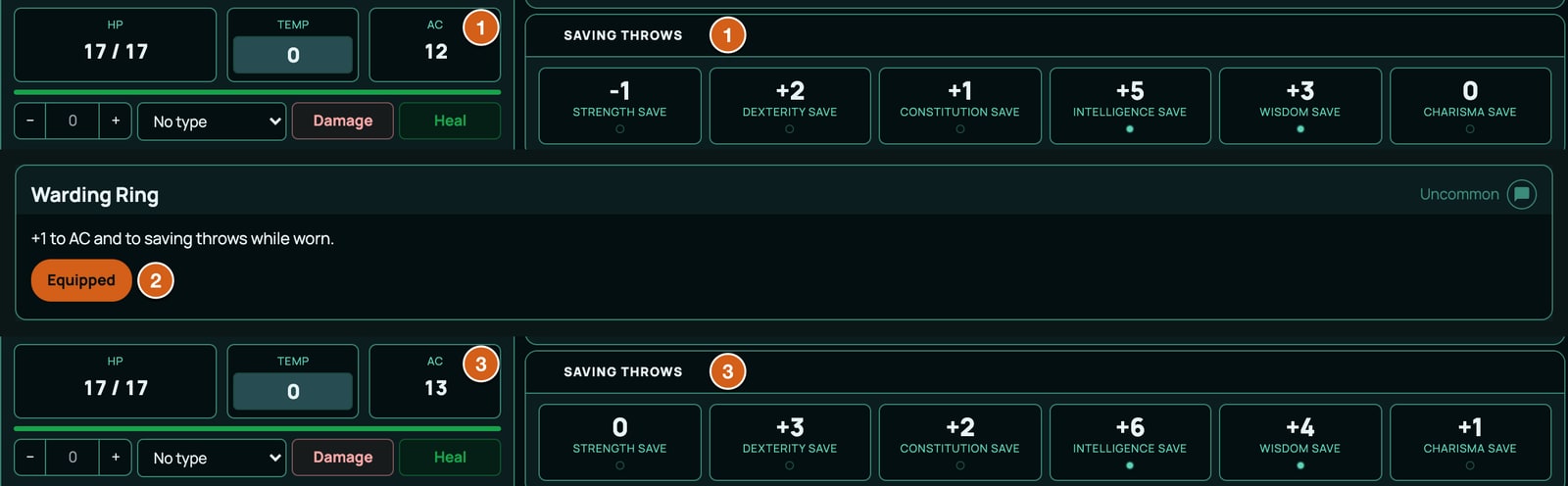
This ring adds 1 to armour class (AC) and to every saving throw while it's worn:
{
  "kind": "inventoryItem",
  "key": "ITEM_WARDING_RING",
  "spec": {
    "subType": "item",
    "id": "ITEM_WARDING_RING",
    "name": "Warding Ring",
    "meta": { "rarity": "Uncommon", "description": "+1 to AC and to saving throws while worn." },
    "effects": [
      { "id": "WARDING_RING_AC", "target": "AC_MISC_BONUS", "op": "add", "value": 1, "condition": "", "trigger": "" },
      { "id": "WARDING_RING_SAVES", "target": "SAVE_MISC_BONUS", "op": "add", "value": 1, "condition": "", "trigger": "" }
    ]
  }
}
| Field | What it holds |
|---|---|
id |
The effect's own ID, unique in your pack, such as WARDING_RING_AC. Required: a sheet stores every effect by its ID, so an effect without one is refused (EFFECT_ID_MISSING). |
target |
What it changes: a value, a roll, or, for a rest effect, a wrapped target such as SELF.uses. Every target must exist in your system. |
op |
The operation, such as add, setMin or advantage. Each kind of target takes its own set, below. |
value |
The amount: a number, a formula starting =, a die such as "1d4" for bonusDie, or a value's ID for setToVF. |
condition |
Leave it empty for always. Otherwise a formula: the effect counts while it works out to anything but 0. Rest effects take a short list of tests instead, below. |
trigger |
Leave it empty for an effect that's always on. Set it to a rest button, such as longRest, for an effect that happens when that button is pressed, or to one of the moments RollQuest notices by itself, such as turnStart. |
scope |
Optional. self makes a roll effect apply only to the item's own rolls. Leave it out for everything else. |
tier |
Optional. Only orders competing setFormula effects. |
There's no field for how long an effect lasts or how it stacks. An item's effects last as long as the item is in use, and each operation has its own stacking rule. An effect with a duration is put on another creature by an action instead: see Effects on another creature.
When an item's effects count
subType |
What it's for | Its effects count |
|---|---|---|
item |
Gear, armour and magic items | While it's equipped |
weapon |
Weapons | While it's equipped |
power |
Spells | While it's prepared |
feat |
Feats | Always |
background |
Species, backgrounds, class levels and class features | Always |
- A feature that switches on and off. Give a
featorbackgrounditem"toggleable": truein itsmeta, and its effects only count while the player has it switched on, like a barbarian's Rage. Switching it on spends a use if it has uses. A rest doesn't switch it off. - Rests reach unused items. An item's own uses come back on a rest even when it isn't equipped, so an unequipped wand still recharges at dawn. Its other rest effects only happen while it's in use.
- Attunement isn't tracked.
meta.attunementis text only. A magic item's effects count as soon as it's equipped, and there's no limit on how many. - An exclusive group ends what the old holder put on others.
meta.exclusiveGroup, such as"concentration", marks which item holds the group and posts a chat line when another takes it over. When the group changes hands, or the holder is dropped, everything the old holder put on other creatures throughmeta.appliescomes off them, effects and conditions alike, and an old holder that switches on and off is switched off. Its own effects on the character, such as a prepared spell's, still count.
The kinds of item, Ashfall's included, are in The pack file, field by field.
The four places an effect works
flowchart TD
  E["An effect in an item"] --> T{"Does it have a trigger?"}
  T -->|"No"| K{"What is its target?"}
  K -->|"A value, such as AC or P_STE"| V["The sheet's numbers<br/>add, setMin, setTo"]
  K -->|"A roll or an action tag, such as STE_ROLL or ATK_ROLL"| R["One roll<br/>add, setMin, bonusDie, critRange, onCritDice, setFormula,<br/>and the system's roll modes, such as advantage"]
  T -->|"Yes, a rest button or an automatic moment"| B["The rest buttons and automatic triggers<br/>uses, pools and plain values<br/>reset, setTo, setToVF, increment, addRandom, setPoolMax"]
  A["An action's meta.applies"] --> O["Another creature's sheet<br/>for a number of rounds"]
The trigger decides it completely: an effect with a trigger only ever happens when its trigger does, a rest button pressed or a moment RollQuest notices by itself, and one without a trigger never does.
Change the sheet's numbers
An effect with no trigger whose target is a value changes that number for as long as the item is in use. A value is any number on the sheet with an ID, such as AC, STR (Strength) or P_STE (the Stealth proficiency flag). The authoring contract lists every value your system has, with its limits.
| op | What it does | Stacking |
|---|---|---|
add |
Adds the value. A negative value takes away. | Every add counts: two +1 rings give +2. |
setMin |
Makes the number at least the value. | Doesn't stack: only the highest setMin counts, and it's applied after every add. |
setTo |
Replaces the number with the value. | Replaces whatever came before it. Use it only on a number one item owns, such as a suit of armour's base AC. |
Last of all, the number is kept within its own limits: AC_MISC_BONUS can't go below -5 or above 10, AC stays from 0 to 40, SPEED from 0 to 120, ability scores from 1 to 30 and proficiency flags from 0 to 2. A +11 ring gives +10.
Why setMin is the one to use for proficiencies, senses and resistances: two items that each give proficiency in Perception give proficiency, not double proficiency, and the longest darkvision wins.
{
  "kind": "inventoryItem",
  "key": "FEATURE_COOKBOOK_TRAITS",
  "spec": {
    "subType": "background",
    "id": "FEATURE_COOKBOOK_TRAITS",
    "name": "Cookbook traits",
    "meta": { "passive": true, "description": "Always-on value effects." },
    "effects": [
      { "id": "CB_PERC_PROF", "target": "P_PERC", "op": "setMin", "value": 1, "condition": "", "trigger": "" },
      { "id": "CB_STEALTH_EXPERTISE", "target": "P_STE", "op": "setMin", "value": 2, "condition": "", "trigger": "" },
      { "id": "CB_WIS_SAVE_PROF", "target": "PROF_WIS", "op": "setMin", "value": 1, "condition": "", "trigger": "" },
      { "id": "CB_ELVISH", "target": "L_ELVISH", "op": "setMin", "value": 1, "condition": "", "trigger": "" },
      { "id": "CB_THIEVES_TOOLS", "target": "T_THIEVES_TOOLS", "op": "setMin", "value": 1, "condition": "", "trigger": "" },
      { "id": "CB_MARTIAL", "target": "W_MARTIAL", "op": "setMin", "value": 1, "condition": "", "trigger": "" },
      { "id": "CB_HEAVY_ARMOUR", "target": "A_HEAVY", "op": "setMin", "value": 1, "condition": "", "trigger": "" },
      { "id": "CB_FIRE_RESIST", "target": "RESIST_FIRE", "op": "setMin", "value": 1, "condition": "", "trigger": "" },
      { "id": "CB_POISON_IMMUNE", "target": "RESIST_POISON", "op": "setMin", "value": 2, "condition": "", "trigger": "" },
      { "id": "CB_COLD_WEAKNESS", "target": "RESIST_COLD", "op": "add", "value": -1, "condition": "", "trigger": "" },
      { "id": "CB_DARKVISION", "target": "SENSE_DARKVISION", "op": "setMin", "value": 60, "condition": "", "trigger": "" },
      { "id": "CB_FAST", "target": "SPEED", "op": "add", "value": 10, "condition": "=IF(IS_WEARING_HEAVY_ARMOR=0,1,0)", "trigger": "" },
      { "id": "CB_TOUGH", "target": "HP_MAX", "op": "add", "value": "=LEVEL", "condition": "", "trigger": "" },
      { "id": "CB_ALERT", "target": "INIT_BONUS", "op": "add", "value": "=PROF", "condition": "", "trigger": "" },
      { "id": "CB_STRENGTH_19", "target": "STR", "op": "setMin", "value": 19, "condition": "", "trigger": "" },
      { "id": "CB_BARKSKIN", "target": "AC", "op": "setMin", "value": 16, "condition": "", "trigger": "" },
      { "id": "CB_DEFENSE", "target": "AC_MISC_BONUS", "op": "add", "value": 1, "condition": "=AC_BODY_ARMOR_EQUIPPED", "trigger": "" },
      { "id": "CB_SPELL_ATTACK", "target": "SPELL_ATTACK_MISC_BONUS", "op": "add", "value": 2, "condition": "", "trigger": "" },
      { "id": "CB_SPELL_DC", "target": "SPELL_DC_MISC_BONUS", "op": "add", "value": 2, "condition": "", "trigger": "" },
      { "id": "CB_FIGHTER_5", "target": "SPEED", "op": "add", "value": 5, "condition": "=FIGHTER_LEVEL>=5", "trigger": "" }
    ]
  }
}
What each of those does:
| Effect | Target | Meaning |
|---|---|---|
CB_PERC_PROF |
P_PERC at least 1 |
Proficiency in Perception. Every skill has a P_ flag: 1 is proficient, 2 is expertise. |
CB_STEALTH_EXPERTISE |
P_STE at least 2 |
Expertise in Stealth. |
CB_WIS_SAVE_PROF |
PROF_WIS at least 1 |
Proficiency in Wisdom saving throws. |
CB_ELVISH |
L_ELVISH at least 1 |
Speaks Elvish. Languages are L_ flags, 0 or 1. |
CB_THIEVES_TOOLS |
T_THIEVES_TOOLS at least 1 |
Proficiency with thieves' tools. Tools are T_ flags. |
CB_MARTIAL, CB_HEAVY_ARMOUR |
W_MARTIAL, A_HEAVY at least 1 |
Martial weapon and heavy armour training. Also W_SIMPLE, A_LIGHT, A_MEDIUM and A_SHIELDS. |
CB_FIRE_RESIST |
RESIST_FIRE at least 1 |
Resistance to fire damage. |
CB_POISON_IMMUNE |
RESIST_POISON at least 2 |
Immunity to poison damage. |
CB_COLD_WEAKNESS |
RESIST_COLD add -1 |
Vulnerability to cold damage. A resistance from anything else outweighs it, because setMin is applied after add. |
CB_DARKVISION |
SENSE_DARKVISION at least 60 |
Darkvision 60 feet. 5.5e also has SENSE_BLINDSIGHT, SENSE_TREMORSENSE and SENSE_TRUESIGHT. |
CB_FAST |
SPEED add 10, condition =IF(IS_WEARING_HEAVY_ARMOR=0,1,0) |
10 feet faster while not wearing heavy armour. |
CB_TOUGH |
HP_MAX add =LEVEL |
One more hit point per character level. In 5e, target HP_MISC_BONUS instead: 5.5e doesn't have it. |
CB_ALERT |
INIT_BONUS add =PROF |
Adds the proficiency bonus to initiative. |
CB_STRENGTH_19 |
STR at least 19 |
Strength becomes 19, unless it's already higher. STR add 2 would raise it by 2 instead. |
CB_BARKSKIN |
AC at least 16 |
AC can't be lower than 16. |
CB_DEFENSE |
AC_MISC_BONUS add 1, condition =AC_BODY_ARMOR_EQUIPPED |
+1 AC while wearing armour. |
CB_SPELL_ATTACK, CB_SPELL_DC |
SPELL_ATTACK_MISC_BONUS, SPELL_DC_MISC_BONUS add 2 |
+2 to spell attacks and to spell save DCs. |
CB_FIGHTER_5 |
SPEED add 5, condition =FIGHTER_LEVEL>=5 |
Only from Fighter level 5. Every class has a <CLASS>_LEVEL value. |
Damage resistances work on damage applied to the character's token, and senses on what the token can see. Both reach the board once the character's sheet has been opened, or its player has joined the game, since the item was added.
Armour
Armour sets the numbers RollQuest builds AC from. This suit of studded hide gives AC 14 plus the Dexterity modifier, up to 2, and disadvantage on Stealth checks:
{
  "kind": "inventoryItem",
  "key": "ITEM_STUDDED_HIDE",
  "spec": {
    "subType": "item",
    "id": "ITEM_STUDDED_HIDE",
    "name": "Studded Hide",
    "meta": { "category": "Medium Armor", "description": "AC 14 + Dex modifier (max 2). Disadvantage on Stealth." },
    "effects": [
      { "id": "STUDDED_HIDE_BASE", "target": "AC_ARMOR_BASE", "op": "setTo", "value": 14, "condition": "", "trigger": "" },
      { "id": "STUDDED_HIDE_DEX", "target": "AC_DEX_MAX", "op": "setTo", "value": 2, "condition": "", "trigger": "" },
      { "id": "STUDDED_HIDE_WORN", "target": "AC_BODY_ARMOR_EQUIPPED", "op": "setTo", "value": 1, "condition": "", "trigger": "" },
      { "id": "STUDDED_HIDE_STEALTH", "target": "STE_ROLL", "op": "disadvantage", "value": 1, "condition": "", "trigger": "" }
    ]
  }
}
setTo is right here because only one suit of armour is worn at a time. Weapons and armour explains how AC is worked out, and shields.
Change one roll
An effect with no trigger whose target is a roll changes that roll each time it's made. There are two kinds of roll target:
- A roll's ID: every saving throw (
STR_SAVE_ROLLtoCHA_SAVE_ROLL), skill (ACR_ROLLfor Acrobatics,STE_ROLLfor Stealth and so on),INITIATIVE_ROLLandSPELL_ATTACK_ROLL. 5.5e ability checks areSTR_MOD_ROLLtoCHA_MOD_ROLL; 5e ability checks areSTR_CHECK_ROLLtoCHA_CHECK_ROLL, and 5e hasDEATH_SAVE_ROLL. - An action tag, which every action of that kind carries:
ATK_ROLL(every attack, spell attacks too),DMG_ROLL(damage),HEAL_ROLL(healing),UNARMED_DMGandIMPROVISED_DMG.
An effect on a value changes the number and every roll built from it. An effect on a roll changes only the roll: ACR add 2 shows +2 more on the sheet and adds 2 to Acrobatics checks, while ACR_ROLL add 2 only adds 2 to the check.
| op | What it does |
|---|---|
add |
Adds the value to the total, after a critical hit doubles the dice, so it isn't doubled. Every add counts. |
setMin |
The total is at least the value, such as a check that can't come out under 10. The highest counts. |
bonusDie |
Rolls an extra die, such as "1d4", and adds it. Not doubled on a critical hit. Every one counts. |
advantage |
5e and 5.5e: rolls the d20 twice and keeps the higher. Value 1. |
disadvantage |
5e and 5.5e: rolls the d20 twice and keeps the lower. Advantage and disadvantage together cancel out, and a mode the player picks by hand overrides both. |
critRange |
Scores a critical hit on this number or higher: 19 crits on a 19 or 20. Write a plain number. If several apply, the lowest counts. |
onCritDice |
Extra dice on the damage that follows a critical hit. |
setFormula |
Replaces the roll's formula, such as unarmed strikes that roll =1d6+STR_MOD. With several, the highest tier counts. |
onCritDice and setFormula only work in the Canvas view (a character sheet drawn on artwork; see Form and Canvas views). 5e games have no Canvas view, so the checker warns that they'd do nothing: EFFECT_OP_NO_SURFACE. The Form View uses the other six.
{
  "kind": "inventoryItem",
  "key": "FEATURE_COOKBOOK_ROLLS",
  "spec": {
    "subType": "background",
    "id": "FEATURE_COOKBOOK_ROLLS",
    "name": "Cookbook rolls",
    "meta": { "passive": true, "description": "Always-on roll effects." },
    "effects": [
      { "id": "CB_STEALTH_ADV", "target": "STE_ROLL", "op": "advantage", "value": 1, "condition": "", "trigger": "" },
      { "id": "CB_INIT_ADV", "target": "INITIATIVE_ROLL", "op": "advantage", "value": 1, "condition": "", "trigger": "" },
      { "id": "CB_BLESS_WIS", "target": "WIS_SAVE_ROLL", "op": "bonusDie", "value": "1d4", "condition": "", "trigger": "" },
      { "id": "CB_CRIT_19", "target": "ATK_ROLL", "op": "critRange", "value": 19, "condition": "", "trigger": "" },
      { "id": "CB_ATHLETICS_FLOOR", "target": "ATH_ROLL", "op": "setMin", "value": 10, "condition": "", "trigger": "" },
      { "id": "CB_ATHLETICS_PLUS", "target": "ATH_ROLL", "op": "add", "value": 2, "condition": "", "trigger": "" },
      { "id": "CB_NO_SHIELD", "target": "ATK_ROLL", "op": "disadvantage", "value": 1, "condition": "=IF(A_SHIELDS=0,1,0)", "trigger": "" },
      { "id": "CB_BRAWLER", "target": "UNARMED_DMG", "op": "setFormula", "value": "=1d6+STR_MOD", "condition": "", "trigger": "", "tier": 1 }
    ]
  }
}
CB_STEALTH_ADV gives advantage on Stealth, CB_INIT_ADV on initiative, CB_BLESS_WIS adds 1d4 to Wisdom saving throws, CB_CRIT_19 crits on 19 or 20, CB_ATHLETICS_FLOOR and CB_ATHLETICS_PLUS make Athletics checks at least 10 and +2, CB_NO_SHIELD gives disadvantage on attacks while not trained with shields (A_SHIELDS is 0), and CB_BRAWLER makes unarmed strikes roll 1d6 plus Strength, in the Canvas view.
A system's own roll modes
advantage and disadvantage are 5e's and 5.5e's roll modes, the ways a roll can be made twice and one result kept. Every game system names its own, and an effect's op may be any roll mode its system has, and only those:
| System | Roll modes an effect can use |
|---|---|
| 5e and 5.5e | advantage (keep the higher d20), disadvantage (keep the lower) |
| Ashfall | fortune (roll the d100 twice and keep the lower, the better result on a roll-under test), misfortune (keep the higher), and fortune2 and misfortune2, the same with three dice. On a sheet they're Fortune, Misfortune, Fortune ×2 and Misfortune ×2. |
| Brightline and Tidewrack | None: their rolls have no modes. |
So on Ashfall, advantage is refused (EFFECT_OP_WRONG_CHANNEL), and on 5e or 5.5e, fortune is. This row from an Ashfall pack, a talent, gives Fortune on every Listen test:
{
  "kind": "inventoryItem",
  "key": "TAL_KEEN_EARS",
  "spec": {
    "subType": "talent",
    "name": "Keen Ears",
    "meta": { "tier": "1", "effect": "Fortune on Listen tests." },
    "actions": [],
    "effects": [
      { "id": "KEEN_EARS_LISTEN", "target": "LISTEN_CHECK", "op": "fortune", "value": 1, "condition": "", "trigger": "" }
    ]
  }
}
Ashfall's tests are calculations such as LISTEN_CHECK, SPOT_CHECK and DODGE_CHECK. More on building for Ashfall is in Build on Ashfall.
Only this weapon's rolls
ATK_ROLL and DMG_ROLL reach every attack and every damage roll, spells included. Put "scope": "self" on an effect in a weapon and it only applies to that weapon's own rolls. This axe has +1 to hit and damage, 1d6 more fire damage on a hit, and 1d8 more on a critical hit (in the Canvas view only):
{
  "kind": "inventoryItem",
  "key": "WEAPON_EMBER_AXE",
  "spec": {
    "subType": "weapon",
    "id": "WEAPON_EMBER_AXE",
    "name": "Ember Axe",
    "meta": {
      "category": "Martial Melee",
      "damage": "1d8",
      "damageType": "slashing",
      "description": "+1 to hit and damage, an extra 1d6 fire on a hit, and 1d8 more fire on a critical hit."
    },
    "actions": [
      { "id": "ATK", "label": "Attack", "formula": "=1d20+PROF*W_MARTIAL+STR_MOD", "damageType": "", "tag": "ATK_ROLL" },
      { "id": "DMG", "label": "Damage", "formula": "=1d8+STR_MOD", "damageType": "slashing", "tag": "DMG_ROLL" }
    ],
    "effects": [
      { "id": "EMBER_AXE_ATK", "target": "ATK_ROLL", "op": "add", "value": 1, "condition": "", "trigger": "", "scope": "self" },
      { "id": "EMBER_AXE_DMG", "target": "DMG_ROLL", "op": "add", "value": 1, "condition": "", "trigger": "", "scope": "self" },
      { "id": "EMBER_AXE_FIRE", "target": "DMG_ROLL", "op": "bonusDie", "value": "1d6", "condition": "", "trigger": "", "scope": "self" },
      { "id": "EMBER_AXE_CRIT", "target": "DMG_ROLL", "op": "onCritDice", "value": "1d8", "condition": "", "trigger": "", "scope": "self" }
    ]
  }
}
self only works on a roll target. On a value it's refused, because a number on the sheet doesn't belong to one item.
Your pack can only target DMG_ROLL and HEAL_ROLL once it has an action with that tag itself. Those tags belong to RollQuest's weapon and spell packs, not to the core pack yours builds on. Any weapon with a damage action in your pack makes DMG_ROLL usable for every row in the pack; without one, the checker answers EFFECT_TARGET_UNRESOLVED.
Uses and the rest buttons
An effect with a trigger happens when a player presses that rest button on the character's sheet, or, for the four automatic triggers below, when RollQuest notices the moment. These are the rest buttons each system has:
| System | Trigger | Button |
|---|---|---|
| 5e | longRest, shortRest, sunrise |
Long Rest, Short Rest, Dawn |
| 5.5e | longRest, shortRest, sunrise, sunset |
Long Rest, Short Rest, Dawn, Dusk |
| Ashfall | longRest, shortRest, tempering |
Recuperate, Catch Breath, Tempering |
| Brightline | longRest, shortRest |
New Session, Catch Your Breath |
| Tidewrack | downtime |
Downtime |
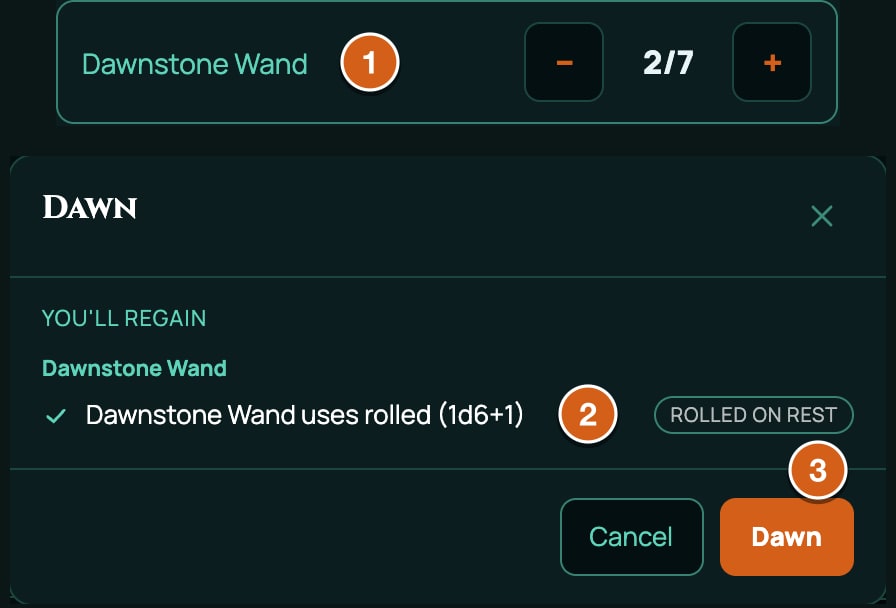
The buttons are in the Hit Points block of the Form View, and at the top of the inventory panel on a Canvas sheet. Each press shows a preview of what will change, and nothing happens until the player confirms it. See Hit points and rests.
Triggers that happen on their own
Every system also has four triggers RollQuest fires by itself, with nothing pressed:
| Trigger | When it happens | Its name in chat |
|---|---|---|
turnStart |
The character's turn starts in a battle. | Turn Start |
dayStart |
The game's world clock passes midnight: once for each day that goes by, and no more than seven at a time. Only in a game whose world clock is running. | Day Start |
onCast |
The character casts a spell, at any level. | On Cast |
levelUp |
The character finishes a Level Up. | Level Up |
Each one runs every effect on that trigger in the character's items, the same way a rest button does, and posts a card in chat saying what changed. Day Start posts one card for all the days that passed. A character with no effect on the trigger isn't touched.
This feature has one use that comes back at the start of each of the character's turns in a battle, and at midnight:
{
  "kind": "inventoryItem",
  "key": "FEATURE_BATTLE_RHYTHM",
  "spec": {
    "subType": "feat",
    "id": "FEATURE_BATTLE_RHYTHM",
    "name": "Battle Rhythm",
    "maxUses": 1,
    "uses": 1,
    "meta": { "category": "General Feat", "passive": false, "description": "Once on each of your turns, you can steady your stance. The use comes back at the start of each of your turns in a battle, and every midnight." },
    "actions": [{ "id": "USE", "label": "Steady", "formula": "", "damageType": "", "tag": "" }],
    "effects": [
      { "id": "BATTLE_RHYTHM_TURN", "target": "SELF.uses", "op": "reset", "value": "", "condition": "", "trigger": "turnStart" },
      { "id": "BATTLE_RHYTHM_DAY", "target": "SELF.uses", "op": "reset", "value": "", "condition": "", "trigger": "dayStart" }
    ]
  }
}
What still needs a press:
- Dawn and Dusk aren't automatic. The world clock reaching sunrise posts a message, but somebody still has to press Dawn. For something that comes back each day by itself, use
dayStart, which happens at midnight. - 5e has no Dusk.
sunsetis refused in a 5e pack.
What a rest effect can change
A rest effect's target is wrapped, to say what kind of thing it changes:
| Target | What it is | Ops |
|---|---|---|
SELF.uses (or SELF) |
The item's own uses left. | reset fills them. setTo sets them. increment gives back that many (a negative number spends). addRandom gives back a rolled amount, such as "1d6+1". |
SELF.maxUses |
The item's most uses. | setToVF sets it from a value, such as PROF. Also setTo, increment and addRandom. |
VF("ID") |
A plain number on the sheet, such as HP, HP_TEMP, HIT_DICE_SPENT, EXHAUSTION or INSPIRATION. |
reset (to its lowest), setTo, setToVF, increment, addRandom. |
POOL("id") |
One pool of spendable points, such as powerSlots.1, the first-level spell slots. |
reset, setTo, increment, addRandom, setPoolMax. |
POOL_GROUP("group") |
Every pool in a group, such as powerSlots, all the spell slots. |
reset, setTo, increment, addRandom. |
Mind the direction. An item's uses count what's left, so increment 1 gives one back. A pool counts what's spent, so increment 1 on a pool spends one, and addRandom gives back. setPoolMax is the only op that creates a pool that doesn't exist yet.
add and setMin do nothing on a wrapped target, and the checker refuses them: EFFECT_OP_NOT_ON_CHANNEL.
The value of a rest effect is never a formula:
setTo,incrementandsetPoolMaxtake a plain number."=PROF"would count as 0, and is refused.addRandomtakes a number or dice:"1d6","1d6+1"or"2d4-1".setToVFtakes a value's ID, which must be one RollQuest keeps up to date for rests: one ending_LEVEL,_MODor_POOL, orLEVEL,PROF,SPEED, a token value such asHP_MAX, or one of the system's own scaling values. Anything else is refused: SCALING_SOURCE_UNPUBLISHABLE.resettakes no value: write"".
Effects in one item happen in order, top to bottom. Put a SELF.maxUses change before the reset that fills the uses, so they fill to the new number.
Examples
A wand with 7 charges that gets back 1d6 + 1 at dawn. The empty-formula action gives the player a button that spends a charge:
{
  "kind": "inventoryItem",
  "key": "ITEM_DAWNSTONE_WAND",
  "spec": {
    "subType": "item",
    "id": "ITEM_DAWNSTONE_WAND",
    "name": "Dawnstone Wand",
    "maxUses": 7,
    "uses": 7,
    "meta": { "description": "7 charges. Regains 1d6 + 1 charges at dawn." },
    "actions": [{ "id": "SPEND", "label": "Use a charge", "formula": "", "damageType": "", "tag": "" }],
    "effects": [{ "id": "DAWNSTONE_DAWN", "target": "SELF.uses", "op": "addRandom", "value": "1d6+1", "condition": "", "trigger": "sunrise" }]
  }
}
A feature with as many uses as the proficiency bonus, one back on a short rest and all back on a long rest:
{
  "kind": "inventoryItem",
  "key": "FEATURE_SECOND_BREATH",
  "spec": {
    "subType": "background",
    "id": "FEATURE_SECOND_BREATH",
    "name": "Second Breath",
    "maxUses": 2,
    "uses": 2,
    "meta": { "passive": false, "description": "Uses equal to your Proficiency Bonus. Regain one on a Short Rest and all on a Long Rest." },
    "actions": [{ "id": "USE", "label": "Use", "formula": "", "damageType": "", "tag": "" }],
    "effects": [
      { "id": "SECOND_BREATH_MAX_LR", "target": "SELF.maxUses", "op": "setToVF", "value": "PROF", "condition": "", "trigger": "longRest" },
      { "id": "SECOND_BREATH_SR", "target": "SELF.uses", "op": "increment", "value": 1, "condition": "", "trigger": "shortRest" },
      { "id": "SECOND_BREATH_LR", "target": "SELF.uses", "op": "reset", "value": "", "condition": "", "trigger": "longRest" }
    ]
  }
}
Print maxUses and uses as the number at level 1, and equal: it's what the feature arrives with. A missing uses is refused (USE_BUDGET_INCOHERENT), because the feature would arrive spent.
A feature that comes back at dusk (5.5e), and on a short rest too from Fighter level 5:
{
  "kind": "inventoryItem",
  "key": "FEATURE_DUSK_VIGIL",
  "spec": {
    "subType": "background",
    "id": "FEATURE_DUSK_VIGIL",
    "name": "Dusk Vigil",
    "maxUses": 1,
    "uses": 1,
    "meta": { "passive": false, "description": "Once between dusks. From Fighter level 5, also regained on a Short Rest." },
    "actions": [{ "id": "USE", "label": "Use", "formula": "", "damageType": "", "tag": "" }],
    "effects": [
      { "id": "DUSK_VIGIL_DUSK", "target": "SELF.uses", "op": "setTo", "value": 1, "condition": "", "trigger": "sunset" },
      {
        "id": "DUSK_VIGIL_SR",
        "target": "SELF.uses",
        "op": "reset",
        "value": "",
        "condition": "=CLASS_LEVEL_GTE(\"Fighter\", 5)",
        "trigger": "shortRest"
      }
    ]
  }
}
What a long rest restores. A class's level 1 row needs these, because RollQuest doesn't restore hit points, hit point dice or spell slots on a rest by itself (see A whole new class):
{
  "kind": "inventoryItem",
  "key": "FEATURE_RESTFUL_HEARTH",
  "spec": {
    "subType": "background",
    "id": "FEATURE_RESTFUL_HEARTH",
    "name": "Restful Hearth",
    "meta": { "passive": true, "description": "A Long Rest restores Hit Points, Hit Point Dice and spell slots, and removes a level of Exhaustion." },
    "effects": [
      { "id": "RH_HP", "target": "VF(\"HP\")", "op": "setToVF", "value": "HP_MAX", "condition": "", "trigger": "longRest" },
      { "id": "RH_HP_TEMP", "target": "VF(\"HP_TEMP\")", "op": "reset", "value": "", "condition": "", "trigger": "longRest" },
      { "id": "RH_HIT_DICE", "target": "VF(\"HIT_DICE_SPENT\")", "op": "reset", "value": "", "condition": "", "trigger": "longRest" },
      { "id": "RH_EXHAUSTION", "target": "VF(\"EXHAUSTION\")", "op": "increment", "value": -1, "condition": "", "trigger": "longRest" },
      { "id": "RH_SLOTS", "target": "POOL_GROUP(\"powerSlots\")", "op": "reset", "value": "", "condition": "", "trigger": "longRest" }
    ]
  }
}
A feature that switches on, with two uses a long rest. Its effects count only while it's on, and its uses come back on a long rest whether it's on or off:
{
  "kind": "inventoryItem",
  "key": "FEATURE_STORM_TRANCE",
  "spec": {
    "subType": "background",
    "id": "FEATURE_STORM_TRANCE",
    "name": "Storm Trance",
    "maxUses": 2,
    "uses": 2,
    "meta": {
      "passive": false,
      "toggleable": true,
      "description": "Switch it on: +2 damage and Resistance to Lightning damage while it lasts. Twice per Long Rest."
    },
    "effects": [
      { "id": "STORM_TRANCE_DMG", "target": "DMG_ROLL", "op": "add", "value": 2, "condition": "", "trigger": "" },
      { "id": "STORM_TRANCE_RESIST", "target": "RESIST_LIGHTNING", "op": "setMin", "value": 1, "condition": "", "trigger": "" },
      { "id": "STORM_TRANCE_LR", "target": "SELF.uses", "op": "reset", "value": "", "condition": "", "trigger": "longRest" }
    ]
  }
}
STORM_TRANCE_DMG targets DMG_ROLL, which this pack can use because the axe above has a damage action.
Tests on a rest effect
A rest effect's condition isn't a formula. It must be empty, a number, or exactly one of these tests:
| Condition | True when |
|---|---|
=CLASS_LEVEL_GTE("Fighter", 5) |
The character's level in that class is at least the number. The class name must match the class's ID exactly. |
=POOL_AVAILABLE("powerSlots.1") |
That pool has a point left. |
=EQUIPPED("…"), =PREPARED("…"), =EXCLUSIVE("group","…") |
These need the ID of one item on one sheet, which a pack can't know. Leave them for effects made on a sheet. |
Anything else, such as two tests joined with AND, is refused: TRIGGER_CONDITION_UNRECOGNISED. RollQuest would treat an unrecognised test as always true.
Formulas in values and conditions
A value or condition starting = is a formula, worked out from the character's sheet each time it changes.
- Names it can use: every value in your system, such as
STR,STR_MOD,PROF,LEVEL,AC_BODY_ARMOR_EQUIPPEDandIS_WEARING_HEAVY_ARMOR; a level for each class, such asCLERIC_LEVEL; and values your own pack declares, once they're on the sheet. - Functions: spreadsheet-style, such as
IF,MAX,MIN,FLOOR,CEILING,ROUND,AND,ORandNOT. Comparisons such as=STR>=13work out to 1 or 0.RANDandRANDBETWEENare refused. - No dice. A die in a value or condition would be rolled again every time the sheet updates. Dice belong in
bonusDie,addRandomand actions. - A condition that can't be worked out counts as off. So does text, such as
"while raging", which the checker refuses: EFFECT_CONDITION_PROSE. A name that doesn't exist is refused too: FORMULA_REFERENCE_UNRESOLVED.
A value your own pack declares, such as a Sanity score, only exists on a sheet once the pack's values have been added to it. Until then a formula naming it counts as 0. See Put your pack on a table.
Effects on another creature
An item's effects only ever change the character who has it. To change someone else, give an action a meta.applies entry of kind effect: using the action on a target puts the effect on the target's sheet for a number of rounds. This potion gives the drinker resistance to fire for 10 rounds:
{
  "kind": "inventoryItem",
  "key": "ITEM_POTION_OF_EMBERSKIN",
  "spec": {
    "subType": "item",
    "id": "ITEM_POTION_OF_EMBERSKIN",
    "name": "Potion of Emberskin",
    "meta": {
      "description": "When you drink it, you have Resistance to Fire damage for 10 rounds.",
      "targets": { "self": true },
      "applies": [{ "kind": "effect", "target": "RESIST_FIRE", "op": "setMin", "value": 1, "durationRounds": 10 }]
    },
    "actions": [{ "id": "DRINK", "label": "Drink", "formula": "", "damageType": "", "tag": "" }],
    "effects": []
  }
}
meta.targets{ "self": true }aims it at the user.{ "max": 1 }would let the player pick one creature on the board.- The entry has a
target,opandvaluelike any effect, anddurationRounds. It ends after that many rounds of a battle. Outside a battle the rounds run on the game's world clock instead, at 6 seconds a round unless the game's settings say otherwise; while the clock isn't running, the time waits. - Using it again replaces the effect rather than adding a second one.
- It only works on a target with a character sheet.
Other kinds of applies entry deal damage, heal or put on a condition: see Magic items and consumables and Spells.
What effects can't do
- Tell a weapon attack from a spell attack.
ATK_ROLLis both. Use"scope": "self"on the weapon. - Reach another creature, except through an action's
meta.applies. - Make a condition do something. Conditions such as Poisoned are badges: no condition changes a roll. For a penalty with teeth, write the effect yourself.
- Make a character immune to a condition. Only creatures have condition immunities.
- Give extra attacks.
ATTACKS_PER_ACTIONis a number shown on the sheet; nothing counts attacks. - Limit attunement or end concentration. See When an item's effects count.
- Happen at dawn or dusk by themselves. Those need the Dawn and Dusk buttons. Only the four automatic triggers fire with nothing pressed.
Mistakes the checker refuses
| Code | What's wrong | Fix |
|---|---|---|
EFFECT_TARGET_UNRESOLVED |
The target isn't a value, roll or tag your pack can use, such as a typo, a 5e value in a 5.5e pack, or DMG_ROLL with no damage action in your pack. |
Check the ID in the authoring contract. Add an action with the tag. |
EFFECT_OP_WRONG_CHANNEL |
A roll op on a value (advantage on P_STE), or a value op on a roll (setTo on ATH_ROLL). |
Target the roll for roll ops, such as STE_ROLL, and the value for setTo. |
EFFECT_OP_NOT_ON_CHANNEL |
An op the wrapped target doesn't take, such as add on SELF.uses. |
Use the ops in the table above. |
EFFECT_TRIGGER_TARGET_MISMATCH |
A wrapped target, such as SELF.uses, with no trigger. |
Give it a trigger. |
TRIGGER_NOT_DECLARED |
A trigger that's neither one of your system's buttons nor one of the four automatic triggers, such as dawn or sleep, or sunset in 5e. The message lists the automatic ones. |
Use one from the tables above. |
TRIGGER_CONDITION_UNRECOGNISED |
A rest effect's condition that isn't one of the tests. | Use one test, a number or nothing. |
EFFECT_CONDITION_PROSE |
A condition written as words. | Write a formula. |
EFFECT_VALUE_UNPARSEABLE |
A value its op can't read, such as "1d8" for add, or a formula on a rest effect. |
Use bonusDie for a die, and plain numbers on rest effects. |
EFFECT_SCOPE_ON_VALUE_FIELD |
"scope": "self" on a value. |
Remove it, or target a roll. |
FORMULA_REFERENCE_UNRESOLVED |
A formula names something that doesn't exist. | Check the name. |
FORMULA_VOLATILE_FUNCTION |
RAND or a similar function. |
Use dice in an action instead. |
SCALING_SOURCE_UNPUBLISHABLE |
setToVF from a value RollQuest doesn't keep up to date for rests. |
Use a _LEVEL, _MOD or _POOL value, LEVEL or PROF. |
USE_BUDGET_INCOHERENT |
maxUses without uses equal to it. |
Print both. |
EFFECT_ID_MISSING |
An effect with no id. |
Give every effect an ID, unique in its item. |
EFFECT_OP_NO_SURFACE is a warning, not a refusal: the op only works in the Canvas view, which this system doesn't have. When a pack is refused has every message in full.
Mistakes the checker lets through
- A
bonusDieoronCritDicevalue that isn't a die. Accepted, and rolls nothing. Try the roll on a sheet. - A formula in
critRange. Accepted, and ignored. Write a plain number. - A number too big for its value, such as +11 on
AC_MISC_BONUS. Accepted, and kept within the value's limits.
Related
Choices and grants · Magic items and consumables · Weapons and armour · Calculations and values · Hit points and rests