

Your first homebrew pack, step by step
This walkthrough takes one homebrew weapon for 5.5e from an empty My Homebrew panel to a player's character sheet, then changes it and brings the game up to date.
You'll make the Thornwhip, a barbed vine whip with reach, as a homebrew pack: a small file RollQuest checks and then offers to the players of a game you choose. The pack below is complete and RollQuest accepts it exactly as it is, so you can paste it, follow every click and see it work before you write your own. Once you've been through it, the other pages in this folder each start from a pack like this one. As the Game Master (GM), you do every step here except the one where a player takes the weapon.
Plan: writing homebrew is on Pro. The player who takes the weapon doesn't need Pro, in the character builder or with + From pack on their sheet.
Before you start
- Homebrew on your account (see Homebrew: what you can build) and a verified email address.
- A game you created, with its system set to 5.5e Compatible. See Create a game and Game systems.
- Someone to make a character in that game: a player, a second account of yours, or you as the GM.
Open My Homebrew
- In your game, open the menu (the three lines at the top left).
- Under Game Master tools, click My Homebrew. The My Homebrew panel opens. With no packs yet it says You have not made any homebrew yet, with a Start your first pack button.
My Homebrew appears a moment after the game loads, and only in a game you created. If it's missing, see Who can write homebrew.
Start a pack and download the contract
- Click Start your first pack (or + New homebrew at the top of the panel, once you have packs). The New homebrew window opens.
- Under Which system are you extending?, choose 5.5e Compatible in System. If your account has only one system to build on, the window names it instead of showing a list.
- Click Download the contract. A Markdown file named
authoring-contract-5-5e-core-and a code, ending.md, downloads, and a message says Downloaded the authoring contract. - Under How do you want to start?, choose I already have the JSON.
- Click Continue. The Check and create window opens.
What the contract is for
The authoring contract is a document RollQuest generates for the system you chose. It lists everything the checker accepts: what each kind of row must carry, with example rows built for that system (its Item shapes section), the values and rolls an item can change (such as AC for armour class), the damage types, the kinds of item, the rest buttons, the formula limits, and dozens of traps, mistakes that look right but would never work on a sheet. Open it in any text editor. The pack file, field by field says what each part of it means.
It's written so you can paste it into an AI chat assistant. To have one draft a pack for you:
- Paste the whole contract into the chat.
- Paste a working example pack from these pages, such as the Thornwhip below. The contract's example rows show the shape of each kind of row; a whole pack that already works shows the assistant how the parts fit together.
- Describe what you want, such as a whip that deals cold damage and costs 40 gp.
- Bring what it writes back to Check and create. The checker has the final word, not the assistant.
Download a fresh contract for each pack: RollQuest makes it new on every download, and an old copy can go out of date.
Download the seed pack in the same window gives you a small pack to copy and edit, built for the system you picked and named after its core pack, such as 5-5e-core-seed-pack.json. It holds two items that work as soon as the pack is bound to a game: one has charges that a rest refills, and one asks the player a choice. Notes inside say what each part does. Rename its slug, name and keys before you create it.
Write the pack
A pack is written in JSON: text with names in double quotes, a colon before each value, lists in square brackets and groups in curly braces. Here is the whole Thornwhip pack. Copy it as it is.
{
  "slug": "my-thornwhip",
  "name": "Thornwhip (homebrew weapon)",
  "system": "5.5e Compatible",
  "derivedFrom": "5-5e-core",
  "category": "addon",
  "version": "1.0.0",
  "license": "USER_HOMEBREW",
  "source": "My table's homebrew.",
  "attribution": "",
  "description": "",
  "requiredDecisions": [],
  "items": [
    {
      "kind": "inventoryItem",
      "key": "WEAPON_THORNWHIP",
      "spec": {
        "subType": "weapon",
        "id": "WEAPON_THORNWHIP",
        "name": "Thornwhip",
        "price": {
          "groupId": "coinage",
          "minor": 2500
        },
        "weight": {
          "unit": "lb",
          "value": 3
        },
        "meta": {
          "category": "Martial Melee",
          "range": "10 ft (reach)",
          "damage": "1d6",
          "damageType": "slashing",
          "properties": "Finesse, Reach",
          "description": "A barbed vine whip grown, not forged.",
          "targets": {
            "max": 1
          },
          "applies": [
            {
              "kind": "damage",
              "formula": "=1d6+MAX(STR_MOD,DEX_MOD)",
              "damageType": "slashing"
            }
          ]
        },
        "effects": [],
        "actions": [
          {
            "id": "ATK",
            "label": "Attack",
            "formula": "=1d20+PROF*W_MARTIAL+MAX(STR_MOD,DEX_MOD)",
            "damageType": "",
            "tag": "ATK_ROLL"
          },
          {
            "id": "DMG",
            "label": "Damage",
            "formula": "=1d6+MAX(STR_MOD,DEX_MOD)",
            "damageType": "slashing",
            "tag": "DMG_ROLL"
          }
        ]
      }
    }
  ]
}
The pack, line by line
The top of the file describes the pack:
| Field | In the Thornwhip | What it does |
|---|---|---|
slug |
my-thornwhip |
The pack's short ID, in lower case with hyphens. Your other packs refer to it by this. |
name |
Thornwhip (homebrew weapon) |
The name in My Homebrew, on builder cards (From Thornwhip (homebrew weapon)) and over its group in + From pack. |
system |
5.5e Compatible |
The system the pack is for. It must match the system's name exactly. |
derivedFrom |
5-5e-core |
The built-in pack this one builds on: the 5.5e core rules. It decides which values your formulas can use, such as STR_MOD. |
category |
addon |
An add-on to a system, which is what most homebrew is. |
version |
1.0.0 |
A label for you. RollQuest doesn't change it. |
license |
USER_HOMEBREW |
Marks the content as your own homebrew. |
source, attribution, description |
Free text for your own notes. | |
requiredDecisions |
[] |
Builder steps. Only a game system of your own has any, so leave it as an empty list. |
items |
The rows. This pack has one. |
Each row in items has a kind, a key and a spec:
kind:inventoryItem, something a character holds.key:WEAPON_THORNWHIP, the row's own ID. It must not match any row in RollQuest's 5.5e packs or in your other 5.5e packs, and it must never change once players have the weapon.spec: the item itself.
Inside spec:
| Field | In the Thornwhip | What it does |
|---|---|---|
subType |
weapon |
The kind of item. weapon puts it on the Weapons tab with an Attack button. The others are item (gear, armour, magic items), power (spells), feat and background (species, backgrounds and class features). |
id |
WEAPON_THORNWHIP |
The ID formulas and effects use for it. Keep it the same as the key. |
name |
Thornwhip |
The name on the sheet. |
price |
coinage, 2500 |
The price in copper pieces, in the system's coins: 2500 is 25 gp. |
weight |
3, lb |
Its weight, for encumbrance. |
meta |
What the sheet shows: category (the builder groups weapons by it), range, damage, damageType, properties and description. These are labels; the rolls come from actions. |
|
meta.targets and meta.applies |
max 1, damage |
Give the weapon a Target button for one creature, so its damage can land on a token on the board. |
effects |
[] |
Bonuses the item gives while it's equipped, such as +1 to armour class. The Thornwhip has none. See Effects. |
actions |
ATK, DMG |
The buttons on the sheet and the dice they roll. |
The two actions:
- Attack:
=1d20+PROF*W_MARTIAL+MAX(STR_MOD,DEX_MOD). A d20, plus the proficiency bonus (PROF) timesW_MARTIAL, which is 1 when the character is trained with martial weapons and 0 when not, plus the higher of the Strength and Dexterity modifiers, because the whip has the finesse property. The tagATK_ROLLmarks it as an attack roll, so anything that improves attack rolls improves it too. - Damage:
=1d6+MAX(STR_MOD,DEX_MOD), slashing. The tagDMG_ROLLmarks it as a damage roll.
Every formula starts with =. Weapons and armour goes further: mastery, thrown weapons, armour and shields.
Check it
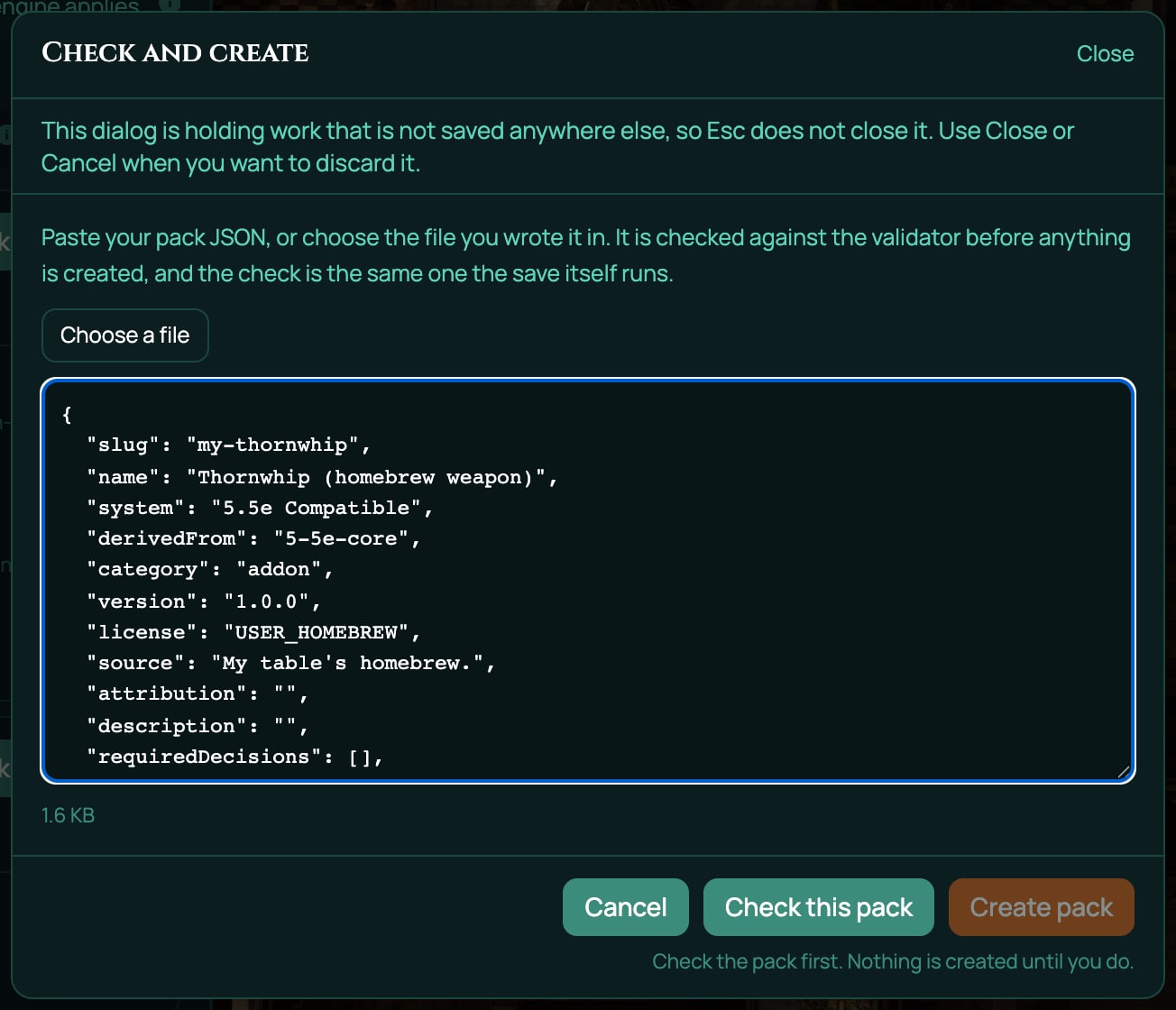
- Paste the pack into the box in Check and create, or click Choose a file and pick the file you saved it in.
- Click Check this pack. RollQuest checks the pack without creating anything. Under What the validator says it reads Nothing here stops this pack being created. and Nothing to report. Checked as a new pack.
If you changed something and the checker found a problem, it's listed under Blocking with what's wrong and, often, You can use: with the values that would work. Fix it in the box and click Check this pack again. When a pack is refused explains every message.
Create it
- Click Create pack. A message says Thornwhip (homebrew weapon) was created. It is private to you.
The pack joins your list: Thornwhip (homebrew weapon), Version 1.0.0 · Revision 1 · 1 item, and 5.5e Compatible under it. Revision 1 is the first saved version: each time you save a change, the pack gets a new revision. The line at the top now reads 1 of 20 packs (with your real count, if you have other packs).
Bind it to your game
A new pack isn't part of any game yet. Adding it to the game you have open is called binding, and the app calls each game a table.
- On the pack's row, click Bind to this table. The Bind Thornwhip (homebrew weapon) to this table window opens.
- Under Where should its items appear?, tick Add Weapons (Optional). That's the character builder step where new characters pick weapons.
- Click Bind pack. A message says Thornwhip (homebrew weapon) is bound to this table. 1 item is now offered to its players.
The row now reads Bound to this table and Pinned r1: the game uses revision 1 until you move it. Under that, Routed into "Add Weapons (Optional)" names the builder step you ticked.
Every builder step you can tick, and what happens with the ones that take a single pick, is in Put your pack on a table.
A player takes it
In the character builder
- In the game, the player creates a new character and opens the character builder (see Create a character).
- They make their choices and click Next until they reach Add Weapons (Optional).
- They find Thornwhip under Martial Melee. Its card shows 25 gp and From Thornwhip (homebrew weapon).
- They click the card. It's marked selected.
- They click Add 1 & Continue. The Thornwhip goes on the sheet and its price comes out of the character's starting money.
If the character can't afford it, the card shows Can't afford. As the GM you can add it anyway: RollQuest asks you to confirm Over budget.
From the sheet
A character who already exists takes it from the top of their sheet. The player who plays the character can do this on any plan, and so can you as the GM.
- Open the character's sheet. At the top, click + From pack (hover text: Add items from the packs bound to this table). The Add from this table's packs window opens, with a Search by name box and the items grouped under each pack's name and count, such as THORNWHIP (HOMEBREW WEAPON) (1).
- Click + Add next to Thornwhip. A message says Added Thornwhip. Its price, 25 gp, comes out of the character's coins, in the Form View and on a Canvas sheet alike. The Form View is the sheet's standard tabbed layout, and a Canvas sheet is drawn on artwork: see Form and Canvas views.
+ From pack shows only while the game binds something the sheet doesn't have yet; once the character holds every item on offer, the button goes. If the window is already open, it says Everything this table's packs offer is already on this character. A player can't add an item they can't afford; you can, and the message then says it went over budget. No coins are taken for an item added over budget.
As the GM you can also add it from the sheet's own Items panel: open the sheet in the Form View, click Edit, then Items, the Weapons tab and + From pack (see Inventory and money). That button is part of the sheet editing tools and keeps their plan.
Check it on the sheet
- Open the character's sheet and its Items tab. Thornwhip is in the Weapon group, with 1d6 slashing; click it and its details read Finesse, Reach, its description and 3 lb.
- Click Thornwhip, then Attack. The roll adds the character's bonuses.
- Click Damage.
The weapon on the sheet is a copy of the item in your pack, so the sheet keeps working even if you edit or unbind the pack later.
Change it and bring the game up to date
Say the Thornwhip should deal 1d8. Editing the pack makes revision 2, but the game stays on revision 1 until you move it, and the copy on the sheet stays as it is until you re-stamp it, which means updating it to the revision the game is on.
- On the pack's row, click Edit. The Edit Thornwhip (homebrew weapon) window opens. Because a character has taken the weapon, a note says Slug, system and derives-from are locked: sheets find the pack by them.
- In Everything else, as JSON, change
1d6to1d8in its three places:"damage": "1d8"inmeta, and the two formulas=1d8+MAX(STR_MOD,DEX_MOD)underappliesand in the Damage action. - Click Check this change. It reads Nothing here stops this change being saved.
- Click Save changes. A message says Thornwhip (homebrew weapon) was saved. The row reads Revision 2, and the binding says Pinned r1 · pack is now at r2.
- Click Move this table to r2. A message says the game is now on r2 and that nothing on any sheet has changed. From now on, new picks get the 1d8 Thornwhip. A line under the binding counts the sheets still on an older revision.
- Click Preview re-stamp from r2. A line says what would change: This would update 1 inventory item across 1 sheet, from r2. Items a player took from the pack are refreshed in place; nothing is taken away. Nothing has changed yet. The preview counts only the sheets whose items would really change, and any sheet recorded on another revision, so the count on its button matches the line under the binding.
- Click Re-stamp 1 sheet. A message says Updated 1 inventory item across 1 sheet, from r2., and the Thornwhip on the character's sheet now shows 1d8.
With more characters holding the weapon, the counts are higher. In the clip below, two characters were still on the old revision, so it reads 2 sheets.
If a new revision would let a step that takes one pick delete players' picks, Move this table to r2 asks first, in the row, with a tick box: see Move a game to a new revision. The Thornwhip's step takes any number of weapons, so it doesn't ask.
A re-stamp updates the item's name, rolls, effects and description. It never changes whether the item is equipped, how many uses it has left or how many the character carries.
What you've done
You wrote a pack, checked it, created it, bound it to your game and routed it into a builder step; a player took the weapon; then you saved a new revision, moved the game to it and re-stamped the sheet. Every homebrew pack follows the same loop. Next:
- Swap the Thornwhip for your own item, using the page for its kind: Homebrew: what you can build.
- Read The pack file, field by field before you rename or remove a row: once players have a row, its key is fixed.
- See Put your pack on a table for turning a pack off, unbinding and retiring.
The My Homebrew panel, part by part
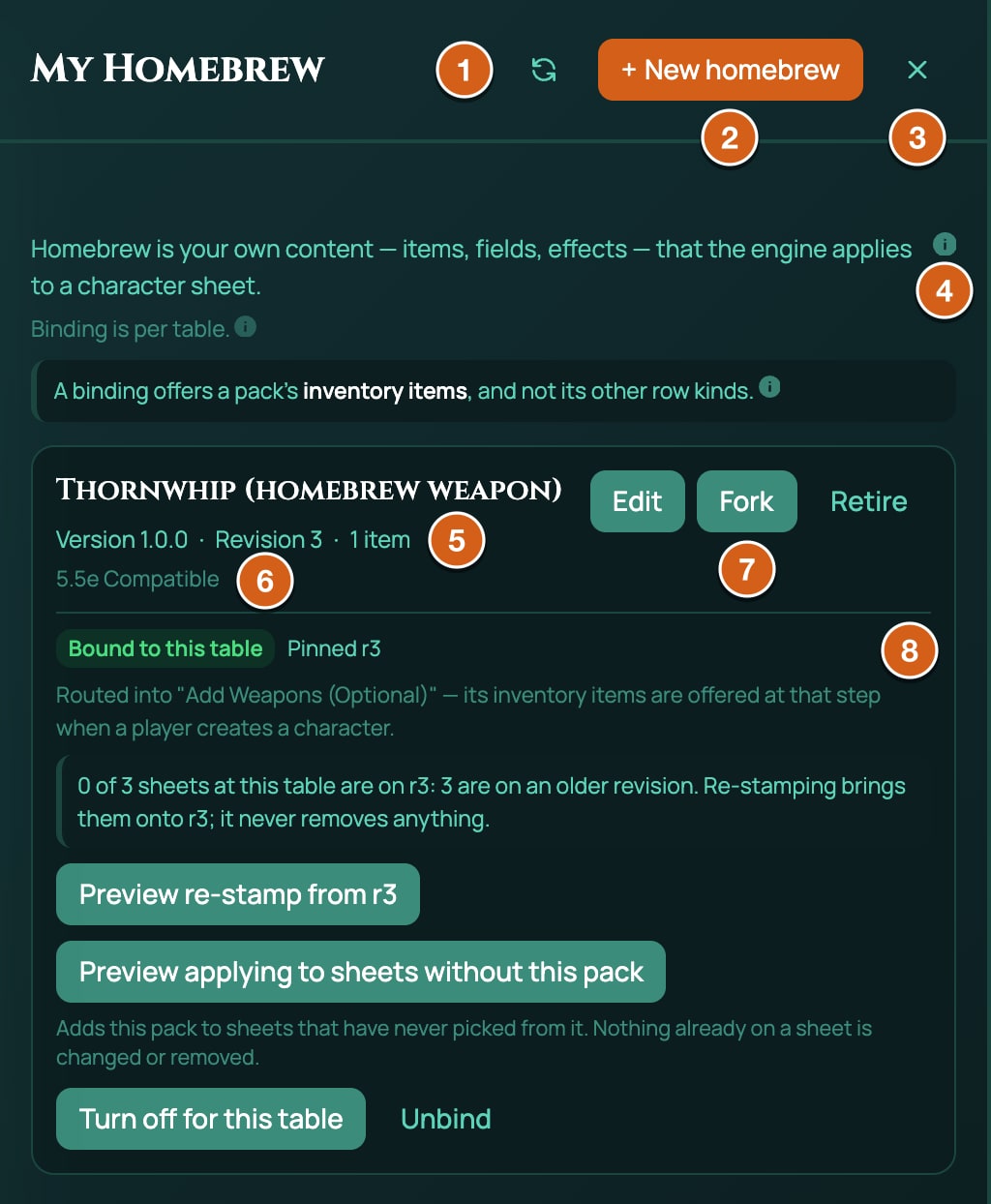
| Part | What it does |
|---|---|
| Refresh (the circular arrow) | Reloads your packs and this game's bindings. |
| + New homebrew | Opens the New homebrew window. Hover text: Start a new homebrew pack. |
| Close (the cross) | Closes the panel. Esc does the same. |
| 1 of 20 packs | How many packs you have against your plan's limit. A retired pack still counts while any character has something from it, and the line then says so, such as 1 of 20 packs, including 1 retired pack characters still hold. On an account with no pack limit, it shows the count alone, such as 3 packs. It reads Pack count unavailable if RollQuest couldn't count them. |
| Retired, still held by characters | Shows only when a pack you retired is still on characters. Each pack is listed with held by N characters and a Remove from characters button. See Retire a pack. |
| The line under it, with an (i) | Says what homebrew is. Hover over the (i), How homebrew works, for a summary. |
| Start your first pack | Shows when you have no packs, under You have not made any homebrew yet. Opens the New homebrew window. |
| Binding is per table. | Everything under each pack is about the game you have open. The same pack can be bound to your other games, and those aren't shown. |
| A binding offers a pack's inventory items, and not its other row kinds. | Hover over the (i), What a binding delivers, for the full list. See What binding delivers. |
| Pack name, Version, Revision, item count | The name (Untitled pack if it has none), your version label (1.0.0 if you wrote none), the newest revision, and how many rows the pack holds, of every kind. The system shows on the line below. |
| Edit | Opens the pack to change it. See The pack file, field by field. |
| Fork | Copies rows into a new pack of your own. See Copy rows (Fork). |
| Retire | Stops offering the pack anywhere, without deleting it. Its slot comes back once no character has anything from it. See Retire a pack. |
| The binding block | The pack's state in this game, and the buttons to bind, move, re-stamp, apply, turn off and unbind. See Put your pack on a table. |
If the panel can't read your packs or this game's bindings, it says so (We could not list your homebrew, This list is incomplete or We could not read this table's homebrew) with Try again. None of these means a pack was deleted.
If homebrew leaves your plan, or is turned off, while you still have packs, My Homebrew stays in a reduced form. It says Your plan no longer includes authoring homebrew (or Authoring homebrew is turned off here), and that you can still turn off, unbind or retire the packs you already have, and take a retired pack off your characters. + New homebrew, Edit, Fork, the pack count and the buttons that move, re-stamp or apply are gone. With nothing left to manage, the panel shows Content authoring is not part of this plan or Content authoring is turned off in place of your packs, and My Homebrew leaves the menu.
The New homebrew window
| Control | What it does |
|---|---|
| System | The system you're building for. It picks which contract you download and which packs Copy rows that already exist lists. It doesn't change a pack you paste: the pack's own system and derivedFrom decide. |
| Download the contract | Downloads the authoring contract for that system. Hover over its (i) for more. |
| Download the seed pack | Downloads a small starter pack built for that system, such as 5-5e-core-seed-pack.json, with two items that work once the pack is bound. Hover over its (i) for more. |
| Copy rows that already exist | Start from rows in a pack you can see, such as RollQuest's 5.5e weapons. Then Pick rows opens the copy window: see Copy rows (Fork). |
| Write it from scratch | Write the file yourself from the contract and an example. My file is ready opens Check and create when you're done; nothing expires in between. |
| I already have the JSON | You have the file. Continue opens Check and create. |
| Cancel or Close | Closes the window. Nothing is saved here, so nothing is lost. |
The Check and create window
| Control | What it does |
|---|---|
| Choose a file | Reads a .json file from your computer into the box, where you can see and change it before anything is sent. A file over 16 MB isn't opened. |
| The box | Paste or type the pack here. A pack can be up to 2 MB, measured without its spaces and line breaks. The size shows under the box, with large over 1 MB and over the limit over 2 MB. |
| Check this pack | Runs the checker and shows What the validator says. Nothing is created. Greyed out while the box is empty. It reads Check again while the box still matches what it last checked. |
| Create pack | Creates the pack. It only works after a check that found nothing blocking; changing the text throws the check away. |
| Cancel or Close | Closes the window and clears the box. |
While the box holds text, or a check result is showing, neither clicking outside the window nor pressing Esc closes it, so a pasted pack isn't lost by accident. Press Esc and the window says This dialog is holding work that is not saved anywhere else, so Esc does not close it. Use Close or Cancel when you want to discard it. The copy window and Edit (once you've changed something) work the same way.
If your JSON sets scope, visibility, ownedBy or createdBy, they're removed before the check and a note says so: a pack you make here is always private and yours.
Related
Homebrew: what you can build · The pack file, field by field · Put your pack on a table · Weapons and armour · When a pack is refused