

Build on Ashfall
Add your own weapons, talents, corruptions and archetypes to Ashfall, RollQuest's d100 survival-horror game, as homebrew packs your players take like the built-in ones.
Ashfall is RollQuest's own game system: a grim gaslight survival-horror game where you roll a hundred-sided die and want to roll low. It's built from five packs of rules and content, and your own homebrew slots in beside them in the same way. This page explains Ashfall in plain words first, then shows how its packs fit together, then builds a small set of packs called Embers, one step at a time: a new weapon for the starting gear, two talents and a corruption to hand out in play, and a new archetype for the character builder. Each one is checked, bound to a table and taken by a player. As the Game Master (GM), you write the packs; your players meet the results on their sheets.
Plan: homebrew is on Pro, with up to 20 homebrew packs. Your players take what you bind with + From pack in their sheet's header, on any plan.
New to homebrew packs? Read Homebrew: what you can build and Your first homebrew pack, step by step first. This page assumes you know how to open My Homebrew, check a pack and create it.
Ashfall in plain words
You need to know the game before you add to it. Everything below is what Ashfall does today, as RollQuest runs it.
The premise
Seven years ago the Cinder Crown opened, and ash still falls on the river cities of the Hearth Concord. Out in the drifts beyond the boundary lamps, the ash has started to remember what it used to be. Characters are investigators and survivors: who they were before the ash is their archetype, what they know is their skills, and what keeps them alive is their gear, their talents and their nerve. There are no levels. A character changes through what they pick up along the way (weapons, talents, rites and, too often, corruptions) and through Tempering: between stories, the skills they used well can improve.
The roll: a d100, rolled under
Every test in Ashfall is one roll of a d100, a die numbered 1 to 100. You pass if you roll your number or lower, so lower is better, the opposite of 5e.
How low you rolled matters too. Every result lands in a named band, and RollQuest shows the band's name with the roll. For a character with Melee 45:
| Band | When | Melee 45 |
|---|---|---|
| Triumph | A roll of 1, whatever the number. Ashfall's critical. | 1 |
| Sharp | A pass at a fifth of the number or under, rounded down. | 2 to 9 |
| Solid | A pass at half the number or under, rounded down. | 10 to 22 |
| Success | Any other pass. | 23 to 45 |
| Failure | Over the number. | 46 to 95 |
| Disaster | A roll of 100, or 96 and up when the number is under 50. Ashfall's fumble. | 96 to 100 |
With Melee 60, Disaster is a 100 only, and 96 to 99 are plain failures. Doubles such as 11, 22 or 33 mean nothing special: Triumph and Disaster are Ashfall's criticals and fumbles now.
- A passed skill test ticks the skill. RollQuest keeps the tick for Tempering, below. Only a test rolled by clicking the skill itself ticks it: a weapon's Strike or a talent's button doesn't. Sanity, Ember and Ashlore tests never tick.
- Fortune and Misfortune are Ashfall's advantage and disadvantage. Fortune rolls two d100s and keeps the lower, which is better when you roll under; Misfortune keeps the higher. Fortune ×2 and Misfortune ×2 roll three d100s. To use one, press and hold a characteristic, a skill or a button in the Form View, choose it in the list that opens, and click Roll.
- Weather counts. Mist on the scene, or heavy rain, heavy snow or thick ashfall, puts Misfortune on Spot tests.
Each test is written in the pack as a calculation, a formula RollQuest rolls: =1d100<=MELEE means "roll 1d100, and pass if it's at most the Melee number".
To roll Ashfall's tests and strikes from a macro, see Macros for Ashfall.
After a failed test
When a test you rolled by clicking a characteristic, Ember, Sanity or a skill fails, or a weapon's Strike (on a firearm, Shoot) fails, buttons appear under the result, one row of them, with Keep result at the end. Each is a second chance, and each has a price:
| Button | What it does | Offered on |
|---|---|---|
| Press the test | Rolls the same test once more, marked Pressed. If the pressed test fails too, the result warns that the GM brings the cost of pushing, in full. | A Failure on any test but Melee, Dodge, Pistol, Long Gun, Sanity, Ember and Ashlore, and never on a weapon's Strike or Shoot |
| Spend Ember | Pays Ember point for point to bring the roll down to the number: Melee 45 rolled 52 costs 7 Ember and becomes a plain Success. Greyed out, with the reason, when you don't have enough. | A Failure on any test but Sanity and Ember, a weapon's Strike included |
| Spend Fate to reroll | Spends 1 Fate point and rolls the test again, marked Fated. Greyed out when no Fate is left. | Every Failure, and a Disaster, where it's the only one of the three |
You get one: the result a button produces offers no more buttons. Rolling anything else, or clicking Keep result, puts them away.
A failed Strike offers Spend Ember and Spend Fate to reroll, but not Press the test: Ashfall doesn't let you press a strike. A strike resolved at a creature through Target offers none, and neither do the test buttons on talents, rites and kit, such as Ash-Sight's Seek or the Set of Picks' Pick a lock.
The Quickened talent adds its own button to a failed Dodge, Reroll the Dodge, with the talent's name on it. It works once, and comes back when the character catches their breath or recuperates.
Characteristics, Ember and skills
A character has eight characteristics, plus Ember. The character builder rolls each one with its own dice:
| Characteristic | What it is | Rolled |
|---|---|---|
| Brawn | Strength and the force behind a blow. | 3d6 × 5 (15 to 90) |
| Vigour | Health and stamina. | 3d6 × 5 |
| Frame | Size and mass: bigger frames carry more Wounds and hit harder. | (2d6 + 6) × 5 (40 to 90) |
| Reflex | Speed of hand and foot. | 3d6 × 5 |
| Presence | Bearing, looks and the weight of your attention. | 3d6 × 5 |
| Wits | Quickness of mind. | (2d6 + 6) × 5 |
| Resolve | Will. Sanity starts here. | 3d6 × 5 |
| Learning | Schooling and reading. | (2d6 + 6) × 5 |
| Ember | Luck that burns down: spend it after a failed test. | 3d6 × 5 |
Ashfall has 42 skills. Each starts at a base and goes up with the points the player buys in the builder: Melee is 25 plus its points, Dodge is half Reflex plus its points.
| Starts at | Skills |
|---|---|
| 30 | Field Dressing |
| 25 | Long Gun, Melee, Spot |
| 20 | Archives, Climb, Drive/Ride, Jump, Listen, Pistol, Stealth, Swim, Throw |
| 15 | Charm, Intimidate |
| 10 | Mechanics, Navigate, Persuade, Read People, Sleight of Hand, Survival, Track, Wildlore |
| 5 | Appraise, Craft, Disguise, History, Law, Ledgers, Occultism, Patter |
| 1 | Customs, Locks, Mind-Mending, Natural Philosophy, Physic, Ruinlore, Tongues |
| 0 | Ashlore, Standing |
| Half Reflex | Dodge |
| Learning | Mother Tongue |
Two are special. Ashlore is what the ash remembers: it's never bought at creation, and every point of it lowers the character's maximum Sanity by one. Standing is the character's place in Concord society, and each archetype sets the range it must sit in.
Every characteristic, Ember and every skill can be clicked on the sheet to roll a test against it.
Wounds, Sanity, Kindling and the other vitals
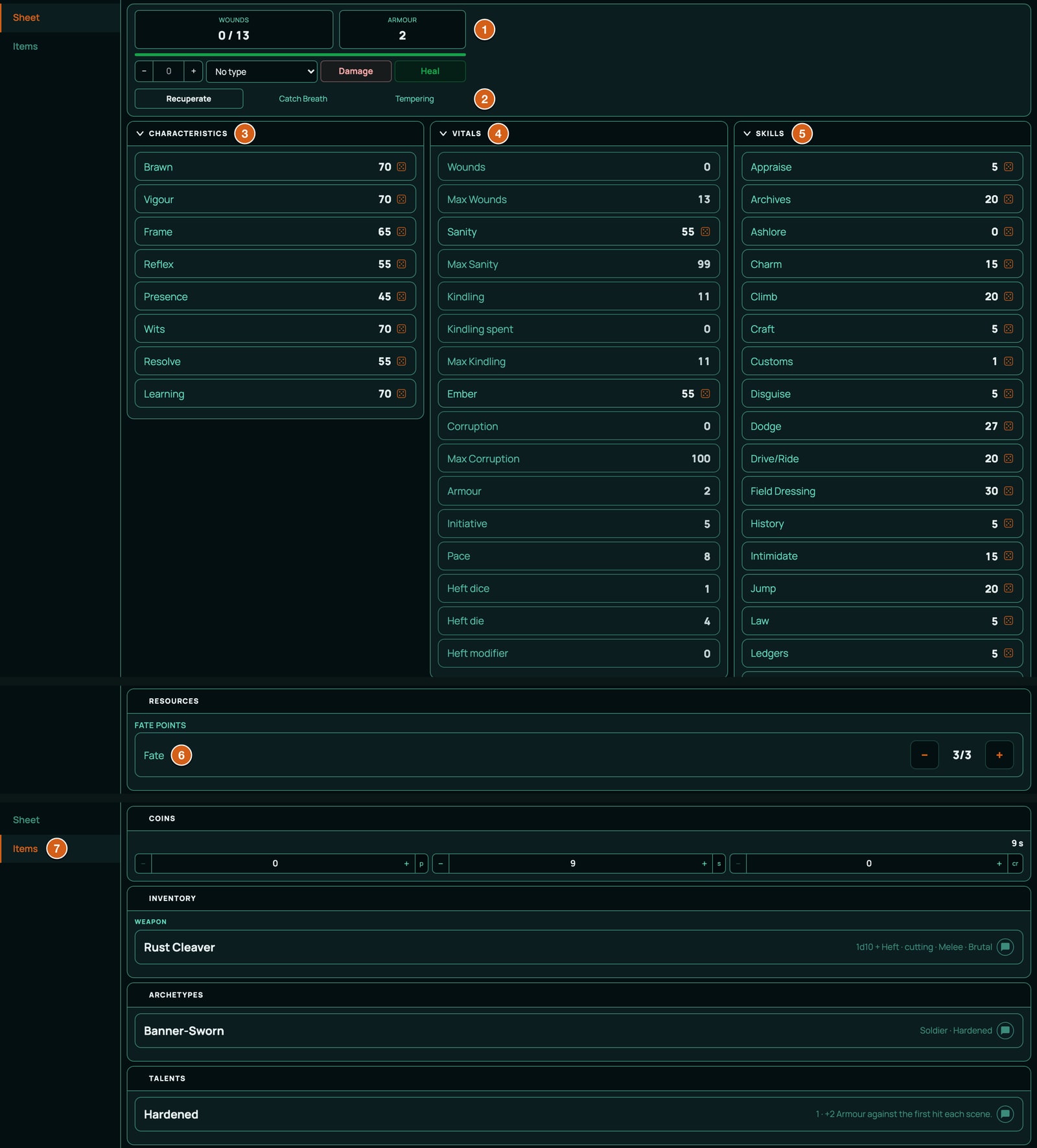
These are the character's vitals. Wounds and Armour also sit in the tile at the top of the sheet, with the rest buttons.
- Wounds count up from 0 as the character is hurt. Max Wounds is a tenth of Vigour plus Frame, rounded down: Vigour 50 and Frame 65 give 11.
- One hit that deals half the character's Max Wounds or more, rounded down, makes them Grievous, and RollQuest asks for a Vigour test. Fail it and they fall Unconscious.
- At Max Wounds the character is Broken: they fall and can't act, and RollQuest marks their token. Another hit that deals Wounds while they're Broken kills them, and RollQuest marks them Dead. Healing even one Wound lifts Broken. The condition's description adds a table rule RollQuest doesn't do for you: spend a Fate point to stagger up one Wound below the maximum.
- Reaching Max Wounds while Grievous makes them Dying: they test Vigour each round, and a failure kills them. A companion with Field Dressing can stabilise them, and you lift Dying when they do.
- Sanity starts at the character's Resolve. Max Sanity is 99 less their Ashlore. Warp damage drains it.
- Losing 5 or more Sanity in one go asks for a Wits test. A pass means they understood what they saw: they're Shaken for 1d10 rounds, and a roll on the Shaken Bout table says how it takes them.
- At 0 Sanity the character is Lost and leaves play.
- Haunted, a lasting dread, is yours to apply when a fifth of a character's Sanity goes in a single day.
- Kindling is the inner flame rites burn: a fifth of Resolve, rounded down, less what they've spent. Mark it in Kindling spent.
- Ember is the luck Spend Ember pays from. Resting doesn't restore it: only Tempering can raise it again.
- Corruption rises from 0 to 100. Nothing raises it on its own: you raise it when the story says so. Corruptions describe in words what happens at higher Corruption, for you to rule on. On the board it shows as a bar.
- Armour is a number from 0 to 20 taken off every physical hit before it reaches Wounds. Worn armour, talents and corruptions add to it.
- Pace is how many yards the character moves in a round: 8, or 7 when Brawn and Reflex are both under Frame, or 9 when both are over it.
- Heft is the extra damage a character's weight puts behind a melee blow, from Brawn plus Frame:
| Brawn + Frame | Heft |
|---|---|
| Under 65 | -2 |
| 65 to 84 | -1 |
| 85 to 124 | none |
| 125 to 164 | +1d4 |
| 165 to 204 | +1d6 |
| 205 and up | +2d6, and another d6 for every 80 more |
In a battle, initiative is a d10 plus Initiative, a tenth of Reflex, rounded down.
Damage
Ashfall has five damage types. Cutting, Impact, Rending and Toxic go to Wounds after Armour has taken its share. Warp goes straight to Sanity.
A Banner-Sworn with Armour 2 and Max Wounds 11 hit for 5 Cutting takes 3 Wounds. Hit for 8, they take 6, which is half their Max Wounds or more, so they're Grievous and test Vigour. Hit for 4 Warp, their Sanity drops by 4. A heal with no type closes Wounds; to give Sanity back, choose Warp as the type and click Heal. See Damage and healing.
A melee weapon adds the wielder's Heft to its damage. When a character strikes at a target from their sheet with a melee weapon and the strike would hit, the target can answer it (its player, or you for an enemy): Dodge (a Dodge test) or Fight back (a Melee test). The better band wins. Equal bands go to the higher skill, and if those are equal too, a Dodge holds and a Fight back loses. Firearms can't be dodged.
Fate
Every character has 3 Fate points, Ashfall's reroll currency. Spend Fate to reroll spends one for you after a failed test or a Disaster. You can still spend one by hand with − on the sheet's Fate row, and + gives one back if you clicked by mistake. Recuperate refills them.
Archetypes, talents, corruptions, rites and cinderbooks
An archetype is who the character was before the ash came down. Each character has exactly one, picked in the character builder. It names the eight skills its points buy, a signature skill that may go higher than the rest, the range Standing must sit in, a starting kit in words, and the talent it grants.
| Archetype | Role | Talent | Signature skill | Points to spend | Standing |
|---|---|---|---|---|---|
| Lamplighter | Warden | Steeled Mind | Spot | Learning × 2 + Resolve × 2 | 9 to 30 |
| Banner-Sworn | Soldier | Hardened | Melee | Learning × 2 + Brawn × 2 | 9 to 30 |
| Ash-Walker | Scavenger | Scavenger | Survival | Learning × 2 + Vigour × 2 | 0 to 10 |
| Cutpurse | Runner | Quickened | Sleight of Hand | Learning × 2 + Reflex × 2 | 5 to 20 |
| Archivist | Keeper of Records | Card Index Mind | Archives | Learning × 4 | 10 to 40 |
| Physician | Doctor | Steady Hands | Physic | Learning × 4 | 30 to 80 |
| Rail Engineer | Engineer | Gauge and Pressure | Mechanics | Learning × 2 + Brawn × 2 | 20 to 50 |
| Assessor's Clerk | Official | Follow the Ledger | Ledgers | Learning × 4 | 15 to 45 |
| Penny Journalist | Reporter | A Name in Every Ward | Patter | Learning × 4 | 9 to 30 |
| Hearth-Priest | Clergy | Hearth Blessing | Persuade | Learning × 2 + Presence × 2 | 9 to 60 |
A talent is a lasting knack: Ashfall's version of a power or a feat. Ashfall has 11. A corruption is a lasting mark the ash leaves, and there are 4. Some of each are worked out on the sheet; others are written in words for you to rule on at the table:
| Talent or corruption | What RollQuest does |
|---|---|
| Hardened | Adds 2 to Armour, all the time. (Its text says "against the first hit each scene": RollQuest can't count hits per scene.) |
| Steeled Mind | Adds 10 to every Sanity test the character makes, on its own: clicking Sanity on the sheet, or a horror's test. It also has a Resist button, a Sanity test at +10. |
| Quickened | Adds Reroll the Dodge to a failed Dodge, once; the use comes back on Catch Breath and Recuperate. |
| Scavenger | Adds an Identify salvage button: a Ruinlore test at +10. |
| Hearth Words | Adds a Talk down button that gives one person back 1d4 Sanity. |
| Card Index Mind, Steady Hands, Gauge and Pressure, Follow the Ledger, A Name in Every Ward, Hearth Blessing | Words only. Several give Fortune on certain tests: you apply it with press and hold. |
| The Tremors (Minor), Whispers (Moderate) | Words only. |
| Ashen Skin (Major) | Adds 2 to Armour. Its Presence penalty is words only. |
| Hollow Gaze (Major) | Carries a Dread 1/1d4 check for up to six people who meet the character's eyes: each makes a Sanity test, losing 1 Sanity on a pass and 1d4 on a fail. |
A rite is a ritual of the ash. Ashfall has 12, three each of wards, summonings, bindings and sendings. Each costs Kindling and Sanity, and has two buttons: Perform (Resolve test) and Sanity cost, which rolls the Sanity it takes. The first time a character performs a rite, it needs a Solid Resolve test or it fails and the cost is paid anyway. A cinderbook is a book of the ash: Ashfall has 6, each with a study time, the rites it holds, and Ashlore gained and Sanity lost buttons for when the character finishes it.
Gear and money
Ashfall's money is Pennies, Shillings and Crowns: 12 pennies make a shilling, and 20 shillings make a crown. A new character rolls 3d6 shillings to spend on starting gear. Ashfall's gear pack holds 25 weapons, 6 pieces of armour and 8 pieces of kit. A few of them:
| Item | Kind | Damage or use | Test | Price |
|---|---|---|---|---|
| Rust Cleaver | Melee weapon | 1d10 + Heft, Cutting | Melee | 3 shillings |
| Iron Maul | Melee weapon | 2d6 + Heft, Impact | Melee | 4 shillings |
| Cudgel | Melee weapon | 1d6 + Heft, Impact | Melee | 6 pennies |
| Toxin Needler | Firearm, short range | 1d6, Toxic | Pistol | 5 shillings |
| Breech-loading Carbine | Firearm, long range | 2d6, Rending | Long Gun | 2 crowns |
| Heavy Greatcoat | Armour | +1 Armour while worn | 4 shillings | |
| Set of Picks | Kit | A Pick a lock button | Locks | 4 shillings |
- Weapons have two buttons. Strike (on a firearm, Shoot) tests the weapon's skill; Damage rolls the damage with its type. All 15 melee weapons test Melee and add Heft. The 10 firearms test Pistol or Long Gun and add no Heft.
- Armour adds to Armour while it's equipped.
- Kit is the lamps, masks and tools an investigator carries. Four pieces have a test button: the Field-dressing Kit's Dress a wound, the Set of Picks' Pick a lock, the Rope and Grapple's Climb and the Salvage Sack and Shovel's Search the drift.
Rests and Tempering
- Recuperate, the long rest: Fate and Kindling come back in full, and 3 Wounds close.
- Catch Breath, the short rest: 1 Wound closes and 1 Kindling comes back.
- Tempering isn't a rest. Click it between stories. RollQuest rolls a d100 for each skill a passed test has ticked: a roll over the skill, or 96 and up, adds 1d10 to it. It also rolls a d100 against Ember: over it, and Ember gains 1d10. Then every tick clears, and a message says what each skill gained.
Sanity and Corruption never come back from resting. What each of these buttons does is written on the archetypes: every character has exactly one, so putting it there gives everyone the same rests. That matters when you write an archetype of your own (Step 3, below).
The character builder
A new Ashfall character goes through six steps:
| Step | What the player does |
|---|---|
| Name Your Character | Types a name. There's no level to pick: Ashfall has none. |
| Allocate Characteristics | Clicks Open Ability Allocator, then Roll scores. Each characteristic and Ember is rolled with its own dice, shown beside it, and lands where it was rolled: there's nothing to share out. Re-roll all rolls them again. Confirm keeps them. |
| Choose an Archetype | Picks one archetype. Its talent comes with it. |
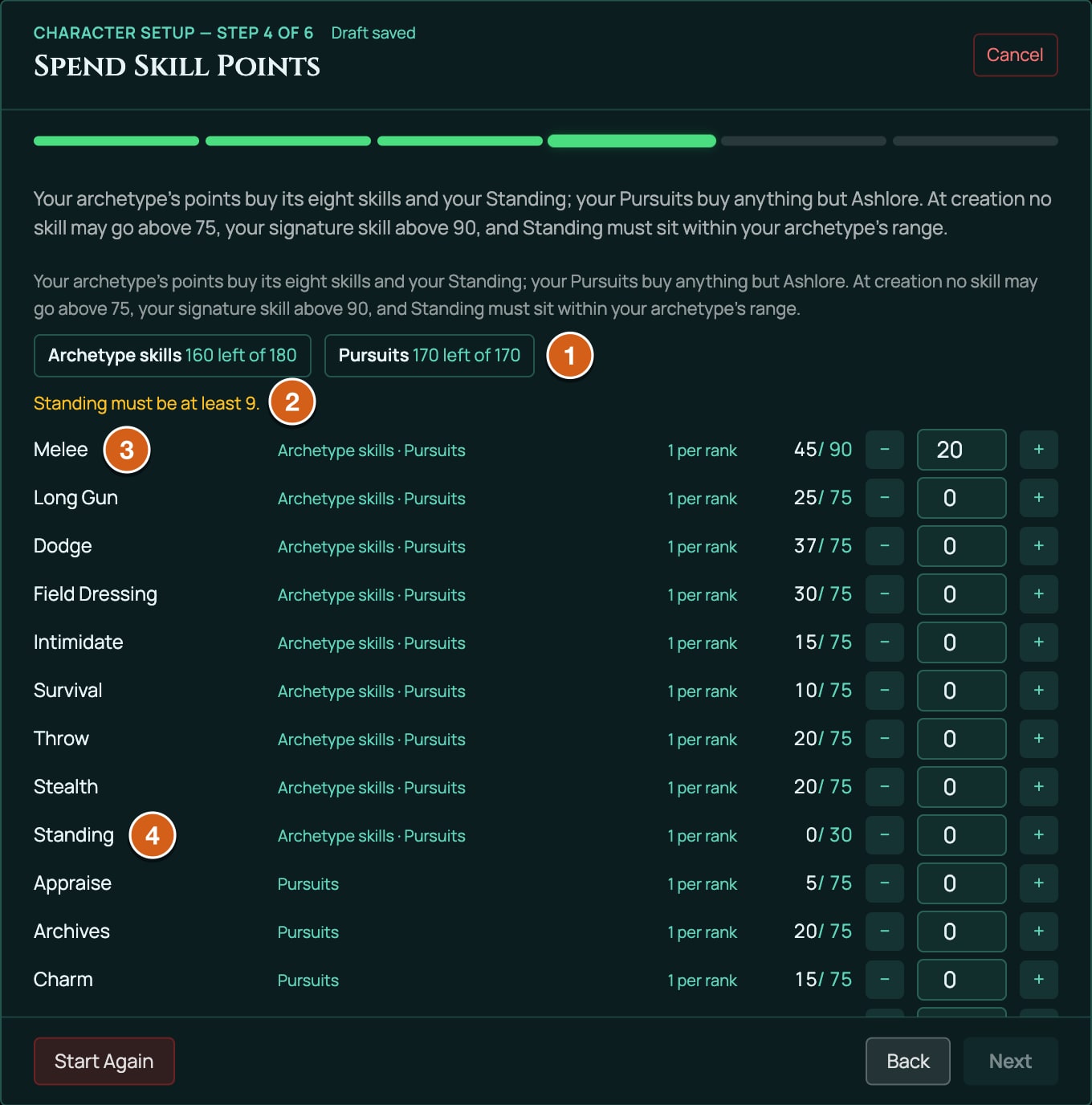
| Spend Skill Points | Spends two budgets. Archetype skills is the archetype's own points (such as Learning × 4) and buys its eight skills and Standing. Pursuits is Wits × 2 and buys any skill but Ashlore. Here no skill may go over 75, the archetype's signature skill over 90, and Standing must sit in the archetype's range. Next works with points still unspent, but nothing keeps them for later. |
| Starting Funds | The purse rolls 3d6 shillings. |
| Starting Gear | Buys any number of weapons, armour and kit from the purse, or skips. |
On Spend Skill Points, each skill's row shows which budgets it draws on, its value with the points in it and its cap, and − and + buttons. The top of the step says how much of each budget is left. Next stays off while anything breaks a rule, and a line says why, such as Standing must be at least 9.
See Create a character for how the builder works.
Characters made before these rules
RollQuest moved every Ashfall character made before these rules onto them. Such a character:
- has the newer characteristics Frame and Learning, and Ember. If its characteristics had been set, each of these still at 30 was raised: Frame and Learning to 65, and Ember to 50.
- has all 42 skills, each at its base (Melee 25, Spot 25, Dodge half Reflex): no skill points have been spent on it yet. A number typed by hand into Melee, Dodge, Stealth, Lore, Intuition or Discipline isn't kept.
- uses Occultism where it had Lore and Read People where it had Intuition, and rolls a Sanity test where it rolled Discipline.
- had Wounds and Sanity lowered to the new Max Wounds and Max Sanity where they were over them. Nothing was raised.
- carries a talent named Rules update: re-run setup under Talents on the Items page. It reads "Ashfall gained new rules; re-run character setup to spend your skill points." When the character had numbers typed by hand, it lists them, for example "Before the change: Melee was 52, Dodge was 40, typed in by hand."
To bring the skills up, open the sheet in the Form View, click Edit, then Re-run character setup. The builder opens at step 1 with your choices kept. Click Next until Spend Skill Points, spend both budgets, and finish the builder. Then you can delete the Rules update talent: it doesn't come back. The player can do this as well as the GM, unless the GM has turned on Freeze characters.
A character whose characteristics were never set (Brawn, Reflex, Vigour, Wits, Resolve and Presence all still at 30) gets no talent: build it as a new character.
The bestiary
Ashfall comes with a bestiary: 15 creatures to set against your players (the Unlit that walk where no lamp burns, the heralds of the Kindled, the Choir of Cinders, ash-hounds and the Pale Physic), each with the Dread it puts to whoever sees it, as a trait. Beside them are 8 Dread horrors, from Dread 0/1 to Dread 1d4/1d10: each is a Sanity test, losing the first amount on a pass and the second on a fail. In an Ashfall game, the creatures are in the creature library, ready to add as enemies: see Creatures.
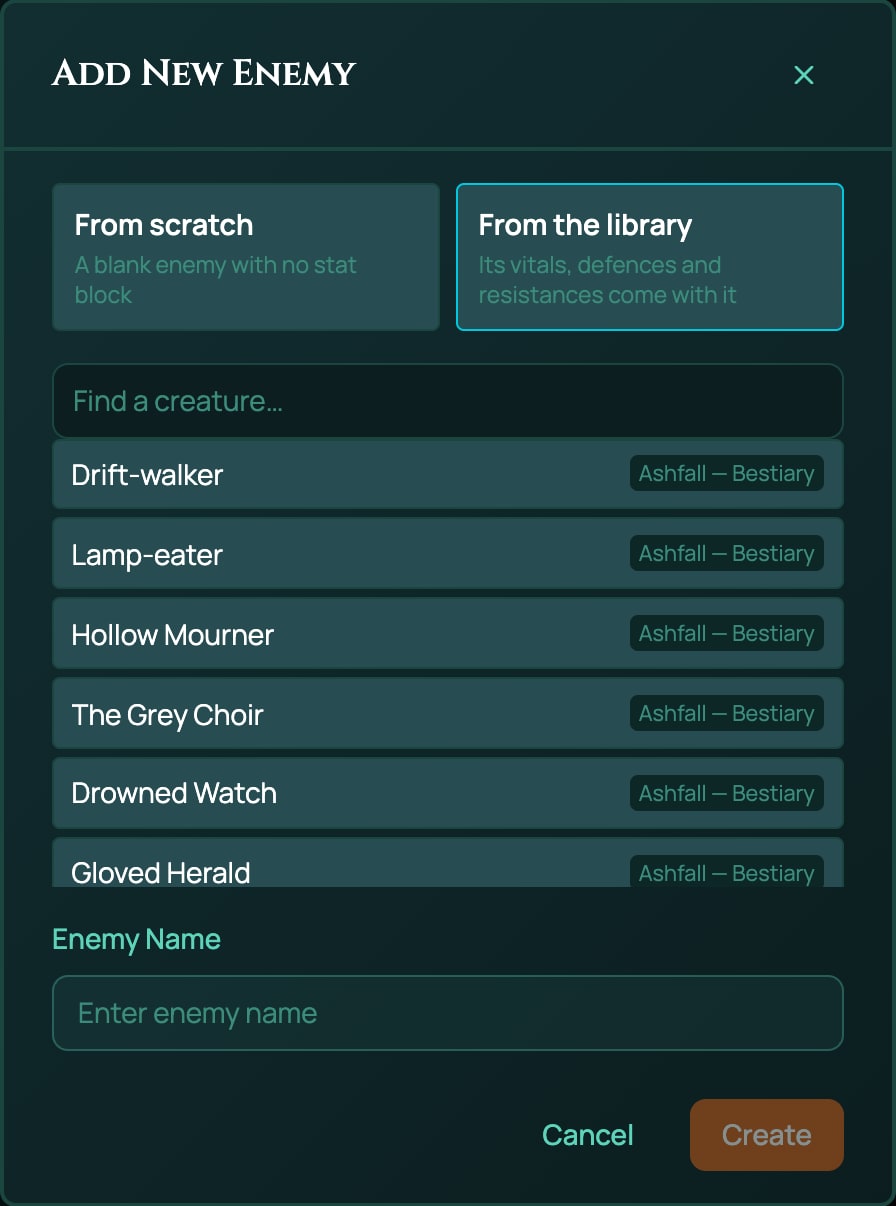
Any GM, on any plan, can fire one of the eight Dread horrors at witnesses. Add it to a sheet you control with + From pack at the top of the sheet: horrors are offered to the GM only, and never to a player. Then click the horror's Target button, tick up to six witnesses and click Resolve. Each witness is asked to roll the Sanity test, then the loss. A witness with Steeled Mind tests at +10 without doing anything: the talent adds it to every Sanity test.
What Ashfall doesn't have
No classes, levels, spells, subclasses, feats or species. No Canvas artwork: Ashfall sheets use the Form View.
How Ashfall is built: five packs
Ashfall isn't one big file. It's five packs, and seeing why is the most useful lesson for your own homebrew.
flowchart TD
  core["ashfall-core: the rules, money, Fate, characteristics, skills, vitals, tests, bands and the builder's steps"]
  arch["ashfall-archetypes: the 10 archetypes"]
  gear["ashfall-gear: 25 weapons, 6 armour, 8 kit"]
  content["ashfall-content: 11 talents, 4 corruptions, 12 rites, 6 cinderbooks"]
  beast["ashfall-bestiary: 15 creatures and 8 Dread horrors"]
  core -->|"Choose an Archetype: one pick"| arch
  core -->|"Starting Gear: any number"| gear
  arch -->|"each archetype grants a talent"| content
  core -->|"the GM's creature library"| beast
| Pack | What it holds | Where players meet it |
|---|---|---|
ashfall-core |
The rules, the money, the Fate pool, characteristics, skills, vitals, every test, the result bands, and the builder's six steps. | On every Ashfall sheet from the start. |
ashfall-archetypes |
The ten archetypes. | The Choose an Archetype step. |
ashfall-gear |
The weapons, armour and kit. | The Starting Gear step. |
ashfall-content |
The talents, corruptions, rites and cinderbooks. | Granted by an archetype, or added during play. |
ashfall-bestiary |
The creatures and the Dread horrors. | Your creature library, as enemies. The horrors are in the GM's + From pack. |
The four smaller packs each say they build on ashfall-core. The core pack, in turn, names which pack each builder step picks from.
One pack per builder step. A step that lets a player hold only one choice, like Choose an Archetype, treats every item in its pack as one of those choices: picking one removes any other the character holds from that step. Ashfall once kept everything in one pack, and the archetype step offered weapons and corruptions as archetypes, and a character couldn't hold a weapon and a talent at once. So a pack that a one-pick step uses holds only the things that step chooses between. Your packs follow the same rule.
What a pack of yours can add
A homebrew pack bound to an Ashfall table adds items: weapons, armour, kit, talents, corruptions, rites, cinderbooks and archetypes, with their effects, actions, prices and grants. You choose whether they appear in Choose an Archetype, in Starting Gear, or only during play.
It can't change Ashfall itself: no new characteristic, skill, vital, test, band, damage type, condition, rest or money. Those live in ashfall-core, and binding a pack to a table delivers its items only. For different rules, write a game system of your own.
Your pack can use what Ashfall already has. These are the names it may refer to, all listed in Ashfall's authoring contract (see below):
| What | Ashfall's names |
|---|---|
| Characteristics and Ember | BRAWN, VIGOUR, FRAME, REFLEX, PRESENCE, WITS, RESOLVE, LEARNING, EMBER |
| Skills | The 42 skills in capitals with underscores: MELEE, DODGE, SPOT, RUINLORE, FIELD_DRESSING, SLEIGHT_OF_HAND and the rest. Each has a _PTS field for its bought points (MELEE_PTS) and, except Ashlore, a _TICK field for its Tempering tick. |
| Vitals | WOUNDS, WOUNDS_MAX, SANITY, SANITY_MAX, KINDLING, KINDLING_SPENT, KINDLING_MAX, CORRUPTION, CORRUPTION_MAX, ARMOUR, INIT, PACE, HEFT_DICE, HEFT_SIDES, HEFT_FLAT |
| Tests | 52 of them: <NAME>_CHECK for every characteristic and skill (BRAWN_CHECK, MELEE_CHECK, SPOT_CHECK), plus EMBER_CHECK and SANITY_CHECK |
| A bonus on every Sanity test | SANITY_TEST_BONUS, which SANITY_CHECK adds to Sanity. It starts at 0; Steeled Mind's effect adds 10 to it with op: "add", and a talent of yours can do the same. |
| Roll tags (attack and damage buttons) | ATK_ROLL, DMG_ROLL |
| Damage types | cutting, impact, rending, toxic, warp |
Kinds of item (subType) |
archetype, armour, cinderbook, corruption, horror, kit, rite, skill, talent, weapon |
Buttons an effect can fire on (trigger) |
longRest (Recuperate), shortRest (Catch Breath), tempering (Tempering). RollQuest also fires turnStart (the character's turn begins in a battle) and dayStart (the campaign clock passes midnight) by itself. |
Fortune and Misfortune on a test (an effect's op) |
fortune, misfortune, fortune2, misfortune2. Not advantage: Ashfall doesn't have it. |
Money (price.groupId) |
coinage, priced in pennies |
| The Fate pool | POOL("fate") |
Ashfall's own items show three more things a pack can do. A melee weapon with meta.contest: "melee" lets its target Dodge or Fight back (the Rust Cleaver). An item's meta.followUps can put a button under a failed test (Quickened). And an item's meta.applies can hold a check for others to make (Hollow Gaze and the Dread horrors). The authoring contract describes each of them, with what it refuses.
The skill kind exists but holds nothing: Ashfall's skills are numbers on the sheet, not items. See Effects: what an item can change for what each op does.
Before you start
You need:
- homebrew on your account (Pro) and a confirmed email address,
- a game you created that plays Ashfall. Choose Ashfall under Game System when you create it: see Create a game.
Then get Ashfall's authoring contract, the document that lists every name above and the rules the checker applies:
- In the game, open the menu (three lines, top left) and click My Homebrew under Game Master tools.
- Click + New homebrew.
- Under Which system are you extending?, choose Ashfall (d100).
- Click Download the contract. A Markdown file downloads. Keep it beside you, or paste it into an AI assistant along with your request. Download a fresh one for each pack: it goes stale as RollQuest changes.
See The pack file, field by field for every top-level field a pack has.
The Embers packs
Embers is three small packs, one for each place its items appear, following Ashfall's one-pack-per-step rule:
flowchart LR
  gear["Embers Gear: Ember Pike"] -->|"routed into"| sg["Starting Gear step"]
  arch["Embers Archetypes: Gravedigger"] -->|"routed into"| ca["Choose an Archetype step"]
  traits["Embers Traits: 2 talents, 1 corruption"] -->|"no routing"| play["Added during play"]
| Pack | Holds | Bound with routing into |
|---|---|---|
| Embers Gear | Ember Pike, a weapon | Starting Gear |
| Embers Traits | Grave Calm and Ash-Sight (talents), Ash Lung (a corruption) | nothing |
| Embers Archetypes | Gravedigger, an archetype | Choose an Archetype |
Routing is the choice you make when you bind a pack: which builder steps show its items. Every bound pack's items can also be added during play with + From pack. See Put your pack on a table.
Step 1: a new weapon
Embers Gear adds the Ember Pike, a reach weapon, to Starting Gear. It's modelled line for line on Ashfall's Rust Cleaver.
{
  "name": "Embers Gear",
  "slug": "embers-gear",
  "system": "Ashfall (d100)",
  "category": "addon",
  "derivedFrom": "ashfall-core",
  "version": "1.0.0",
  "license": "USER_HOMEBREW",
  "description": "Extra starting weapons for my Ashfall table.",
  "items": [
    {
      "kind": "inventoryItem",
      "key": "WPN_EMBER_PIKE",
      "spec": {
        "subType": "weapon",
        "name": "Ember Pike",
        "price": {
          "groupId": "coinage",
          "minor": 48
        },
        "meta": {
          "damage": "1d8 + Heft",
          "damageType": "cutting",
          "range": "Melee",
          "qualities": "Reach",
          "applies": [
            {
              "kind": "damage",
              "formula": "=1d8+(HEFT_DICE)dHEFT_SIDES+HEFT_FLAT",
              "damageType": "cutting"
            }
          ],
          "targets": {
            "max": 1
          },
          "contest": "melee"
        },
        "actions": [
          {
            "id": "ATK",
            "label": "Strike",
            "formula": "=1d100<=MELEE",
            "damageType": "",
            "tag": "ATK_ROLL"
          },
          {
            "id": "DMG",
            "label": "Damage",
            "formula": "=1d8+(HEFT_DICE)dHEFT_SIDES+HEFT_FLAT",
            "damageType": "cutting",
            "tag": "DMG_ROLL"
          }
        ],
        "equipped": false
      }
    }
  ]
}
Line by line:
| Field | What it does here |
|---|---|
name, slug |
The pack's name in My Homebrew and on builder cards, and its short ID. |
system |
Must be exactly Ashfall (d100). A pack of another system is refused when it's added to an Ashfall sheet. |
category, derivedFrom |
An add-on that builds on ashfall-core, so its effects and formulas can use Ashfall's names. |
version, license, description |
Your own version text, the licence (USER_HOMEBREW for your own work) and a line for you. |
kind, key |
An item, with a key that never changes once players have it. Keys must not clash with Ashfall's: WPN_CLEAVER would be refused. |
subType: "weapon" |
Files it with the weapons. Ashfall's weapons use the verb Strike, and their effects only count while equipped. |
price |
48 pennies, which is 4 shillings, in Ashfall's coinage. |
meta.damage, damageType, range, qualities |
What the weapon's row says. Keep damageType the same as the damage action's. |
meta.applies, meta.targets |
What a hit does to a target (1d8 plus Heft, as Cutting damage) and how many targets it takes (one). |
meta.contest: "melee" |
Lets a target the Pike strikes at Dodge or Fight back, as Ashfall's own melee weapons do. Leave it out on a firearm. |
actions |
The two buttons. Strike tests Melee by rolling under it, and the tag marks it as the attack. Damage rolls the damage, tagged as the damage. |
=1d8+(HEFT_DICE)dHEFT_SIDES+HEFT_FLAT |
1d8, plus the wielder's Heft: as many dice as HEFT_DICE, each with HEFT_SIDES sides, plus HEFT_FLAT. The brackets let a number from the sheet set how many dice roll; when it's 0, none do. |
equipped: false |
The pike starts unequipped. |
For a firearm, copy one of Ashfall's: its action is labelled Shoot, its test reads PISTOL or LONG_GUN, and its damage adds no Heft.
Check and create it
- In My Homebrew, click + New homebrew.
- Choose Ashfall (d100), then I already have the JSON, then Continue. The Check and create window opens.
- Paste the JSON into the box, or click Choose a file and pick your saved file.
- Click Check this pack. Under What the validator says, it reads Nothing here stops this pack being created.
- Click Create pack. A message says Embers Gear was created. It is private to you.
If the check lists a problem instead, see When the check finds a problem, below.
Bind it to your table
- In the Embers Gear row, click Bind to this table. The Bind Embers Gear to this table window opens.
- Under Where should its items appear?, tick Starting Gear. It's a step where players can take any number of items, so nothing they already hold is replaced.
- Click Bind pack. A message says Embers Gear is bound to this table. 1 item is now offered to its players. The row now reads Bound to this table and Routed into "Starting Gear".
The table is pinned to the pack as it is now. Editing the pack later doesn't change what the table offers until you move it on: see Change a pack later.
A player takes it
For a new character:
- Click Character Sheets on the tool rail, then New Sheet. Choose Build your own, type a Title and click Create Sheet. The builder opens.
- Go through the steps to Starting Gear. The Ember Pike sits among Ashfall's weapons, armour and kit, with From Embers Gear on its card and its price.
- Click the Ember Pike to select it, then click Add 1 & Finish. The purse drops by 4 shillings.
A 3d6 roll gives at least 3 shillings, so every new character can buy something: the Cudgel costs 6 pennies. A character who rolls 3 can't afford the Pike, and Can't afford shows on its card.
For a character who already exists, the player adds it themselves, on any plan:
- Open the character's sheet. In its header, click + From pack. For a player, the button shows only while the table binds something the sheet doesn't have yet. Add from this table's packs opens.
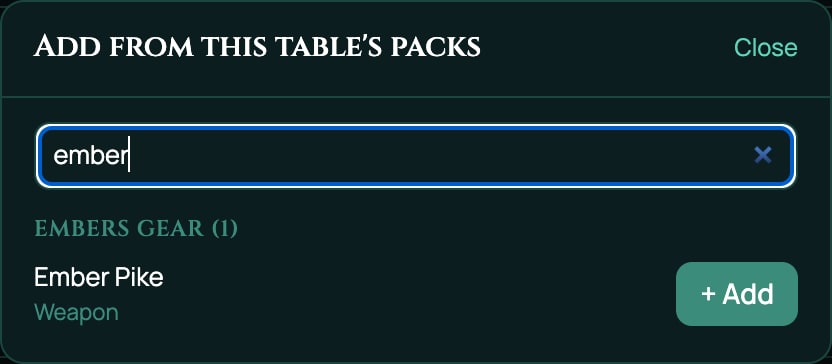
- Under Embers Gear (1), click + Add beside Ember Pike. Type in Search by name to narrow a long list. Its price, 4 shillings, comes out of the character's Coins.
As the GM, you can also use the + From pack in the sheet's Items panel (part of the sheet editing tools, which keep their own plan), or press Ctrl+K (Cmd+K on a Mac) and type /item "Ember Pike" @Mara, with the character's name after the @. In Ashfall, /item hands out weapons only: not armour, kit, talents or the rest. See Inventory and money.
Try it on the sheet
- Open the character's sheet in the Form View and go to its Items page. Ember Pike is listed under Inventory, where the Form View puts weapons.
- Open the Ember Pike's row and turn on Equipped.
- Click Strike. A d100 is rolled against Melee, and the result names its band.
- Click Damage. 1d8 plus the character's Heft is rolled as Cutting damage.
Step 2: talents and a corruption
Talents are how Ashfall gives a character a power: something they're good at, or a trick they can pull. Embers Traits holds two talents and a corruption. None of them is picked in the builder: in Ashfall, talents arrive from an archetype or from you during play, and corruptions arrive when the ash takes its toll.
{
  "name": "Embers Traits",
  "slug": "embers-traits",
  "system": "Ashfall (d100)",
  "category": "addon",
  "derivedFrom": "ashfall-core",
  "version": "1.0.0",
  "license": "USER_HOMEBREW",
  "description": "Talents and corruptions for my Ashfall table.",
  "items": [
    {
      "kind": "inventoryItem",
      "key": "TAL_GRAVE_CALM",
      "spec": {
        "subType": "talent",
        "name": "Grave Calm",
        "meta": {
          "tier": "1",
          "effect": "+5 maximum Sanity."
        },
        "actions": [],
        "effects": [
          {
            "id": "TAL_GRAVE_CALM_SANITY",
            "target": "SANITY_MAX",
            "op": "add",
            "value": 5,
            "condition": "",
            "trigger": ""
          }
        ]
      }
    },
    {
      "kind": "inventoryItem",
      "key": "TAL_ASH_SIGHT",
      "spec": {
        "subType": "talent",
        "name": "Ash-Sight",
        "meta": {
          "tier": "1",
          "effect": "Seek: a Spot test at +10 to see what moves in the grey."
        },
        "actions": [
          {
            "id": "SEEK",
            "label": "Seek",
            "formula": "=1d100<=SPOT+10",
            "damageType": "",
            "tag": ""
          }
        ],
        "effects": []
      }
    },
    {
      "kind": "inventoryItem",
      "key": "COR_ASH_LUNG",
      "spec": {
        "subType": "corruption",
        "name": "Ash Lung",
        "meta": {
          "severity": "Minor",
          "effect": "-5 Vigour."
        },
        "actions": [],
        "effects": [
          {
            "id": "COR_ASH_LUNG_VIG",
            "target": "VIGOUR",
            "op": "add",
            "value": -5,
            "condition": "",
            "trigger": ""
          }
        ]
      }
    }
  ]
}
What's new here:
| Item | How it works |
|---|---|
| Grave Calm | A talent that's always on. Its one effect adds 5 to SANITY_MAX. Max Sanity never goes over 99, so on a new character, whose Ashlore is 0, it still reads 99. Grave Calm gives back the room Ashlore takes: with Ashlore 10, Max Sanity reads 94 instead of 89. meta.tier and meta.effect are what its row says. |
| Ash-Sight | A talent with a button. Its Seek action rolls =1d100<=SPOT+10: a d100 against Spot plus 10. It's a separate roll, as Scavenger's Identify salvage is, not a bonus on the ordinary Spot test. Its result names a band too. |
| Ash Lung | A corruption whose effect takes 5 off Vigour. A negative value with op: "add" subtracts. Vigour feeds Max Wounds, so Ash Lung can lower that too. meta.severity is what its row says. |
Talents and corruptions are always on in Ashfall: their effects count as soon as the character has them, with nothing to equip. Write the effect text honestly. RollQuest has no "once per scene" or "the first hit": if a talent needs one, say so in meta.effect and rule on it at the table, as Ashfall does with Hardened. See Effects: what an item can change for every kind of effect.
Create and bind it
- Check and create the pack as in Step 1. The message says Embers Traits was created. It is private to you.
- In its row, click Bind to this table.
- Leave every step under Where should its items appear? unticked, and click Bind pack. A message says Embers Traits is bound to this table. 3 items are now offered to its players.
Don't route a talents pack into Choose an Archetype: its talents would be offered as archetypes, and picking one would take away the character's archetype.
Give one to a character
When a character earns a talent, or the ash marks them, the player (or you) adds it:
- Open their sheet and click + From pack in its header.
- Under Embers Traits (3), click + Add beside it.
As the GM, the Items panel's own + From pack works too, where your plan has the sheet editing tools: choose the Talents tab (or Corruptions) first. The /item command can't do it: in Ashfall it hands out weapons only.
Then check it on the sheet. The Items page lists the talents under Talents and the corruption under Corruptions. Ash-Sight's row has a Seek button that rolls a d100 against Spot plus 10. Ash Lung takes 5 off Vigour.
Step 3: an archetype
Embers Archetypes adds the Gravedigger to Choose an Archetype. An Ashfall archetype carries more than its benefit: it tells Spend Skill Points what the character may buy, and it carries what every rest and Tempering does. This one is modelled on Ashfall's Banner-Sworn.
{
  "name": "Embers Archetypes",
  "slug": "embers-archetypes",
  "system": "Ashfall (d100)",
  "category": "addon",
  "derivedFrom": "ashfall-core",
  "version": "1.0.0",
  "license": "USER_HOMEBREW",
  "description": "A new archetype for my Ashfall table.",
  "items": [
    {
      "kind": "inventoryItem",
      "key": "ARCH_GRAVEDIGGER",
      "spec": {
        "subType": "archetype",
        "name": "Gravedigger",
        "meta": {
          "role": "Undertaker",
          "grants": "+5 maximum Sanity",
          "description": "Somebody has to put the dead where the ash cannot reach them. You have done it so often that very little frightens you now.",
          "kind": "background",
          "skills": ["FIELD_DRESSING", "SPOT", "LISTEN", "OCCULTISM", "SURVIVAL", "MELEE", "CLIMB", "HISTORY"],
          "signature": "OCCULTISM",
          "points": "=LEARNING*2+RESOLVE*2",
          "standing": { "min": 5, "max": 20 },
          "kit": "A spade, a lantern, a coil of rope and a bundle of grave-markers."
        },
        "actions": [],
        "effects": [
          { "id": "ARCH_GRAVEDIGGER_SANITY", "target": "SANITY_MAX", "op": "add", "value": 5, "condition": "", "trigger": "" },
          { "id": "RECUPERATE_FATE", "target": "POOL(\"fate\")", "op": "reset", "value": "", "condition": "", "trigger": "longRest" },
          { "id": "RECUPERATE_WOUNDS", "target": "VF(\"WOUNDS\")", "op": "increment", "value": -3, "condition": "", "trigger": "longRest" },
          { "id": "CATCH_BREATH_WOUNDS", "target": "VF(\"WOUNDS\")", "op": "increment", "value": -1, "condition": "", "trigger": "shortRest" },
          { "id": "RECUPERATE_KINDLING", "target": "VF(\"KINDLING_SPENT\")", "op": "setTo", "value": 0, "condition": "", "trigger": "longRest" },
          { "id": "CATCH_BREATH_KINDLING", "target": "VF(\"KINDLING_SPENT\")", "op": "increment", "value": -1, "condition": "", "trigger": "shortRest" },
          { "id": "TEMPERING_SKILLS", "target": "VF_GROUP(\"skills\")", "op": "improveTicked", "value": { "check": "1d100", "formula": "1d10", "overOrAtLeast": 96, "tick": "<ID>_TICK", "points": "<ID>_PTS" }, "condition": "", "trigger": "tempering" },
          { "id": "TEMPERING_EMBER", "target": "VF(\"EMBER\")", "op": "improveTicked", "value": { "check": "1d100", "formula": "1d10" }, "condition": "", "trigger": "tempering" }
        ]
      }
    }
  ]
}
What its meta says:
| Field | What it does here |
|---|---|
role, grants, description |
What the archetype's card and row say. |
kind: "background" |
Ashfall's own archetypes carry it, and with it the archetype's name shows in the sheet's header, as Banner-Sworn does. Keep it. |
skills |
The eight skills the archetype's points buy, by their IDs. Standing is always added to them. |
signature |
One of the eight. At creation it may go to 90, where the others stop at 75. |
points |
The formula for the Archetype skills budget: here twice Learning plus twice Resolve. |
standing |
The range Standing must sit in at creation: 5 to 20 for a Gravedigger. |
kit |
The starting kit, in words. It adds no items to the sheet. |
Four things matter on every archetype you write:
Give it
skillsandpoints. Without them, Spend Skill Points gives the character only Learning × 4 to spend, and only on Standing.Copy the seven rest and Tempering effects onto it. In Ashfall, what Recuperate, Catch Breath and Tempering do is written on the archetype. An archetype without them gives a character whose Fate and Kindling never come back, whose Wounds never close and whose skills never improve.
RECUPERATE_FATEsets the Fate pool back to full (reset) when the character recuperates (longRest).RECUPERATE_WOUNDSchanges Wounds by -3 (increment) on Recuperate: 3 Wounds close.CATCH_BREATH_WOUNDScloses 1 on Catch Breath (shortRest).RECUPERATE_KINDLINGsets Kindling spent back to 0 (setTo), so all Kindling returns.CATCH_BREATH_KINDLINGtakes 1 off it.TEMPERING_SKILLSandTEMPERING_EMBERrun on Tempering (tempering) withimproveTicked: rollcheck(a d100) for each ticked skill in theskillsgroup, and on a roll over the skill, oroverOrAtLeast96 and up, addformula(1d10) to itspointsfield and clear itstick. For Ember, a roll over it adds 1d10.
An effect with a
triggerfires when that button is pressed, and it names its target wrapped, asPOOL("fate"),VF("WOUNDS")orVF_GROUP("skills"). Only some ops work on a wrapped target:adddoesn't, which is why the Wounds effects useincrement.One archetype per character. Choose an Archetype is a one-pick step, so your archetypes join Ashfall's: a character who picks the Gravedigger loses the archetype they had. Keep this pack to archetypes only.
Keep
"kind": "background"inmeta, so the header shows the archetype.
The first effect, ARCH_GRAVEDIGGER_SANITY, is the archetype's own benefit: +5 Max Sanity, always on. Like Grave Calm in Step 2, it shows only once Ashlore has lowered the maximum. Ashfall's own archetypes don't carry a benefit themselves; Grant a talent instead shows how they do it.
Create and bind it
- Check and create the pack as in Step 1.
- In its row, click Bind to this table.
- Tick Choose an Archetype. It carries the warning Replaces existing picks, and a red box headed This routing deletes players' existing picks appears: picking a Gravedigger removes whatever archetype the character held, on every sheet at this table, not only new ones.
- Tick I understand this replaces existing picks on sheets at this table. That's how Ashfall's own archetypes already behave.
- Click Bind pack. The row now reads Routed into "Choose an Archetype".
A player picks it
- Start a new character, as in Step 1, and go to Choose an Archetype.
- The Gravedigger is there beside Ashfall's ten, with From Embers Archetypes on its card. Click it. A message says Added Gravedigger. and the builder moves on to Spend Skill Points.
- The Archetype skills budget is twice Learning plus twice Resolve. It buys Field Dressing, Spot, Listen, Occultism, Survival, Melee, Climb and History, plus Standing, which must be 5 to 20. Occultism may go to 90. Spend the points and click Next.
- Finish the builder. The sheet's header names the Gravedigger, and the Items page lists it under Archetypes.
- To test the rests, hurt the character first. In the vitals tile at the top of the sheet, type 1 as the amount, choose Cutting and click Damage, three times. Wounds read 3. Keep each hit small: one hit of half their Max Wounds or more would make them Grievous. Spend a Fate point with − on the Fate row.
- Click Recuperate. A preview says what will come back; confirm it. Fate is full again and Wounds read 0.
Grant a talent instead
Ashfall's archetypes don't carry their benefit themselves: each grants a talent from ashfall-content. Yours can do the same with autoInclude, a list of items that come with this one. This Gravedigger grants Grave Calm from Embers Traits instead of carrying its own +5:
    {
      "kind": "inventoryItem",
      "key": "ARCH_GRAVEDIGGER",
      "spec": {
        "subType": "archetype",
        "name": "Gravedigger",
        "meta": {
          "role": "Undertaker",
          "grants": "Grave Calm",
          "description": "Somebody has to put the dead where the ash cannot reach them. You have done it so often that very little frightens you now.",
          "kind": "background",
          "skills": ["FIELD_DRESSING", "SPOT", "LISTEN", "OCCULTISM", "SURVIVAL", "MELEE", "CLIMB", "HISTORY"],
          "signature": "OCCULTISM",
          "points": "=LEARNING*2+RESOLVE*2",
          "standing": { "min": 5, "max": 20 },
          "kit": "A spade, a lantern, a coil of rope and a bundle of grave-markers."
        },
        "actions": [],
        "effects": [
          { "id": "RECUPERATE_FATE", "target": "POOL(\"fate\")", "op": "reset", "value": "", "condition": "", "trigger": "longRest" },
          { "id": "RECUPERATE_WOUNDS", "target": "VF(\"WOUNDS\")", "op": "increment", "value": -3, "condition": "", "trigger": "longRest" },
          { "id": "CATCH_BREATH_WOUNDS", "target": "VF(\"WOUNDS\")", "op": "increment", "value": -1, "condition": "", "trigger": "shortRest" },
          { "id": "RECUPERATE_KINDLING", "target": "VF(\"KINDLING_SPENT\")", "op": "setTo", "value": 0, "condition": "", "trigger": "longRest" },
          { "id": "CATCH_BREATH_KINDLING", "target": "VF(\"KINDLING_SPENT\")", "op": "increment", "value": -1, "condition": "", "trigger": "shortRest" },
          { "id": "TEMPERING_SKILLS", "target": "VF_GROUP(\"skills\")", "op": "improveTicked", "value": { "check": "1d100", "formula": "1d10", "overOrAtLeast": 96, "tick": "<ID>_TICK", "points": "<ID>_PTS" }, "condition": "", "trigger": "tempering" },
          { "id": "TEMPERING_EMBER", "target": "VF(\"EMBER\")", "op": "improveTicked", "value": { "check": "1d100", "formula": "1d10" }, "condition": "", "trigger": "tempering" }
        ],
        "autoInclude": [
          { "packSlug": "embers-traits", "itemKey": "TAL_GRAVE_CALM" }
        ]
      }
    }
For it to work:
- Create Embers Traits first. Until a pack with the slug
embers-traitsexists in your homebrew, the check refuses the grant with PACK_REFERENCE_UNKNOWN_PACK: it names a pack this one can't refer to. - Bind Embers Traits to the same table, with no routing, as in Step 2. The grant is looked up among the packs the table binds.
If a player later picks a different archetype, the talent the Gravedigger granted goes with it, unless the character already had that talent before. See Choices and grants for everything autoInclude can do.
When the check finds a problem
The check names a code and the place in your pack. These are the slips people make most on Ashfall, each a real result of a broken copy of Embers Gear:
| Slip | Code | Fix |
|---|---|---|
An effect aimed at ARMOR |
EFFECT_TARGET_UNRESOLVED | Ashfall spells it ARMOUR. Use a name from the table under What a pack of yours can add. |
A formula that reads DISCIPLINE, INTUITION or LORE |
FORMULA_REFERENCE_UNRESOLVED | Those are Ashfall's old skills, and they're gone. Test Sanity for nerve, Spot for noticing, and Ruinlore, Occultism or History for knowledge. |
damageType: "slashing" |
DAMAGE_TYPE_UNDECLARED | Ashfall has no slashing. Use cutting, impact, rending, toxic or warp. |
subType: "spell" |
SUBTYPE_UNDECLARED | Ashfall has no spells. Use one of its ten kinds: a ritual is a rite. |
price.groupId: "gold" |
PRICE_GROUP_UNDECLARED | Ashfall's money is coinage, priced in pennies. |
condition: "while wielded" |
EFFECT_CONDITION_PROSE | A condition must be a formula or empty. Leave it empty; a weapon's effects already count only while equipped. |
A rest effect with op: "add" on VF("WOUNDS") |
EFFECT_OP_NOT_ON_CHANNEL | Use increment with a negative value. |
An effect with op: "advantage" on MELEE_CHECK |
EFFECT_OP_WRONG_CHANNEL | Ashfall's word is fortune. |
The formula =1d100<=MELE |
FORMULA_REFERENCE_UNRESOLVED | A misspelt name would count as 0. Spell it MELEE. |
trigger: "sleep" |
TRIGGER_NOT_DECLARED | Ashfall's buttons are longRest, shortRest and tempering. |
The key WPN_CLEAVER |
ITEM_KEY_COLLISION | That key is Ashfall's Rust Cleaver. Give your item a key of its own. |
An item with no name in its spec |
ITEM_NAME_MISSING | Every item needs the name players see. |
Every code, with what it means, is in When a pack is refused.
Change a pack later
A character's items are copies, taken from the pack as it was when the table was pinned to it. To change one:
- In the pack's row, click Edit, change the JSON, click Check this change, then Save changes. The pack gets a new revision; the table stays on the old one.
- Click Move this table to r2 (with the new revision's number). New picks now get the new version.
- To update characters who already have the item, click Preview re-stamp from r2, read what it would change, then click Re-stamp 1 sheet (the button counts the sheets it would change).
Never change or remove an item's key once players have it: list an old key under retired instead. Bump version yourself if you want it to mean something: RollQuest counts revisions on its own. See Put your pack on a table and The pack file, field by field.
Good to know
- The system must match exactly.
"system": "Ashfall (d100)"and"derivedFrom": "ashfall-core", every time. - Max values cap effects. An effect can't push a value past its field's maximum: Max Sanity stops at 99, Armour at 20.
- Pips turn into a bar. A token shows a vital as a row of dots up to 20, and as a bar above that, which is why Corruption (out of 100) shows as a bar on the board.
- Fate Points is Ashfall's word for the pool: the rest preview and a greyed-out Spend Fate to reroll (No Fate Points left) use it. The sheet's row keeps the pool's own label, Fate.
- Macros can roll Ashfall tests and spot a Triumph or a Disaster, and the ready-made Weapon strike rolls any Ashfall weapon, yours included: see Macros for Ashfall. A macro's roll gets no band name and no follow-up buttons; those come with the sheet's own rolls.
- Enemies for Ashfall come from its bestiary, or you write your own: see Creatures.
Related
Homebrew: what you can build · Weapons and armour · Effects: what an item can change · Choices and grants · A game system of your own · Macros for Ashfall · Game systems