

Weapons and armour
This page shows how to write a homebrew weapon, a suit of armour, a shield and a +1 weapon that asks which weapon it is, field by field, for 5e and 5.5e.
A weapon or a piece of armour in a homebrew pack is one row in the pack's items list. Once you, the Game Master (GM), bind the pack to a game, players take it like any built-in weapon: from + From pack on their sheet, or from a step of the character builder. A weapon then has Attack and Damage buttons that roll the right dice and can hit the creatures a player targets; armour raises the character's armour class (AC, how hard they are to hit) while it's equipped. Everything here works for 5e (the 2014 rules, SRD 5.1) and 5.5e (the 2024 rules, SRD 5.2.1); where the two differ, the page says so.
Plan: writing homebrew packs is on Pro. Players on any plan take what you bind with + From pack on their sheet, and the character builder's steps are on every plan.
Every example on this page is a complete pack that RollQuest accepts as it stands. To try one, paste the whole file into Check and create (see Your first homebrew pack, step by step). To add the item to a pack you already have, copy the object inside items into your pack's items list. The fields around items, such as slug, system and derivedFrom, are explained in The pack file, field by field.
A weapon, complete
The Thornwhip is a martial weapon with the finesse and reach properties, for a 5.5e game. It costs 25 gp, weighs 3 lb, and deals 1d6 slashing damage plus the better of the character's Strength and Dexterity modifiers.
{
  "slug": "my-thornwhip",
  "name": "Thornwhip (homebrew weapon)",
  "system": "5.5e Compatible",
  "derivedFrom": "5-5e-core",
  "category": "addon",
  "version": "1.0.0",
  "license": "USER_HOMEBREW",
  "source": "My table's homebrew.",
  "attribution": "",
  "description": "",
  "requiredDecisions": [],
  "items": [
    {
      "kind": "inventoryItem",
      "key": "WEAPON_THORNWHIP",
      "spec": {
        "subType": "weapon",
        "id": "WEAPON_THORNWHIP",
        "name": "Thornwhip",
        "price": {
          "groupId": "coinage",
          "minor": 2500
        },
        "weight": {
          "unit": "lb",
          "value": 3
        },
        "meta": {
          "category": "Martial Melee",
          "range": "10 ft (reach)",
          "damage": "1d6",
          "damageType": "slashing",
          "properties": "Finesse, Reach",
          "description": "A barbed vine whip grown, not forged.",
          "targets": {
            "max": 1
          },
          "applies": [
            {
              "kind": "damage",
              "formula": "=1d6+MAX(STR_MOD,DEX_MOD)",
              "damageType": "slashing"
            }
          ]
        },
        "effects": [],
        "actions": [
          {
            "id": "ATK",
            "label": "Attack",
            "formula": "=1d20+PROF*W_MARTIAL+MAX(STR_MOD,DEX_MOD)",
            "damageType": "",
            "tag": "ATK_ROLL"
          },
          {
            "id": "DMG",
            "label": "Damage",
            "formula": "=1d6+MAX(STR_MOD,DEX_MOD)",
            "damageType": "slashing",
            "tag": "DMG_ROLL"
          }
        ]
      }
    }
  ]
}
In play, a player who adds the Thornwhip gets a row on their sheet's Items tab and in Combat on the Main tab. Opening it shows Target, Attack and Damage. Attack rolls a d20 plus their proficiency bonus (if they're trained with martial weapons) plus their better modifier. Damage rolls 1d6 plus the same modifier. With a creature picked through Target, Resolve rolls the attack against its AC. On a hit, a Roll your damage prompt appears at the bottom right: click Roll and the damage lands on the creature, with its resistances applied. If nobody rolls in time, chat says the attack is awaiting a ruling. On a natural 20 the GM is asked to make the call. With a target picked, pressing Damage on its own lands the damage without an attack roll.
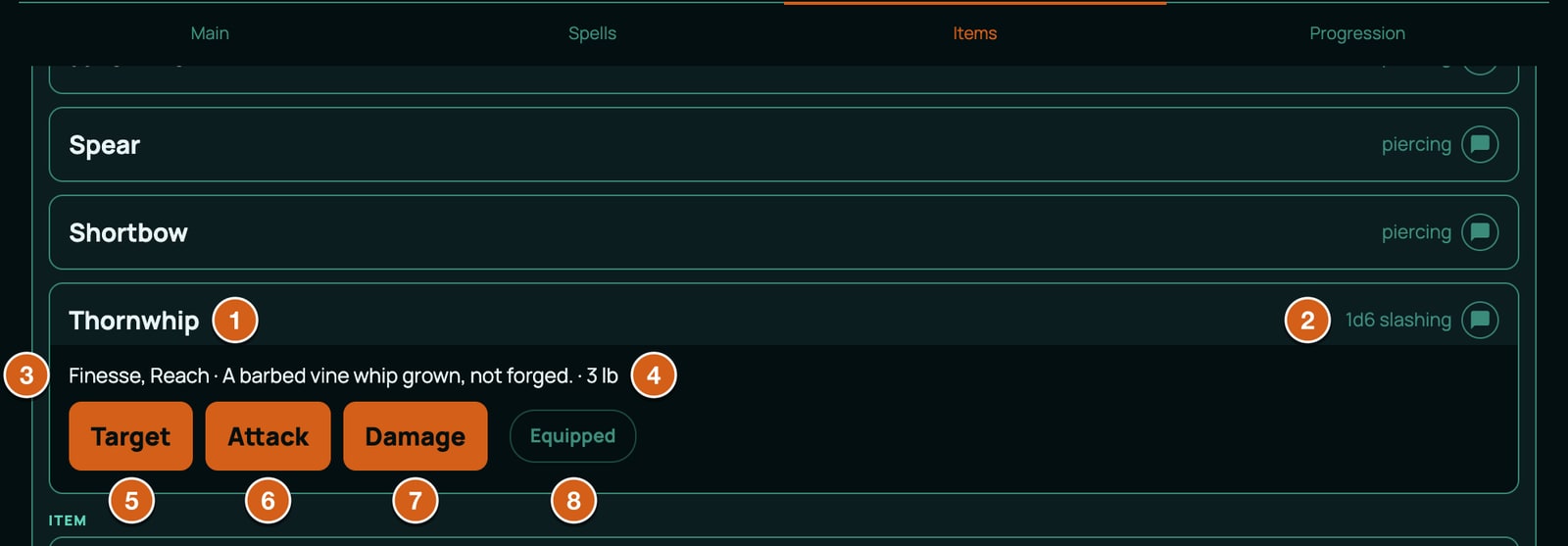
Each part of the row drives something different:
flowchart LR
  A["actions: Attack, tag ATK_ROLL"] --> R1["d20 roll, checked against the target's AC"]
  B["actions: Damage, tag DMG_ROLL"] --> R2["damage roll, in chat"]
  C["meta.applies"] --> T["what lands on each creature picked with Target"]
  D["meta: category, range, properties"] --> S["text on the sheet and in the builder"]
  E["effects"] --> V["the character's numbers, only while Equipped"]
The weapon, field by field
The item's own fields:
| Field | What it does | Allowed values | Checked when you create the pack? |
|---|---|---|---|
kind |
Says this row is something a character holds. | inventoryItem for every weapon, armour, item, spell, feat, species and background. |
Yes: any other spelling is refused. |
key |
The item's permanent ID. Sheets that take the item remember it by this key, and edits match on it. | Your own ID, such as WEAPON_THORNWHIP, in capitals and underscores like the built-in keys. Unique in the pack, and not used by a built-in item or by another of your packs for the same system. |
Yes: a duplicate or a clash is refused, and so is a row with no key (ITEM_MISSING_KEY). |
spec.subType |
Which tab the item lives on, and when its effects count. | weapon here. 5e and 5.5e also have item, power (spells), feat and background. |
Yes: an unknown word is refused, and so is a row without one (ITEM_SUBTYPE_MISSING). |
spec.id |
Nothing on the sheet reads it, but the check compares it with built-in IDs. | Keep it the same as key, or leave it out. |
Yes: it can't match a built-in ID. |
spec.name |
The name on the sheet, in + From pack and in the builder. | Any text. | Yes: a row without one is refused (ITEM_NAME_MISSING). |
spec.price |
What the item costs. A player can't add an item they can't afford; the GM can. The builder takes the price from the character's starting money, and + From pack takes it from the character's coins, in the Form View and on a Canvas sheet alike. | { "groupId": "coinage", "minor": 2500 }. coinage is the only money in 5e and 5.5e, and minor is in copper pieces: 100 is 1 gp, so 2500 is 25 gp. Leave price out for an item that's free. |
Yes: an unknown groupId is refused. |
spec.weight |
Counts towards the character's encumbrance (see Inventory and money). | { "unit": "lb", "value": 3 }. The number is what counts; the sheet always uses the game system's unit (pounds), whatever unit says. |
No. |
spec.effects |
Changes to the character's numbers while the weapon is equipped, such as a bonus to AC. | A list of effects. See Effects: what an item can change. An empty list [] is fine. |
Yes, each effect is checked, and an effect without an id is refused. |
spec.actions |
The roll buttons. | A list of actions (below). | Yes, each formula and damage type is checked. |
spec.equipped |
Whether the weapon arrives equipped. | true or false. Left out, it arrives unequipped. |
No. |
The fields inside meta, which describe the weapon and aim it:
| Field | What it does | Allowed values | Checked? |
|---|---|---|---|
category |
The weapon's group. The builder's Add Weapons (Optional) step groups its cards by it, and choices that filter weapons by category read it. | Any text. The built-in weapons use Simple Melee, Simple Ranged, Martial Melee and Martial Ranged: use the same words so filters find yours. |
No. |
range |
Shown on the sheet. | Any text, such as 10 ft (reach) or 80/320 ft. |
No. |
damage |
The damage shown on the sheet's row, such as 1d6 slashing. It doesn't roll anything: the Damage action does. | Any text. The built-in 5.5e weapons leave it out, so their row shows only the damage type. | No. |
damageType |
Shown on the row and in the Items panel's Type column, and picked first when a roll asks for a damage type. | One of the system's damage types (list below). | No. |
properties |
Shown when the weapon is opened. Some features look for words in it: the Great Weapon Fighting style's dice button only appears for a weapon whose properties say Two-Handed, Heavy or Versatile (5.5e), on the Canvas view. | Any text, comma separated, spelled like the built-in weapons: Finesse, Reach, Versatile (1d10). |
No. |
description |
The weapon's text, shown when it's opened and on the builder's card. | Any text. | No. |
mastery |
5.5e: the weapon's mastery property, shown in the Items panel's Mastery column (off until you switch it on), and when a weapon with no description is opened. |
Any text, such as Vex or Sap. |
No. |
targets |
How many creatures Target lets the player pick. | { "max": 1 } for one creature; { "self": true } for the user only. Leave max out for no limit. |
Yes, the shape. |
applies |
What happens to each targeted creature when the player presses Damage. Without it there's no Target button, and rolls only go to chat. | A list. For a weapon, one entry: { "kind": "damage", "formula": "...", "damageType": "..." } (the full list of entry kinds is in Effects: what an item can change). |
Yes: the kind and the damage type are checked. |
The formula in an applies entry must be the Damage action's formula, character for character. RollQuest rolls the button, then finds the entry with the same formula and applies the total. If the two differ, the roll goes to chat and nothing lands on the target. To tie an entry to a button whose formula differs, add "actionId": "DMG" (the button's id) to the entry.
Each entry in actions is one button:
| Field | What it does | Allowed values | Checked? |
|---|---|---|---|
id |
The button's ID, unique in the item. | Any text; the built-in items use ATK and DMG. An ID that ends in _L and a number, such as DMG_L5, locks the button until the character reaches that level: use that shape only when you mean it (see Spells). |
No. |
label |
The button's text. Empty shows Use. | Any text. | No. |
formula |
What the button rolls. | Starts with =: dice and the sheet's values, such as =1d20+PROF*W_MARTIAL+STR_MOD. At most 10 dice terms and 100 dice in one formula, dice of up to 1000 sides, and no RAND or NOW. |
Yes: every value it names must exist, and the limits are checked. |
damageType |
Labels the roll and picks the dice effect. Empty for an attack roll. | A damage type, or healing. |
Yes: an unknown type is refused. |
tag |
Tells RollQuest what kind of roll it is, so bonuses aimed at that kind of roll apply. | ATK_ROLL for the roll to hit, DMG_ROLL for damage, HEAL_ROLL for healing. |
No, but an untagged roll gets no bonuses at all. |
The attack formula reads like this:
1d20: one twenty-sided die.PROF*W_MARTIAL:PROFis the proficiency bonus, andW_MARTIALis 1 when the character is trained with martial weapons and 0 when not. Multiplying them adds the bonus only for a trained character. UseW_SIMPLEfor a simple weapon.MAX(STR_MOD,DEX_MOD): the better of the Strength and Dexterity modifiers, which is what finesse means. UseSTR_MODfor a melee weapon without finesse andDEX_MODfor a ranged one.
The ATK_ROLL tag matters beyond bonuses: it marks the roll RollQuest compares against the target's AC, and a natural 20 or 1 always hits or misses. A roll tagged DMG_ROLL or HEAL_ROLL is the one that applies its total to the targets.
The damage types in 5e and 5.5e are acid, bludgeoning, cold, fire, force, lightning, necrotic, piercing, poison, psychic, radiant, slashing and thunder, in any mix of capitals.
Where players find it
Bind the pack to your game with Bind to this table in My Homebrew (see Put your pack on a table). Under Where should its items appear? you choose:
- Leave every step unticked, and the weapon is offered in + From pack only.
- Tick Add Weapons (Optional), and the weapon also appears in that step of the character builder, as a card grouped under its
category, with its price. This step lets a character pick several things, so routing a pack here doesn't replace anything they already have.
A player then adds it from their sheet, on any plan:
- Open the character's sheet and click + From pack at the top: in the Form View, the sheet's standard tabbed layout, it's in the header, and on a Canvas sheet, drawn on artwork, it's in the top row (see Form and Canvas views). The button only shows while the packs bound to the table offer something the character doesn't have yet.
- The Add from this table's packs window lists the items under each pack's name with a count, such as Thornwhip (homebrew weapon) (1). Type in Search by name to narrow a long list.
- Click + Add next to the Thornwhip. It joins the character's weapons, and its price, 25 gp, comes out of the character's coins. A player who can't afford it gets a message instead, such as Need 5 gp more to buy Thornwhip. The GM can add it anyway: a Canvas sheet asks first, and the Form View adds it and says it went over budget. Either way, no coins are taken.
- Click the weapon's equip switch if it has effects that should count. It arrives unequipped.
When the character takes the last thing on offer, the window says Everything this table's packs offer is already on this character., and the button stays hidden until there is something new to take.
From the Items panel
The sheet's Items panel has a + From pack of its own, with each item's price and a tab for each kind of item. It's part of editing a sheet, so it needs Pro:
- Open the sheet in the Form View and click Edit at the top.
- Click Items in the Edit toolbar, then the Weapons tab.
- Click + From pack. The list groups items under each pack's name in capitals, such as THORNWHIP (HOMEBREW WEAPON).
- Click + Add next to the Thornwhip. Its price comes out of the character's coins, as it does from the top of the sheet. A player who can't afford it finds + Add greyed out.
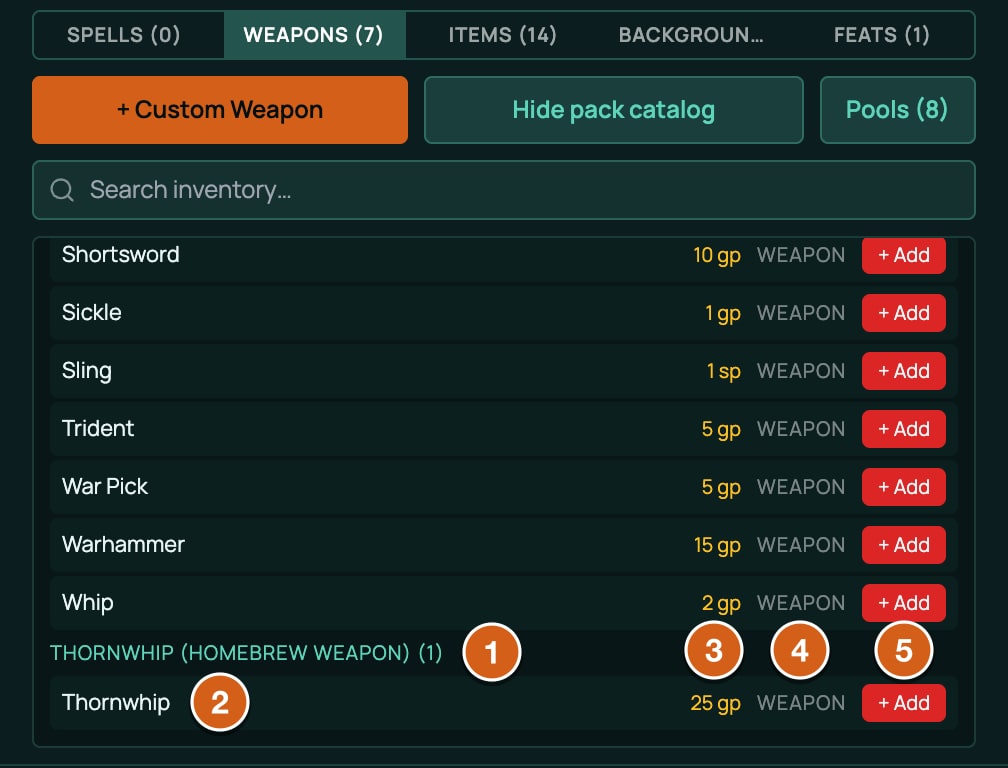
In the Items panel's Weapons tab the row shows the Damage column (meta.damage, or the damage type when there's none), Type, an Atk / DC column whose (i) shows the attack formula, Equipped, and a button for each action. The weapon's properties and the first two lines of its description sit under its name.
More weapons
Each of these is a complete pack that RollQuest accepts.
Versatile, with a mastery
A versatile weapon has a second damage button for two hands. altActionIds in the applies entry tells Target that the two-handed button applies the same damage. mastery shows the 5.5e mastery property.
{
  "slug": "my-ashbrand",
  "name": "Ashbrand (homebrew versatile weapon)",
  "system": "5.5e Compatible",
  "derivedFrom": "5-5e-core",
  "category": "addon",
  "version": "1.0.0",
  "license": "USER_HOMEBREW",
  "source": "My table's homebrew.",
  "attribution": "",
  "description": "",
  "requiredDecisions": [],
  "items": [
    {
      "kind": "inventoryItem",
      "key": "WEAPON_ASHBRAND",
      "spec": {
        "subType": "weapon",
        "name": "Ashbrand",
        "price": {
          "groupId": "coinage",
          "minor": 2000
        },
        "weight": {
          "unit": "lb",
          "value": 3
        },
        "meta": {
          "category": "Martial Melee",
          "range": "5 ft",
          "damageType": "slashing",
          "properties": "Versatile (1d10)",
          "mastery": "Sap",
          "description": "A soot-black blade you can swing in one hand or two.",
          "targets": {
            "max": 1
          },
          "applies": [
            {
              "kind": "damage",
              "formula": "=1d8+STR_MOD",
              "damageType": "slashing",
              "altActionIds": [
                "DMG_TWO_HANDED"
              ]
            }
          ]
        },
        "effects": [],
        "actions": [
          {
            "id": "ATK",
            "label": "Attack",
            "formula": "=1d20+PROF*W_MARTIAL+STR_MOD",
            "damageType": "",
            "tag": "ATK_ROLL"
          },
          {
            "id": "DMG",
            "label": "Damage",
            "formula": "=1d8+STR_MOD",
            "damageType": "slashing",
            "tag": "DMG_ROLL"
          },
          {
            "id": "DMG_TWO_HANDED",
            "label": "Damage (Two-Handed)",
            "formula": "=1d10+STR_MOD",
            "damageType": "slashing",
            "tag": "DMG_ROLL"
          }
        ]
      }
    }
  ]
}
RollQuest shows the mastery but doesn't apply its rule, for built-in weapons or yours. A character's weapon masteries come from a choice on their class, such as a fighter's at level 1, which lists the built-in weapons only, so a homebrew weapon can't be picked there.
Ranged, firing ordinary arrows
meta.consumes makes each shot spend one arrow. ammo.arrows is the pool the built-in bows draw from, so the Emberbow shoots the arrows a character already carries, such as Arrows (20).
{
  "slug": "my-emberbow",
  "name": "Emberbow (homebrew ranged weapon)",
  "system": "5.5e Compatible",
  "derivedFrom": "5-5e-core",
  "category": "addon",
  "version": "1.0.0",
  "license": "USER_HOMEBREW",
  "source": "My table's homebrew.",
  "attribution": "",
  "description": "",
  "requiredDecisions": [],
  "items": [
    {
      "kind": "inventoryItem",
      "key": "WEAPON_EMBERBOW",
      "spec": {
        "subType": "weapon",
        "name": "Emberbow",
        "price": {
          "groupId": "coinage",
          "minor": 4000
        },
        "weight": {
          "unit": "lb",
          "value": 2
        },
        "meta": {
          "category": "Martial Ranged",
          "range": "120/480 ft",
          "damageType": "piercing",
          "properties": "Ammunition (Arrow), Two-Handed",
          "description": "A recurve bow of charred yew. It shoots ordinary arrows.",
          "consumes": {
            "poolId": "ammo.arrows",
            "amount": 1
          },
          "targets": {
            "max": 1
          },
          "applies": [
            {
              "kind": "damage",
              "formula": "=1d8+DEX_MOD",
              "damageType": "piercing"
            }
          ]
        },
        "effects": [],
        "actions": [
          {
            "id": "ATK",
            "label": "Attack",
            "formula": "=1d20+PROF*W_MARTIAL+DEX_MOD",
            "damageType": "",
            "tag": "ATK_ROLL"
          },
          {
            "id": "DMG",
            "label": "Damage",
            "formula": "=1d8+DEX_MOD",
            "damageType": "piercing",
            "tag": "DMG_ROLL"
          }
        ]
      }
    }
  ]
}
Slings draw on ammo.bullets the same way. Crossbows load from a magazine and reload from a reserve, a longer pattern: to make one, copy a built-in crossbow into a pack of your own with New homebrew > Copy rows that already exist > Pick rows (see Copy rows) and change it. With no arrows on the sheet the attack is refused; tick Don't consume resource when you open the bow to shoot anyway.
Thrown, used up as it's thrown
A consumes on the action itself, { "self": 1 }, takes one from the stack each time the player presses that button, and the count's + picks one back up.
{
  "slug": "my-cinder-darts",
  "name": "Cinder Darts (homebrew thrown weapon)",
  "system": "5.5e Compatible",
  "derivedFrom": "5-5e-core",
  "category": "addon",
  "version": "1.0.0",
  "license": "USER_HOMEBREW",
  "source": "My table's homebrew.",
  "attribution": "",
  "description": "",
  "requiredDecisions": [],
  "items": [
    {
      "kind": "inventoryItem",
      "key": "WEAPON_CINDER_DART",
      "spec": {
        "subType": "weapon",
        "name": "Cinder Dart",
        "price": {
          "groupId": "coinage",
          "minor": 10
        },
        "weight": {
          "unit": "lb",
          "value": 0.25
        },
        "meta": {
          "category": "Simple Ranged",
          "range": "20/60 ft",
          "damageType": "piercing",
          "properties": "Finesse, Thrown (20/60)",
          "description": "A heavy iron dart, warm to the touch.",
          "targets": {
            "max": 1
          },
          "applies": [
            {
              "kind": "damage",
              "formula": "=1d4+MAX(STR_MOD,DEX_MOD)",
              "damageType": "piercing"
            }
          ]
        },
        "effects": [],
        "actions": [
          {
            "id": "THROW",
            "label": "Throw",
            "formula": "=1d20+PROF*W_SIMPLE+MAX(STR_MOD,DEX_MOD)",
            "damageType": "",
            "tag": "ATK_ROLL",
            "consumes": {
              "self": 1
            }
          },
          {
            "id": "DMG",
            "label": "Damage",
            "formula": "=1d4+MAX(STR_MOD,DEX_MOD)",
            "damageType": "piercing",
            "tag": "DMG_ROLL"
          }
        ]
      }
    }
  ]
}
The 5e version
A 5e weapon is written the same way: the pack's system and derivedFrom change to "5e Compatible" and "5e-core", and the item itself is the same. This is the Thornwhip row from a 5e pack:
{
  "kind": "inventoryItem",
  "key": "WEAPON_THORNWHIP_5E",
  "spec": {
    "subType": "weapon",
    "id": "WEAPON_THORNWHIP_5E",
    "name": "Thornwhip",
    "price": {
      "groupId": "coinage",
      "minor": 2500
    },
    "weight": {
      "unit": "lb",
      "value": 3
    },
    "meta": {
      "category": "Martial Melee",
      "damage": "1d6",
      "damageType": "slashing",
      "properties": "Finesse, Reach",
      "targets": {
        "max": 1
      },
      "applies": [
        {
          "kind": "damage",
          "formula": "=1d6+MAX(STR_MOD,DEX_MOD)",
          "damageType": "slashing"
        }
      ]
    },
    "actions": [
      {
        "id": "ATK",
        "label": "Attack",
        "formula": "=1d20+PROF*W_MARTIAL+MAX(STR_MOD,DEX_MOD)",
        "damageType": "",
        "tag": "ATK_ROLL"
      },
      {
        "id": "DMG",
        "label": "Damage",
        "formula": "=1d6+MAX(STR_MOD,DEX_MOD)",
        "damageType": "slashing",
        "tag": "DMG_ROLL"
      }
    ],
    "effects": []
  }
}
5e has no mastery. Its built-in weapons also check a training value for the one weapon, such as WP_LONGSWORD in PROF*MAX(W_MARTIAL,WP_LONGSWORD); a homebrew weapon has no such value, so use W_SIMPLE or W_MARTIAL on their own.
Armour, complete
Armour is an item, not a weapon. It has no buttons: its effects set the numbers RollQuest builds AC from, and they count only while the armour is equipped. The Emberscale Coat is medium armour, AC 14 plus Dexterity up to +2, with disadvantage on Stealth:
{
  "slug": "my-emberscale",
  "name": "Emberscale Coat (homebrew armour)",
  "system": "5.5e Compatible",
  "derivedFrom": "5-5e-core",
  "category": "addon",
  "version": "1.0.0",
  "license": "USER_HOMEBREW",
  "source": "My table's homebrew.",
  "attribution": "",
  "description": "",
  "requiredDecisions": [],
  "items": [
    {
      "kind": "inventoryItem",
      "key": "ARMOUR_EMBERSCALE_COAT",
      "spec": {
        "subType": "item",
        "id": "ARMOUR_EMBERSCALE_COAT",
        "name": "Emberscale Coat",
        "price": {
          "groupId": "coinage",
          "minor": 30000
        },
        "weight": {
          "unit": "lb",
          "value": 18
        },
        "meta": {
          "category": "Medium Armor",
          "ac": "14 + DEX (max 2)",
          "description": "Overlapping scales shed by a fire drake."
        },
        "actions": [],
        "effects": [
          {
            "id": "EMBERSCALE_AC_BASE",
            "target": "AC_ARMOR_BASE",
            "op": "setTo",
            "value": 14,
            "condition": "",
            "trigger": ""
          },
          {
            "id": "EMBERSCALE_AC_DEX_MAX",
            "target": "AC_DEX_MAX",
            "op": "setTo",
            "value": 2,
            "condition": "",
            "trigger": ""
          },
          {
            "id": "EMBERSCALE_AC_EQUIPPED",
            "target": "AC_BODY_ARMOR_EQUIPPED",
            "op": "setTo",
            "value": 1,
            "condition": "",
            "trigger": ""
          },
          {
            "id": "EMBERSCALE_STEALTH_DIS",
            "target": "STE_ROLL",
            "op": "disadvantage",
            "value": 1,
            "condition": "",
            "trigger": ""
          }
        ]
      }
    }
  ]
}
How RollQuest works out AC
A character's AC is built from five values. With body armour equipped, it's the armour's base plus the Dexterity modifier, capped at the armour's limit (no Dexterity at all when the limit is 0). Without it, it's 10 plus the Dexterity modifier plus any unarmoured bonus, such as a monk's. A shield and any other bonuses add on top.
| Value | What it is | Default | What armour writes |
|---|---|---|---|
AC_BODY_ARMOR_EQUIPPED |
1 while body armour is worn, so the armour's base is used. | 0 | setTo 1 on every body armour. Without it, the other two rows are ignored. |
AC_ARMOR_BASE |
The armour's base AC. | 10 | setTo the base, such as 14. |
AC_DEX_MAX |
The most Dexterity can add. | 99 | setTo 99 light, setTo 2 medium, setTo 0 heavy. |
AC_SHIELD_BONUS |
A shield's bonus. | 0 | setTo 2 on a shield. |
AC_MISC_BONUS |
Anything else, such as a ring of protection. | 0 | add 1 for each +1. It can't go below -5 or above 10. |
Each effect row has an id (unique in the pack; an effect without one is refused), a target (the value it changes), an op (how), a value, and an empty condition and trigger. setTo replaces the value, add adds to it, and disadvantage on STE_ROLL gives every Stealth roll disadvantage. Effects are covered in full in Effects: what an item can change.
The armour fields in meta are only text. category (Light Armor, Medium Armor, Heavy Armor or Shield, as the built-in armour spells them) and ac show when the armour is opened. strMin, strength and stealthDisadvantage show on its reference card and change nothing: the effects do the work.
Because body armour uses setTo, two suits equipped at once don't add up: the one lower in the inventory wins, not the better one.
On the sheet
A player adds armour with + From pack (in the Items panel it's on the Items tab), or from the builder's Add Starting Equipment (Optional) step when you route the pack there. It arrives unequipped. Once they click Equipped, their AC changes straight away, on the open sheet and on their token; the builder's Defense box also shows it, with a line for each thing that adds to it.
Heavy armour
Heavy armour adds two more rows: IS_WEARING_HEAVY_ARMOR, which other features check (such as boots that only work without heavy armour), and a 10 ft Speed penalty that applies only while Strength is below the armour's minimum. SPEED_IGNORES_HEAVY_ARMOR is 1 for characters who aren't slowed by heavy armour, such as 5e dwarves.
{
  "slug": "my-cinderplate",
  "name": "Cinderplate (homebrew heavy armour)",
  "system": "5.5e Compatible",
  "derivedFrom": "5-5e-core",
  "category": "addon",
  "version": "1.0.0",
  "license": "USER_HOMEBREW",
  "source": "My table's homebrew.",
  "attribution": "",
  "description": "",
  "requiredDecisions": [],
  "items": [
    {
      "kind": "inventoryItem",
      "key": "ARMOUR_CINDERPLATE",
      "spec": {
        "subType": "item",
        "name": "Cinderplate",
        "price": {
          "groupId": "coinage",
          "minor": 50000
        },
        "weight": {
          "unit": "lb",
          "value": 60
        },
        "meta": {
          "category": "Heavy Armor",
          "ac": "17",
          "strMin": 15,
          "stealthDisadvantage": true,
          "description": "Blackened plates riveted over chain."
        },
        "actions": [],
        "effects": [
          {
            "id": "CINDERPLATE_AC_BASE",
            "target": "AC_ARMOR_BASE",
            "op": "setTo",
            "value": 17,
            "condition": "",
            "trigger": ""
          },
          {
            "id": "CINDERPLATE_AC_DEX_MAX",
            "target": "AC_DEX_MAX",
            "op": "setTo",
            "value": 0,
            "condition": "",
            "trigger": ""
          },
          {
            "id": "CINDERPLATE_AC_EQUIPPED",
            "target": "AC_BODY_ARMOR_EQUIPPED",
            "op": "setTo",
            "value": 1,
            "condition": "",
            "trigger": ""
          },
          {
            "id": "CINDERPLATE_IS_HEAVY",
            "target": "IS_WEARING_HEAVY_ARMOR",
            "op": "setTo",
            "value": 1,
            "condition": "",
            "trigger": ""
          },
          {
            "id": "CINDERPLATE_STEALTH_DIS",
            "target": "STE_ROLL",
            "op": "disadvantage",
            "value": 1,
            "condition": "",
            "trigger": ""
          },
          {
            "id": "CINDERPLATE_STR_SPEED",
            "target": "SPEED",
            "op": "add",
            "value": -10,
            "condition": "=IF(AND(STR<15, SPEED_IGNORES_HEAVY_ARMOR=0), 1, 0)",
            "trigger": ""
          }
        ]
      }
    }
  ]
}
The condition is a formula that's 1 (on) or 0 (off), worked out from the character's sheet: here, "Strength below 15, and not someone heavy armour can't slow". A condition must start with =; plain words such as while strong are refused, because they would never switch on.
Shields
A shield sets AC_SHIELD_BONUS. For a +1 shield, set it to 3.
{
  "slug": "my-emberward-shield",
  "name": "Emberward Shield (homebrew shield)",
  "system": "5.5e Compatible",
  "derivedFrom": "5-5e-core",
  "category": "addon",
  "version": "1.0.0",
  "license": "USER_HOMEBREW",
  "source": "My table's homebrew.",
  "attribution": "",
  "description": "",
  "requiredDecisions": [],
  "items": [
    {
      "kind": "inventoryItem",
      "key": "SHIELD_EMBERWARD",
      "spec": {
        "subType": "item",
        "name": "Emberward Shield",
        "price": {
          "groupId": "coinage",
          "minor": 1500
        },
        "weight": {
          "unit": "lb",
          "value": 6
        },
        "meta": {
          "category": "Shield",
          "ac": "+2",
          "description": "A round shield faced with fire-hardened bronze."
        },
        "actions": [],
        "effects": [
          {
            "id": "EMBERWARD_SHIELD_AC",
            "target": "AC_SHIELD_BONUS",
            "op": "setTo",
            "value": 2,
            "condition": "",
            "trigger": ""
          }
        ]
      }
    }
  ]
}
Armour in 5e
5e armour works the same way, with one addition: the built-in 5e armour also gives an untrained wearer disadvantage on Strength and Dexterity checks, Strength and Dexterity saves and attack rolls. Each of those is an effect with a condition on the training value (A_LIGHT, A_MEDIUM, A_HEAVY or A_SHIELDS). The built-in armour adds a row for each of ten rolls; this example shows three of them:
{
  "slug": "my-emberscale-5e",
  "name": "Emberscale Coat (homebrew armour, 2014 rules)",
  "system": "5e Compatible",
  "derivedFrom": "5e-core",
  "category": "addon",
  "version": "1.0.0",
  "license": "USER_HOMEBREW",
  "source": "My table's homebrew.",
  "attribution": "",
  "description": "",
  "requiredDecisions": [],
  "items": [
    {
      "kind": "inventoryItem",
      "key": "ARMOUR_EMBERSCALE_COAT_5E",
      "spec": {
        "subType": "item",
        "name": "Emberscale Coat",
        "price": {
          "groupId": "coinage",
          "minor": 30000
        },
        "weight": {
          "unit": "lb",
          "value": 18
        },
        "meta": {
          "category": "Medium Armor",
          "ac": "14 + Dex modifier (max 2)",
          "stealthDisadvantage": true,
          "description": "Overlapping scales shed by a fire drake."
        },
        "actions": [],
        "effects": [
          {
            "id": "EMBERSCALE5_AC_BASE",
            "target": "AC_ARMOR_BASE",
            "op": "setTo",
            "value": 14,
            "condition": "",
            "trigger": ""
          },
          {
            "id": "EMBERSCALE5_AC_DEX_MAX",
            "target": "AC_DEX_MAX",
            "op": "setTo",
            "value": 2,
            "condition": "",
            "trigger": ""
          },
          {
            "id": "EMBERSCALE5_AC_EQUIPPED",
            "target": "AC_BODY_ARMOR_EQUIPPED",
            "op": "setTo",
            "value": 1,
            "condition": "",
            "trigger": ""
          },
          {
            "id": "EMBERSCALE5_STEALTH_DIS",
            "target": "STE_ROLL",
            "op": "disadvantage",
            "value": 1,
            "condition": "",
            "trigger": ""
          },
          {
            "id": "EMBERSCALE5_UNPROF_ATK",
            "target": "ATK_ROLL",
            "op": "disadvantage",
            "value": 1,
            "condition": "=IF(A_MEDIUM=0, 1, 0)",
            "trigger": ""
          },
          {
            "id": "EMBERSCALE5_UNPROF_STR_CHECK",
            "target": "STR_CHECK_ROLL",
            "op": "disadvantage",
            "value": 1,
            "condition": "=IF(A_MEDIUM=0, 1, 0)",
            "trigger": ""
          },
          {
            "id": "EMBERSCALE5_UNPROF_DEX_SAVE",
            "target": "DEX_SAVE_ROLL",
            "op": "disadvantage",
            "value": 1,
            "condition": "=IF(A_MEDIUM=0, 1, 0)",
            "trigger": ""
          }
        ]
      }
    }
  ]
}
STR_CHECK_ROLL and DEX_CHECK_ROLL exist only in 5e. A 5.5e pack that names them is refused; the 5.5e names for a plain Strength or Dexterity check are STR_MOD_ROLL and DEX_MOD_ROLL.
A +1 weapon that asks which weapon it is
Some magic weapons can be any weapon: "a +1 weapon (any martial)". Write one as an item with a baseWeapon choice. When a player adds it, a choices window asks Which weapon is this?; they pick one, and the row becomes that weapon, renamed, with +1 on its attack and damage.
{
  "slug": "my-emberforged",
  "name": "Emberforged Weapon (homebrew +1 weapon)",
  "system": "5.5e Compatible",
  "derivedFrom": "5-5e-core",
  "category": "addon",
  "version": "1.0.0",
  "license": "USER_HOMEBREW",
  "source": "My table's homebrew.",
  "attribution": "",
  "description": "",
  "requiredDecisions": [],
  "items": [
    {
      "kind": "inventoryItem",
      "key": "ITEM_EMBERFORGED_WEAPON",
      "spec": {
        "subType": "item",
        "name": "Emberforged Weapon, +1",
        "meta": {
          "rarity": "Uncommon",
          "attunement": false,
          "notes": "+1 to attack and damage.",
          "description": "Any martial weapon, reforged in dragonfire. You have a +1 bonus to attack and damage rolls made with it."
        },
        "actions": [],
        "effects": [],
        "choices": [
          {
            "id": "BASE_WEAPON",
            "kind": "baseWeapon",
            "prompt": "Which weapon is this?",
            "packSlug": "5-5e-srd-weapons",
            "filter": {
              "category": "Martial"
            },
            "bonus": 1,
            "nameTemplate": "Emberforged {base}, +1"
          }
        ]
      }
    }
  ]
}
The choice's fields:
| Field | What it does | Allowed values |
|---|---|---|
id |
The choice's ID, unique in the item. | Any text, such as BASE_WEAPON. |
kind |
Makes this the "which weapon" question. | baseWeapon, spelled exactly. |
prompt |
The question in the choices window. | Any text. |
packSlug |
The pack the weapons come from. | 5-5e-srd-weapons for the built-in 5.5e weapons, 5e-srd-weapons for 5e. |
filter |
Narrows the list by the weapons' category. |
{ "category": "Martial" } keeps every weapon whose category contains Martial. Leave it out for every weapon. |
from |
Narrows the list to named weapons instead. | A list of keys, such as ["WEAPON_RAPIER", "WEAPON_SCIMITAR", "WEAPON_SHORTSWORD"]. |
bonus |
Added to the weapon's attack and damage formulas. | A whole number, such as 1. |
nameTemplate |
The new name. {base} becomes the weapon's name. |
Emberforged {base}, +1 gives Emberforged Rapier, +1. |
The player always picks exactly one weapon. The new row takes the weapon's buttons, with the bonus added to the attack and damage formulas, and its category, range, damage type, properties, mastery, weight and targeting; your item's own fields, such as rarity and description, win where both have one. It moves to the Weapons tab. With Target, the damage that lands on a creature carries the +1 too.
Where players find it: it's an item, so in the Items panel's + From pack it's on the Items tab, not the Weapons tab. While the GM has frozen characters, players can still add a +1 weapon like this one; other items with choices wait for the GM.
The check that runs when you create the pack reads the choice too. A misspelt kind is refused (CHOICE_INVALID), so is a packSlug that names no pack it can see (PACK_REFERENCE_UNKNOWN_PACK), and so is a key in from that isn't an item of that pack (PACK_REFERENCE_UNKNOWN_ITEM). It can't tell whether the list of weapons suits your item, so add the item to a test character before your players do.
Mistakes that get a pack refused
Check this pack lists each problem with its code. The ones you're most likely to meet with weapons and armour:
| Code | What you wrote | Fix |
|---|---|---|
DAMAGE_TYPE_UNDECLARED |
An action's damageType that isn't a damage type, such as frost. The message says deals damage type "frost", which this system does not declare. |
Use a type from the list above, such as cold. |
APPLIES_DAMAGE_TYPE_UNDECLARED |
The same mistake in an applies entry. |
The same fix. |
SUBTYPE_UNDECLARED |
A subType that doesn't exist, such as armor. |
Armour is item. |
ITEM_SUBTYPE_MISSING |
No subType at all. The item would sit in no list, so nobody could add it. |
Add "subType": "weapon" or "item". |
ITEM_NAME_MISSING |
No spec.name. |
Give the item a name. |
ITEM_MISSING_KEY |
A row with no key. |
Give every row its own key. |
EFFECT_ID_MISSING |
An effect with no id. A later re-stamp of a sheet holding the item would fail. |
Give every effect an ID, unique in the item. |
PRICE_GROUP_UNDECLARED |
A price in something other than coinage, such as gold. |
Use coinage and give the price in copper. |
EFFECT_TARGET_UNRESOLVED |
An effect aimed at a value that doesn't exist, such as AC_BONUS, or a 5e-only value in a 5.5e pack. |
Use one of the values in this page's table, or check the authoring contract's list. |
EFFECT_OP_WRONG_CHANNEL |
An op that doesn't suit its target, such as advantage on AC. |
Advantage and disadvantage go on rolls (STE_ROLL, ATK_ROLL); add, setMin and setTo go on values (AC_MISC_BONUS). |
EFFECT_CONDITION_PROSE |
A condition in words. |
Write a formula starting with =, or leave it empty. |
FORMULA_REFERENCE_UNRESOLVED |
A formula naming a value that doesn't exist, such as FINESSE_MOD. |
Use real values: MAX(STR_MOD,DEX_MOD). |
ITEM_KEY_COLLISION |
A key a built-in item already uses, such as WEAPON_LONGSWORD. |
Give your item its own key. |
ITEM_DUPLICATE_KEY |
The same key twice in one pack. | Rename one. |
Every code and how to fix it is in When a pack is refused.
Mistakes the check lets through
These are accepted, so look out for them yourself:
- A weapon written as
item. It lands on the Items tab with a Use button, not on the Weapons tab. - An
appliesformula that doesn't match the Damage action's. The roll goes to chat, and nothing reaches the target. - Armour without
AC_BODY_ARMOR_EQUIPPED. The character's AC ignores the armour's base and cap. - AC written only in
meta.ac. The text shows; the AC doesn't change. - An untagged action. It rolls, but no bonus from a feature or an item ever applies to it.
Good to know
- An item on a sheet is a copy. Editing the pack later doesn't change it until you move the game to the new revision and re-stamp (see Put your pack on a table).
- Equipped gates a weapon's or armour's effects, not its buttons: an unequipped weapon still rolls.
- Your weapons don't appear in a class's starting equipment or in its weapon mastery picker, which list the built-in weapons.
Related
The pack file, field by field · Effects: what an item can change · Choices and grants · Magic items and consumables · Inventory and money