Your campaign runs on its own calendar
ProMost virtual tabletops have no idea what day it is. You track the date in a notes app, forget to advance it for three sessions, and then have to reconstruct whether the ritual happens before or after the party reaches the coast. RollQuest gives the campaign a real clock and a calendar you define, and then uses them.
A calendar you actually build
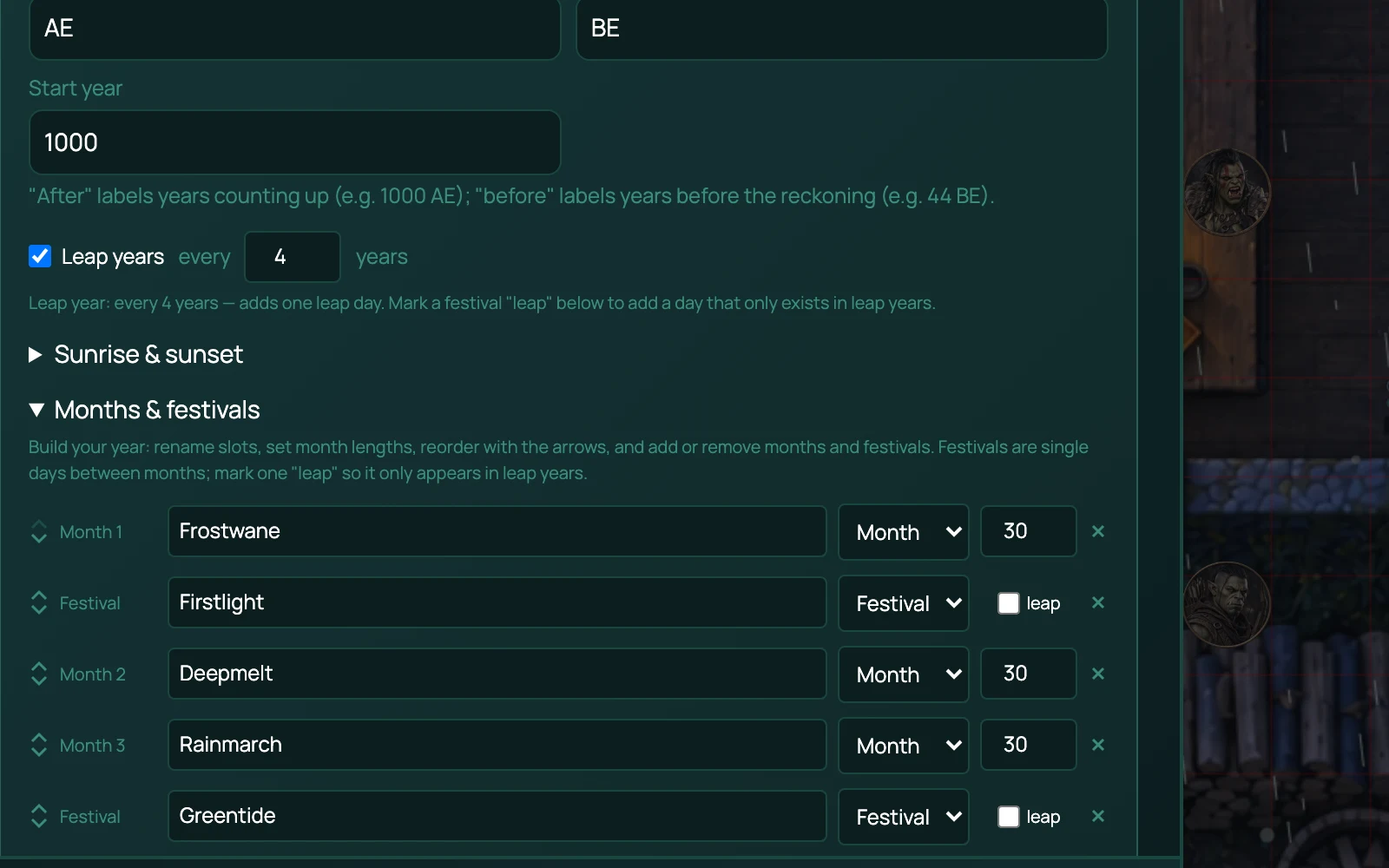
Start from a preset or build your own. Name the months and set how many days each one has. Add eras, so the year can be 1000 AE rather than 1000. Add a leap rule if your world has one. Add intercalary days - festival days that sit between months and belong to none of them, the way real calendars often work and fantasy calendars almost always want to.
Three presets ship: the system default, a real-world Gregorian calendar, and a Generic Fantasy calendar with twelve thirty-day months and four festival days between the seasons. All copyright-safe, so nothing here ties you to one publisher's setting.
Once a calendar exists, every date in the campaign is expressed in it. "17:42, 14 Frostwane, 1000 AE, dusk" is a sentence the app can produce, not one you have to type.
Time that moves at the speed of the scene
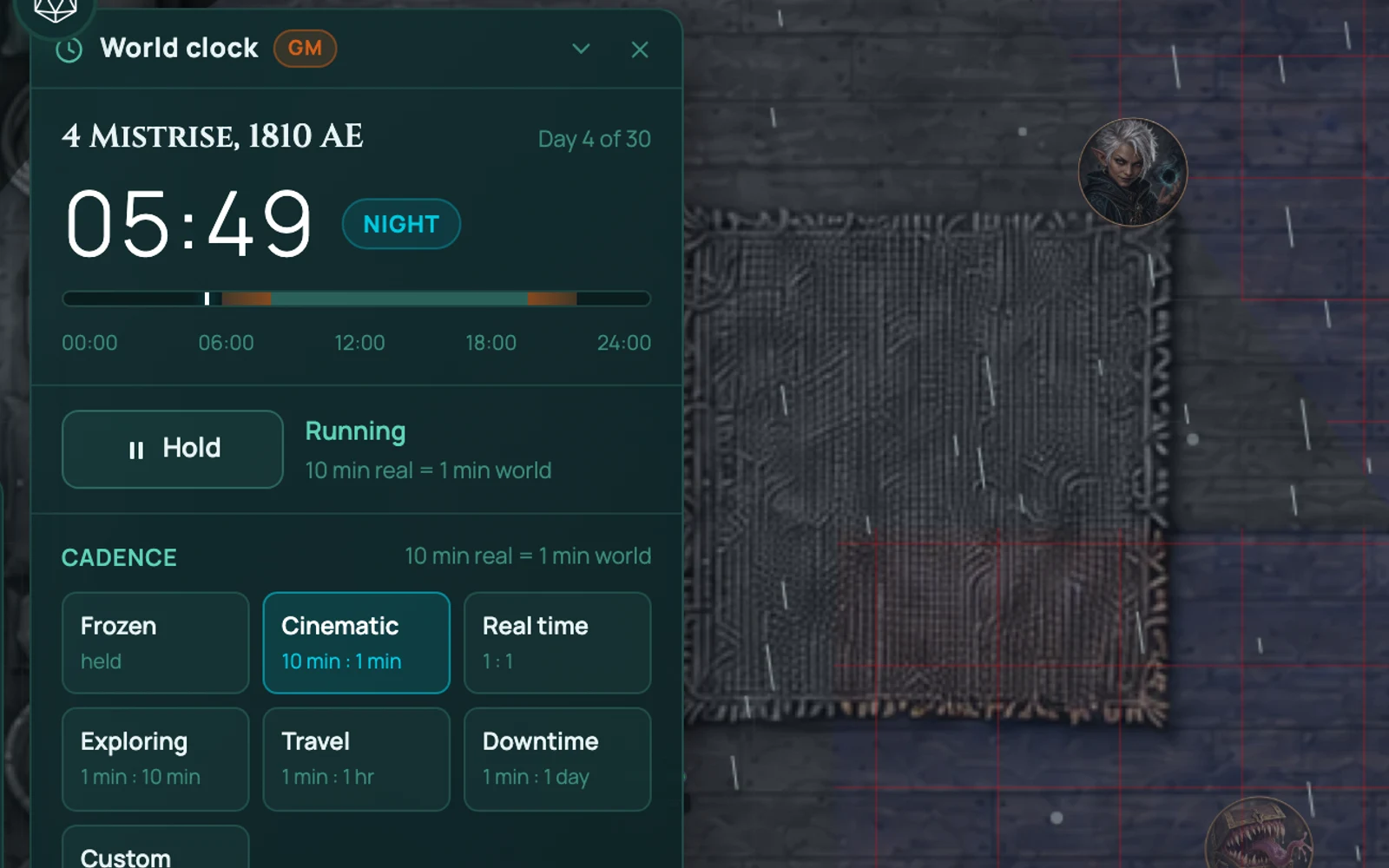
The clock has a cadence: how fast world time runs against real time. You change it as the scene changes.
- Frozen - held. Combat, or any scene where the clock should not move.
- Cinematic - 10 minutes of real time to 1 of world time. A tense scene you want to slow down.
- Real time - 1 : 1. Talking to an NPC.
- Exploring - 1 minute to 10. The default, for poking around a dungeon.
- Travel - 1 minute to an hour. Crossing the map.
- Downtime - 1 minute to a day. Weeks between adventures.
There's a custom option if none of those fit: set any ratio you like.
You can also jump. Move to dawn, to dusk, to the end of a long rest, or to any date and time you type. The clock is an anchor rather than a ticking counter, so a jump is exact and nobody's client drifts out of step with anyone else's.
What the clock is wired into
This is the part that makes it more than a date display.
Conditions count down in world time. A condition can carry a duration in rounds or in world minutes. In a fight, the badge shows rounds remaining, because that's what you act on this turn. Outside a fight it shows the world clock instead - "another forty minutes of Poisoned" - which is the only one of the two that survives the fight ending.
Dawn and dusk are real moments. The calendar knows sunrise and sunset for a given date, and can vary them seasonally. The clock counts down to the next one, because that is when the pile of magic items that recharge at dawn come back. Rests work the other way round: a long rest is something somebody did, so it reads as time elapsed since.
The journal dates itself. Entries in the campaign journal carry the in-world date and hour they happened, so the session log reads as a chronicle rather than a stack of undated notes.
Frequently asked questions
Which plan has the calendar and world clock?
Pro. They're two separate features on the same plan - a table can care about the hour of the day without wanting to edit month lengths.
Can I use a real-world calendar?
Yes. Gregorian is one of the presets, leap years included.
Do my players see the clock?
Yes, the current date and time are visible at the table.
Does time move on its own?
Only at the cadence you set, and only while it isn't frozen. Set it to Frozen and the clock holds until you move it.
Can I set a calendar per campaign?
Yes, or inherit the game system's default and not think about it.
Try it
The calendar and world clock are on Pro. Build a calendar once at the start of a campaign and it runs itself from there.