

Dice, values and outcomes
This page explains what a macro's roll can contain, every value a macro can read, and how RollQuest decides whether a roll is a hit, a miss, a critical hit or a fumble.
A macro works with three kinds of number: the dice it rolls, values from the character sheet, and the results earlier steps saved, such as a target's armour class (AC). Put them together in a Roll step and the macro rolls the same numbers your sheet does; compare the total with something and the macro knows whether it hit, so it can post the right card. The examples work in the editor's Text view (see The macro language (Text view)), and each setting has a box of the same name in the Steps view. They cover 5e and 5.5e, where you roll a d20 and higher is better, and Ashfall, where you roll a d100 and lower is better.
Plan: building and editing macros needs Pro. Running them is free on every plan.
What a roll can contain
The dice go between [[ and ]] in the Text view, or in the Dice box of a Roll step. Once the values are filled in, they may contain only:
- dice, written
NdM:1d20,2d6,8d6, ord20for one die, - whole numbers, such as
5, +and-between them, with or without spaces.
| Dice | What it rolls |
|---|---|
1d20 + 5 |
A d20 plus 5 |
1d20 + @{STR_MOD} + @{PROF} |
A d20 plus the sheet's Strength modifier and proficiency bonus |
1d20 + @{DEX_MOD} - 2 |
A d20 plus the Dexterity modifier, minus 2 |
8d6 |
Eight d6, added together |
{n}d6 |
As many d6 as the answer saved as n |
@{SNEAK_DICE}d6 |
As many d6 as the sheet's Sneak Attack value |
1d@{MARTIAL_ARTS_DIE} + @{DEX_MOD} |
One die the size of the sheet's Martial Arts die (a d6 when it's 6), plus Dexterity |
1d100 - {diff} |
A d100, minus the answer saved as diff |
5 |
No dice: the number 5 on its own, a way to save a number to use later |
Macros can't roll these yet: keep or drop (2d20kh1), exploding dice (1d6!), success counting (1d100<=45), Fate dice (4dF), multiplying or dividing (1d20*2), brackets ((1d20+2)) or words (max(1,2)). The editor says so under the Dice box, and in its list of problems: Macros can roll dice like 2d6 and add or subtract numbers; keep/drop, exploding and success dice are not supported in macros yet. For advantage and disadvantage, use the roll mode instead (below).
Limits: up to 100 dice in one roll, dice of up to 1000 sides, and up to 20 parts joined by + and -.
How values go into the dice
- A number goes in as a whole number: 2.7 counts as 2.
- An empty value counts as 0.
- A value that holds a roll, such as
2d6, goes in as dice. A weapon's whole attack, such as{weapon.attack}(which might be1d20 + 5), can be added, but not taken away:10 - {weapon.attack}stops with weapon.attack is a whole roll, which can be added but not subtracted. - Anything else stops the roll. A typed answer of
+3gives bonus is "+3", which is not a number: type3or-3. - Signs are tidied, so
1d20 + -2rolls as1d20 - 2. - Zero dice roll nothing and add 0:
@{SNEAK_DICE}d6for a character with no Sneak Attack dice is0d6, and the card shows Sneak Attack with a total of 0.
When a roll can't be rolled while the macro runs, the macro stops there, and a note only you see says the roll could not be rolled and why. Steps before it have already happened.
[[@{SNEAK_DICE}d6]] label="Sneak Attack" type=piercing -> sneak
&{card:default} "Sneak Attack" show=sneak
end
?{How many d6?} -> n
[[{n}d6]] label="Pool" -> pool
&{card:default} "{n}d6" show=pool
end
When the dice are thrown
A macro works out its rolls as it goes, then throws the 3D dice for all of them right before the next thing it shows: a card, a question, a pop-up, a whisper or the end. So an attack and its damage rolled one after the other land in one throw. Only d4, d6, d8, d10, d12, d20 and d100 are thrown in 3D, and only when there are 20 dice or fewer: bigger rolls show their results without the animation. A test run in the editor rolls without 3D dice.
Advantage, disadvantage and roll modes
The roll mode decides how many times the dice are rolled. Set it with mode= in the Text view, or the Roll mode box in the Steps view:
| Mode | What it does |
|---|---|
normal |
Rolls once. The default. |
advantage |
Rolls all the dice twice and keeps the better set: the higher dice total, or the lower on a roll-under roll. |
disadvantage |
Rolls all the dice twice and keeps the worse set: the lower dice total, or the higher on a roll-under roll. |
{mode} |
Uses the answer an Ask step saved as mode. An answer of advantage or disadvantage, in capitals or not, sets that mode; any other answer rolls normally. |
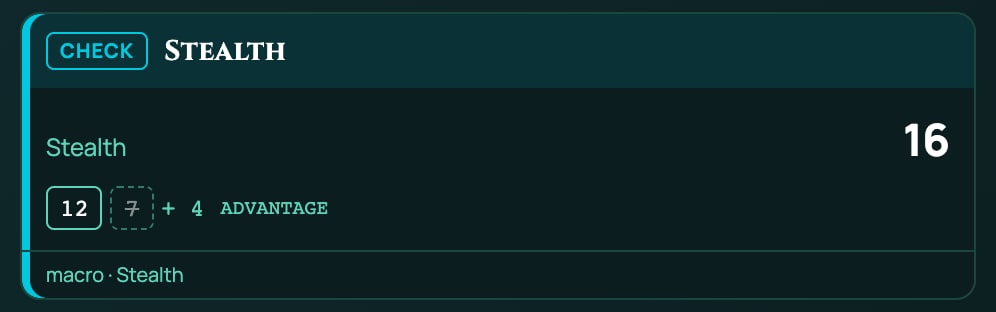
The card shows both sets of dice: the set that didn't count is struck through, and the mode is written after the dice. Numbers added to the dice count once, whichever set is kept.
A choice of modes when you press the macro:
?{Roll Stealth with?|Normal=normal|Advantage=advantage|Disadvantage=disadvantage} -> mode
[[1d20 + @{STE}]] label="Stealth" mode={mode} -> stealth
&{card:check} "Stealth" show=stealth
end
Good to know:
Capitals don't matter in the Text view.
mode=Advantageworks, and so domode=advandmode=dis. A word that isn't a mode, such as a typo, is a problem the Text view names: "mode=advntage" is not a roll mode; use normal, advantage, disadvantage or {answer}. In the Steps view, pick the mode from the list the Roll mode box opens, so it's spelt exactly as the list has it:advtyped there rolls normally, with no warning.The whole set counts. With
1d20 + 1d4, both dice are rolled twice and the set with the higher d20 plus d4 is kept. For a d20 plus numbers, that's the same as the 5e rule.On a roll-under roll, advantage keeps the lower. With
beat=under(Succeeds: at or below), lower is better, soadvantagekeeps the set with the lower total anddisadvantagethe higher. Ashfall's Fortune (roll twice and keep the lower) isadvantage, and Misfortune isdisadvantage. The card prints the mode you chose, advantage for a Fortune roll. See Macros for Ashfall.
Values a macro can read
Results of earlier steps: {name}
Every step that saves a result has a name, set by saves as in the Steps view or -> name in the Text view. Read it with the name in curly brackets: {attack}. Add a dot and a field for one part of it: {attack.natural}.
| Step | {name} on its own |
Fields |
|---|---|---|
| Roll | The total | {name.total}: the total. {name.natural}: the face of the first die, when the dice start with one die such as 1d20 or 1d100 (empty otherwise). {name.outcome}: hit, miss, crit, fumble, or empty. {name.versus}: the number it was compared with. {name.label}: its label. {name.formula}: the dice with the values filled in, such as 1d20 + 5. {name.damageType}: its damage type. {name.critOn}: its Critical on number. {name.beat}: atLeast, or atMost for roll-under. |
| Ask | The answer: the value of the answer picked, or the typed text | None |
| Target | The first token's name | {name.name}: the first token's name. {name.names}: every token picked, such as Goblin 1, Goblin 2. {name.stat}: the stat it read from the first token. |
| Weapon | The weapon's name | {name.name}: its name. {name.attack}: its attack roll, such as 1d20 + 5, or 1d100 for an Ashfall weapon. {name.damage}: its damage roll, such as 1d8 + 3. {name.type}: its damage type. {name.target}: for an attack that rolls against a number of its own, such as an Ashfall weapon's skill, that number (empty otherwise). {name.beat}: under or over for such an attack. |
One level of field only: {attack.total} works, {attack.total.x} doesn't.
Every field of a roll, written into a whisper to yourself:
[[1d20 + @{DEX_MOD}]] label="Dexterity" vs=12 crit=20 -> dex
/w me Die {dex.natural}, total {dex.total}, outcome {dex.outcome}, against {dex.versus}.
That whispers something like Die 17, total 19, outcome hit, against 12.
Inside a chat card's button, which might be pressed later and on another computer, a roll saved before the card keeps only its total, natural roll, outcome, label, the number it was compared with and its damage type. Targets, answers and weapons are kept whole.
A name no step has saved
A name in curly brackets that no step has saved counts as 0 in dice and as nothing in text, with no warning. So a typo goes unnoticed: check your names against Values steps produce in the editor. It also covers a step inside an if that didn't run, which you can use on purpose: a value that's only there when something is true.
Bless adds 1d4 to a save, only when you say you're blessed:
?{Blessed?|Yes=yes|No=no} -> blessed
if {blessed} = yes
  [[1d4]] label="Bless" -> bless
end
[[1d20 + @{WIS_SAVE} + {bless}]] label="Wisdom save" -> save
&{card:check} "Wisdom save" show=save
end
Answer No and {bless} was never saved, so the save rolls 1d20 + 1 + 0 (with a Wisdom save of +1).
Results don't cross between macros: a macro run with #shortcut starts with none of the first macro's results, and gives none back.
Sheet values: @{ID}
@{ID} reads a value from the character sheet by its ID, such as @{STR_MOD} for the Strength modifier. These are the numbers the sheet works out, with items, effects and class levels counted, the same as you see on it. In the Steps view, + Sheet value beside Dice lists your character's values, each with its label, ID and current value, and adds the one you click.
A few things on a sheet aren't values a macro can read:
- Resource pools, such as Ashfall's Fate.
- Calculations, the rolls defined on a sheet, such as Ashfall's Melee check. Read the value they roll against instead, such as
@{MELEE}.
Which character's sheet is read depends on how the macro runs: see Which character a macro reads. If the character doesn't have the value, it counts as 0, and a note only you see says, for example, Stealth (STE) isn't on this character's sheet any more, so it counted as 0. It was 4. The macro then shows 1 missing value in the Macros panel until you fix it: see Share, run and fix macros. With no character in the game at all, every value counts as 0, and the note says You have no character in this game, so every sheet value counted as 0.
A value changed on the sheet in the last 20 seconds may not be picked up yet.
Useful 5e and 5.5e values
| ID | On the sheet |
|---|---|
STR, DEX, CON, INT, WIS, CHA |
Strength, Dexterity, Constitution, Intelligence, Wisdom, Charisma |
STR_MOD, DEX_MOD, CON_MOD, INT_MOD, WIS_MOD, CHA_MOD |
Strength Modifier and the other five modifiers |
PROF |
Proficiency Bonus |
STR_SAVE, DEX_SAVE, CON_SAVE, INT_SAVE, WIS_SAVE, CHA_SAVE |
Strength Save and the other five saving throws |
STR_CHECK, DEX_CHECK, CON_CHECK, INT_CHECK, WIS_CHECK, CHA_CHECK |
Strength Check and the other five ability checks. 5e only: in 5.5e, use the modifier, such as STR_MOD. |
ACR, ANIM, ARC, ATH, DEC, HIS, INS, INTIM, INV, MED, NAT, PERC, PERF, PERSUA, REL, SLOH, STE, SUR |
The skills: Acrobatics, Animal Handling, Arcana, Athletics, Deception, History, Insight, Intimidation, Investigation, Medicine, Nature, Perception, Performance, Persuasion, Religion, Sleight of Hand, Stealth, Survival |
PASSIVE_PERC |
Passive Perception |
AC |
Armour class |
HP, HP_MAX, HP_TEMP |
Hit Points, Max HP, Temp HP |
INITIATIVE |
Initiative: the Dexterity modifier plus any initiative bonus |
INIT_BONUS |
Only the extra initiative bonus, on top of Dexterity |
SPELL_ATTACK, SPELL_SAVE_DC, SPELL_ABIL_MOD |
Spell Attack, Spell Save DC, Spellcasting Mod |
SPEED |
Speed |
SNEAK_DICE |
How many d6 of Sneak Attack (a number, so write @{SNEAK_DICE}d6) |
MARTIAL_ARTS_DIE |
The size of the Martial Arts die (4 for a d4, so write 1d@{MARTIAL_ARTS_DIE}) |
EXHAUSTION, INSPIRATION |
Exhaustion level, and Inspiration (Heroic Inspiration in 5.5e) |
A homebrew value has the ID its creator gave it: find it with + Sheet value.
Ashfall values
Ashfall's characteristics and skills mostly run from 1 to 100, and you pass a test by rolling them or lower on a d100.
| ID | On the sheet |
|---|---|
BRAWN, VIGOUR, FRAME, REFLEX, PRESENCE, WITS, RESOLVE, LEARNING |
The eight characteristics: Brawn, Vigour, Frame, Reflex, Presence, Wits, Resolve and Learning |
MELEE, DODGE, STEALTH, SPOT, PISTOL, RUINLORE, READ_PEOPLE, OCCULTISM and the rest |
The 42 skills. Each skill's ID is its name in capitals, with _ for a space, such as LONG_GUN for Long Gun and FIELD_DRESSING for Field Dressing (DRIVE is Drive/Ride, MIND_MENDING is Mind-Mending). Each counts its base and the points you bought for it. |
WOUNDS, WOUNDS_MAX |
Wounds, which count up as you're hurt, and Max Wounds (a tenth of Vigour plus Frame, rounded down) |
SANITY, SANITY_MAX |
Sanity, which starts at your Resolve, and Max Sanity (99 less your Ashlore) |
CORRUPTION, CORRUPTION_MAX |
Corruption and Max Corruption |
KINDLING, KINDLING_MAX |
Kindling, the inner flame rites burn, and Max Kindling |
EMBER |
Ember, luck you can spend after a failed test |
ARMOUR |
Armour, the damage it soaks |
INIT |
Initiative, added to a d10 |
PACE |
Pace, in yards a round |
HEFT_DICE, HEFT_SIDES, HEFT_FLAT |
Heft, the extra damage your weight puts behind a melee blow: how many dice, their size, and a modifier from 0 down to -2 |
Lore, Intuition and Discipline aren't Ashfall skills any more. For what they covered, use Occultism, Read People and a Sanity test.
Fate is a resource pool, so a macro can't read it or spend it. After a failed test, the sheet itself offers Spend Fate to reroll. Macros for Ashfall shows more.
Token stats, from a Target step
A Target step reads one stat from the first token it picks, with stat= in the Text view or Read stat in the Steps view, and saves it as {target.stat}:
| System | Stats |
|---|---|
| 5e and 5.5e | ac (armour class), hp (hit points), temp (temporary hit points) |
| Ashfall | armour, wounds, sanity, corruption |
| Any | defense: whichever stat the system defends with, such as AC in 5e and 5.5e. Ashfall has none, so defense reads nothing there: name armour instead. |
A token without that stat gives an empty {target.stat}. In Ashfall, Armour soaks damage: it isn't a number to roll against, so don't compare an Ashfall attack with {target.stat}.
Values in text
In a card's title and lines, a pop-up's title and lines, a whisper and a damage type, every {name} and @{ID} is filled in when the macro runs: "{weapon.name} misses" becomes Longsword misses. Values can't be added up in text: {a} + {b} shows both numbers with a plus between them. Work a sum out in a roll first, and show the roll.
Outcomes: hit, miss, critical hit and fumble
A roll gets an outcome when you give it something to compare with (vs=, Compare to) or a critical number (crit=, Critical on). The outcome is one of four words, hit, miss, crit and fumble, or nothing.
RollQuest works it out like this, in order:
- The natural roll is the face of the first die, when the dice start with a single die, such as
1d20 + 5or1d100. Dice that start with more than one die, such as2d6 + 3, have no natural roll. With advantage or disadvantage, it's the first die of the set that was kept. - With
crit=: a natural roll of that number or more is acrit, and a natural 1 is afumble, whatever the total. Withoutcrit=, there are no critical hits or fumbles. - With
vs=, the total is compared. Normally a total at or above the number is ahit, and below it amiss. Withbeat=under(Succeeds: at or below), a total at or below the number is ahit, and above it amiss. - With nothing to compare (no
vs=, or one that isn't a number, such as a token with no AC), there's no outcome, unless step 2 gave one.
flowchart TD
  A["The roll's total and natural roll"] --> B{"Critical on set, and the natural roll is that or more?"}
  B -- "Yes" --> C["crit"]
  B -- "No" --> D{"Critical on set, and the natural roll is 1?"}
  D -- "Yes" --> E["fumble"]
  D -- "No" --> F{"Compare to is a number?"}
  F -- "No" --> G["no outcome"]
  F -- "Yes" --> H{"Succeeds at or below?"}
  H -- "No: at or above" --> I["hit if total is at least Compare to, else miss"]
  H -- "Yes: roll-under" --> J["hit if total is at most Compare to, else miss"]
| Roll | Settings | Natural, total | Outcome |
|---|---|---|---|
1d20 + 5 |
vs=15 |
12, 17 | hit |
1d20 + 5 |
vs=15 |
9, 14 | miss |
1d20 + 5 |
vs=15 crit=20 |
20, 25 | crit |
1d20 + 12 |
vs=10 crit=20 |
1, 13 | fumble: a natural 1 fails, even though 13 beats 10 |
1d20 + 5 |
vs=15 crit=19 |
19, 24 | crit |
1d20 + 5 |
crit=20 |
14, 19 | none: nothing to compare with |
1d100 |
vs=45 beat=under |
38, 38 | hit |
1d100 |
vs=45 beat=under |
72, 72 | miss |
2d6 + 3 |
vs=10 crit=20 |
none, 11 | hit: no natural roll, so no crit or fumble |
RollQuest's server works the outcome out again from the dice, so the card everyone sees always agrees with the branch your macro took.
What you can compare with
vs= takes one value, with no sums:
- a number:
vs=15, - a saved result:
vs={target.stat}(the target's AC), orvs={dc}(a typed answer), - a sheet value:
vs=@{MELEE}.
vs=@{MELEE}+10 isn't one value, so the roll gets no outcome. To make a check easier or harder, change the roll instead: see Roll-under checks, below.
A DC asked for when you press the macro:
?{DC?} -> dc
[[1d20 + @{ATH}]] label="Athletics" vs={dc} -> check
if {check.outcome} = hit
  &{card:check} "Athletics: success" show=check
  end
else
  &{card:miss} "Athletics: failure" show=check
  end
end
Where you see the outcome
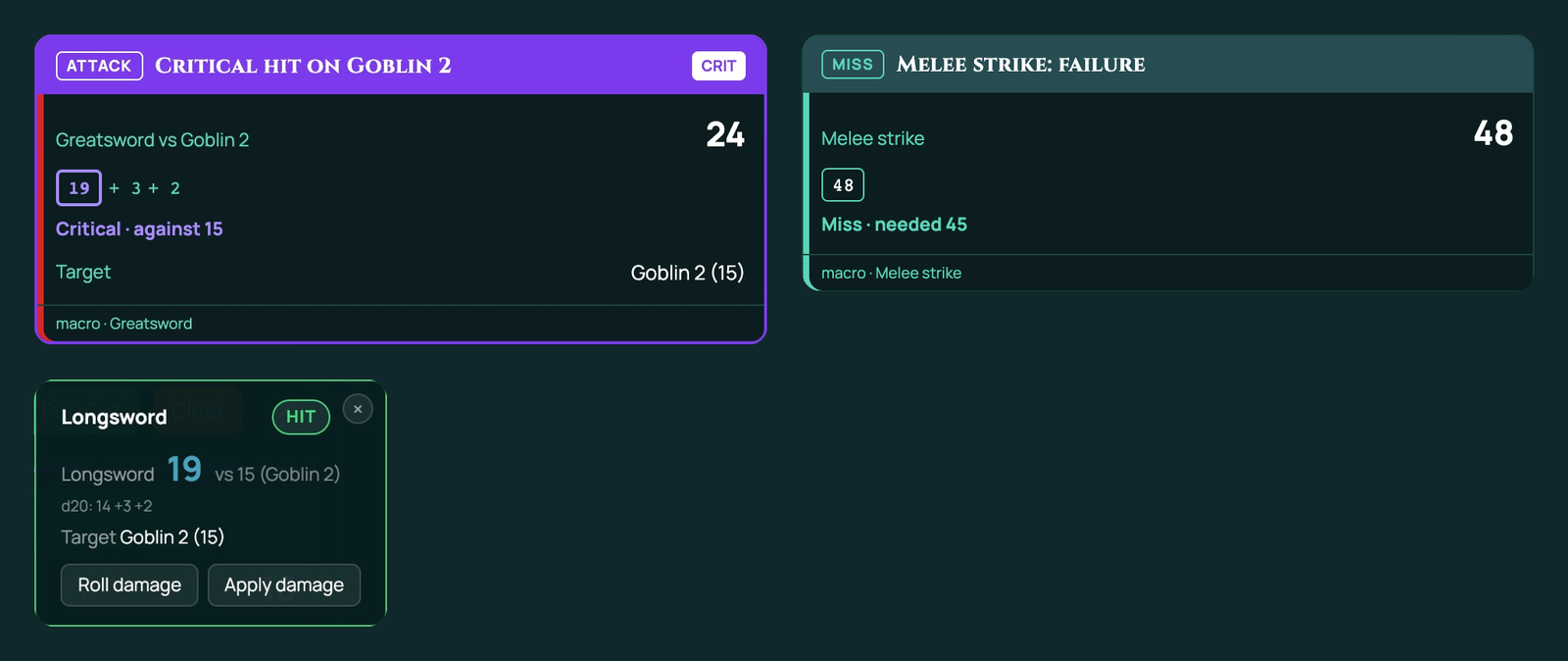
- On the card, under the roll: Hit · against 15, Miss · against 15, Critical · against 15 or Fumble · against 15. A roll-under roll says needed instead of against, such as Hit · needed 45. A critical hit or a fumble also puts CRIT or FUMBLE beside the card's title and colours the card. When Critical on is set, the d20's natural roll is outlined when it's a critical number or a 1.
- On a pop-up, as a badge: HIT, MISS, CRIT or FUMBLE, from the first roll on it that has an outcome.
- In an
if:if {attack.outcome} in (hit, crit).
Critical hits in 5e and 5.5e
Use crit=20, or crit=19 for a character whose critical hits come on a 19 or 20. Branch on all four outcomes with else if, like this:
@target(count=1, stat=defense) -> target
[[1d20 + @{STR_MOD} + @{PROF}]] label="Greatsword" vs={target.stat} crit=19 -> attack
if {attack.outcome} = crit
  &{card:attack} "Critical hit on {target.name}" show=attack,target
  end
else if {attack.outcome} = fumble
  &{card:miss} "Fumble" show=attack,target
  end
else if {attack.outcome} = hit
  &{card:attack} "Hit" show=attack,target
  end
else
  &{card:miss} "Miss" show=attack,target
  end
end
A critical hit doesn't double any damage dice by itself. To roll an extra die on a critical hit, roll it only then, and add it to the damage: on any other hit it was never rolled, so it counts as 0.
@target(count=1, stat=defense) -> target
[[1d20 + @{STR_MOD} + @{PROF}]] label="Longsword" vs={target.stat} crit=20 -> attack
if {attack.outcome} = crit
  [[1d8]] label="Critical die" -> extra
end
if {attack.outcome} in (hit, crit)
  [[1d8 + {extra} + @{STR_MOD}]] label="Damage" type=slashing -> damage
  &{card:attack} "Longsword hits {target.name}" show=attack,damage,target
    apply "Apply damage" id=apply-damage amount={damage.total} type=slashing
  end
else
  &{card:miss} "Longsword misses {target.name}" show=attack,target
  end
end
Against a token with no AC, only a natural 20 hits: every other roll has no outcome, so in (hit, crit) is false and the macro takes the else.
Roll-under checks (Ashfall)
For a d100 check you pass by rolling your skill or lower, use beat=under (Succeeds: at or below) and compare with the skill:
[[1d100]] label="Melee strike" vs=@{MELEE} beat=under -> check
hitmeans you passed andmissthat you failed. Put success and failure in your card titles.- Don't set
crit=. It counts the highest rolls as critical and a 1 as a fumble, the wrong way round for a roll-under game, and the editor warns you: Step 1: "Critical on 20" counts a high roll as a critical and a 1 as a fumble, but this roll succeeds at or below its target, so those are backwards. Clear "Critical on" for a roll-under roll. - Ashfall names its results in bands, which a macro's hit or miss doesn't: Triumph on a natural 1, Disaster on a natural 100 (or 96 and up when the skill is under 50), Sharp for a pass at or under a fifth of the skill, and Solid for one at or under half. A macro can check Triumph and Disaster with
{check.natural}, as inif {check.natural} = 1. It can't work out Sharp and Solid, because that needs a division. See Triumph and Disaster. - Shift the roll to make a check easier or harder, because
vs=can't do sums. A bonus of 20 takes 20 off the roll:[[1d100 - {diff}]] label="Stealth" vs=@{STEALTH} beat=under, wherediffis 20 for an easy check and -20 for a hard one. The card then shows the shifted total, such as 62 for a natural 82 on an easy check, while{check.natural}keeps the real d100 face. - Fortune and Misfortune are the roll modes
advantageanddisadvantage: see Advantage, disadvantage and roll modes, above.
Whole Ashfall macros, with Triumph and Disaster, Fortune, damage through Armour and Sanity, are in Macros for Ashfall.
Related
The macro language (Text view) · Every step, one by one · Macros for Ashfall · Macro cookbook · Your first macro · Roll dice