

The macro language (Text view)
The macro editor's Text view writes a macro as lines of text, one step to a line, and this page explains every line it understands, with small examples you can copy.
A macro is a list of steps (see Macros: what they are). The editor shows it two ways: Steps, where each step is a form, and Text, where the whole macro is written out. Both edit the same steps, so you can build in one and finish in the other. The Text view suits you if you'd rather type, want to copy a macro from these pages or from a friend, or want to see a long macro at a glance. Players and the Game Master (GM), the person running the game, write macros the same way. If you've written macros on another virtual tabletop, the [[ ]], ?{ } and @{ } will look familiar, but macros from elsewhere can't be pasted in as they are. New to macros? Build your first macro in the Steps view first, then come back here.
Plan: the macro editor, Text view included, needs Pro on your own account. Running the macros you write is free on every plan.
Open the Text view
- Open the editor: New macro in the Macros panel, or the three dots on a macro's row, then Edit.
- Click Text, at the top right. The steps appear as text, under The same steps as text. Switching views loses nothing.
The text is read again as you type. The line under the box says Reads as 4 steps in green when it all makes sense, or names the first problem in red, such as Line 4: This "if" is missing its "end". While there's a problem, Save is greyed out and you can't switch back to Steps. Syntax, under the box, opens a short reminder of the main lines.
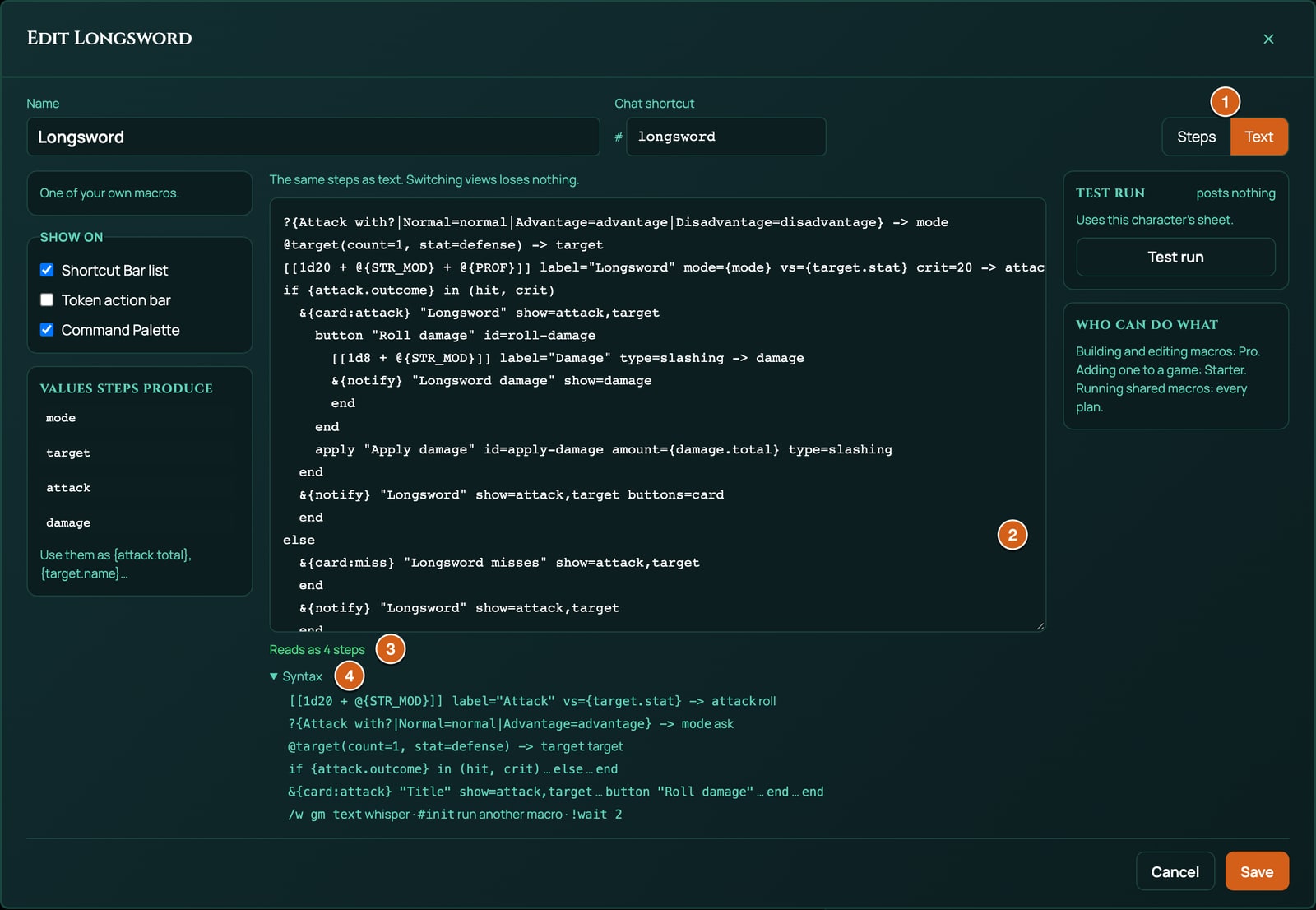
How the text is read
- One step to a line. Blank lines are skipped. Indenting is only for you to read: use it inside blocks, as the examples do.
- Blocks end with
end. Anif, a chat card, a card's button and a pop-up each run until their ownend. - Comments are lines that start with
//. They're for you while you type: a macro is saved as steps, not as text, so comments are gone once you switch to Steps or open the macro again. A//partway along a line is part of that line, not a comment. - Quotes go round titles, labels and lines of text:
"Longsword misses". Anything with a space in it needs quotes, or only its first word is kept. To put a quote mark inside, write\". - Settings are written
key=value, with no spaces round the=, such aslabel="Attack"orcrit=20. The key can be in capitals or not. A setting this page doesn't list is ignored, with no warning. - Result names follow
->at the end of a line that saves a result:-> attack. A name starts with a letter, then letters, digits or_, up to 32 characters, with no spaces or dashes. Every name in a macro must be different, even in the two halves of anif. Capitals count when you use a name, so-> Attackis read by{Attack}and not{attack}: keep names in lower case. - Values go in curly brackets.
{attack}is what the step saved asattack(a roll's total, for instance),{attack.natural}is one part of it, and@{STR_MOD}is a number on the character sheet. Every value is explained in Dice, values and outcomes. - Line numbers in a problem count every line from the top, blank lines and comments included.
When the text is rebuilt from the steps, it comes back tidied: settings in a set order, quotes added, settings at their default left out (such as mode=normal), &{card} written &{card:default}, to=me written to=self, and an if that is alone inside an else written as else if.
Every line at a glance
?{Question|Label=value|Label=value} -> name                   Ask, with answers to pick
?{Question} -> name                                            Ask, with a typed answer
@target(count=1, stat=defense, selected=no) -> name            Target
@weapon "Label" -> name                                        Weapon
[[dice]] label="Label" mode=M vs=V beat=under crit=N type=T -> name    Roll
!swing weapon target=target outcome=attack                     Weapon swing
if LEFT = RIGHT                                                If, with = != > >= < <= or in (a, b)
  ...
else if LEFT = RIGHT                                           optional, as many as you need
  ...
else
  ...
end
&{card:attack} "Title" show=a,b to=gm                          Chat card (default, attack, check, miss)
  line "Label" "Value"
  button "Label" id=a-name                                     a button that runs steps
    ...
  end
  apply "Label" id=a-name amount={damage.total} type=T target=name   an Apply damage button
end
&{notify} "Title" show=a,b to=everyone buttons=card            Pop-up
  line "Label" "Value"
end
/w gm text                                                     Whisper to the GM
/w me text                                                     Whisper to yourself
!table TABLE_ID "Label" to=gm                                  Rollable table
!action ACTION_ID instance=ITEM_ID "Label"                     Sheet action
#shortcut                                                      Run another macro
!wait 2                                                        Wait
!scene {"sceneId":"…","label":"…"}                             Switch scene (GM); also !phase,
                                                               !sound, !music, !stopMusic,
                                                               !spellFx, !dramatic
// a comment
The words on the right are labels for this page: don't type them. Each line is explained below. What each step does when it runs, with its limits, is in Every step, one by one.
Ask
?{Attack with?|Normal=normal|Advantage=advantage|Disadvantage=disadvantage} -> mode
Asks a question when the macro runs and saves the answer. Between ?{ and } comes the question, then each answer after a |. An answer is written Label=value: the label is what you see on the button, the value is what's saved. An answer written without =value saves its label. When it runs, press an answer's number key, or click it.
With no answers, it asks for a typed answer instead, such as a bonus or a number of dice:
?{Bonus?} -> bonus
Up to 10 answers. With more, the editor won't save until you remove some. A question can be 120 characters long, and a label or value 60.
|and=can't be part of a label or value.The question can show a value, filled in when it's asked:
[[1d20 + @{PERC}]] label="Perception" -> look
?{You rolled {look.total}. Roll again?|Yes=yes|No=no} -> again
A typed number is read as a whole number:
3and-2work,+3doesn't (the roll stops with a note that it isn't a number).To use the answer as a roll mode, the values must be
normal,advantageordisadvantage, in capitals or not. See Roll, below.
Target
@target(count=1, stat=defense) -> target
@target(count=3) -> targets
@target(count=1, selected=no) -> ally
Those are three separate examples: one target with its defence stat, up to three targets, and one token always picked from the list.
Picks tokens on the board and saves who they are. Inside the brackets, separated by commas:
| Setting | What it does | If you leave it out |
|---|---|---|
count= |
How many tokens to pick, 1 to 10. | 1 |
stat= |
A token stat to read from the first token picked. defense reads whichever stat the game system defends with, such as AC in 5e and 5.5e. Ashfall has none: its Armour soaks damage instead, so stat=defense reads nothing there. You can also name one: ac, hp or temp in 5e and 5.5e; armour, wounds, sanity or corruption in Ashfall. |
Reads no stat |
selected=no |
Always shows the list of tokens to pick from. | If you've selected tokens on the board, it uses them without asking |
The result gives you {target} (the first token's name), {target.names} (all of them, such as Goblin 1, Goblin 2) and {target.stat} (the stat it read). With tokens selected, it takes up to count of them, even if that's fewer than count. Pressing Esc at the list stops the macro.
Weapon
@weapon "Weapon" -> weapon
Uses the weapon your character has equipped. It asks which one when several are equipped, and when none is equipped it asks which of the weapons you carry (with only one, it uses that one). The Unarmed Strike and Improvised Attack every 5e and 5.5e character carries don't count as equipped: they're offered last, when nothing else is. The label in quotes is optional. The result gives you {weapon.attack} and {weapon.damage} to roll, {weapon.type} for the damage type and {weapon.name}. For a weapon whose attack rolls against a number of its own, such as an Ashfall weapon's d100 under its skill, it also gives {weapon.target}, that number, and {weapon.beat}, under or over:
@weapon "Weapon" -> weapon
[[{weapon.attack}]] label="Strike" vs={weapon.target} beat=under -> attack
See Every step, one by one and the Ashfall Weapon strike on Ready-made macros.
Roll
[[1d20 + @{STR_MOD} + @{PROF}]] label="Longsword" mode={mode} vs={target.stat} crit=20 -> attack
Rolls the dice between [[ and ]] and saves the result. The dice can mix dice (2d6), whole numbers, sheet values and saved values, joined with + and -. What a roll can and can't contain is in Dice, values and outcomes. The first ]] ends the dice. Then come any of these settings, and -> name at the end:
| Setting | What it does | If you leave it out |
|---|---|---|
label="..." |
The roll's name on the card, such as Longsword. | Roll |
mode= |
advantage rolls the dice twice and keeps the better total, disadvantage the worse: the higher with at or above, the lower with beat=under. {mode} uses an Ask step's answer. In capitals or not, and adv and dis work too. Any other word is a problem: "mode=advntage" is not a roll mode; use normal, advantage, disadvantage or {answer} |
normal: rolled once |
vs= |
What to compare the total with: one number (vs=15), one saved value (vs={target.stat}, vs={dc}) or one sheet value (vs=@{MELEE}). No sums: vs=@{MELEE}+10 gives no hit or miss at all. |
No hit or miss |
beat=under |
The roll hits when the total is at or below vs, for roll-under games such as Ashfall. |
Hits at or above vs |
crit= |
A natural roll of this or more on the first die is a critical hit, and a natural 1 a fumble: crit=20, or crit=19 for a wider range. 2 to 1000. |
No critical hits or fumbles |
type= |
The damage type, such as slashing or fire, shown on the card and used by Apply damage. Saved in lower case. type={weapon.type} uses the weapon's. |
No type |
A roll inside a chat card's button is added to that card when the button is pressed.
[[1d100]] label="Melee strike" vs=@{MELEE} beat=under -> check
That's an Ashfall skill check: a d100 that passes at or below the Melee skill. Don't set crit= on a roll-under roll: it would make the highest rolls critical, and the editor warns you if you do. Macros for Ashfall shows how to post Ashfall's own results, such as Triumph and Disaster, instead.
Weapon swing
!swing weapon target=target outcome=attack
Plays the weapon's swing on the board, from your token to the target. After !swing comes the name a Weapon step saved, then target= with the name a Target step saved, and outcome= with the name of the attack roll, so a miss looks like a miss and a critical hit strikes harder (outcome= is optional). It needs the GM to be on Pro, like Spell FX; without it, the macro runs without the swing.
If, else and end
[[1d20 + @{PERC}]] label="Perception" vs=15 -> look
if {look.outcome} = hit
  &{card:check} "Perception: you spot it" show=look
  end
else
  &{card:miss} "Perception: nothing" show=look
  end
  /w me You rolled {look.total} against 15.
end
Runs the lines under if when the condition is true, and the lines under else when it isn't. else is optional. end closes the if.
A condition is a value, a comparison and another value:
| Comparison | True when |
|---|---|
= (or ==) |
Both sides are the same. Numbers are compared as numbers, words without caring about capitals, so Yes = yes. |
!= |
They're different. |
>, >=, <, <= |
The left number is greater, greater or equal, less, or less or equal. If either side isn't a number, it's false. |
in (a, b, c) |
The left side equals any value in the brackets, up to 10. Put a space between in and the bracket. |
Each side is one value with no spaces: a saved value such as {look.outcome} or {look.total}, a sheet value such as @{HP}, a number, or a single word such as hit. A roll's outcome is one of the words hit, miss, crit and fumble.
Join up to 6 conditions with and (all must be true) or or (any one will do), but not both in the same if:
if {check.outcome} = hit and {check.natural} != 100
if {attack.outcome} = crit or {attack.total} >= 20
For three or more outcomes, write else if and a condition on one line. RollQuest tries each condition in turn and runs the lines under the first that's true, or the lines under the last else when none is. One end closes the whole chain:
[[1d20 + @{PERC}]] label="Perception" -> look
if {look.total} >= 20
  &{card:check} "You see everything" show=look
  end
else if {look.total} >= 10
  &{card:check} "You see something" show=look
  end
else
  &{card:miss} "You see nothing" show=look
  end
end
A total of 20 or more posts You see everything, 10 to 19 You see something, and anything lower You see nothing. Each else if is stored as an if inside the else before it, so it counts towards the four levels of blocks inside blocks (below): one if can take up to three else if lines, and fewer when the chain sits inside a button or another if. else with anything after it other than if is a problem: "else" stands on its own line, or reads "else if …"; not "else foo".
More to know:
- There's no
not: use!=, or swap what's underifandelse. - A name no step has saved yet reads as nothing:
{x} = hitis false, and{x} != hitis true. - Blocks can sit inside blocks four deep, such as an
ifinside a button inside anif. The editor won't save one that goes deeper, and names the steps to move up a level. - There are no loops, and no sums in a condition: work a number out inside a roll first (see Dice, values and outcomes).
Chat card
&{card:attack} "Longsword" show=attack,target
  button "Roll damage" id=roll-damage
    [[1d8 + @{STR_MOD}]] label="Damage" type=slashing -> damage
  end
  apply "Apply damage" id=apply-damage amount={damage.total} type=slashing
end
Posts a card to chat. The first line holds:
| Part | What it does | If you leave it out |
|---|---|---|
&{card:attack} |
Starts a card with a layout: default (shown as Plain in the Steps view), attack, check or miss. Each layout has its own coloured stripe down the card's edge, and attack, check and miss put an Attack, Check or Miss tag in the header. &{card} on its own is default. |
default |
"Title" |
The card's title, up to 120 characters. It can hold values: "{weapon.name} misses". |
The macro's name |
show= |
The results to show, by name, separated by commas with no spaces: show=attack,target. A roll shows its dice, total and hit or miss; a target its name and stat; a weapon its name; an answer its text. Up to 6. |
Shows no results |
to=gm |
Only you and the GM see the card. It's marked Only the roller and the GM see this. | Everyone sees it |
to=me |
Only you and the GM see the card. It's marked Only you and the GM see this. Also written to=self, which is how the Text view writes it back. |
|
to=everyone |
Everyone sees it, as when you leave to= out. |
Any other word after to= is a problem: "to=friends" is not someone to show it to; use to=everyone, to=gm or to=me.
A card needs a title, a result to show or a line. Inside it, before its end, go only these:
line "Label" "Value"adds a line of text, such asline "Save" "DEX DC @{SPELL_SAVE_DC}, half on a success". Quote both parts. Up to 8 lines.button "Label" id=a-name...endadds a button that runs the lines inside it when pressed, such as Roll damage. Its rolls are added to the same card. The person who ran the macro or the GM can press it, once. The lines inside can be any steps, a pop-up or another card included.apply "Label" id=a-name amount=... type=... target=...adds an Apply damage button for the GM (below). It's one line, with noend.
A card holds up to 4 buttons in all. Give every button an id=, made of letters, digits and dashes: it's how a posted card finds its button again. A button written without one gets a new id each time the text is read, which only matters to cards already in chat.
A card written to=me is still seen by the GM: it's kept from the other players, not from the GM. For a result only you see, use a pop-up (below).
Apply damage button
apply "Apply damage" id=apply-damage amount={damage.total} type=slashing
A button only the GM can press. It takes the amount off every token the target result holds, through the game's own damage rules, and adds Applied with the amount, type and names to the card. Players see the button's label and waiting for the GM.
| Setting | What it does | If you leave it out |
|---|---|---|
"Label" |
The button's text, up to 40 characters. | Apply damage |
id= |
The button's id, as above. | A new one each time |
amount= |
How much: a saved value such as {damage.total}, a sheet value or a number. Rounded down to a whole number. It can't heal: an amount below zero is refused when the GM presses the button. Required. |
Refused: An apply button needs amount=… |
type= |
The damage type, such as fire. In 5e and 5.5e a missing or unknown type still does damage. In Ashfall, damage with no type lands like a cutting blow, through Armour onto Wounds, but a type Ashfall doesn't have, such as fire, does nothing: use cutting, impact, rending, toxic or warp. |
No type |
target= |
The name a Target step saved. | target |
Pressed before there's any damage to apply, such as before Roll damage, it says There is no damage to apply yet. With an amount below zero, such as amount=-{heal.total}, it says The damage came to -4, which is no damage to apply. (with the amount it got), and nothing changes. To heal, post the amount on a card and heal the token by hand: see Questions, cards and buttons. The amount on the card is what was sent, before any armour or resistance takes its share.
Pop-up
&{notify} "Longsword" show=attack,target buttons=card
end
Pops the result up at the top right of the screen, like a roll from the character sheet, for 15 seconds. The first roll with a hit or miss shows as a HIT, MISS, CRIT or FUMBLE badge. The first line works like a card's, without a layout, and the pop-up always ends with end, even with nothing inside. Inside, it can hold line "Label" "Value" lines, and nothing else.
| Part | What it does | If you leave it out |
|---|---|---|
"Title" |
The title. | The macro's name |
show= |
The results to show, as on a card. | Shows no results |
to=gm |
You and the GM see it. | Only you see it |
to=everyone |
Everyone at the table sees it: players with a token, and the GM. Others see who ran it. | |
to=me |
Only you see it, as when you leave to= out. |
|
buttons=card |
Offers the buttons of the card this macro posted last, such as Roll damage, on your own pop-up. Put the pop-up after its card. Players aren't offered Apply damage there. | No buttons |
A pop-up has no buttons of its own: a button inside it is refused with A pop-up has no buttons of its own; use buttons=card to offer the card's.
A pop-up's title and lines can show sheet values, such as line "Wounds" "@{WOUNDS} / @{WOUNDS_MAX}", filled in from the sheet when it runs.
Whisper
/w gm Hidden check: {check.total} (bonus {bonus})
/w me You rolled {look.total} against 15.
Sends a whisper in chat to the GM (/w gm) or to yourself (/w me), up to 500 characters, with its values filled in. A whisper isn't secret from the GM: the GM can read every whisper in the chat history, one to yourself included. For a result only you see, use a pop-up. See Keep a result secret. Only gm and me work: to whisper a player by name, use chat's own /w.
Rollable table
!table PASTE_TABLE_ID "Ambushers" to=gm
Rolls one of the game's rollable tables. After !table comes the table's ID, then an optional label in quotes and an optional to=. The ID isn't shown anywhere in the app: pick the table from the list in the Steps view, then switch to Text to see it written out. Who sees the result is in Every step, one by one.
Sheet action
!action ATK instance=PASTE_ITEM_INSTANCE_ID "Rust Cleaver"
Presses an action on the character's sheet, such as a weapon's attack, exactly as its own button would, spending any uses, slots or ammunition it spends. It needs both the action's ID and the item's (instance=), which the app doesn't show yet. See Every step, one by one.
Run another macro
/w gm Ready for battle.
#init
A line with only # and a shortcut runs that macro, then carries on. The other macro starts with its own values: it can't read this macro's results, and this macro can't read its. If the other macro is stopped, this one stops too. A macro can run another that runs another, but no deeper. It finds the macro the same way chat does, so it must be one you can run.
Wait, and the GM's scene and music steps
!wait 2
!scene {"sceneId":"PASTE_SCENE_ID","label":"Cliffs"}
!music {"musicId":"PASTE_TRACK_ID","label":"Battle"}
!wait 2pauses for that many seconds, from 0.1 to 60.!waiton its own, or!wait 0, waits 1 second.!scene,!phase,!sound,!music,!stopMusic,!spellFxand!dramaticare the same steps as Held actions. Their settings follow in curly brackets, written as{"key": value}with double quotes, and they need IDs the app doesn't show.!scene,!phase,!musicand!stopMusicare skipped when a player runs them. Every setting is in Every step, one by one.
A whole macro, line by line
This attack asks for advantage, picks a target, rolls against its AC, and on a hit posts a card with Roll damage and Apply damage. It's for 5e and 5.5e, with a longsword's d8:
?{Attack with?|Normal=normal|Advantage=advantage|Disadvantage=disadvantage} -> mode
@target(count=1, stat=defense) -> target
[[1d20 + @{STR_MOD} + @{PROF}]] label="Longsword" mode={mode} vs={target.stat} crit=20 -> attack
if {attack.outcome} in (hit, crit)
  &{card:attack} "Longsword" show=attack,target
    button "Roll damage" id=roll-damage
      [[1d8 + @{STR_MOD}]] label="Damage" type=slashing -> damage
      &{notify} "Longsword damage" show=damage
      end
    end
    apply "Apply damage" id=apply-damage amount={damage.total} type=slashing
  end
  &{notify} "Longsword" show=attack,target buttons=card
  end
else
  &{card:miss} "Longsword misses" show=attack,target
  end
  &{notify} "Longsword" show=attack,target
  end
end
| Line | What it does |
|---|---|
| 1 | Asks Attack with? and saves the answer as mode. |
| 2 | Picks one target (the selected token, or one from the list) and reads its AC as {target.stat}. |
| 3 | Rolls a d20 plus Strength modifier plus proficiency bonus, twice if mode says so, against the target's AC. A natural 20 is a critical hit, a natural 1 a fumble. Saved as attack. |
| 4 | If it hit or was a critical hit... |
| 5 | ...posts an Attack card titled Longsword with the roll and the target. |
| 6 to 10 | A Roll damage button: when pressed, rolls a d8 plus Strength modifier as slashing damage, adds it to the card, and pops it up. end on line 9 closes the pop-up, and on line 10 the button. |
| 11 | An Apply damage button for the GM, applying the damage roll's total as slashing damage to the target. |
| 12 | Closes the card. |
| 13 and 14 | Pops the result up on your screen, with the card's Roll damage button. |
| 15 | Otherwise (a miss or a fumble)... |
| 16 to 19 | ...posts a Miss card and pops up the result. |
| 20 | Closes the if. |
flowchart TD
  A["Ask: Attack with?"] --> B["Target: one token, read its AC"]
  B --> C["Roll: d20 + STR + proficiency against AC"]
  C --> D{"Hit or critical hit?"}
  D -- "Yes" --> E["Attack card: Roll damage and Apply damage buttons"]
  E --> F["Pop-up with Roll damage"]
  D -- "No" --> G["Miss card"]
  G --> H["Pop-up"]
More whole macros, for 5e, 5.5e, Ashfall and any game, are in the Macro cookbook.
When the text has a problem
The line under the text box names the first problem, with its line number. You can't save or switch to Steps until it's fixed.
| Message | What it means |
|---|---|
| Line 4: Could not read and the line | The line isn't any step this page lists. Look for a typo, a whisper to a name (/w Bob), or a shortcut with a space in it. |
| Line 4: Could not read the condition and the condition | One side of the comparison has a space in it, such as = critical hit, the comparison sign is missing, or there's no space before the bracket of in (. |
| Line 4: Use either "and" or "or" in one if, not both | Split it into two if lines, one inside the other. |
| Line 4: Say where to save the result, e.g. "-> attack" | The line needs -> name at the end, or its name breaks the rules: it starts with a digit, or has a dash or a space. |
| Line 4: A roll needs its closing ]] | The ]] after the dice is missing. |
| Line 4: This "if" is missing its "end" | An if, with or without an else, has no end. The line number is the line of the if, so in the Longsword macro below, with its last end deleted, it says Line 4. |
| Line 6: This "button" is missing its "end" | A button inside a card has no end. The line number is the button's. |
| Line 5: This card is missing its "end" | A card or a pop-up has no end. The line number is where the card or pop-up starts. |
| Line 4: "else" stands on its own line, or reads "else if …"; not and the line | Something other than if follows else on its line. |
| Line 3: "mode=advntage" is not a roll mode; use normal, advantage, disadvantage or {answer} | A typo in mode=. |
| Line 7: "to=friends" is not someone to show it to; use to=everyone, to=gm or to=me | A card, pop-up or table with a to= it doesn't know. |
| Line 6: A card can hold "line", "button" and "apply"; not and a word | A step sits inside a card. Usually the card's end is missing, so the next step looks as if it's inside. |
| Line 6: An apply button needs amount=… | Add amount= to the apply line. |
| Line 5: A pop-up has no buttons of its own; use buttons=card to offer the card's | Take the button out of the pop-up, and put buttons=card on its first line. |
| Line 5: Say which weapon swings, e.g. "!swing weapon" | !swing needs the name a Weapon step saved. |
| Line 1: The settings after this step must be written as {"key": value} | A !scene, !music or similar line needs its settings in curly brackets, with double quotes round each key. |
Once the text reads, Save can still be held back by the editor's own checks, such as two steps saving the same name, or a card with more than 4 buttons: see When Save is greyed out.
What the Text view changes without telling you
These are read without a problem, but don't do what they look like:
beat=overor any other word is read as the usual at or above. Onlybeat=underchanges it.- An unquoted title, label or line keeps only its first word:
&{card} Two wordsis titled Two. show=a, b, with a space, shows onlya.- A setting with a typo, such as
stats=acorlable="Attack", is ignored. - A name in curly brackets that no step saves, such as a typo, counts as 0 in a roll and as nothing in text.
crit=1is saved ascrit=2, and a layout other than the four is saved asdefault.- More than 10 values after
inare dropped when you save. The editor checks the other limits, such as 60 steps and 4 buttons on a card, and won't save until you're within them. <and>are taken out of titles, lines and whispers.
Macros from older and newer versions
Each macro is saved with the version of the macro language it was written in. RollQuest reads older macros as the current version, so they keep working. You'll only notice versions if a macro was saved by a newer RollQuest than the page you have open: its row shows Needs a newer RollQuest, running it says This macro was saved by a newer version of RollQuest. Refresh the page to run it., and a step this page doesn't know shows in the Steps view as This step needs a newer version of RollQuest. It is kept as it is and skipped when the macro runs. In the Text view, such a step is written !unknown, the step's kind and its settings. Leave those lines as they are: they're kept for the newer version.
Related
Your first macro · Dice, values and outcomes · Every step, one by one · Questions, cards and buttons · Macro cookbook · Macros for Ashfall