

Every step, one by one
This page is the reference for every step a macro can hold: what each one does, its settings in the Steps view, how to write it in the Text view, its defaults and limits, and a short example.
A macro is a list of steps that runs from top to bottom when you press it. Each step does one thing: rolls dice, asks a question, picks a target, posts a chat card, pops up a result, whispers, rolls a table, runs another macro, or, for the Game Master (GM), changes the scene or the music. A step that produces something, such as a roll, saves it under a result name, and later steps use that name in curly brackets, such as {attack.total}. You can build the steps with forms in the Steps view, or type them in the Text view: both edit the same steps. New to macros? Start with Your first macro, then come back here when you need the detail.
Plan: running macros is on every plan. Building and editing a macro, and so every step on this page, needs Pro. Putting a macro into a game for the table needs the GM to be on Starter.
How a macro runs its steps
- Top to bottom. An If / otherwise step runs one of its two lists. The steps inside a card's button wait on the card until someone presses the button.
- Result names. A step that saves something shows saves as in its header in the Steps view, and ends in
-> namein the Text view. Later steps read it as{name}, or one part of it as{name.field}, such as{attack.outcome}. A name uses letters, digits and_, starts with a letter, is up to 32 characters, and must be different from every other result name in the macro, even one on the other side of an if. - Misspelt names count as nothing.
{bonsu}in place of{bonus}counts as 0 in dice and as blank in text, and nothing warns you. If a total looks too low, check the spelling first. - Questions wait for you. An Ask or a Target step pauses the macro until you answer. Press Esc to cancel: the macro stops, and anything it already posted stays in chat.
- Dice land together. Rolls are worked out as they come, then thrown together in one 3D throw before the next step that shows something, such as a card, a pop-up, a whisper or a question. So the dice and the card that shows them arrive together.
- Sheet values such as
@{STR_MOD}are read from a character sheet: see Dice, values and outcomes. - GM steps. Music, Stop music, Switch scene and Change phase only run for the GM. When a player runs a macro with one, that step is skipped and the player gets a note saying so.
flowchart TD
  A["You press the macro"] --> B["Steps run from the top"]
  B --> C["Ask or Target: waits for an answer"]
  C --> D["Roll: works out the dice"]
  D --> E["Card, pop-up or whisper: the dice land, then it shows"]
  E --> F["Buttons on the card wait until someone presses them"]
  C -.->|Esc| X["The macro stops. Anything already posted stays"]
Add, move and remove steps
In the Steps view each step is a box with a number, its name and its settings. Steps inside an if or a button are numbered under it, such as 2.1.
- Click + Add step at the bottom of a list. Every list has one: the main list, each side of an if, and each button.
- Choose a step from Choose…. Each entry shows the step's name and a hint, such as Roll and Dice plus sheet values. The step joins the end of that list with its defaults filled in.
- Fill in its settings, described below.
- Click ↑ or ↓ to move a step, or × to delete it.
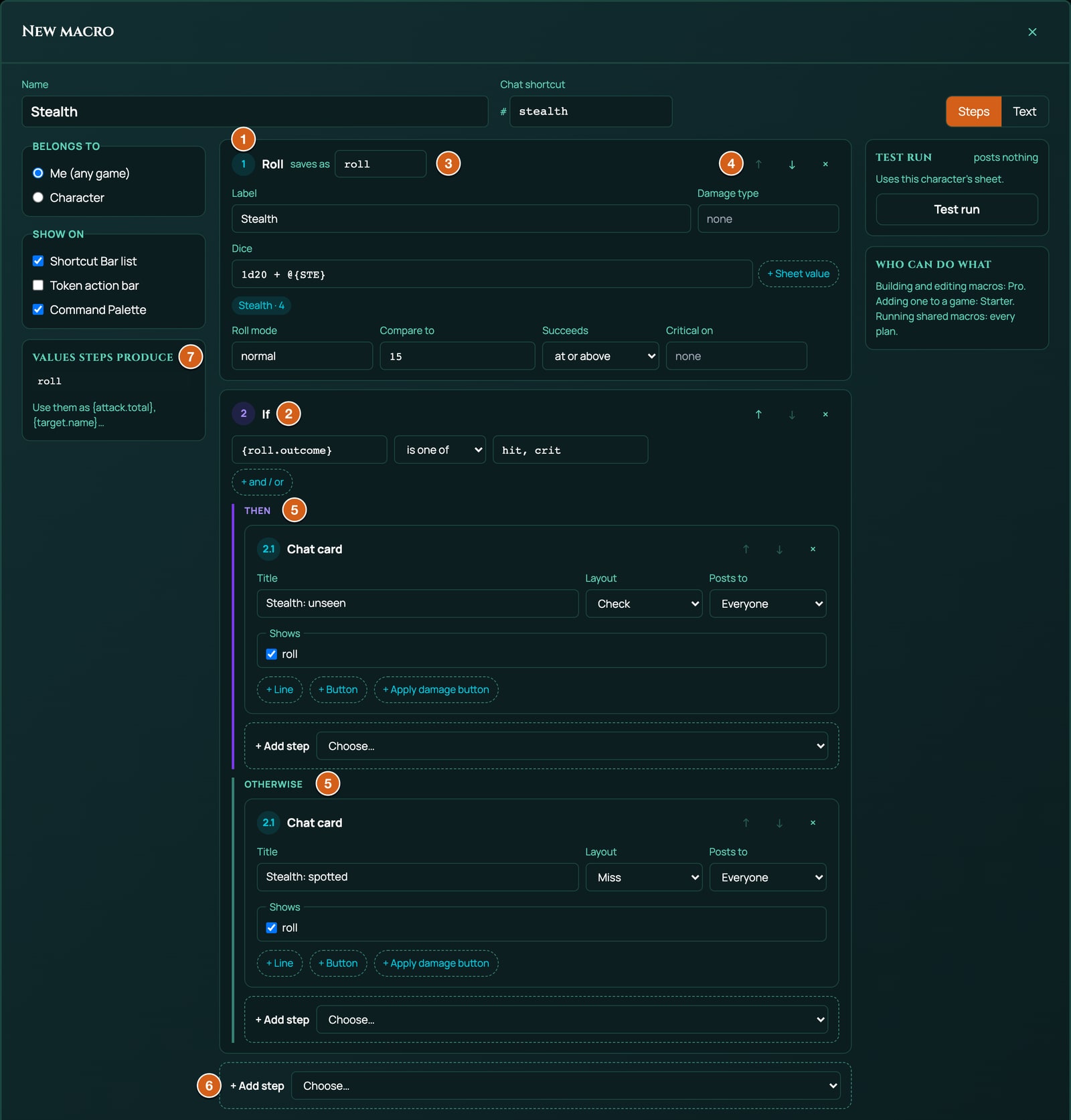
Steps the menu offers, and the ones only the Text view writes:
| Step | What it does | Text view | Saves a result | Who can run it |
|---|---|---|---|---|
| Roll | Rolls dice, with sheet values and earlier results added in | [[1d20 + 5]] -> roll |
Yes | Anyone |
| Ask | Asks a question, with answers to pick or a free answer | ?{Bonus?} -> bonus |
Yes | Anyone |
| Target | Picks tokens and reads one of their stats | @target(count=1) -> target |
Yes | Anyone |
| Weapon | Reads the equipped weapon's attack, damage and type | @weapon "Weapon" -> weapon |
Yes | Anyone with a character |
| Weapon swing | Plays the weapon's swing at the target | !swing weapon target=target |
No | Anyone |
| If / otherwise | Runs one list of steps or another | if … else … end |
No | Anyone |
| Chat card | Posts results in chat, with buttons | &{card} "Title" … end |
No | Anyone |
| Pop-up | Shows the result on screen | &{notify} "Title" … end |
No | Anyone |
| Whisper | Sends a note to the GM or to yourself | /w gm text |
No | Anyone |
| Sheet action | Presses an action on your character sheet | !action ID instance=ID |
No | Anyone with a character |
| Rollable table | Rolls one of the game's tables | !table ID "Label" |
No | Anyone who can see the table |
| Run macro | Runs another macro by its shortcut | #init |
No | Anyone |
| Sound | Plays a sound for everyone | !sound {…} |
No | Anyone |
| Music | Plays a track | !music {…} |
No | GM |
| Stop music | Stops the music | !stopMusic |
No | GM |
| Switch scene | Changes the scene | !scene {…} |
No | GM |
| Wait | Pauses between steps | !wait 2 |
No | Anyone |
| Change phase (Text view only) | Swaps the scene to one of its phases | !phase {…} |
No | GM |
| Spell FX (Text view only) | Casts a Spell FX effect | !spellFx {…} |
No | Anyone; needs the GM's Pro plan |
| Dramatic effect (Text view only) | Plays a dramatic effect | !dramatic {…} |
No | Meant for the GM |
Music, Stop music and Switch scene only show in the GM's menu.
Roll
Rolls a dice formula and saves the result. The formula can add sheet values, such as @{STR_MOD}, and earlier results, such as {bonus}. With Compare to set, the roll also gets an outcome: hit, miss, critical or fumble.
| Setting | What it does | Default and limits |
|---|---|---|
| Label | The roll's name on the card and the pop-up. | Roll. Up to 120 characters. |
| Damage type | The damage type the card shows, such as slashing or cutting. It can be a result, such as {weapon.type}. |
Empty (placeholder none). Up to 32 characters, saved in lower case. |
| Dice | The formula: dice like 1d20 or 2d6, whole numbers, + and -. + Sheet value opens a list of the sheet's values, each shown as its label, its ID and its value now; click one to add it. |
1d20. Up to 200 characters, 100 dice, 1000 sides a die and 20 terms. |
| Roll mode | normal, advantage, disadvantage, or an earlier answer in curly brackets, such as {mode}. With advantage or disadvantage the whole formula is rolled twice, and the better or worse set counts: the higher dice total, or the lower when Succeeds is at or below. An answer counts in capitals or not. |
normal. Pick the mode from the list the box opens: a word typed here that isn't on it, such as adv, rolls normally without a warning. (The Text view also takes adv, dis and capitals.) |
| Compare to | The number to beat: a number, a result such as {target.stat}, or a sheet value such as @{MELEE}. One thing only: @{MELEE}+10 gives no outcome. |
Empty: no outcome. |
| Succeeds | at or above for rolls where high is good, such as a 5e attack. at or below for roll-under games such as Ashfall. | at or above. |
| Critical on | A natural roll at or above this number is a critical, and a natural 1 is a fumble. Leave it empty for no criticals or fumbles. | Empty (placeholder none). From 2 to 1000. |
Text view, with every option:
[[1d20 + @{STR_MOD} + @{PROF}]] label="Longsword" mode={mode} vs={target.stat} crit=20 -> attack
[[ ]] holds the formula, label= the label, mode= the roll mode, vs= Compare to, crit= Critical on, type= the damage type, and beat=under sets Succeeds to at or below. -> attack is the result name. Quote a value with spaces in it, such as label="Melee strike".
What it saves, for a result named attack:
| Write | You get |
|---|---|
{attack} or {attack.total} |
The total. |
{attack.natural} |
The face of the first die, when the formula starts with one die, such as 1d20 or 1d100. With advantage, the die of the set that counted. |
{attack.outcome} |
hit, miss, crit or fumble, or nothing without Compare to or Critical on. |
{attack.versus} |
The number it was compared with. |
{attack.label}, {attack.formula}, {attack.damageType} |
The label, the formula as rolled with the values filled in, and the damage type. |
A minimal example, a d20 plus 5 posted to chat:
[[1d20 + 5]] label="Check" -> roll
&{card:check} "Check" show=roll
end
What a formula can and can't hold, how outcomes are worked out and which sheet values exist are on Dice, values and outcomes. In short: no keep or drop dice, no exploding dice, no multiplying or dividing, and no brackets. A formula a macro can't roll stops the macro with a note, such as "Attack" could not be rolled, followed by the reason.
Ask
Asks the person running the macro a question, and saves the answer. With answers listed, they pick one; with none, they type one.
| Setting | What it does | Default and limits |
|---|---|---|
| Question | What the prompt asks. It can show a result, such as You rolled {look.total}. Roll again?. |
Which one?. Up to 120 characters. Required. |
| Answers | One row for each answer: its label, which the person sees, then saves and the value the macro saves. Leave the value empty to save the label itself. × removes an answer, and + Answer adds one, labelled Option. | Normal (saves normal) and Advantage (saves advantage). Up to 10 answers, 60 characters each: at 10, + Answer goes. |
Text view, with answers as Label=value:
?{Roll Stealth with?|Normal=normal|Advantage=advantage|Disadvantage=disadvantage} -> mode
And with no answers, for a free answer:
?{Bonus?} -> bonus
The answer is saved as text: {mode} is advantage when the person picks Advantage. A value that is a number, such as -20, works in a formula. A typed answer must be a plain whole number to work in dice: 3 works, +3 stops the roll with bonus is "+3", which is not a number.
How the value follows the label in the Steps view:
- A new answer starts as Option, with its value empty. Type a label, such as
Disadvantage, and with the value still empty it savesDisadvantage. - Type a value of its own, such as
-20for Hard (-20), and it keeps that value whatever you then call the answer. Renaming Normal to Straight keeps savingnormal. - The hint under the answers says: Each answer saves the value next to it (e.g. "advantage" sets a roll mode); leave it blank to save the answer itself.
How the prompt looks and works when the macro runs is on Questions, cards and buttons.
Target
Picks one or more tokens on the board and reads one of their stats, such as AC, so a roll can be compared with it.
| Setting | What it does | Default and limits |
|---|---|---|
| How many | The most tokens it picks. | 1. From 1 to 10. |
| Read stat | The token stat to read. defense reads whichever stat the game system uses to defend, such as AC in 5e and 5.5e. Ashfall has none (its Armour soaks damage), so there defense reads nothing: name armour if you want it. You can also name a stat, such as ac, hp, sanity or wounds. |
defense. |
| Use the selected token | When it's on and tokens are selected on the board, the macro takes them without asking. | On. |
Text view. selected=no turns Use the selected token off:
@target(count=1, stat=defense) -> target
@target(count=3) -> targets
@target(count=1, selected=no) -> target
When it runs:
- With Use the selected token on and tokens selected, it takes the first ones selected, up to How many, without a prompt. With fewer selected than How many, it takes those. Run from the token action bar, the bar's own token is left out, because it's the one acting: with no other token selected, the prompt opens.
- Otherwise a prompt lists every player, enemy and NPC token on the board, with the stat beside each. The GM also sees hidden tokens.
- If there's no token to pick, or you press Esc, the macro stops.
What it saves, for a result named target:
| Write | You get |
|---|---|
{target} or {target.name} |
The first token's name. |
{target.names} |
Every picked token's name, such as Goblin 1, Goblin 2, Goblin 3. |
{target.stat} |
The first token's stat, or nothing if it has none. |
An Apply damage button hits every token the Target step picked, with the same amount.
Weapon
Reads the weapon your character has equipped, so one macro works whatever they carry.
| Setting | What it does | Default and limits |
|---|---|---|
| (no settings) | The box explains what you can read from it. | Saves as weapon. |
Text view:
@weapon "Weapon" -> weapon
When it runs:
- With one weapon equipped, it uses that one.
- With several equipped, it asks Which weapon?.
- With none equipped, it asks Nothing is equipped. Attack with? and lists every weapon the character carries. With only one to choose from, it uses that one without asking.
- With no weapon at all, or no character in the game, the macro stops with a note.
A weapon the game system gives every character, such as the Unarmed Strike and Improvised Attack on every 5e and 5.5e sheet, doesn't count as equipped here. So one equipped Longsword is used without a question, and with nothing else equipped those two are listed last.
What it saves, for a result named weapon:
| Write | You get |
|---|---|
{weapon} or {weapon.name} |
The weapon's name. |
{weapon.attack} |
The attack as a formula, such as 1d20 + 5. Proficiency, finesse and magic bonuses come from the sheet. |
{weapon.damage} |
The damage as a formula, such as 1d8 + 3. |
{weapon.type} |
The damage type, such as slashing. |
{weapon.target} |
For an attack that rolls against a number of its own, such as an Ashfall weapon's skill, that number. Empty for a 5e or 5.5e weapon. |
{weapon.beat} |
under for such an attack that succeeds at or below its number, over for one at or above. |
Use them in a roll: [[{weapon.attack}]]. You can add to a whole roll like this, {weapon.attack} + 2, but not subtract it.
The sheet's bonuses to the weapon's rolls are added in, but not yet effects that give advantage, a wider critical range, a formula that replaces the damage, or doubled dice on a critical.
It works with Ashfall weapons too. An Ashfall weapon's attack is a d100 under its skill, so {weapon.attack} is 1d100 and {weapon.target} is the skill, such as 45 for Melee 45. Roll it with beat=under:
@weapon "Weapon" -> weapon
[[{weapon.attack}]] label="Strike" vs={weapon.target} beat=under -> attack
A melee weapon's damage includes Heft. The step works Heft out when it reads the weapon, so {weapon.damage} shows it as a plain number added to the weapon's dice, such as 1d10 + 1. The ready-made Ashfall Weapon strike uses all of this: see Ready-made macros.
Weapon swing
Plays the weapon's swing animation from your character's token to the target, for everyone: a miss on a miss or a fumble, and a harder strike on a critical.
| Setting | What it does | Default and limits |
|---|---|---|
| Weapon | The result name of a Weapon step. | weapon. Required. |
| At | The result name of a Target step. | target. |
| Miss or crit from | The result name of the attack roll, so the swing misses or strikes hard to match. | Empty (placeholder optional). |
Text view:
!swing weapon target=target outcome=attack
It needs Spell FX, which is on the GM's Pro plan. Without it, the macro runs without the swing, and says nothing. A weapon with no swing animation of its own stays quiet too, as Ashfall's weapons do for now.
If / otherwise
Runs one list of steps when a condition is true, and another when it isn't.
| Setting | What it does | Default and limits |
|---|---|---|
| Condition | A left side, a comparison and a right side, such as {attack.outcome} is one of hit, crit. The comparisons are =, ≠, >, ≥, <, ≤ and is one of. |
{roll.outcome} is one of hit, crit. |
| + and / or | Adds another condition, joined with and or or. | Up to 6 conditions. is one of takes up to 10 values. |
| Then | The steps to run when it's true. | Empty. |
| Otherwise | The steps to run when it isn't. | Empty. |
Text view:
[[1d20 + @{PERC}]] label="Perception" vs=15 -> look
if {look.outcome} = hit
  &{card:check} "Perception: you spot it" show=look
  end
else
  &{card:miss} "Perception: nothing" show=look
  end
  /w me You rolled {look.total} against 15.
end
Every condition, and how to chain several ifs, is on Questions, cards and buttons.
Chat card
Posts a card in chat with the results you choose, extra lines of text, and up to four buttons.
| Setting | What it does | Default and limits |
|---|---|---|
| Title | The card's heading. It can hold results and sheet values, such as {weapon.name} attack. |
Result. Up to 120 characters. |
| Layout | Plain, Attack, Check or Miss. Each has its own coloured stripe down the card's edge, and Attack, Check and Miss add a tag with that word in the card's header. Miss gives the card the look of a miss. A critical or a fumble on the card changes its look whatever the layout. | Plain. |
| Posts to | Everyone, You and the GM, or Only you. Only you cards are seen by the GM too. | Everyone. |
| Shows | A tick box for each result name: the rolls, targets, weapons and answers to show on the card. | None ticked. Up to 6. |
| Lines | + Line adds a label and a value, such as Save and DEX DC @{SPELL_SAVE_DC}. |
Up to 8. |
| + Button | A button that runs more steps when pressed, such as Roll damage. | Up to 4 buttons in all. |
| + Apply damage button | A button only the GM can press, which applies an amount of damage to the target. |
A card needs a title, a line or something ticked under Shows. At 8 lines, + Line goes; at 4 buttons, + Button and + Apply damage button go.
Text view: &{card:LAYOUT} with default, attack, check or miss, then the title, then show= and to=gm (You and the GM) or to=me (Only you, also written to=self). Lines, buttons and the closing end follow:
?{Bonus?} -> bonus
[[1d20 + {bonus}]] label="Hidden check" -> check
&{card:check} "Hidden check" show=check to=gm
  line "Bonus" "{bonus}"
end
/w gm Hidden check: {check.total} (bonus {bonus})
Buttons, what a card looks like and who sees what are on Questions, cards and buttons.
Pop-up
Shows the result on screen in the roll pop-ups at the top right, with a HIT, MISS, CRIT or FUMBLE badge from the first roll that has an outcome. It posts nothing in chat.
| Setting | What it does | Default and limits |
|---|---|---|
| Title | The pop-up's heading. | Result. Up to 120 characters. |
| Who sees it | Only you, You and the GM, or Everyone. It always shows on your screen. | Only you. |
| Shows | A tick box for each result name. | The last result name in the macro. Up to 6. |
| Lines | + Line adds a label and a value. | Up to 8. |
| Offer the card's buttons (yours only) | Puts the buttons of the card this run has posted on the pop-up too, such as Roll damage. | Off. |
Text view. A pop-up always needs its end. buttons=card offers the card's buttons, and to=gm or to=everyone widens who sees it:
[[1d6]] label="d6" -> d6
&{notify} "Rolled a d6" show=d6
end
A pop-up has no buttons of its own. It closes after 15 seconds, or when you click ×.
Whisper
Sends a private note in chat to the GM or to yourself. It can hold results and sheet values.
| Setting | What it does | Default and limits |
|---|---|---|
| To | The GM or Yourself. The GM can read every whisper in the chat history, a whisper to yourself included. | The GM. |
| Text | The note. | Rolled {roll.total}. Up to 500 characters. Required. |
Text view: /w gm or /w me, then the text. A macro can't whisper to another player.
/w gm Ready for battle.
#init
Sheet action
Presses an action on your character's sheet, as clicking it on the sheet would: a spell is cast the way the sheet casts it, and anything else rolls with the sheet's own roller and spends what that item spends, such as a use, a spell slot or ammunition.
| Setting | What it does | Default and limits |
|---|---|---|
| Label | A name for the step. | Empty. |
| Action id | The ID of the action on the item. | Empty. Required. |
| Item id | The ID of the item on this character's sheet. | Empty. |
Text view, here pressing the Strike action of an Ashfall Rust Cleaver:
!action ATK instance=PASTE_ITEM_INSTANCE_ID "Rust Cleaver"
Without a character in the game, the step is skipped with a note.
Note: the step needs both IDs, and RollQuest doesn't show them in the app yet. The editor warns you beside Save: Step 4: a Sheet action with no Item id does nothing when it runs., and, with no Action id, Step 4: a Sheet action with no Action id is dropped when you save.
Rollable table
Rolls one of the game's rollable tables, and posts the result like rolling it from the Rollable Tables tool. See Rollable tables.
| Setting | What it does | Default and limits |
|---|---|---|
| Table | Pick from the tables you can see, starting at Pick a table…. | Required. |
| Who sees it | Everyone, You and the GM, or Only you. | Everyone. |
Text view: the table's ID, a label, and to=gm or to=self:
!table PASTE_TABLE_ID "Ambushers" to=gm
A player's macro can only roll tables their GM has shown to players. Any other table fails with Table not found.
Run macro
Runs another of your macros, by its chat shortcut, then carries on.
| Setting | What it does | Default and limits |
|---|---|---|
| Macro shortcut | The other macro's shortcut, without the #. |
Empty (placeholder init). Required. |
Text view: # and the shortcut, on a line of its own:
/w gm Ready for battle.
#init
- The other macro runs with values of its own: results don't pass between the two, in either direction.
- If the other macro is cancelled, this one stops too.
- If the other macro is switched off (its badge says Switched off), it's skipped and this one carries on, with a note only you see: #init is switched off, so it was skipped.
- A macro can run a macro that runs a macro, and no deeper: a fourth level is skipped with Macros can only run other macros 2 deep, so #x was skipped.
- When two macros share a shortcut, your character's macro comes first, then your own, then the game's.
Sound
Plays a sound from the game's Sound Library, once, for everyone.
| Setting | What it does | Default and limits |
|---|---|---|
| Label | A name for the step, used in notes. | Empty. |
| sound id | The sound's ID. | Empty. Required. |
Text view: the settings go in curly brackets, as "key": value pairs:
!sound {"soundId":"PASTE_SOUND_ID","label":"Thunder"}
!wait 2
/w gm The storm has started.
If the sound has been deleted, the step doesn't run, with "Thunder" is no longer in the sound library.
Music, Stop music and Switch scene
Steps for the GM: they play a track for everyone, stop the music, or switch everyone to a scene, the same way the matching steps of a held action do.
| Step | Settings | Text view |
|---|---|---|
| Music | Label, music id | !music {"musicId":"PASTE_TRACK_ID","label":"Battle"} |
| Stop music | Label | !stopMusic |
| Switch scene | Label, scene id | !scene {"sceneId":"PASTE_SCENE_ID","label":"Cliffs"} |
Each box says Only the GM can run this step. A GM macro that uses them:
!scene {"sceneId":"PASTE_SCENE_ID","label":"Cliffs"}
!music {"musicId":"PASTE_TRACK_ID","label":"Battle"}
!wait 2
!table PASTE_TABLE_ID "Ambushers" to=gm
/w gm Ambush sprung. Roll initiative!
Tip: the sound, music and scene steps take IDs the app doesn't show yet. For a sequence of scenes, music and sounds, a held action lets you pick each from a list.
Left without its ID, one of these steps does nothing, and the editor warns you beside Save, such as Step 1: a Music step with no track id does nothing, and is dropped when you save.
Wait
Pauses the macro before the next step.
| Setting | What it does | Default and limits |
|---|---|---|
| Seconds | How long to wait. | 1. From 0.1 to 60. A wait of 0 is dropped when you save. |
Text view:
!wait 2
Steps only the Text view writes
These three aren't in the + Add step menu. The Text view reads and writes them, and the Steps view shows each as a box with its Label, and for a phase its scene id and phase id.
| Step | Text view | What it does |
|---|---|---|
| Change phase | !phase {"sceneId":"PASTE_SCENE_ID","phaseId":"PASTE_PHASE_ID","label":"Night"} |
Swaps the scene to one of its phases, for everyone. GM only. It only works on the scene that's on: otherwise it says "Night" is a phase of another scene. Switch to that scene first. See Phases. |
| Spell FX | !spellFx {…} |
Casts a Spell FX effect. Needs the GM's Pro plan. |
| Dramatic effect | !dramatic {…} |
Plays a dramatic effect, through the GM's Dramatic Effect tool. |
A GM macro with a phase change:
!stopMusic
!phase {"sceneId":"PASTE_SCENE_ID","phaseId":"PASTE_PHASE_ID","label":"Night"}
A step from a newer RollQuest
A macro saved by a newer version of RollQuest can hold a step this version doesn't know. It's kept as it is, never run and never deleted. Its box says This step needs a newer version of RollQuest. It is kept as it is and skipped when the macro runs., and running the macro gives the note A "x" step needs a newer version of RollQuest, so it was skipped. Reload the page to get the newest version.
Limits
| Limit | Value | Past it |
|---|---|---|
| Steps in a macro, counting the steps inside ifs and buttons | 60 | The editor won't save, and names the first step that would be lost. |
| Steps inside steps (an if in a button in an if) | 4 levels | The editor won't save. In the Steps view, a list nested deeper than that says Steps can't go deeper than 4 levels; anything here is not saved. in place of + Add step. |
| Answers on an Ask | 10 | The editor won't save. + Answer goes at 10. |
| Conditions on an If | 6 | The editor won't save. |
| Values after is one of | 10 | The rest are dropped when you save, without a warning. |
| Tokens a Target step picks | 1 to 10 | The editor won't save more than 10. |
| Buttons on a card | 4 | The editor won't save. + Button and + Apply damage button go at 4. |
| Lines on a card or a pop-up | 8 | The editor won't save. + Line goes at 8. |
| Results under Shows | 6 | The editor won't save. |
| Rows on a posted card (shown results and lines) | 12 | Only the first 12 show. |
| Macros running macros | 3 levels | The fourth is skipped, with a note. |
| Name, label, text, formula | 80, 120, 500 and 200 characters | |
| Chat shortcut | 1 to 32 characters: lower-case letters, digits and dashes, starting with a letter or a digit | The editor won't save. |
| Wait | 0.1 to 60 seconds | Kept within that range. |
When a macro goes over a limit, the bottom of the editor says which step and what would be lost, and Save stays greyed out until you fix it, so nothing is dropped without you knowing. For example, a question with 11 answers says Step 1: a question can have at most 10 answers (it has 11). The extra answers would not be saved. Every message is listed in When Save is greyed out.
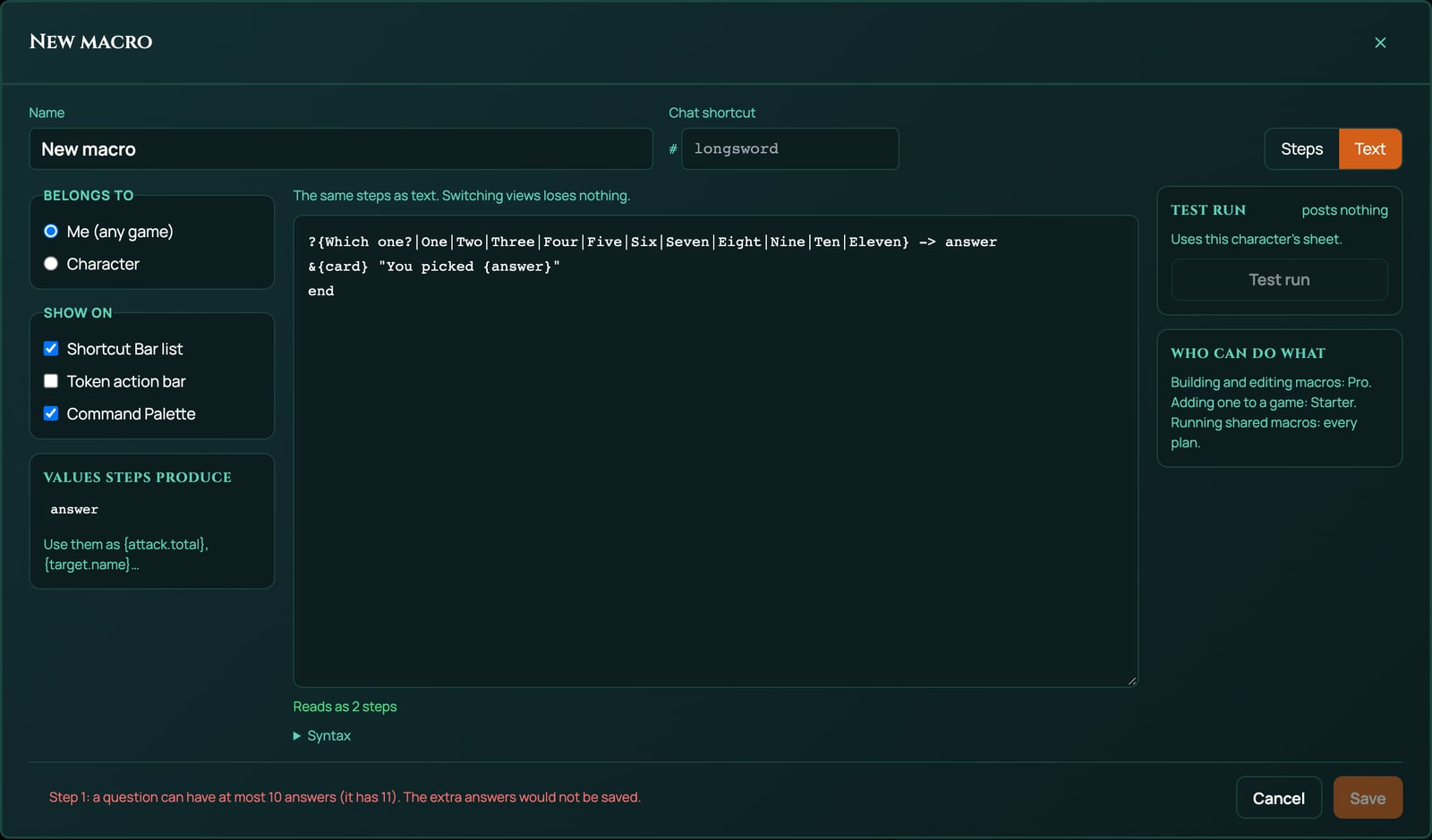
To keep a long macro within the limits, move a part of it into a macro of its own, and run that with Run macro.
Related
The macro language (Text view) · Dice, values and outcomes · Questions, cards and buttons · Macro cookbook · Held actions