

Macros for Ashfall
This page walks through Ashfall's rules one at a time, with a working macro for each: roll-under tests, Triumph and Disaster, harder and easier tests, Fortune and Misfortune, strikes and damage through Armour, the warp, Corruption, Wounds, Fate, and what macros can't do in Ashfall yet.
Ashfall is RollQuest's own game system: gaslight survival horror, with percentile dice. In 5e you roll high; in Ashfall you roll a d100, a die from 1 to 100, and want to roll low, at or under the number you're testing. Wounds count up as you're hurt, the warp drains your Sanity, and Corruption creeps in. A macro does the bookkeeping at the table: it rolls the test, says whether it passed, spots a Triumph or a Disaster, and in a fight hands the damage to the Game Master (GM) to apply with one click. Every macro on this page has been checked against RollQuest's own macro code: copy one into the editor's Text view and it works. To build new Ashfall gear and talents, see Build on Ashfall.
Plan: running macros is on every plan, and so is adding the four ready-made Ashfall macros. Building the others on this page needs Pro. Putting them into a game, so every player can run them, needs the GM to be on Starter.
Tip: the GM can build these once, add them to the game, and every player runs them from their Shortcut Bar, whatever their plan. See Share, run and fix macros.
What a macro can read in Ashfall
A macro reads a character's numbers by their ID, such as @{MELEE}. These are Ashfall's:
| Value | ID | What it is |
|---|---|---|
| Brawn, Vigour, Frame, Reflex, Presence, Wits, Resolve, Learning | BRAWN, VIGOUR, FRAME, REFLEX, PRESENCE, WITS, RESOLVE, LEARNING |
The eight characteristics, each rolled at character creation. |
| Ember | EMBER |
Luck that burns down: the sheet spends it after a failed test. |
| The 42 skills | MELEE, DODGE, SPOT, STEALTH, PISTOL, LONG_GUN, RUINLORE, READ_PEOPLE and the rest, in capitals with underscores |
Each is its base plus the points bought for it: Melee is 25 plus its points, Dodge is half Reflex plus its points. |
| Wounds and Max Wounds | WOUNDS, WOUNDS_MAX |
Wounds count up from 0 as you're hurt. Max Wounds is a tenth of Vigour plus Frame, and at it you're Broken. |
| Sanity and Max Sanity | SANITY, SANITY_MAX |
Sanity starts at Resolve, and the warp drains it. Max Sanity is 99 less your Ashlore. |
| Kindling and Max Kindling | KINDLING, KINDLING_MAX |
The inner flame rites burn: a fifth of Resolve, less what you've spent. |
| Corruption and Max Corruption | CORRUPTION, CORRUPTION_MAX |
Rises from 0 towards 100. |
| Armour | ARMOUR |
How much of each physical hit it soaks. |
| Initiative | INIT |
Reflex divided by 10, rounded down. |
| Pace | PACE |
How many yards you move in a round. |
| Heft | HEFT_DICE, HEFT_SIDES, HEFT_FLAT |
The extra damage your weight puts behind a melee blow: how many dice, their size, and a flat amount (0, -1 or -2). |
A Target step reads a token's stats instead: wounds, sanity, corruption and armour. To show a target's Armour on a card, write stat=armour: stat=defense doesn't read it, because in Ashfall Armour soaks a hit rather than being a number to beat.
Fate isn't a value: it's a pool of points on the sheet, and a macro can't read it or spend it. The sheet itself offers Spend Fate to reroll after a failed test it rolled. See Fate: reroll a failure.
How sheet values work is on Dice, values and outcomes, and which character's sheet a macro reads on Share, run and fix macros.
Roll under a skill
This is the ready-made Melee strike macro, #strike. It rolls a d100 against Melee and posts a success or a failure:
[[1d100]] label="Melee strike" vs=@{MELEE} beat=under -> check
if {check.outcome} = hit
  &{card:check} "Melee strike: success" show=check
  end
  &{notify} "Melee strike: success" show=check
  end
else
  &{card:miss} "Melee strike: failure" show=check
  end
  &{notify} "Melee strike: failure" show=check
  end
end
flowchart TD
  A["Roll 1d100"] --> B{"At or under Melee?"}
  B -->|Yes| C["Success card and pop-up"]
  B -->|No| D["Failure card and pop-up"]
[[1d100]]rolls the d100.vs=@{MELEE}compares it with the character's Melee.beat=undermakes a roll at or under Melee succeed. Without it, a macro expects you to roll high, as in 5e.- The outcome is
hitfor a pass andmissfor a fail. The macro puts success or failure in the title, because the card's own words are Hit · needed 45 or Miss · needed 45, and the pop-up's badge HIT or MISS.
A macro's card says hit or miss, never a band. The sheet's own rolls name Ashfall's bands (Triumph, Sharp, Solid, Success, Failure and Disaster): see Build on Ashfall.
Ashfall's other ready-made macros are Weapon strike (#attack, below), Dodge (#dodge, the same macro with @{DODGE}) and Steady your nerves (#steady, the same with @{SANITY}). Add them from the Macros panel: see Ready-made macros. For any other skill, swap the ID and the titles.
Note: don't set Critical on (crit=) on an Ashfall roll. It counts a high roll as a critical and a 1 as a fumble, which is backwards for roll-under, and the editor warns you if you do. For Ashfall's own criticals, see Triumph and Disaster.
Make a test harder or easier
The GM often says a test is easier or harder, such as "Stealth, at -20". Compare to can't hold a sum, so vs=@{STEALTH}-20 gives no outcome at all. Move the roll instead: a -20 test adds 20 to the roll, which has the same effect.
This macro asks how hard the test is first:
?{How hard?|Easy (+20)=20|Normal=0|Hard (-20)=-20|Very hard (-40)=-40} -> diff
[[1d100 - {diff}]] label="Stealth" vs=@{STEALTH} beat=under -> check
if {check.outcome} = hit
  &{card:check} "Stealth: success" show=check
    line "Difficulty" "{diff}"
  end
else
  &{card:miss} "Stealth: failure" show=check
    line "Difficulty" "{diff}"
  end
end
- Each answer's value is the modifier: Hard saves
-20. [[1d100 - {diff}]]takes the modifier off the roll. Taking away -20 adds 20, so on Hard an 82 becomes 102, against Stealth 40.- The card shows that moved total, 102, and the Difficulty line says why.
{check.natural}is still the d100's own face, 82, so a check for a Triumph or a Disaster still reads the die.
Triumph and Disaster
Ashfall's critical is a Triumph: a roll of 1, whatever the number. Its fumble is a Disaster: a roll of 100, or 96 and up when the number is under 50. Doubles such as 11 or 22 mean nothing special. A macro checks the d100's face, {check.natural}:
[[1d100]] label="Melee" vs=@{MELEE} beat=under -> check
if {check.natural} = 1
  &{card:check} "Melee: Triumph" show=check
  end
else
  if {check.natural} = 100
    &{card:miss} "Melee: Disaster" show=check
    end
  else
    if {check.natural} >= 96 and @{MELEE} < 50
      &{card:miss} "Melee: Disaster" show=check
      end
    else
      if {check.outcome} = hit
        &{card:check} "Melee: success" show=check
        end
      else
        &{card:miss} "Melee: failure" show=check
        end
      end
    end
  end
end
&{notify} "Melee" show=check
end
flowchart TD
  A["Roll 1d100 against Melee"] --> B{"A 1?"}
  B -->|Yes| C["Triumph"]
  B -->|No| D{"A 100?"}
  D -->|Yes| E["Disaster"]
  D -->|No| F{"96 or more, and Melee under 50?"}
  F -->|Yes| E
  F -->|No| G{"Passed?"}
  G -->|Yes| H["Success"]
  G -->|No| I["Failure"]
- The first
ifcatches a Triumph. A 1 always passes, so it never needs the outcome. - The next two catch a Disaster: a 100, then 96 to 99 when Melee is under 50.
@{MELEE} < 50reads the skill straight from the sheet. - The last
ifis an ordinary pass or fail. - The pop-up at the end runs whichever way it went.
The two bands in between, Sharp (a pass at a fifth of the number or under) and Solid (at half or under), can't be worked out in a macro: an if can't compare with a fifth or a half of a skill. Roll from the sheet when you need them.
Fortune and Misfortune
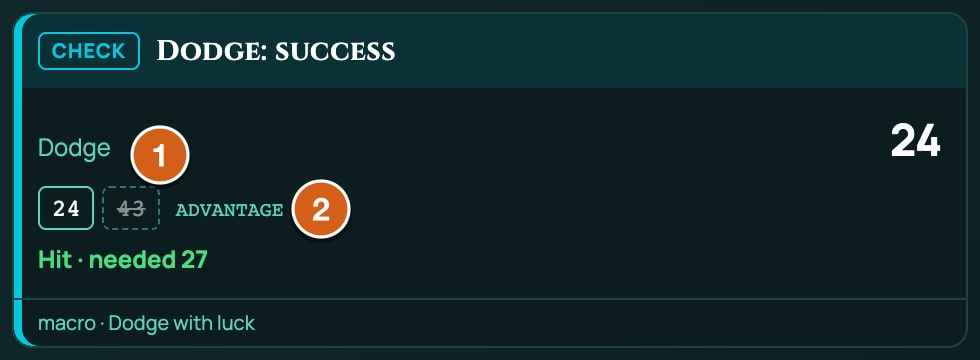
Ashfall's Fortune rolls two d100 and keeps the lower; Misfortune keeps the higher. A macro has no Fortune mode by name, but on a roll-under roll (beat=under) its roll modes mean the same thing: advantage keeps the lower d100, which is Fortune, and disadvantage keeps the higher, which is Misfortune. In 5e, advantage keeps the higher die; rolling under, RollQuest turns it round, so advantage is always the better roll. The answers here say what they mean:
?{Roll with?|Normal=normal|Fortune (keep the lower)=advantage|Misfortune (keep the higher)=disadvantage} -> luck
[[1d100]] label="Dodge" mode={luck} vs=@{DODGE} beat=under -> check
if {check.outcome} = hit
  &{card:check} "Dodge: success" show=check
  end
else
  &{card:miss} "Dodge: failure" show=check
  end
end
&{notify} "Dodge" show=check
end
The card shows both dice, with the one that didn't count struck through, and names the mode you picked: a Fortune roll says advantage.
A macro can't roll Fortune ×2 or Misfortune ×2, the three-dice versions: use the sheet's press and hold for those.
Strike and wound
An Ashfall strike is a skill test: Melee for a blade or a club, Pistol or Long Gun for a firearm. On a hit, the attacker rolls damage, and the GM applies it to the target, where Armour soaks some of it and the rest counts up as Wounds. A melee weapon adds the wielder's Heft to its damage; a firearm doesn't.
| Weapon | Test | Damage |
|---|---|---|
| Rust Cleaver | Melee | 1d10 + Heft, cutting |
| Iron Maul | Melee | 2d6 + Heft, impact |
| Toxin Needler | Pistol | 1d6, toxic |
A melee strike made from the sheet at a target lets the target Dodge or Fight back. A strike from a macro doesn't: only the attacker rolls.
The ready-made Weapon strike
The ready-made Weapon strike, #attack, rolls whatever weapon the character has equipped, Ashfall's or your own homebrew's:
?{Strike with?|Normal=normal|Fortune=advantage|Misfortune=disadvantage} -> mode
@weapon "Weapon" -> weapon
@target(count=1) -> target
[[{weapon.attack}]] label="Strike" mode={mode} vs={weapon.target} beat=under -> attack
!swing weapon target=target outcome=attack
if {attack.outcome} = hit
  &{card:attack} "{weapon.name} strikes" show=attack,target
    button "Roll damage" id=roll-damage
      [[{weapon.damage}]] label="Damage" type={weapon.type} -> damage
      &{notify} "{weapon.name} damage" show=damage
      end
    end
    apply "Apply damage" id=apply-damage amount={damage.total} type={weapon.type}
  end
  &{notify} "{weapon.name}" show=attack,target buttons=card
  end
else
  &{card:miss} "{weapon.name} misses" show=attack,target
  end
  &{notify} "{weapon.name}" show=attack,target
  end
end
- Strike with? asks for Normal, Fortune or Misfortune. Their values are
advantageanddisadvantage, as above. @weaponis the Weapon step. It reads the equipped weapon from the sheet, and asks which when more than one is equipped. With none equipped, it takes the one weapon the character carries without asking, or offers them all when there are several.{weapon.attack}is the weapon's roll, a1d100, andvs={weapon.target}is the number it's rolled under: the character's Melee for a melee weapon, Pistol or Long Gun for a firearm.!swingasks for the weapon's swing on the board, at the target. Ashfall's weapons have no swing animation yet, so nothing plays, and the macro carries on without it.- On a hit, Roll damage rolls
{weapon.damage}with the weapon's damage type, and Apply damage applies it.
The Weapon step works out a melee weapon's Heft as one number when it reads the weapon. With +1d4 Heft, the d4 is rolled then, so a Rust Cleaver's damage reads something like 1d10 + 3: the card shows the d10, and the Heft is already in the 3. With no Heft dice it's plain 1d10, and with -1 Heft 1d10 - 1. To see the Heft die land on the card, write the strike yourself, as in the next section.
The step stops with a message, and the macro rolls nothing, when it can't turn a weapon into dice: when an effect adds a bonus die to a roll-under strike (rolls under a number, so its bonus dice can't be added), or when the number to beat can't be worked out (could not work out the number to beat).
A strike written by hand
This one strikes with a Rust Cleaver and rolls the Heft die on the card:
@target(count=1, stat=armour) -> target
[[1d100]] label="Melee strike" vs=@{MELEE} beat=under -> attack
if {attack.outcome} = hit
  &{card:attack} "Strike hits {target.name}" show=attack,target
    button "Roll damage" id=roll-damage
      [[1d10 + @{HEFT_DICE}d@{HEFT_SIDES} + @{HEFT_FLAT}]] label="Damage" type=cutting -> damage
    end
    apply "Apply damage" id=apply-damage amount={damage.total} type=cutting
  end
  &{notify} "Melee strike" show=attack,target buttons=card
  end
else
  &{card:miss} "Strike misses {target.name}" show=attack,target
  end
  &{notify} "Melee strike" show=attack,target
  end
end
@target(count=1, stat=armour)picks the enemy and shows its Armour on the card. Don't compare the strike with it: Armour soaks damage, it isn't a number to roll under.- The strike rolls under the attacker's Melee.
- Roll damage rolls 1d10 plus the character's Heft, read from the sheet:
@{HEFT_DICE}d@{HEFT_SIDES}becomes1d4with +1d4 Heft, and0d4, which rolls nothing, with none.@{HEFT_FLAT}adds 0, -1 or -2. With -1 Heft and a 1 on the d10, the damage comes to 0, and Apply damage says there's no damage to apply. - Apply damage applies it as
cutting. The GM presses it; RollQuest takes off the target's Armour and adds the rest to its Wounds. The card says Applied 12 cutting to Drift-walker: that's before Armour, so against Armour 2 the Drift-walker takes 10 Wounds.
For an Iron Maul, change 1d10 to 2d6 and cutting to impact, on both the roll and Apply damage. A firearm adds no Heft. For the Toxin Needler, which shoots under Pistol:
@target(count=1, stat=armour) -> target
[[1d100]] label="Toxin Needler" vs=@{PISTOL} beat=under -> attack
if {attack.outcome} = hit
  &{card:attack} "Needle hits {target.name}" show=attack,target
    button "Roll damage" id=roll-damage
      [[1d6]] label="Damage" type=toxic -> damage
    end
    apply "Apply damage" id=apply-damage amount={damage.total} type=toxic
  end
else
  &{card:miss} "Needle misses {target.name}" show=attack,target
  end
end
Ashfall's damage types, and where each lands:
| Type | Text | Lands on |
|---|---|---|
| Cutting, Impact, Rending, Toxic | cutting, impact, rending, toxic |
Armour soaks it, then the rest adds to Wounds. |
| Warp | warp |
Sanity, with no Armour. |
Note: set the type on an Ashfall Apply damage button. With no type, the damage goes to Wounds through Armour, like Cutting. A type Ashfall doesn't have, such as 5e's slashing, does nothing at all, and Sanity only drains when you name warp.
The Weapon step in your own macros
The Weapon step works in any macro. It saves {weapon.name}, {weapon.attack}, {weapon.damage} and {weapon.type}, and for an Ashfall weapon also {weapon.target}, the number to roll under, and {weapon.beat}, which reads under. Write vs={weapon.target} beat=under on the strike, as the ready-made does.
A Sheet action step can press the weapon's own actions instead: ATK is its Strike and DMG its Damage, rolled by the sheet the same way as clicking them, Heft die and all:
!action ATK instance=PASTE_ITEM_INSTANCE_ID "Rust Cleaver"
It needs the ID of the weapon on the character's sheet, which the app doesn't show yet.
Resist the warp
The warp attacks the mind, and in Ashfall you resist it with a Sanity test. This macro tests Sanity; on a failure it rolls warp damage for the GM to apply to your Sanity, and tells the GM quietly when you're close to breaking:
@target(count=1, stat=sanity) -> me
[[1d100]] label="Sanity" vs=@{SANITY} beat=under -> resist
if {resist.outcome} = hit
  &{card:check} "{me.name} resists the warp" show=resist
  end
else
  [[1d6]] label="Warp" type=warp -> warp
  &{card:miss} "The warp takes hold of {me.name}" show=resist,warp
    line "Sanity now" "@{SANITY} / @{SANITY_MAX}"
    apply "Apply warp to Sanity" id=apply-warp amount={warp.total} type=warp target=me
  end
  if @{SANITY} <= 10
    /w gm {me.name} is close to breaking (Sanity @{SANITY}).
  end
end
@target(count=1, stat=sanity) -> meis your own token: select it before you press the macro, or pick it from the list. Apply warp to Sanity needs that token to apply the warp to.- On a failure the warp roll goes straight on the card, and Apply warp to Sanity applies it as
warp, which drains Sanity. - Sanity now shows Sanity before the warp is applied.
if @{SANITY} <= 10reads the sheet, and whispers the GM when Sanity is 10 or less.
The rest is RollQuest's: when 5 or more Sanity goes in one go, it asks for a Wits test, and at 0 Sanity the character is Lost.
With Steeled Mind
The Steeled Mind talent gives +10 to Sanity tests against the warp. Its own Resist button on the sheet rolls that test, and the Sanity test a horror asks for adds the 10 by itself. A macro reads @{SANITY} without the talent, so take 10 off the roll, as for a harder or easier test:
@target(count=1, stat=sanity) -> me
[[1d100 - 10]] label="Sanity (Steeled Mind)" vs=@{SANITY} beat=under -> resist
if {resist.outcome} = hit
  &{card:check} "{me.name} resists the warp" show=resist
  end
else
  [[1d6]] label="Warp" type=warp -> warp
  &{card:miss} "The warp takes hold of {me.name}" show=resist,warp
    apply "Apply warp to Sanity" id=apply-warp amount={warp.total} type=warp target=me
  end
end
More talents
Several of Ashfall's talents are worked out on the sheet now, and a macro can play them from the Shortcut Bar too:
Scavenger, +10 Ruinlore to identify salvage and ruins. Its own Identify salvage button on the sheet rolls it. In a macro, the question's answers are the bonus itself:
?{Identifying salvage or ruins?|Yes=10|No=0} -> scav
[[1d100 - {scav}]] label="Ruinlore" vs=@{RUINLORE} beat=under -> check
if {check.outcome} = hit
  &{card:check} "Ruinlore: success" show=check
  end
else
  &{card:miss} "Ruinlore: failure" show=check
  end
end
Quickened, reroll a failed Dodge once between breathers. The sheet does this by itself: a failed Dodge rolled from the sheet offers Reroll the Dodge, and the use comes back on Catch Breath and Recuperate. For a Dodge rolled from a macro, ask on a failure:
[[1d100]] label="Dodge" vs=@{DODGE} beat=under -> first
if {first.outcome} = hit
  &{card:check} "Dodge: success" show=first
  end
else
  ?{Failed. Use Quickened to reroll?|Yes=yes|No=no} -> quick
  if {quick} = yes
    [[1d100]] label="Reroll (Quickened)" vs=@{DODGE} beat=under -> second
    &{card:default} "Dodge, rerolled with Quickened" show=first,second
    end
  else
    &{card:miss} "Dodge: failure" show=first
    end
  end
end
The macro can't spend the sheet's Quickened use, or tell whether you've used it: you keep count. Hardened, +2 Armour, is already on the sheet, so there's nothing for a macro to do.
Corruption
The Tremors, a minor corruption, gives -5 to every Reflex-based test while Corruption is 25 or more. A macro can read Corruption and add the 5 to the roll only when it applies:
if @{CORRUPTION} >= 25
  [[5]] label="Tremors" -> tremors
end
[[1d100 + {tremors}]] label="Reflex" vs=@{REFLEX} beat=under -> check
if {check.outcome} = hit
  &{card:check} "Reflex test: success" show=check
    line "Corruption" "@{CORRUPTION}"
  end
else
  &{card:miss} "Reflex test: failure" show=check
    line "Corruption" "@{CORRUPTION}"
  end
end
[[5]]rolls no dice: it's a way to save the number 5 astremors.- With Corruption under 25 that step never runs, so
{tremors}was never set, and in a formula it counts as 0. The roll is then1d100 + 0. - With Corruption 30 the roll is
1d100 + 5: 5 worse, for a roll-under test.
Wounds, Grievous and Broken
When Wounds reach Max Wounds, a tenth of Vigour plus Frame, the character is Broken, and RollQuest badges the token by itself. It handles the rest of Ashfall's injuries too: one hit of half Max Wounds or more makes the character Grievous and asks for a Vigour test, reaching Max Wounds while Grievous makes them Dying, and another hit while Broken kills them. This macro reads Wounds and tells the table, or only you:
if @{WOUNDS} >= @{WOUNDS_MAX}
  &{card:miss} "Broken" to=everyone
    line "Wounds" "@{WOUNDS} / @{WOUNDS_MAX}"
  end
  &{notify} "Broken" to=gm
    line "Wounds" "@{WOUNDS} / @{WOUNDS_MAX}"
  end
else
  &{notify} "Still standing"
    line "Wounds" "@{WOUNDS} / @{WOUNDS_MAX}"
    line "Sanity" "@{SANITY} / @{SANITY_MAX}"
  end
end
- At Max Wounds, such as 10 of 10, it posts a Broken card for everyone and pops it up for the GM.
- Below that, only you see a pop-up with your Wounds and Sanity.
- A macro compares two sheet values directly,
@{WOUNDS} >= @{WOUNDS_MAX}. It can't read the Broken, Grievous or Dying badges themselves.
Fate: reroll a failure
Fate points let a character reroll. When a test or a weapon's Strike rolled from the sheet fails, the sheet offers Spend Fate to reroll and pays the point itself. A macro's roll gets no such button, and a macro can't read or spend Fate, so this one asks, rerolls, and reminds you to mark the point on your sheet:
[[1d100]] label="Melee strike" vs=@{MELEE} beat=under -> first
if {first.outcome} = hit
  &{card:check} "Melee strike: success" show=first
  end
else
  ?{Failed. Spend a Fate point to reroll?|Yes=yes|No=no} -> spend
  if {spend} = yes
    [[1d100]] label="Reroll (1 Fate)" vs=@{MELEE} beat=under -> second
    &{card:default} "Melee strike, rerolled with Fate" show=first,second
    end
    /w me Mark 1 Fate as spent on your sheet.
    /w gm Spent 1 Fate: reroll {second.total} ({second.outcome}).
  else
    &{card:miss} "Melee strike: failure" show=first
    end
  end
end
- On a pass there's no question at all.
- On a failure it asks. Yes rolls again and posts both rolls on one card, whispers you a reminder, and tells the GM the result.
- No posts the failure.
- Spend the point with − on the Fate row of your sheet. The macro doesn't check that you have one left.
Initiative
Ashfall rolls a d10 for initiative, plus Initiative:
[[1d10 + @{INIT}]] label="Initiative" -> init
&{card:check} "Initiative" show=init
end
&{notify} "Initiative" show=init
end
It posts the roll in chat and pops it up. It doesn't enter it in a battle's turn order: see Start a battle for that.
What macros can't do in Ashfall yet
- Name the bands. A macro's card says hit or miss. It can spot a Triumph or a Disaster from the die, but not a Sharp or a Solid. Roll from the sheet for those.
- The sheet's second chances. Press the test, Spend Ember, Spend Fate to reroll and Quickened's Reroll the Dodge come with the sheet's own rolls, not a macro's. A macro's roll ticks no skill for Tempering either.
- Fate and Ember: read or spend them. Use the sheet.
- Fortune ×2 and Misfortune ×2. A macro has advantage (Fortune) and disadvantage (Misfortune), with two dice; for three, roll from the sheet.
- A target's Dodge or Fight back. Only a strike made from the sheet at a target offers them.
- The Heft die in the Weapon step. It arrives as a flat number. Write the damage yourself to roll it.
- Change Wounds, Sanity or Corruption directly. Damage and warp go through the GM's Apply damage button; Corruption only changes on the sheet.
- Rests and Tempering: Recuperate, Catch Breath and Tempering are buttons on the sheet, not steps.
- Read the Broken, Grievous, Dying or Dead badges, or a target's sheet. A macro reads a target's token stats only.
- Sums in Compare to: move the roll instead.
Related
Build on Ashfall · Ready-made macros · Dice, values and outcomes · Questions, cards and buttons · Macro cookbook · Game systems