

Questions, cards and buttons
This page shows how a macro talks to the table: it asks a question when you press it, picks one path or another with if and otherwise, posts a chat card with buttons such as Roll damage and Apply damage, pops up the result on screen, and keeps a roll secret when it should be.
These are the parts of a macro people see. A question lets one macro cover several cases, such as rolling with or without advantage. An if, with its otherwise, posts a hit card on a hit and a miss card on a miss. A chat card shows the dice and the outcome to the table, and its buttons carry the rest of the turn: the player rolls damage when they hit, and the Game Master (GM) applies it to the target with one click. A pop-up shows the same result on screen without filling the chat. Each part has its own settings, listed in full on Every step, one by one; this page is about putting them together.
Plan: running macros, answering their questions and pressing their buttons is on every plan. Building and editing them needs Pro.
Ask a question
An Ask step stops the macro and asks the person who ran it a question. Their answer is saved under the step's result name, for later steps to use.
This macro asks how to roll before rolling Stealth. The answer's value, normal, advantage or disadvantage, becomes the roll mode:
?{Roll Stealth with?|Normal=normal|Advantage=advantage|Disadvantage=disadvantage} -> mode
[[1d20 + @{STE}]] label="Stealth" mode={mode} -> stealth
&{card:check} "Stealth" show=stealth
end
?{…}is the question. After the question, each|adds an answer asLabel=value: the person sees the label, and the macro saves the value.-> modesaves the answer asmode.mode={mode}rolls with the answer as the mode. Advantage rolls the formula twice and keeps the higher total.
When it runs, a prompt opens with the macro's name at the top and a button for each answer.
- Click an answer, or press its number key: 1 for the first answer, 2 for the second, up to 9.
- Or press Esc, click Esc at the top, or click outside the prompt, to cancel. The macro stops there.
On a phone, the prompt opens from the bottom of the screen.
A free answer
With no answers listed, the person types one. The prompt shows a box (Type an answer) and a Continue button: press Enter or click Continue. This secret check asks for a bonus and adds it to the roll:
?{Bonus?} -> bonus
[[1d20 + {bonus}]] label="Hidden check" -> check
&{card:check} "Hidden check" show=check to=gm
  line "Bonus" "{bonus}"
end
/w gm Hidden check: {check.total} (bonus {bonus})
A typed answer used in dice must be a plain whole number, such as 3 or -2. +3 or three stops the roll with a note saying it isn't a number. A number with a decimal point, such as 2.7, counts as 2.
Answers that are numbers
An answer's value can be a number for a formula. This Ashfall check asks how hard it is, and moves the roll by that much:
?{How hard?|Easy (+20)=20|Normal=0|Hard (-20)=-20|Very hard (-40)=-40} -> diff
[[1d100 - {diff}]] label="Stealth" vs=@{STEALTH} beat=under -> check
if {check.outcome} = hit
  &{card:check} "Stealth: success" show=check
    line "Difficulty" "{diff}"
  end
else
  &{card:miss} "Stealth: failure" show=check
    line "Difficulty" "{diff}"
  end
end
Why the roll moves instead of the target number is on Macros for Ashfall.
In the Steps view, each answer has two boxes with saves between them: the label people see, then the value the macro saves. Type 20 in the value box of Easy (+20), and so on. A value box left empty saves the label itself. Renaming an answer later keeps the value it saves: rename Normal to Straight and it still saves normal.
- An Ask holds up to 10 answers.
- Answers are compared without regard to capitals, so
{spend} = yesis true forYes. - A question can show results, such as
You rolled {look.total}. Roll again?, in the Steps view or the Text view. They're filled in when it's asked.
Pick a target
A Target step asks which tokens the macro is for, and reads one of their stats, such as AC. If tokens are selected on the board, and the step's Use the selected token box is ticked, it takes them without asking.
Otherwise a prompt opens: Pick a target, or Pick up to 3 targets when the step picks several.
- Click a token's button. Its stat shows beside its name, such as Goblin 2 and 15.
- Click Use target (or Use 3 targets) to carry on.
The tip at the bottom, Tip: select a token on the board first to skip this., is the quicker way. With no tokens on the board the prompt says There are no tokens on the board to target. Press Esc to cancel.
Do one thing or another
An If / otherwise step checks a condition and runs one of two lists of steps: Then when it's true, Otherwise when it isn't. In the Text view it's if, then the steps, else, the other steps, and end.
This macro checks Perception against a fixed number and posts a different card for each outcome:
[[1d20 + @{PERC}]] label="Perception" vs=15 -> look
if {look.outcome} = hit
  &{card:check} "Perception: you spot it" show=look
  end
else
  &{card:miss} "Perception: nothing" show=look
  end
  /w me You rolled {look.total} against 15.
end
vs=15compares the roll with 15, so the roll gets an outcome:hitat 15 or more,missbelow.if {look.outcome} = hitchecks it.- The Otherwise side posts the miss card, then whispers the total to you.
Conditions
A condition is a left side, a comparison and a right side. Each side is a result ({look.outcome}), a part of one ({look.total}), a sheet value (@{WOUNDS}), a number, or a single word.
| Steps view | Text view | True when |
|---|---|---|
| = | = or == |
Both sides are equal. Numbers compare as numbers, words without regard to capitals. |
| ≠ | != |
The sides aren't equal. |
| >, ≥, <, ≤ | >, >=, <, <= |
Both sides are numbers and the comparison holds. A word on either side makes it false. |
| is one of | in (hit, crit) |
The left side equals any value in the list, up to 10. |
The outcome of a roll is one of hit, miss, crit or fumble. An attack that should do damage on a critical too checks {attack.outcome} in (hit, crit).
More than one condition
Join conditions with and (all must be true) or or (any one will do). In the Steps view, click + and / or for another row and pick and or or at its start. This one posts the big card on a natural 20 or a total of 20 or more:
[[1d20 + @{PERC}]] label="Perception" -> look
if {look.natural} = 20 or {look.total} >= 20
  &{card:check} "You notice everything" show=look
  end
else
  &{card:default} "Perception" show=look
  end
end
One if uses either and or or, not both: the Text view says Use either "and" or "or" in one if, not both. For a mix, put one if inside another.
Three or more paths
In the Text view, write else if and another condition on one line, up to three times after one if, and close the whole chain with one end:
[[1d20 + @{PERC}]] label="Perception" -> look
if {look.total} >= 20
  &{card:check} "You see everything" show=look
  end
else if {look.total} >= 10
  &{card:check} "You see something" show=look
  end
else
  &{card:miss} "You see nothing" show=look
  end
end
In the Steps view, the same thing is an If / otherwise step inside the Otherwise list of another. Dice, values and outcomes has one with four paths: critical, fumble, hit and miss. Macros for Ashfall has one for Ashfall's Triumph and Disaster.
What conditions can't do
- No sums:
{look.total} + 2 >= 15isn't possible. Work the number out in a roll first, such as[[{look.total} + 2]] label="With help" -> sum, then compareif {sum} >= 15. A roll of plain numbers throws no dice. - No "not" and no brackets.
- In the Text view each side is one word with no spaces:
{r.outcome} = critical hitgives Could not read the condition. - A result that was never set, because its step was on the other side of an earlier if, reads as nothing:
{x} != hitis then true.
Post a chat card
A Chat card step posts the results you choose in chat, for the table to see. Here's a card from a longsword attack, labelled:
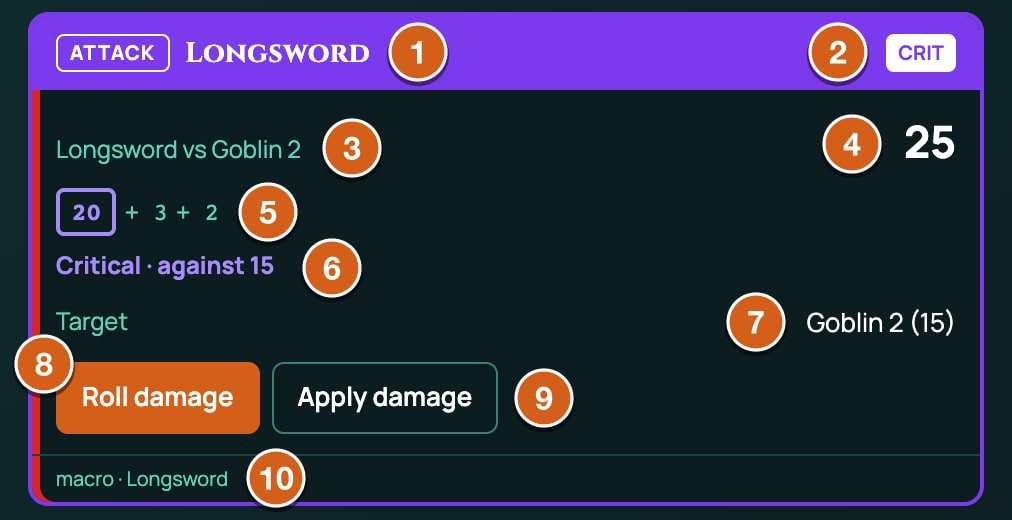
| Part | What it shows |
|---|---|
| Title | The card's title, or the macro's name. CRIT or FUMBLE beside it when a roll on the card was one. |
| A roll | Its label, its damage type, and vs the target's name; its total; its dice and the numbers added. With advantage or disadvantage, the dice that didn't count are struck through (hover: Did not count) and the mode is named. A natural roll that crits or fumbles is ringed, on a d20 with Critical on set. |
| The outcome | Hit · against 15, Miss · against 15, Critical or Fumble. A roll-under roll says needed in place of against, such as Hit · needed 45. |
| A target | Target and the token's name, with its stat, such as Goblin 2 (15). |
| Lines | The card's extra lines, with results and sheet values filled in. |
| A button's result | Each button press adds a section under the card, headed with the button's name, such as Roll damage. |
| Buttons | The buttons nobody has pressed yet. |
| Footer | macro · and the macro's name. |
What the card holds:
- Shows (
show=in the Text view) picks results to show, in order: rolls with their dice, targets with their stat, a weapon as its name, an answer as its text. Up to 6. - + Line (
line "Label" "Value") adds a line of text. The value can hold results and sheet values:line "Save" "DEX DC @{SPELL_SAVE_DC}, half on a success". Up to 8. - Layout (
&{card:attack},&{card:check},&{card:miss}, or&{card}for Plain) sets the look. Each layout has its own coloured stripe down the card's edge, and Attack, Check and Miss put that word as a tag in the header. Miss looks like a miss; a critical or a fumble changes the look whatever you pick. - Posts to (
to=) decides who sees it: see Keep a result secret, below.
A card shows its first 12 rows: results first, then lines.
Add buttons to a card
A card can carry up to four buttons. A button saves the rest of the turn for later: the player rolls damage only once they know they've hit, and the GM applies it when they're ready. There are two kinds:
| Button | Who can press it | What it does |
|---|---|---|
A button (+ Button, button "Label" id=… … end) |
The person who ran the macro, or the GM | Runs the steps inside it. Rolls made there are added to the same card, under the button's name. |
An apply button (+ Apply damage button, apply "Label" id=… amount=…) |
The GM only | Applies an amount of damage to the target, through the game's own damage rules. Players see Apply damage: waiting for the GM in its place. |
Each button works once: after it's pressed, it leaves the card.
An attack with Roll damage and Apply damage
This longsword attack, for 5e or 5.5e, uses most of the parts on this page:
?{Attack with?|Normal=normal|Advantage=advantage|Disadvantage=disadvantage} -> mode
@target(count=1, stat=defense) -> target
[[1d20 + @{STR_MOD} + @{PROF}]] label="Longsword" mode={mode} vs={target.stat} crit=20 -> attack
if {attack.outcome} in (hit, crit)
  &{card:attack} "Longsword" show=attack,target
    button "Roll damage" id=roll-damage
      [[1d8 + @{STR_MOD}]] label="Damage" type=slashing -> damage
      &{notify} "Longsword damage" show=damage
      end
    end
    apply "Apply damage" id=apply-damage amount={damage.total} type=slashing
  end
  &{notify} "Longsword" show=attack,target buttons=card
  end
else
  &{card:miss} "Longsword misses" show=attack,target
  end
  &{notify} "Longsword" show=attack,target
  end
end
flowchart TD
  A["Ask: normal, advantage or disadvantage"] --> B["Target: pick the enemy and read its AC"]
  B --> C["Roll the attack against the AC"]
  C --> D{"Hit or critical?"}
  D -->|Yes| E["Card: Longsword, with Roll damage and Apply damage"]
  E --> F["The player presses Roll damage: the damage joins the card"]
  F --> G["The GM presses Apply damage: the target takes it"]
  D -->|No| H["Card: Longsword misses"]
Line by line:
- The Ask saves the roll mode as
mode. @target(count=1, stat=defense)picks one token and reads its defence stat, AC in 5e, as{target.stat}.- The roll adds Strength and proficiency from the sheet, rolls with the chosen mode, compares the total with the target's AC (
vs={target.stat}), and treats a natural 20 as a critical (crit=20). - On a hit or a critical, the card posts with two buttons.
- Roll damage rolls
1d8 + @{STR_MOD}as slashing damage, adds it to the card, and pops it up for the player. - Apply damage applies
{damage.total}, the damage rolled under the first button, to the target, as slashing. - A pop-up shows the attack on the player's screen, with the card's buttons on it too (
buttons=card). - On a miss, a miss card and a pop-up, and no buttons.
What Apply damage does
- The amount is worked out from the card's results when the GM presses it, as a whole number. Pressed before Roll damage, there's nothing to apply yet: There is no damage to apply yet.
- It only does damage. An amount below zero is refused with The damage came to -4, which is no damage to apply. (with the amount it got), and nothing changes.
- It hits every token the Target step picked, all with the same amount. To pick which result's tokens, set To (
target=in the Text view) to its name: the default istarget. - It goes through the game's damage rules, as applying damage from a token does: resistances, Armour in Ashfall and temporary hit points all count. See Damage and healing.
- When it's done, the card gets a line such as Applied 9 slashing to Goblin 2. That's the amount sent, before resistances or Armour.
- The target's own damage note follows, as a pop-up and a line in chat. It shows what landed and the meter that moved. In 5e and 5.5e that's the damage after resistances, taken off hit points: 10 fire on a target with fire resistance and 12 HP shows 5, with HP going from 12 to 7. Temporary hit points that soak part of a hit are inside that number; when they soak all of it, the note names Temp instead. In Ashfall it shows the hit before Armour: 10 cutting against Armour 2 shows 10, with Wounds going from 0 to 8.
- Set the damage type. In 5e and 5.5e an unknown or empty type still applies. In Ashfall, damage with no type lands through Armour onto Wounds, but a type Ashfall doesn't have, such as
slashing, does nothing.
Healing
Apply damage can't heal, and a card has no healing button. A healing macro rolls the healing and posts it on a card, and the GM heals the token by that much, from the token (see Damage and healing). This Healing Word macro asks who to heal, rolls, and says what the GM should do:
@target(count=1, selected=no) -> target
[[1d4 + @{SPELL_ABIL_MOD}]] label="Healing Word" -> heal
&{card:default} "Healing Word on {target.name}" show=heal,target
  line "To do" "The GM heals {target.name} by {heal.total} from the token"
end
The card shows the roll, the target and a line such as The GM heals Goblin 2 by 5 from the token.
Hit several targets
Let the Target step pick several tokens. This one applies a fireball's full damage to up to three:
@target(count=3) -> targets
[[8d6]] label="Fireball" type=fire -> burn
&{card:attack} "Fireball" show=burn,targets
  line "Save" "DEX DC @{SPELL_SAVE_DC}, half on a success"
  apply "Apply full damage" id=apply-full amount={burn.total} type=fire target=targets
end
&{notify} "Fireball" show=burn,targets buttons=card
end
Every target takes the full amount. A macro can't roll each target's save: the GM halves it for those who saved, from the token.
When the GM can press the buttons
The GM can press the buttons on any macro card the GM can see, whoever's macro posted it: a player's own macro (one that belongs to Me (any game), such as a ready-made macro the player added), a character's macro, or a game macro. Apply damage is the GM's alone; the other buttons can be pressed by the person who ran the macro or by the GM.
What a button can use
A button runs later, maybe on another screen, so it keeps a copy of the results from when the card was posted: a roll's total, natural roll, outcome, label, the number it was compared with and its damage type; a target's names and stat; answers and weapons in full. Results saved inside a button, such as damage, are there for the buttons pressed after it.
A button's steps can be any steps: rolls, which join the card, but also a question, a pop-up, a whisper, or another card, which posts as a new message.
Pop up the result
A Pop-up step shows the result on screen, in the roll pop-ups at the top right, as a roll from the character sheet does. It posts nothing in chat.
[[1d6]] label="d6" -> d6
&{notify} "Rolled a d6" show=d6
end
- The badge shows HIT, MISS, CRIT or FUMBLE, from the first roll on it that has an outcome.
- Each roll shows its total, vs the number it was compared with and the target's name, its damage type, and its dice.
- Who sees it (
to=in the Text view): Only you (the default), You and the GM (to=gm) or Everyone (to=everyone). It always shows on your screen. Other people's copies say who ran it, such as Mara ran Longsword. - Everyone reaches the GM and the players who have a token of their own on the board.
- Offer the card's buttons (yours only) (
buttons=card) puts the buttons of the card the macro has posted on the pop-up too, so the player can press Roll damage without finding the card in chat. Players don't get Apply damage on it. - It closes after 15 seconds, or when you click ×.
- A pop-up always ends with
endin the Text view, even with nothing inside it.
Keep a result secret
Pick who sees each part:
| Part | Setting | Who sees it |
|---|---|---|
| Chat card | Posts to: Everyone | Everyone in the game. |
| Chat card | Posts to: You and the GM (to=gm) |
You and the GM. The card says Only the roller and the GM see this. |
| Chat card | Posts to: Only you (to=me, also written to=self) |
You and the GM. The card says Only you and the GM see this. |
| Pop-up | Who sees it: Only you | You alone. Nothing is posted. |
| Pop-up | You and the GM or Everyone | You and the GM, or everyone with a token. |
| Whisper | /w gm |
You and the GM. |
| Whisper | /w me |
You, and the GM, who can read every whisper in the chat history. |
A card to Only you is still seen by the GM, and so is a whisper to yourself, in the chat history. For a result that only you see, use a pop-up on Only you.
A Stealth roll only you and the GM see:
[[1d20 + @{STE}]] label="Stealth" -> sneak
&{card:check} "Stealth" show=sneak to=self
end
The GM's own secret rolls, outside macros, are on Secret rolls.
Good to know
- Cancelling a question or a target doesn't take back what the macro already posted.
- If the macro is edited after a card is posted, so that one of its buttons changes or goes, pressing that button says This macro has changed or been deleted since the card was posted. In the Text view, keep a button's
id=the same when you edit it. - Two people pressing the same button at once: one wins, and the other sees Someone pressed that first.
- Every card, pop-up, whisper and button press counts towards the macro speed limit: see Share, run and fix macros.
Related
Every step, one by one · Dice, values and outcomes · Macro cookbook · Share, run and fix macros · Damage and healing