

Ready-made macros
Ready-made macros are macros RollQuest has already built for your game's system, such as a weapon attack for 5e or a weapon strike for Ashfall, and adding one is free on every plan.
A macro is a button that asks, targets, rolls and posts a result for you (see Macros: what they are). Building your own takes Pro, but you don't need to build one to start. Each game system comes with its common moves already made into macros. Add one and it's yours: it sits in your list of macros, you put it on the Shortcut Bar, and it rolls with the numbers on your character's sheet when you press it. On Pro you can Customise one, such as giving the spell attack your spell's damage. This page lists every ready-made macro, says exactly what each does, and shows how to add, change and share them, and how a game system of your own offers its own. The Game Master (GM), the person running the game, adds them the same way as players.
Plan: adding a ready-made macro and running it are free on every plan. Customise needs Pro. Adding one to a game for the whole table needs the GM to be on Starter or Pro. Listing ready-made macros in a game system of your own is part of homebrew, which needs Pro.
Which ones your game gets
Each game system offers its own list. RollQuest offers the list of your game's system, and nothing from any other:
| Game system | Macro | Shortcut | What its card in the panel says |
|---|---|---|---|
| 5e and 5.5e | Weapon attack | #attack |
Ask mode → equipped weapon → target → roll → swing → hit or miss card and pop-up → damage button |
| 5e and 5.5e | Roll initiative | #init |
Roll d20 + your Initiative (Dexterity and any bonus), post it and pop it up |
| 5e and 5.5e | Spell attack | #spell |
Spell attack against a target → hit or miss card and pop-up → damage button. Its damage is 1d10 fire: edit the damage roll to match your spell |
| 5e and 5.5e | Roll a d20 | #d20 |
Roll a d20, post it and pop it up |
| 5e and 5.5e | Secret check | #secret |
Ask for a bonus, roll d20 + it, and show only you and the GM |
| Ashfall | Weapon strike | #attack |
Equipped weapon → target → d100 under its skill → swing → card and pop-up → damage button |
| Ashfall | Melee strike | #strike |
Roll d100 under Melee and post the result |
| Ashfall | Dodge | #dodge |
Roll d100 under Dodge and post the result |
| Ashfall | Steady your nerves | #steady |
Roll d100 under Sanity |
| Brightline, Tidewrack, No System, or a game with no system at all | Roll a d20 | #d20 |
Roll a d20, post it and pop it up |
| The same | Secret check | #secret |
Ask for a bonus, roll d20 + it, and show only you and the GM |
Ashfall has no Roll a d20 or Secret check: it plays with a d100, so it offers only its own four.
5e is the 2014 fifth edition rules (SRD 5.1) and 5.5e the 2024 revision (SRD 5.2.1); see Game systems. A game with no system of its own (None (generic HP) or No System) is offered the macros of the system most of its characters use. A homebrew game system offers the list it declares. One that declares none is offered the list of the RollQuest system it's built on, or Roll a d20 and Secret check when it isn't built on one: see Ready-made macros for a system of your own, below.
Add one
- Open the Macros panel: click Macros on the tool rail, the column of icons down the right edge. See Macros: what they are.
- Click Mine and leave the search box empty. The ready-made macros are at the top, each with its name, what it does, Add and Customise:
- While you have no macros of your own, they're open, under One click for the things you do every turn and Ready-made for and your game's system, such as Ready-made for 5e Compatible.
- Once you have one, they're folded into Add a ready-made macro. Click it to open them.
- Click Add on the one you want. It joins Mine, marked Me · ready-made, and you can run it straight away with Run. Add as many as you like: after your first, the list folds into Add a ready-made macro, still at the top of Mine.
- To keep it one click away, open the Shortcut Bar at the bottom of the board, click an empty slot, and click the macro under Macros. Click the slot to run it, or press Ctrl (Cmd on a Mac) with the slot's number. See Shortcut Bar.
A ready-made macro you add is one of your own macros (Me). That means:
- It comes with you into every game you play in. In a game of another system it shows Built for and its system, such as Built for 5e Compatible, because its sheet values may not exist there.
- It's private: nobody else can see it or run it, not even the GM.
- It reads the sheet of your character in the game you're in, or of the token you run it from.
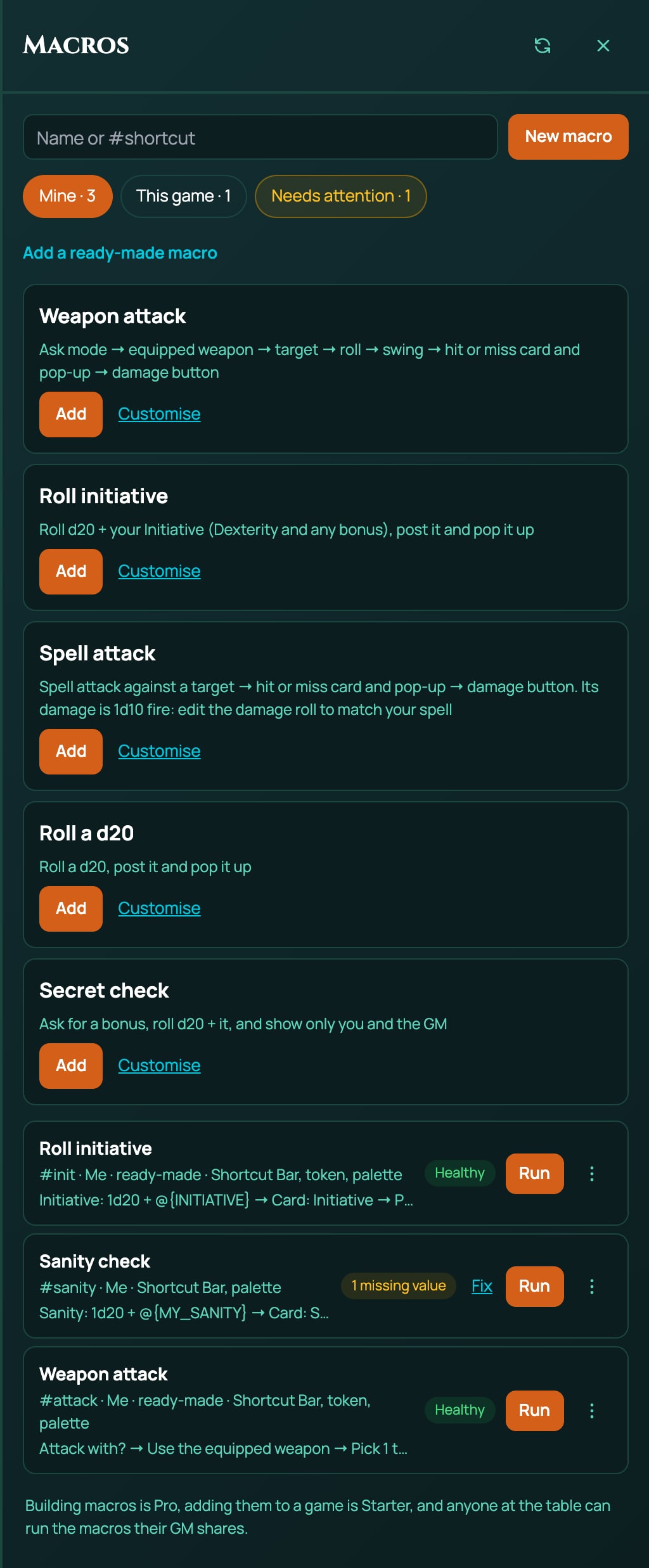
The GM's Mine tab also lists every player's character macros. Those aren't the GM's own, so they don't fold the GM's ready-made macros away.
Weapon attack (5e and 5.5e)
Attacks with the weapon your character has equipped, against the token you target, with buttons to roll the damage and for the GM to apply it.
When you press it:
It asks Attack with?: Normal, Advantage or Disadvantage.
It finds your weapon, the one in your hand. The Unarmed Strike and Improvised Attack every 5e and 5.5e character carries don't count as weapons in hand here. With one weapon equipped, it uses that one without asking. With two or more equipped it asks Which weapon?, between those only. With none equipped it asks Nothing is equipped. Attack with?, listing the weapons you carry first and Unarmed Strike and Improvised Attack last. With no weapon at all it stops, and a note says your character has no weapon to attack with.
It picks the target. If you've selected a token on the board, it uses that one without asking; otherwise it asks Pick a target. Run from the token action bar, it always asks, because the bar's own token is the attacker, not the target.
It rolls the weapon's attack, with the proficiency, ability and magic bonuses your sheet gives it, against the target's AC (armour class). A natural 20 is a critical hit and a natural 1 a fumble.
The weapon's swing plays on the board, from your token to the target: a miss looks like a miss, a critical hit strikes harder. The swing needs the GM to be on Pro, like the rest of Spell FX; without it the macro runs without the swing.
On a hit or a critical hit, it posts a card to chat, titled with the weapon's name and attack, showing the roll and the target, with two buttons:
- Roll damage: you press it to roll the weapon's damage, with its damage type. The damage joins the same card and pops up on your screen. It works once.
- Apply damage: only the GM can press it. It takes the damage off the target, through the game's own damage rules, and adds Applied and the amount to the card. Players see Apply damage: waiting for the GM.
It also pops up the result on your screen with the Roll damage button, so you can roll damage without opening chat.
On a miss or a fumble, it posts a card titled with the weapon's name and misses, and pops up the result.
It shows on the Shortcut Bar list, the token action bar and the command palette.
Good to know:
- A token with no AC can only be hit by a natural 20: every other roll gets the miss card.
- On a critical hit, Roll damage rolls the weapon's ordinary damage. Double the dice yourself, or ask your GM how your table plays it.
- Effects that give your attacks advantage, a wider critical range, or damage that replaces the weapon's own aren't counted yet. Bonuses that add a number or a die to the weapon's attack or damage are.
- Ashfall has a ready-made of its own for this, Weapon strike: see below.
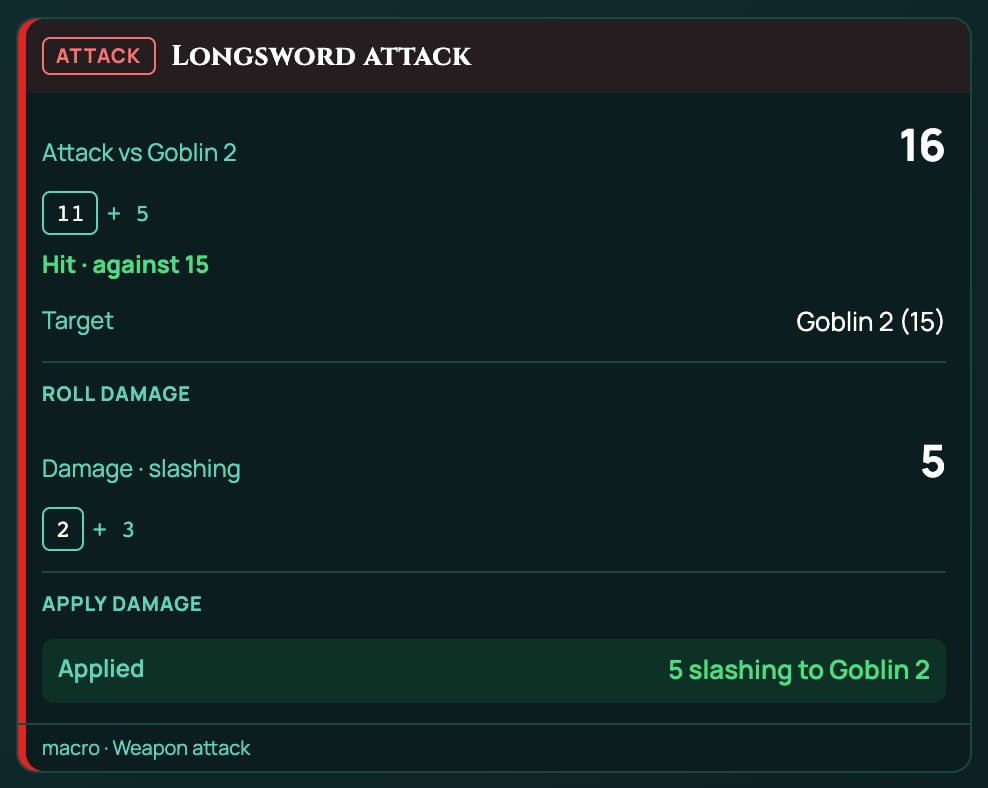
As text, it is:
?{Attack with?|Normal=normal|Advantage=advantage|Disadvantage=disadvantage} -> mode
@weapon "Weapon" -> weapon
@target(count=1, stat=defense) -> target
[[{weapon.attack}]] label="Attack" mode={mode} vs={target.stat} crit=20 -> attack
!swing weapon target=target outcome=attack
if {attack.outcome} in (hit, crit)
  &{card:attack} "{weapon.name} attack" show=attack,target
    button "Roll damage" id=roll-damage
      [[{weapon.damage}]] label="Damage" type={weapon.type} -> damage
      &{notify} "{weapon.name} damage" show=damage
      end
    end
    apply "Apply damage" id=apply-damage amount={damage.total} type={weapon.type}
  end
  &{notify} "{weapon.name}" show=attack,target buttons=card
  end
else
  &{card:miss} "{weapon.name} misses" show=attack,target
  end
  &{notify} "{weapon.name}" show=attack,target
  end
end
Each line is explained in The macro language (Text view).
Roll initiative (5e and 5.5e)
Rolls a d20 for initiative, the roll that decides who acts first in a fight. It adds the sheet's Initiative value (INITIATIVE), which is your Dexterity modifier plus any initiative bonus your features give, the same number the sheet's own initiative roll adds. It posts an Initiative card to chat for everyone and pops the result up on your screen. It shows on the Shortcut Bar list, the token action bar and the command palette.
With a Dexterity modifier of +2 and no other bonus, it rolls 1d20 + 2. As text, it is:
[[1d20 + @{INITIATIVE}]] label="Initiative" -> init
&{card:check} "Initiative" show=init
end
&{notify} "Initiative" show=init
end
Spell attack (5e and 5.5e)
Makes a spell attack against the token you target. It rolls a d20 plus your sheet's Spell Attack value against the target's AC, with a critical hit on a natural 20. On a hit it posts a Spell attack card with Roll damage and Apply damage buttons, as the Weapon attack does, and pops up the result; on a miss it posts Spell attack misses. It shows on the Shortcut Bar list and the command palette.
Its damage is always 1d10 fire, the damage of the Fire Bolt cantrip, and a critical hit doesn't double it. For any other spell, customise it on Pro: change the damage dice and the damage type, and the titles. It only rolls: it doesn't spend a spell slot or play a spell effect. To cast from your sheet, see Spells and casting.
As text, with the parts you'd change for your spell being the [[1d10]], the two fire words and the titles:
@target(count=1, stat=defense) -> target
[[1d20 + @{SPELL_ATTACK}]] label="Spell attack" vs={target.stat} crit=20 -> attack
if {attack.outcome} in (hit, crit)
  &{card:attack} "Spell attack" show=attack,target
    button "Roll damage" id=roll-damage
      [[1d10]] label="Damage" type=fire -> damage
      &{notify} "Spell damage" show=damage
      end
    end
    apply "Apply damage" id=apply-damage amount={damage.total} type=fire
  end
  &{notify} "Spell attack" show=attack,target buttons=card
  end
else
  &{card:miss} "Spell attack misses" show=attack,target
  end
  &{notify} "Spell attack" show=attack,target
  end
end
Weapon strike (Ashfall)
Ashfall is RollQuest's own survival-horror game, played with a d100: you roll 1 to 100 and pass if you roll your skill or lower. Weapon strike attacks with the weapon your character has equipped, against the token you target, with buttons to roll the damage and for the GM to apply it.
When you press it:
- It asks Strike with?: Normal, Fortune or Misfortune. Fortune rolls two d100s and keeps the lower, the better one in Ashfall; Misfortune keeps the higher.
- It finds your weapon, as Weapon attack does: the one equipped, or Which weapon? when several are. With none equipped, it uses the one weapon you carry without asking, or asks Nothing is equipped. Attack with? when you carry more than one.
- It picks the target: the token you've selected, or Pick a target. It reads no stat from the target, because Ashfall's Armour soaks damage rather than making you harder to hit.
- It rolls a d100 against the weapon's own skill, such as Melee for a Rust Cleaver or Pistol for a Toxin Needler, with any flat bonus your sheet gives that weapon. Your skill or lower is a hit.
- It asks for the weapon's swing on the board, as Weapon attack does, but Ashfall's weapons have no swing animation yet, so nothing plays and the macro carries on.
- On a hit, it posts a card titled with the weapon's name and strikes, with the roll and the target, and the Roll damage and Apply damage buttons. Roll damage rolls the weapon's damage with its type, such as cutting for the Rust Cleaver. The GM's Apply damage goes through the target's Armour, then onto its Wounds.
- On a miss, it posts a card titled with the weapon's name and misses.
Good to know:
- The card says Hit · needed 45 (your skill), like every roll-under roll. With Fortune it prints advantage after the dice, the roll mode the macro used, and with Misfortune disadvantage: see Dice, values and outcomes.
- A melee weapon's damage includes your Heft. The macro works Heft out when it reads the weapon, so the card shows it as a plain number added to the weapon's dice, such as
1d10 + 1for a Rust Cleaver. - It gives hit or miss only. Ashfall's named results, such as Triumph on a natural 1, come from the sheet's own tests, not from macros.
- Its shortcut is
#attack, the same as the 5e and 5.5e Weapon attack. If you play both kinds of game, you can hold both macros, but#attackin chat runs only one of them: run each from its own Shortcut Bar slot or the panel.
As text, it is:
?{Strike with?|Normal=normal|Fortune=advantage|Misfortune=disadvantage} -> mode
@weapon "Weapon" -> weapon
@target(count=1) -> target
[[{weapon.attack}]] label="Strike" mode={mode} vs={weapon.target} beat=under -> attack
!swing weapon target=target outcome=attack
if {attack.outcome} = hit
  &{card:attack} "{weapon.name} strikes" show=attack,target
    button "Roll damage" id=roll-damage
      [[{weapon.damage}]] label="Damage" type={weapon.type} -> damage
      &{notify} "{weapon.name} damage" show=damage
      end
    end
    apply "Apply damage" id=apply-damage amount={damage.total} type={weapon.type}
  end
  &{notify} "{weapon.name}" show=attack,target buttons=card
  end
else
  &{card:miss} "{weapon.name} misses" show=attack,target
  end
  &{notify} "{weapon.name}" show=attack,target
  end
end
{weapon.target} is the number the weapon's attack has to beat (your skill), and beat=under makes it roll-under. Fortune's answer is the roll mode advantage: on a roll-under roll, advantage keeps the lower d100.
Melee strike, Dodge and Steady your nerves (Ashfall)
Ashfall's other three ready-made macros each roll one test:
| Macro | Rolls a d100 under | Success card | Failure card |
|---|---|---|---|
Melee strike (#strike) |
your Melee | Melee strike: success | Melee strike: failure |
Dodge (#dodge) |
your Dodge | Dodge: success | Dodge: failure |
Steady your nerves (#steady) |
your Sanity | Steady your nerves: success | Steady your nerves: failure |
Each posts its card to chat for everyone and pops the result up on your screen. They show on the Shortcut Bar list, the token action bar and the command palette.
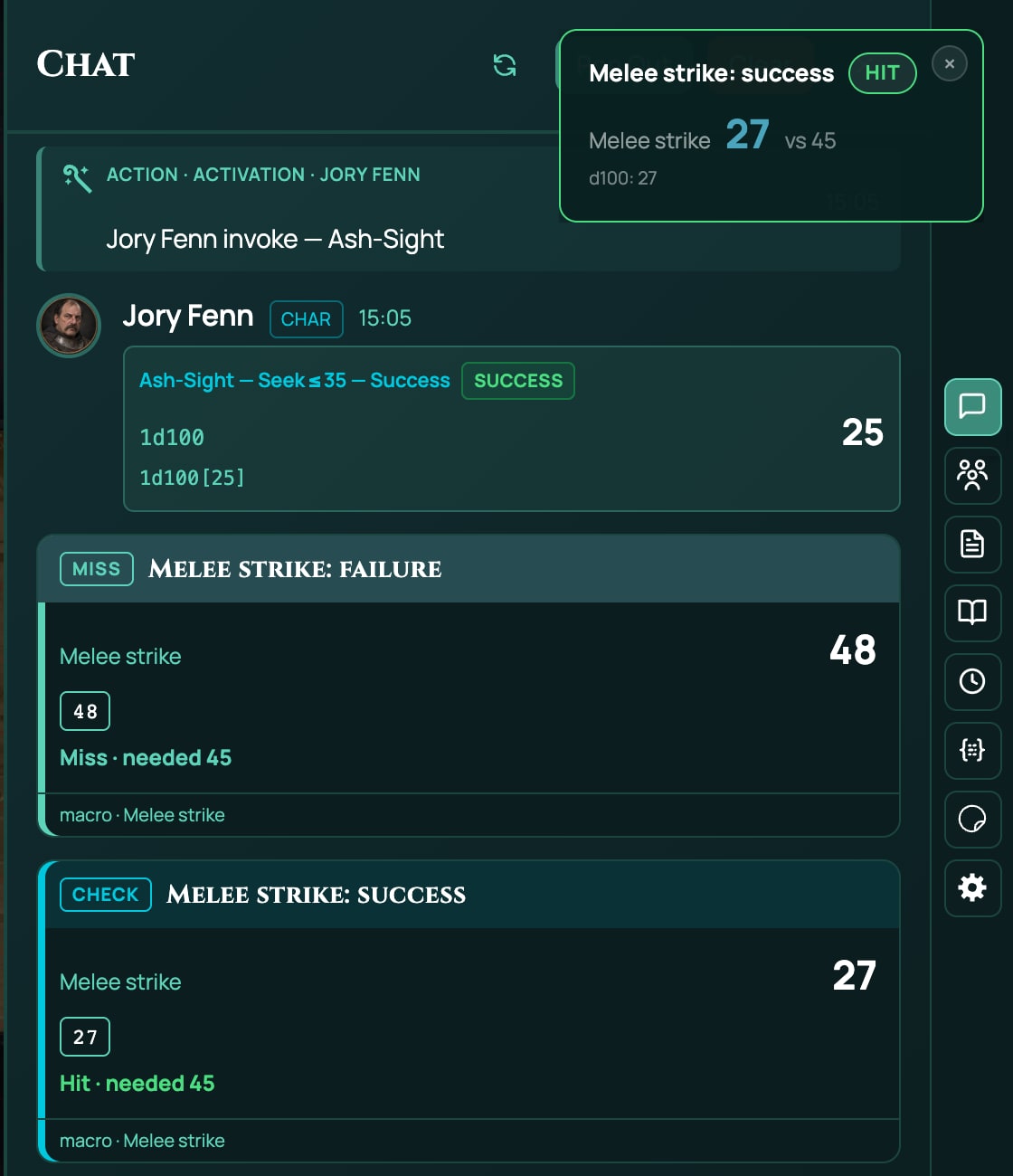
Macros use the words hit and miss for every roll, so on these cards and pop-ups Hit means you passed and Miss that you failed. The card shows the skill you needed, such as Hit · needed 45, and wears a Check tag on a success and a Miss tag on a failure. The titles say success or failure in words.
They don't roll damage, and they don't name Ashfall's results, such as Triumph and Disaster. Macros for Ashfall builds those, with Fortune, Misfortune and damage that goes through Armour.
As text, Melee strike is below. Dodge and Steady your nerves are the same with @{DODGE} or @{SANITY} and their own titles:
[[1d100]] label="Melee strike" vs=@{MELEE} beat=under -> check
if {check.outcome} = hit
  &{card:check} "Melee strike: success" show=check
  end
  &{notify} "Melee strike: success" show=check
  end
else
  &{card:miss} "Melee strike: failure" show=check
  end
  &{notify} "Melee strike: failure" show=check
  end
end
beat=under is what makes it roll-under: see Dice, values and outcomes.
Roll a d20 and Secret check
These two read nothing from a character sheet, so they work in any game that offers them: 5e, 5.5e, Brightline, Tidewrack, No System, and a game with no system at all. Because they read no sheet, they aren't marked Built for a system.
Roll a d20 rolls one d20, posts a d20 card to chat for everyone and pops it up on your screen.
Secret check is for a roll only you and the GM should see:
- It asks Bonus?. Type the number to add, such as
3, or-1for a minus, and press Enter. Type0for no bonus. Don't put a plus sign in front:+3stops the macro with a note that it isn't a number. - It rolls a d20 plus that number.
- It posts a Secret check card that only you and the GM see, marked Only the roller and the GM see this, and pops the result up on your screen.
Both show on the Shortcut Bar list and the command palette.
[[1d20]] label="d20" -> result
&{card:check} "d20" show=result
end
&{notify} "d20" show=result
end
?{Bonus?} -> bonus
[[1d20 + {bonus}]] label="Secret check" -> check
&{card:check} "Secret check" show=check to=gm
end
&{notify} "Secret check" show=check
end
Customise one
Customising makes a ready-made macro your own: a spell attack with your spell's damage, a check with a question added, or a new shortcut. It needs Pro.
- On the ready-made card, click Customise. The macro is added to Mine and opens in the editor. (For one you've already added, click the three dots on its row, then Edit.)
- Change what you need. The editor has two views of the same steps, Steps (forms) and Text. See Your first macro for the forms and The macro language (Text view) for the text.
- Click Test run to try it. It asks its questions and rolls for real, but posts nothing.
- Click Save.
Without Pro, Customise wears a crown: clicking it opens a box that says which plan includes building macros, and adds nothing.
A customised macro keeps its Built for system, so it's still marked when you take it into a game of another system.
Here is the Spell attack customised for the Guiding Bolt spell, which deals 4d6 radiant damage, with its name on every card:
@target(count=1, stat=defense) -> target
[[1d20 + @{SPELL_ATTACK}]] label="Guiding Bolt" vs={target.stat} crit=20 -> attack
if {attack.outcome} in (hit, crit)
  &{card:attack} "Guiding Bolt" show=attack,target
    button "Roll damage" id=roll-damage
      [[4d6]] label="Damage" type=radiant -> damage
      &{notify} "Guiding Bolt damage" show=damage
      end
    end
    apply "Apply damage" id=apply-damage amount={damage.total} type=radiant
  end
  &{notify} "Guiding Bolt" show=attack,target buttons=card
  end
else
  &{card:miss} "Guiding Bolt misses" show=attack,target
  end
  &{notify} "Guiding Bolt" show=attack,target
  end
end
Give each customised copy its own Chat shortcut, such as guiding-bolt, so #spell still means one macro. More attacks, checks and spells to copy are in the Macro cookbook.
Share one with the table (GM)
A ready-made macro you add is private, so to give one to the whole table, add it to the game:
- Add the ready-made macro to Mine, as above.
- Click the three dots on its row, then Add to game. This needs Starter or Pro.
- Choose who can run it, then click Add to game. A copy appears in the This game tab, and the players you chose find it there and in their Shortcut Bar's Macros list. Your own macro stays in Mine.
Every option is explained in Share, run and fix macros.
A player doesn't need the GM to share one: each player can add the same ready-made macros to their own Mine. The GM can press Apply damage on the cards those post, as on any macro card the GM can see. See When the GM can press the buttons.
Ready-made macros for a system of your own
A game system is a pack of rules, and it decides which ready-made macros its games are offered. A GM who builds a homebrew system (see A game system of your own) can list its own in the system pack, under systemRules, as macroTemplates. RollQuest then offers exactly that list in every game played with the system.
| Your system pack | Its games are offered |
|---|---|
Lists macroTemplates |
Exactly that list. An empty list, [], offers none. |
Leaves macroTemplates out, and is built on one of RollQuest's systems (its derivedFrom names one, such as 5-5e-core) |
That system's list, such as the five 5.5e ones |
Leaves macroTemplates out, and isn't built on one |
Roll a d20 and Secret check |
Each entry is a macro as RollQuest stores it, its steps written as data rather than in the Text view, plus three things of its own:
templateId: the entry's id, lower-case letters and digits joined by single dashes, such ascinder-fight, up to 64 characters and different from every other entry. A macro someone adds from it finds it again by this id.summary: the line the panel shows under its name.anySystem: optional.truefor a macro that reads nothing from the sheet, so it isn't marked Built for your system. A macro that reads a sheet value can't saytrue.
Here is one for Cinder, the small d100 system on A game system of your own: a Fight check that rolls a d100 under the character's Fight and posts the result.
{
  "systemRules": {
    "macroTemplates": [
      {
        "templateId": "cinder-fight",
        "summary": "Roll d100 under Fight and post the result",
        "name": "Fight check",
        "shortcut": "fight",
        "showOn": { "shortcutBar": true, "tokenBar": true, "palette": true },
        "steps": [
          { "id": "roll", "kind": "roll", "label": "Fight", "formula": "1d100", "mode": "normal", "versus": "@{FIGHT}", "beat": "atMost", "critOn": null, "damageType": "", "saveAs": "check" },
          { "id": "card", "kind": "card", "layout": "check", "title": "Fight", "lines": [], "show": ["check"], "audience": "everyone", "buttons": [] }
        ]
      }
    ]
  }
}
In the Text view, the same macro reads:
[[1d100]] label="Fight" vs=@{FIGHT} beat=under -> check
&{card:check} "Fight" show=check
end
Check this pack refuses a list with a problem, with the code MACRO_TEMPLATE_INVALID and the entry it means:
- a
templateIdwritten another way, or one used twice, - a sheet value, such as
@{MELEE}, that no pack the system can see declares, anySystem: trueon a macro that reads a sheet value,- a macro RollQuest would change when it stores it. Write every setting the way RollQuest keeps it: lower-case roll modes such as
"normal","atMost"for roll-under, and every field of each step, as in the example.
See When a pack is refused for how to read a refusal.
Related
Macros: what they are · Your first macro · Macros for Ashfall · Macro cookbook · Share, run and fix macros · Shortcut Bar