

Share, run and fix macros
This page covers a macro's life after you build it: putting it into a game for the table, running it from the Shortcut Bar, a token or chat, fixing one that needs attention, switching it back on, deleting it, and what every message means.
Your own macros are private: nobody else sees them, not even the Game Master (GM). To give the table a macro, the GM adds it to the game, and every player it's shared with can run it, whatever their plan. A macro runs from the Macros panel, a slot on the Shortcut Bar, a bar above a selected token, or its #shortcut typed in chat. When a macro hits a snag, such as a sheet value that's gone, it still runs where it can, tells you alone what went wrong, and the Macros panel marks it so you can fix it in a couple of clicks. And if a macro runs away, firing over and over, RollQuest stops it and switches it off before it floods the chat.
Plan: running macros, fixing a missing value, switching a macro back on and deleting one are on every plan. Adding a macro to a game, and choosing who can run it, needs the GM to be on Starter. Building, editing and copying a macro needs Pro.
Who can see and run a macro
Where a macro belongs decides who sees it. You choose under Belongs to when you build it.
| Belongs to | In the panel | Who can run it | Who can edit it |
|---|---|---|---|
| Me (any game) | Mine, marked Me (or Me · ready-made) | You, in every game. Nobody else can see it, not even the GM. | You |
| A character | Mine, marked Character | The character's player and the GM | Either of them |
| The game | This game, marked Game · everyone, Game · chosen players or Game · GM only | Whoever the GM chooses | The GM |
Every ready-made macro you add belongs to Me (any game). The GM's Mine tab also lists every character's macros in the game.
Put a macro into the game
As the GM, you share a macro with the table by adding a copy of it to the game. Players then find it on the This game tab and in their Shortcut Bar list.
- Click Macros on the tool rail, the column of icons down the right edge (it's also in the menu, under Game Master tools). On the Mine tab, find one of your own macros.
- Click ⋯ on its row and choose Add to game. Without Starter it reads Add to game (Starter), and clicking it shows what Starter adds.
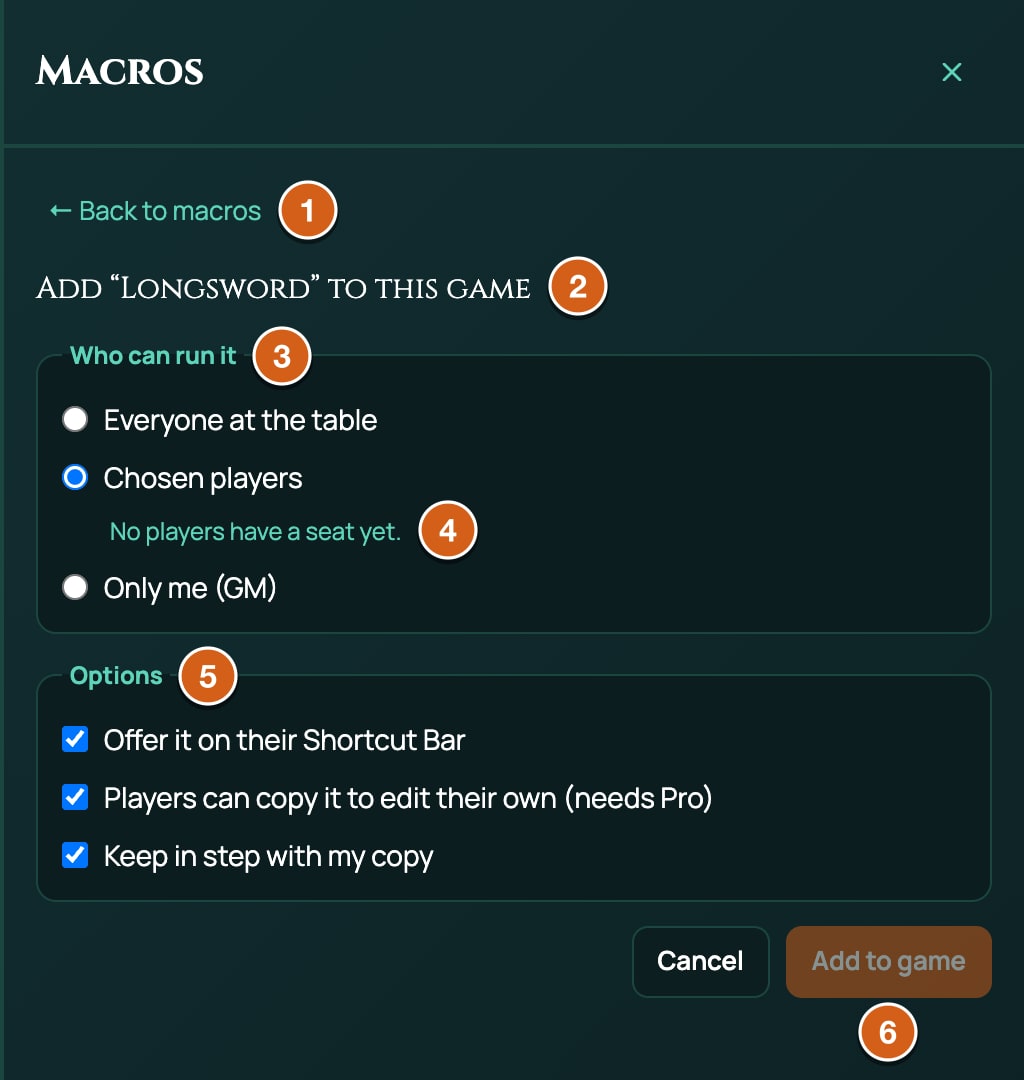
- Under Who can run it, choose Everyone at the table, Chosen players or Only me (GM).
- For Chosen players, tick the players. Only players with a token of their own in the game are listed: until then it says No players have a seat yet.
- Tick or untick the Options, described below.
- Click Add to game. The panel switches to This game, where the macro now is.
| Option | What it does | Default |
|---|---|---|
| Offer it on their Shortcut Bar | Players see the game's macro in their Shortcut Bar's Macros list. Untick it to keep it out of their list: they can still run it from the This game tab, chat or the token action bar. You, the GM, still see it in yours. It also needs Shortcut Bar list ticked under Show on in the editor. | On |
| Players can copy it to edit their own (needs Pro) | Players see Copy to my macros in its menu. | On |
| Keep in step with my copy | Every time you edit or fix your own macro, the game's copy is updated to match. | On |
What Keep in step with my copy means in practice:
- You keep editing your own macro, and the table's copy follows. Name, shortcut and steps are all copied over.
- If you edit the game's copy directly, your next edit of your own macro overwrites it. Untick the option first to keep the game's copy as it is.
- Deleting your own macro leaves the game's copy in the game.
Change who can run it
- On the This game tab, click ⋯ on the macro's row and choose Who can run it.
- Change the choices and click Save.
Players never see who else a macro is shared with.
Copy a game macro to your own
Players can make a copy of a game macro of their own to change, when the GM allows it, and the GM always can. It needs Pro.
- On the This game tab, click ⋯ on the macro's row and choose Copy to my macros. Without Pro it reads Copy to my macros (Pro).
- The copy, named with (copy) at the end, joins your Mine tab. Edit it as you like: the game's macro doesn't change.
If the GM turned copies off, it says The GM has not allowed copies of this macro.
Run a macro
A macro runs the same way from anywhere, as it's saved now: an edit you made after putting it on the Shortcut Bar is what runs.
| From | How |
|---|---|
| The Macros panel | Click Run on its row. |
| The Shortcut Bar | Click its slot, or press its key. See below. |
| A token | Select your character's token, then click the macro on the bar above the Shortcut Bar. See below. |
| Chat | Type # and its shortcut, such as #attack, as the whole message, and press Enter. The macro runs in place of posting the text. |
| The Command Palette | Type /macro attack. Without a shortcut it asks Which macro? e.g. /macro attack. |
When two macros share a shortcut, your character's macro wins, then your own, then the game's.
A macro that's running can't be started again until it finishes: pressing it again does nothing.
Put it on the Shortcut Bar
- Click Shortcut Bar at the bottom of the board, then click an empty slot. Assign to Shortcut Bar Slot opens.
- Under Macros, click the macro. Each row shows its name and its first three steps, such as Attack with? → Pick 1 target → Longsword: 1d20 + @{STR_MOD} + @{PROF}.
- Click the slot to run it, or press Ctrl (Windows) or Cmd (Mac) with the slot's number.
The Macros list holds your macros, your character's and the ones your GM shared, that have Shortcut Bar list ticked under Show on, less any game macro the GM chose not to offer on players' Shortcut Bars. With none, it says Macros you add or build in the Macros panel appear here. More on the bar is on Shortcut Bar.
A slot shows the macro's name as it is now, so a renamed macro shows its new name. It also shows how the macro is doing:
- RUNNING while it runs. Pressing a slot folds the bar away as the macro starts, so you see RUNNING only if you open the bar again while the macro is still running, for example while it waits for your answer.
- NOT RUN when the macro didn't run or was stopped part way, such as by runaway protection, or because it was saved by a newer RollQuest. Hover over it to see Did not run: and the reason, such as Did not run: Started 9 times in 10 seconds. It goes after 8 seconds, except when runaway protection stopped the macro as it started, as in that example: then it stays until the macro next runs.
A problem the macro carries on through, such as a missing sheet value, doesn't show NOT RUN: it's in the note in chat (see below).
If the macro has been deleted, pressing the slot says That macro was deleted. and empties the slot.
Run it from a token
Select one token, your character's (the GM can select any): a bar with the token's name appears above the Shortcut Bar, with up to five of its macros and ⋯ for the rest. Edit bar opens the Macros panel.
The bar shows the character's macros, and your own and the game's macros, that have Token action bar ticked under Show on. A macro run from here reads that token's character sheet.
The bar's token is the one acting, so an attack run from the bar never targets it: a Target step that would take the selected token leaves it out and asks you which token to attack.
Which character a macro reads
A macro that uses sheet values, such as @{STR_MOD}, reads one character sheet:
- A macro that belongs to a character reads that character.
- A macro run from a token's bar reads that token's character.
- Anything else reads your character in the game. If you have several, it's the one marked Primary character (see Who can see and change a sheet), or else the one changed most recently.
- A GM with no character of their own reads the character changed most recently in the game. Run it from the character's token to choose.
With no character at all, every sheet value counts as 0 and a note says so. A value you changed in the last 20 seconds may not be read yet.
When a macro has a problem
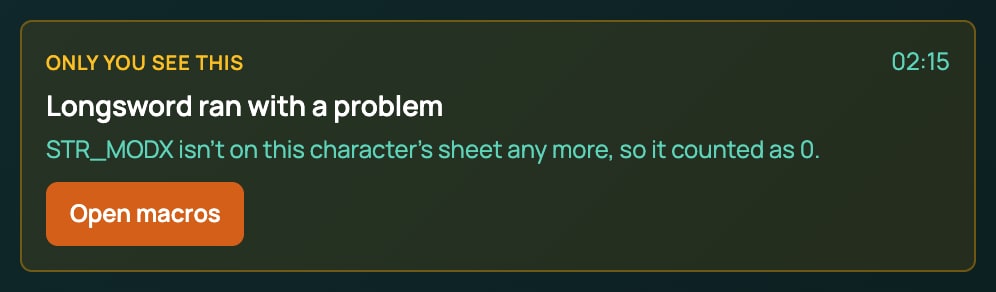
A macro that can't do something carries on where it can, then posts a note in chat that only you see: Only you see this, Longsword ran with a problem (your macro's name), the problems, and Open macros. It isn't saved, and it doesn't show in a popped-out chat.
The Macros panel marks each macro with a badge:
| Badge | What it means | What to do |
|---|---|---|
| Switched off (red) | Runaway protection stopped it. Hover over the badge for the reason. | Click Switch on on its row. See Runaway protection. |
| 1 missing value, 2 missing values (amber) | It uses a sheet value the character no longer has. | Click Fix. See below. |
| Needs a newer RollQuest | It was saved by a newer version of RollQuest, or holds a step this version doesn't know. | Reload the page. |
| Built for 5e Compatible (or another system) | A ready-made macro made for another game system than this game's. | Use the ones made for this game's system: see Ready-made macros. |
| Running | It's running now. | |
| Did not run | The last run failed. | Read the note in chat. |
| Healthy | Nothing wrong. |
Fix a missing sheet value
A macro remembers each sheet value it uses by its ID, with the value's label and its last number. If the character's sheet loses that value, after a game system change or on a different character, the macro still runs: the value counts as 0, and a note tells whoever ran it, such as Strength Modifier (STR_MOD) isn't on this character's sheet any more, so it counted as 0. It was 3. Repairing it is free, on every plan.
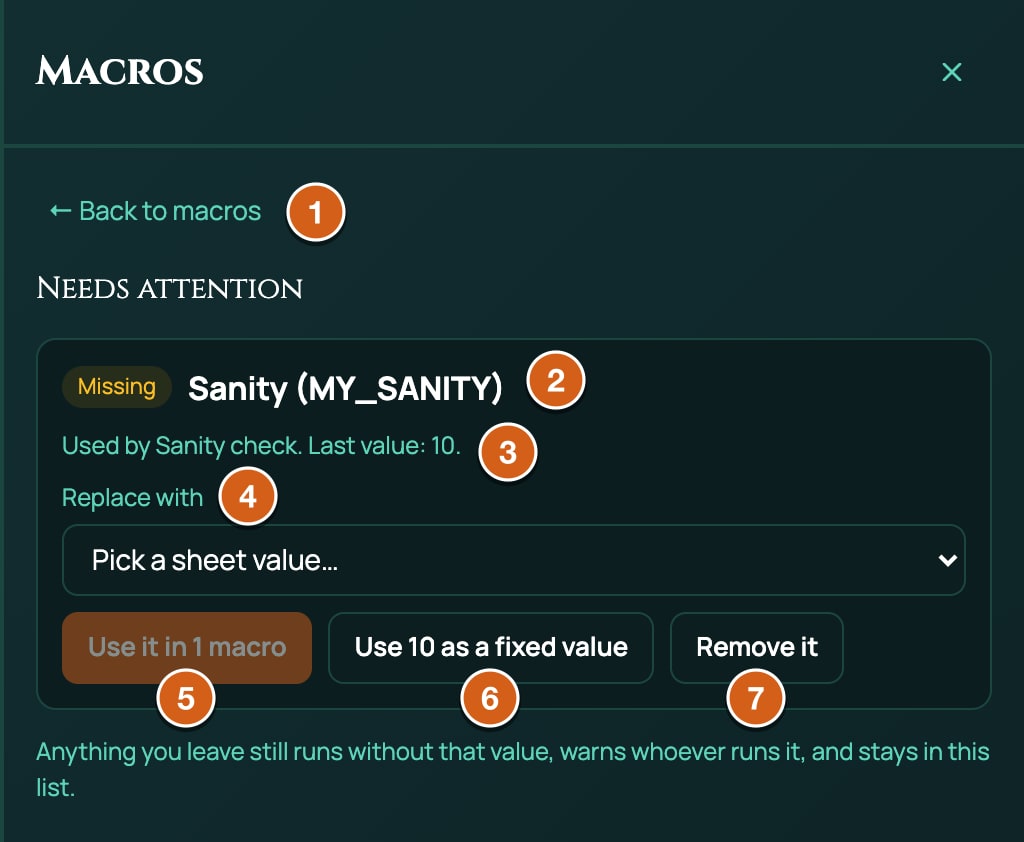
- Click Fix on the macro's row, or the Needs attention tab. Each missing value has a box: Missing, its label and ID, and the macros that use it, such as Used by Longsword, Strength check. Last value: 3.
- Choose its replacement under Replace with. RollQuest picks the closest one for you: the value that now has the old label, or the nearest name, so a typed
STR_MODXpicks Strength Modifier. When two values are equally near, it picks neither: the box reads Pick a sheet value… and Use it stays greyed out until you choose. - Click Use it in 2 macros (with your number). Every macro that used the old value now reads the new one.
Or, in place of step 2 and 3:
- Use 3 as a fixed value writes the last number into the macros, so they stop reading the sheet for it. It shows when the last value was a whole number or dice, such as
1d6. - Remove it takes the value out: it counts as 0 from then on.
Click ← Back to macros when you're done. Values you leave as they are keep running as 0, keep warning whoever runs the macro, and stay on the list. With nothing to fix, it says Every macro you can fix reads values this character's sheet still has.
Only the GM can fix a game macro. The panel checks each macro against the sheet it reads: a character's macro against that character, and your own macros against your character (for a GM with none, the most recently updated character). When the value is missing from another character's sheet than yours, such as a player's character macro the GM is fixing, its box starts On this character's sheet., and Replace with lists that sheet's values.
Runaway protection
A macro can't loop by itself, but it can be fired over and over, by a stuck key or a macro running too often. RollQuest watches for that and stops it before it floods the chat.
| Limit | Counted | Past it |
|---|---|---|
| 8 starts in 10 seconds | For each macro | The 9th start is stopped: started 9 times in 10 seconds. |
| 20 messages in 10 seconds | For every macro on your screen together. Each card, button result, pop-up (even an Only you one), whisper, table roll, sound, music, scene, wait, swing and Apply damage counts. | The macro is stopped: sent more than 20 messages in 10 seconds. |
| 20 macro messages in 10 seconds | By RollQuest's server, for each person | The message is refused, and your macro messages are refused for the next 60 seconds: The server stopped it for sending too much. |
When a macro is stopped:
- It stops where it is. What it already posted stays.
- It's switched off: its badge reads Switched off and its Run button is greyed out. A notice says why, such as #attack was stopped and switched off: started 9 times in 10 seconds. Switch it back on in Macros.
- It counts as a strike on your account. A burst caught both on your screen and by the server counts once.
Three strikes within 24 hours pause macros on your whole account, and an admin reviews it. While they're paused:
- The Macros panel says Macros are paused on your account while an admin reviews it. Too many of your macros ran away in a day. You can still read and delete them.
- Nothing builds, adds, shares, switches on or runs, and card buttons don't work. Running one, or saving one in the editor, says Macros are paused on your account while an admin reviews it.
- You can still read and delete your macros. Chat, dice and the rest of your account work as usual.
When the admin restores your macros, the strikes that led to the pause are cleared, so the next runaway starts the count again. The macros themselves stay switched off: look at each one, fix what ran away, and switch it back on.
flowchart TD
  A["A macro starts too often, or sends too much"] --> B["It stops and is switched off"]
  B --> C["A strike on your account"]
  C --> D{"Third strike in 24 hours?"}
  D -->|No| E["Switch it back on when it's fixed"]
  D -->|Yes| F["Macros are paused on your account"]
  F --> G["An admin restores them, or keeps them off"]
Note: a busy fight can reach 20 messages in 10 seconds without anything running away. The ready-made Weapon attack sends 5 on the attacker's screen (the card, the swing, the pop-up, the damage and its pop-up), so a fifth full attack within 10 seconds is stopped. Each Apply damage the GM presses sends 2. Leave a few seconds between bursts.
Switch a macro back on
Click Switch on on its row. It's free. Only the GM can switch a game macro back on, and nothing switches on while macros are paused on the account.
There's no switch to turn a macro off by hand. To stop using one, untick its boxes under Show on so it leaves the Shortcut Bar list and the token bar, or delete it.
Delete a macro
- Click ⋯ on its row and choose Delete.
- Delete this macro? asks to confirm: "Longsword" will be gone for good. For a game macro it adds for everyone in this game.
- Click Delete. There's no undo.
You can delete your own macros and your character's; only the GM deletes a game macro. Deleting works while macros are paused. A Shortcut Bar slot that held it empties the next time it's pressed.
How many macros you can keep
- Up to 200 macros of your own, counting your own and your characters'. Past that: You can keep up to 200 macros. Delete one to add another.
- Up to 200 macros in a game. Past that: A game can hold up to 200 macros.
The limits for each macro, such as 60 steps, are on Every step, one by one.
What the messages mean
Where a message names a macro, it uses its shortcut, such as #attack, or its name in quotes when it has none.
Notices at the top right
| Message | What it means | What to do |
|---|---|---|
| No macro called #attack. | Nothing you can run has that shortcut. | Check the shortcut on its row in the Macros panel. |
| That macro was deleted. | A Shortcut Bar slot's macro is gone. The slot empties. | Fill the slot again. |
| Macros are paused on your account while an admin reviews it. | Three runaway macros in 24 hours. | Wait for the review. You can still delete macros. |
| #attack is switched off: started 9 times in 10 seconds. Switch it back on in Macros. | Runaway protection switched it off earlier. | Click Switch on on its row. |
| #attack was stopped and switched off: started 9 times in 10 seconds. Switch it back on in Macros. | It was started more than 8 times in 10 seconds. | Check what's starting it, then switch it on. |
| #attack was stopped and switched off: sent more than 20 messages in 10 seconds. Switch it back on in Macros. | Your macros sent more than 20 messages in 10 seconds. | Slow down, then switch it on. |
| The server stopped it for sending too much. | RollQuest's server refused it, or you're in the 60 seconds after a strike. | Wait a minute, then switch it on. |
| The server could not check the macro just now, so it was stopped; try again in a moment. | RollQuest couldn't check the macro at that moment, so it stopped it. It isn't a strike. | Run it again in a moment. |
| That button is not on this card. | The card's button is gone. | Run the macro again. |
| That button has already been used. | Someone pressed it already. | |
| Only the GM can do that. | A player pressed Apply damage. | The GM presses it. |
| This macro has changed or been deleted since the card was posted. | The macro was edited or deleted after the card posted, so the button is gone. | Run the macro again. |
| There is no damage to apply yet. | Apply damage was pressed before Roll damage, or the amount is 0. | Press Roll damage first. |
| The damage came to -4, which is no damage to apply. (with the amount) | The amount came to less than 0, such as amount=-{heal.total}. Apply damage can't heal. |
Heal the token by hand: see Questions, cards and buttons. |
| This card has no target to apply damage to. | The card has no Target result under the button's To name. | Add a Target step, or fix the To name. |
| Could not apply damage, followed by not connected to the game. | Your connection to the game dropped. | Reload the page and press it again. |
| Only the person who ran the macro can do that | Another player pressed a button that isn't theirs. | |
| Someone pressed that first | Two people pressed the same button at once. | |
| This card is full | The card can't take another section. | Run the macro again. |
| Card not found, Not in a game | The card or the game couldn't be found. | Reload the page. |
| Which macro? e.g. /macro attack | /macro without a shortcut. |
Add the shortcut. |
Notes in chat, only you see them
| Note | What it means | What to do |
|---|---|---|
| Strength Modifier (STR_MOD) isn't on this character's sheet any more, so it counted as 0. It was 3. | A sheet value is gone. | Fix it. |
| You have no character in this game, so every sheet value counted as 0. | You have no character in this game. | Make one, or run it from a character's token. |
| Could not read your character sheet, so every sheet value counted as 0. | The sheet didn't load. | Run it again. |
| "Attack" could not be rolled, and why | The formula can't be rolled. The macro stops. Reasons include bonus is "+3", which is not a number, Too many dice, Too many terms, Bad sides in "1d1001", and Macros can roll dice like 2d6 and add or subtract numbers; keep/drop, exploding and success dice are not supported in macros yet. | See Dice, values and outcomes. |
| weapon.attack is a whole roll, which can be added but not subtracted | A formula subtracts a whole roll, such as 10 - {weapon.attack}. |
Add to it instead. |
| The "Longsword" card could not be posted, and why | Reasons include You are muted in this session, Not connected to the game and No answer from the server. | Ask the GM to unmute you, or reload. |
| The "Longsword" pop-up was not shown to others, and why | The pop-up reached your screen only. | |
| "Cliffs" can only be run by the GM, so it was skipped. | A player ran a GM step. | Leave GM steps to the GM's macros. |
| "Thunder" did not run. | A sound, music, scene or other step failed. | Check the ID. |
| "Thunder" is no longer in the sound library. (or music library.) | The sound or track was deleted. | Edit the step. |
| "Night" is a phase of another scene. Switch to that scene first. | A Change phase step for a scene that isn't on. | Switch scene first. |
| "Strike" needs your character, and you have none in this game. | A Sheet action with no character. | |
| You have no character in this game, so there is no weapon to attack with. | A Weapon step with no character. The macro stops. | |
| this character has no weapon to attack with. | The character carries no weapon. The macro stops. | Give them one. |
| The weapon's name, then "Attack" can't be rolled by a macro because its dice are inside a calculation. | The Weapon step can't turn this weapon's formula into dice a macro rolls, such as a homebrew weapon with dice inside brackets. Also … because it subtracts dice. The weapons of 5e, 5.5e and Ashfall read fine. | Write the dice into the macro instead. |
| Rust Cleaver: "Strike" rolls under a number, so its bonus dice can't be added. | An effect adds a die to this roll-under weapon's test, and a macro can't add a die to a d100 rolled under a skill. | Write the test by hand instead. See the ready-made Weapon strike for how the Weapon step reads Ashfall weapons. |
| Rust Cleaver: "Strike" could not work out the number to beat, and why | The sheet couldn't work out the skill the weapon rolls under. | Check the weapon and the skill on the sheet. |
| Longsword has no attack to roll., … could not be worked out, and why | The weapon has no attack, or the sheet couldn't work it out. | Check the weapon on the sheet. |
| Longsword's swing did not play, and why | The weapon swing failed. The rest of the macro ran. | |
| The "Ambushers" roll failed, and why | A table roll failed, such as Table not found for a table players can't see. | Ask the GM to show the table to players. |
| Macros can only run other macros 2 deep, so #three was skipped. | A fourth level of macros running macros. | Move the steps up a level. |
| #init was not found. | A Run macro step's shortcut matches nothing. | Fix the shortcut. |
| #init is switched off, so it was skipped. | A Run macro step's macro is switched off. This macro carried on without it. | Switch it back on in the Macros panel. |
| A "x" step needs a newer version of RollQuest, so it was skipped. | A step from a newer version. | Reload the page. |
| This macro was saved by a newer version of RollQuest. Refresh the page to run it. | The whole macro is newer than your page. | Reload the page. |
| A "x" step could not be run. | An unknown step. | |
| Stopped: and a reason | Runaway protection stopped the run, such as Stopped: started 9 times in 10 seconds. | See Runaway protection. |
| The macro stopped unexpectedly., The button stopped unexpectedly. | Something went wrong while it ran. | Run it again. |
In the Text view
Each starts with the line number, such as Line 4:.
| Message | What it means |
|---|---|
| Could not read "…" | The line isn't a step. Also a whisper to anyone but gm or me. |
| Use either "and" or "or" in one if, not both | An if mixes the two. |
| Could not read the condition "…" | A side of a condition has a space in it. |
| Say where to save the result, e.g. "-> attack" | A step that saves a result has no -> name. |
| A roll needs its closing ]] | A roll is missing ]]. |
| This "if" is missing its "end" | An if, with or without an else, has no end. The line number is the if's. |
| This "button" is missing its "end" | A button inside a card has no end. |
| This card is missing its "end" | A card or a pop-up has no end. |
| "else" stands on its own line, or reads "else if …"; not "else foo" | Something other than if follows else on its line. |
| "mode=adv2" is not a roll mode; use normal, advantage, disadvantage or {answer} | A roll's mode= isn't a mode. Capitals, adv and dis are fine. |
| "to=friends" is not someone to show it to; use to=everyone, to=gm or to=me | A card, pop-up or table's to= isn't one of those. |
| A card can hold "line", "button" and "apply"; not "/w" | Another step sits inside a card, usually because the card's end is missing. |
| An apply button needs amount=… | An apply line has no amount. |
| A pop-up has no buttons of its own; use buttons=card to offer the card's | A pop-up holds a button. |
| Say which weapon swings, e.g. "!swing weapon" | !swing names no weapon. |
| The settings after this step must be written as {"key": value} | The settings of a step such as !scene aren't in curly brackets. |
Lines that start with // are notes for you, and the Text view drops them when it rebuilds the text.
When you save, or in the panel
The editor won't save while these show at the bottom. Steps are numbered by where they are, such as Step 2.then.1 for the first step on the Then side of step 2.
| Message | What to do |
|---|---|
| Give the macro a name. | Type a Name. |
| A chat shortcut is lower-case letters, digits and dashes. | Take out spaces and other marks. Capitals are turned to lower case for you. |
| Add at least one step. | |
| Step 2: name its result with letters, digits and _. | Fix the saves as name. |
| Step 2: "damage" is already used by another step. | Give each result a name of its own, even on the two sides of an if. |
| Step 2: and a dice problem | Fix the formula. |
| Step 2: write the question. | |
| Step 2: a card needs a title or something to show. | |
| Step 2: write the whisper. | |
| Step 2: a pop-up needs a title or something to show. | |
| Step 2: say which #macro to run. | |
| Step 2: pick a table. | |
| Step 2: say which weapon swings. | |
| Step 2: an if needs a condition. | |
| Step 2: button 1 needs a label. | |
| Step 2: say how much damage to apply. | Fill in Amount. |
| This macro has 61 steps, counting those inside if branches and buttons. A macro can have at most 60: step 61 and everything after it would not be saved. | Move a part into a macro of its own, run with Run macro. |
| Step 2: a question can have at most 10 answers (it has 11). The extra answers would not be saved. | Remove an answer. |
| Step 2: pick at most 10 targets (it asks for 12). | Lower How many. |
| Step 2: an if can test at most 6 conditions (it has 7). The extra conditions would not be saved. | Remove a condition. |
| Step 2.then.1.then.1.Roll damage.1.then.1: steps nested more than 4 levels deep (an if inside a button inside an if…) would not be saved. Move them up a level. | Move those steps up a level. |
| Step 2: a card can have at most 8 lines (it has 9). The extra lines would not be saved. (or a pop-up) | Remove a line. |
| Step 2: a card can show at most 6 results (it shows 7). (or a pop-up) | Untick a result under Shows. |
| Step 2: a card can have at most 4 buttons (it has 5). The extra buttons would not be saved. | Remove a button. |
These warnings show beside Save in amber, and don't stop you saving:
| Warning | What it means |
|---|---|
| Step 2: "Critical on 20" counts a high roll as a critical and a 1 as a fumble, but this roll succeeds at or below its target, so those are backwards. Clear "Critical on" for a roll-under roll. | Clear Critical on on a roll-under roll. |
| Step 2: a d100 roll compared to a target usually succeeds at or below it (roll under). This one succeeds at or above; set "Succeeds" to "at or below" if that is what you meant. | Set Succeeds to at or below for a roll-under test. |
| Step 2: a Sheet action with no Item id does nothing when it runs. | Fill in the Item id. |
| Step 2: a Sheet action with no Action id is dropped when you save. | Fill in the Action id. |
| Step 2: a Sound step with no sound id does nothing, and is dropped when you save. | The same for Music (track), Switch scene (scene) and Change phase (scene or phase). Fill in the ID. |
| Step 2: "Apply damage" has no damage type. On this system, damage without a type does nothing. | Give the button a Type. |
Every one is explained in When Save is greyed out.
Saving or working in the panel can also say:
| Message | What it means |
|---|---|
| Give the macro a name, A macro needs at least one step that can run, This macro is too large, A macro must be an object | RollQuest refused the macro as sent. A step missing something it needs is dropped when it saves, so a macro of only such steps has none left. |
| You can only add macros to a character you play | The character under Belongs to isn't yours. |
| Macro not found | It was deleted, or isn't yours to see. |
| No such ready-made macro for this game | That ready-made macro isn't for this game's system. |
| Only the GM can edit a game macro, Only the GM can repair a game macro, Only the GM can switch a game macro back on, Only the GM can delete a game macro | Game macros are the GM's. |
| The GM has not allowed copies of this macro | The GM turned copies off. |
| Pick one of your macros to add | Only your own macros can go into a game. |
| That replacement is not a sheet value, a number or a roll | A fixed value must be a whole number or dice, such as 1d6. |
| Could not save the macro, Could not load macros, Could not add that macro, Could not copy the macro, Could not repair the macro, Could not switch the macro on, Could not delete the macro, Could not add the macro to the game, Could not update sharing, Could not load ready-made macros | RollQuest couldn't do it at that moment. Try again. |
A plan you don't have opens a window saying what the plan adds, instead of an error.
Related
Macros: what they are · Your first macro · Questions, cards and buttons · Shortcut Bar · Macro cookbook