Your homebrew, on every sheet at the table
ProMost homebrew lives in a document: the cursed blade from your adventure, the spell a player invented, the subclass that fits your world. In RollQuest you write it as a homebrew pack, RollQuest checks it, and the players in the games you choose take it in the character builder, at Level Up and from the top of their sheet, with every bonus worked out. Writing homebrew is on Pro. Your players don't need Pro to use it.
What you can build
Weapons and armour, magic items and consumables, spells, feats, species and backgrounds, subclasses and class features added to an existing class, and a whole new class with all 20 levels, its own features and its own subclass choice. Items can carry effects (armour class, advantage on a roll, a resistance, uses that come back after a rest), ask the player a choice when they take them, and hand out features at a set level. You can also write stat blocks for your game's creature list.
A pack builds on one of RollQuest's game systems: D&D 5e or 5.5e, or our own Ashfall, Brightline and Tidewrack. So you can add talents, archetypes and gear to Ashfall, new powers and Edges to Brightline, or new callings, abilities, gear and crews to Tidewrack, as well as the 5e and 5.5e content above.
Start from a file, a fork or a draft
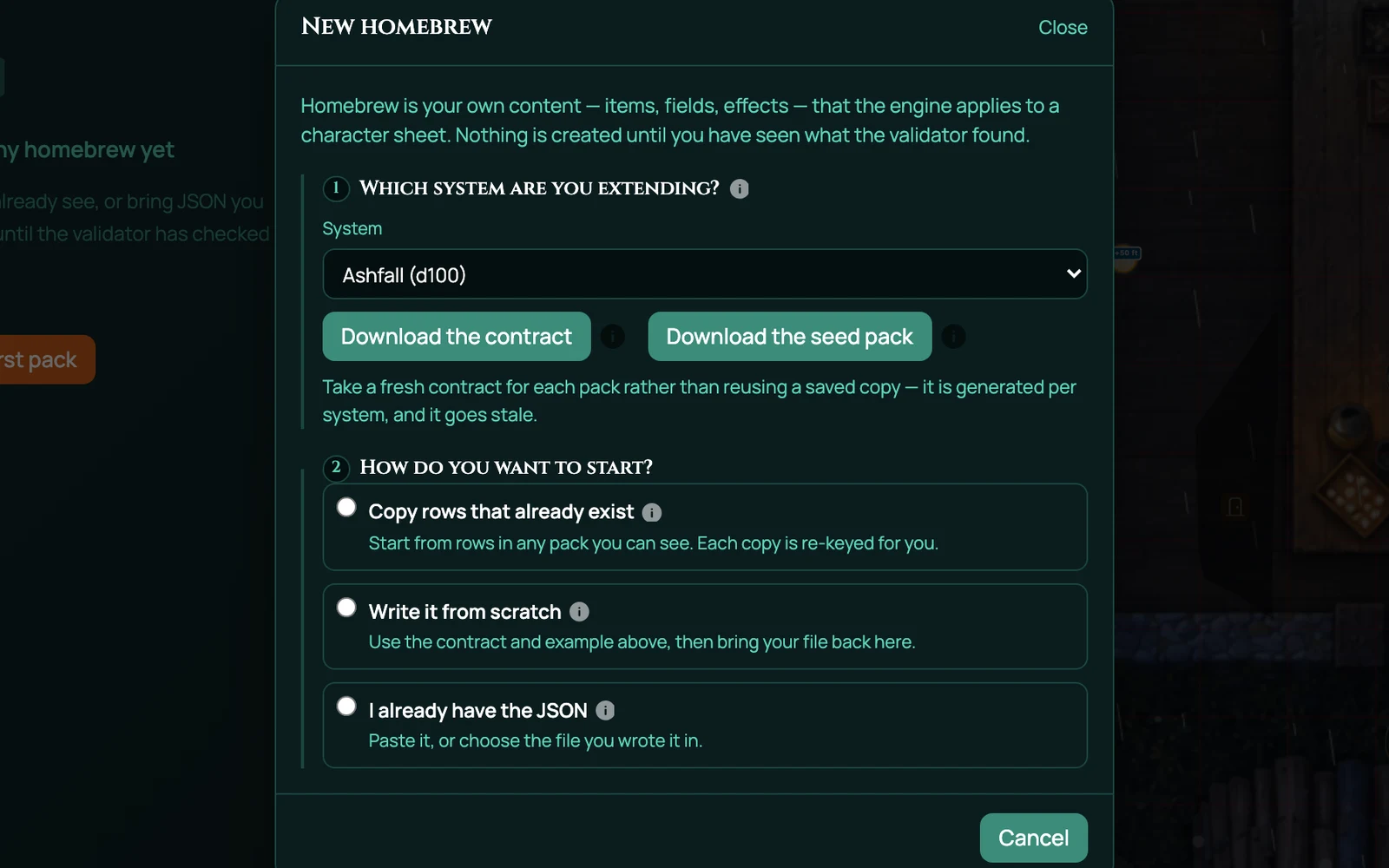
There is no form to fill in. A homebrew pack is a JSON file, plain text that lists each new thing with its numbers. You can write it yourself, copy rows out of an existing pack with Fork, or download a seed pack to edit. Download the contract gives you a document that lists everything RollQuest accepts for the system you picked, written so you can paste it into an AI chat assistant and have it draft a pack for you. The checker has the final word, not the assistant.
Checked before it's created
Check this pack runs RollQuest's validator over the file and lists anything that would break on a sheet. Nothing is created until it finds no blocking problem, so a bad reference is something you fix while you write, not something a player finds mid-session when their sheet won't add up.
On your table, and only there
A pack doesn't spread into every game you run. You bind it to the game that should have it and choose which step of the character builder lists its items. That game stays on the version of the pack it was bound with, so editing the pack mid-campaign changes nothing for your players until you move the game on. When you do, re-stamp brings the items already on sheets up to date.
Retiring a pack stops offering it anywhere without deleting it, and the characters who hold something from it keep it.
Your players take it, on any plan
Once a pack is bound, the players in that game are offered its contents in the character builder, at Level Up for subclasses and class features, and with + From pack at the top of their sheet. Each pick puts a copy on the sheet with its bonuses worked out, so nobody types numbers in by hand. None of that needs a paid plan: writing homebrew is the Pro part, playing with it is not.
A game system of your own
When the change you want is the rules themselves (different characteristics, meters, rolls, damage, rests or builder steps), a homebrew pack can be a whole system: its own numbers, rolls and character builder steps, picked from the Game System list when you create a game. It's experimental, so try it with a second account, playing as a player, before your group relies on it.
Private by design
A homebrew pack is always private. Players in a game you've added it to can use it there, and nobody else can see it, copy it or add it to their own games. To share an adventure with other GMs, publish a content pack instead: a content pack carries a game's scenes, maps and board, a homebrew pack carries rules content for character sheets.
What you can't build yet
A pack can't add a condition, a damage type, a skill or an ability score to 5e, 5.5e, Ashfall, Brightline or Tidewrack: those belong to the system itself. A creature's attacks don't roll from its stat block (roll them yourself, or with a macro). And a homebrew spell isn't added to the built-in classes' spell lists, so offer it through a builder step of your own.
Works with
Character sheets are where your homebrew lands, with its numbers worked out.
Game systems are what every pack builds on: 5e, 5.5e, Ashfall, Brightline and Tidewrack.
Content packs are how you share an adventure, rather than rules.
Frequently asked questions
Which plan do I need to write homebrew?
Pro. A Pro account holds up to 20 homebrew packs at a time, and copies you make with Fork count too. A pack you retire stops counting once no character has anything from it. You also need a verified email address to create, edit or retire a pack.
Do my players need Pro?
No. Players on any plan take what you add to their game in the character builder, at Level Up and with + From pack at the top of their sheet.
Can I share or sell my homebrew?
No. A homebrew pack is always private to you and the games you add it to. To share an adventure with other GMs, publish a content pack instead.
Do I need to write code?
No code, but a pack is a JSON file you write or copy, not a form. Download the contract for your system, start from a seed pack or Fork rows from an existing pack, and let the checker tell you what to fix.
Does homebrew work with Ashfall, Brightline and Tidewrack?
Yes. A pack can build on 5e, 5.5e, Ashfall, Brightline or Tidewrack, and the contract you download lists what each system accepts.
Can I add a new condition or skill to 5e?
Not with a pack that builds on 5e: conditions, damage types, skills and ability scores belong to the system. To add a condition to one game, use its conditions library; to change the rules wholesale, write a system of your own.
Try it
Homebrew is on Pro. Write one weapon, check it, bind it to a game and watch a player take it. The step-by-step guide walks you through it.