

Mods, upgrades and field costs
This page shows how to write items that take mods, the mods that fit them, upgrades attached for good, a button that costs a value each time it's pressed, and magazine weapons that reload from boxes of ammunition.
A mod is an item a character attaches to another item they hold, such as a sight on a gun: while it's attached, its bonus counts on that one item's rolls, and taking it off gives it back. The item that takes mods declares slots, each with a name and room for one or more mods; each mod says which slot it fills and which items it fits. An upgrade is a mod attached for good. A field cost makes pressing a button add to a number on the sheet, such as 1 Strain for each shot, and a mod can add a cost of its own to every shot of the item it sits on. Mods, field costs and ammunition boxes are engine pieces any system can use, a homebrew pack for 5e included: Ninefold, RollQuest's near-future system, uses them for its weapon mods, upgrade kits and Heat, and the Ninefold packs show a full example. This page builds a harpoon gun for Driftglass, a made-up system about a salvage crew diving a drowned city. It's for the Game Master (GM) writing the pack; what players see is in Mods and upgrades and Ammunition and reloading.
Plan: homebrew is on Pro, with up to 20 homebrew packs.
Every example on this page is part of the Driftglass pack, which passes Check this pack as it stands. Weapons themselves are covered in Weapons and armour; this page adds only what's new.
How mods fit together
| Part | Where it goes | What it does |
|---|---|---|
| Slots | meta.modSlots on the item that takes mods |
The mounts the item has, and how many mods each holds. |
| The mod | meta.mod on the mod |
The slot it fills, and the items it fits. |
| The mod's kind of item | flags.activeGate: "attached" on its category |
Its effects count only while it's attached to something. |
| The mod's effects | scope: "host" on each effect |
The bonus counts only on the rolls of the item it's attached to. |
An item that takes mods
Driftglass's Harpoon Gun has a tip, a sight and room for two upgrades:
{
  "kind": "inventoryItem",
  "key": "WPN_HARPOON_GUN",
  "spec": {
    "subType": "weapon",
    "name": "Harpoon Gun",
    "meta": {
      "damage": "1d8",
      "attackRange": "ranged",
      "category": "Spring gun",
      "description": "A spring-loaded gun that holds three harpoons. Each shot costs 1 Strain to cock.",
      "countsAs": "GRIT_CHECK",
      "modSlots": [
        { "id": "tip", "label": "Tip" },
        { "id": "sight", "label": "Sight" },
        { "id": "upgrade", "label": "Upgrade", "max": 2 }
      ],
      "consumes": { "poolId": "ammo.harpoonMag", "amount": 1 },
      "reload": { "fromPoolId": "ammo.harpoons", "amount": 3 },
      "targets": { "max": 1 },
      "applies": [ { "kind": "damage", "formula": "=1d8", "damageType": "pierce" } ]
    },
    "actions": [
      { "id": "ATK", "label": "Fire", "formula": "=(2+BOOST)d10kh1+GRIT", "damageType": "", "tag": "ATK_ROLL", "fieldCost": { "field": "STRAIN", "amount": 1, "label": "Strain" } },
      { "id": "DMG", "label": "Damage", "formula": "=1d8", "damageType": "pierce", "tag": "DMG_ROLL" }
    ],
    "effects": []
  }
}
meta.modSlots is a list of 1 to 8 slots:
| Field | Needed | What it does |
|---|---|---|
id |
Yes | 1 to 40 lower-case letters, digits, _ or -, such as tip. A mod names the slot it fills by it. Each slot once: for room for two, use max. |
label |
No | What the sheet calls the slot, up to 40 characters, such as Tip. Without it, the id. |
max |
No | How many mods the slot holds, 1 to 8. Without it, 1. |
An item takes only the slots it declares. A mod can't take mods of its own.
The consumes, reload and fieldCost in this row are for its ammunition and its cost per shot: see Field costs and Magazines and boxes of ammunition, below. countsAs makes a shot a Grit roll, so Fire opens the pool builder and is read into Driftglass's bands against the target: see Attacks read into bands.
A mod
A mod is an item whose meta.mod says which slot it fills and which items it fits:
{
  "kind": "inventoryItem",
  "key": "MOD_BARBED_TIP",
  "spec": {
    "subType": "mod",
    "name": "Barbed Tip",
    "meta": {
      "mount": "Tip",
      "effect": "+1 damage",
      "mod": { "slot": "tip", "fits": { "itemKeys": ["WPN_HARPOON_GUN"] } }
    },
    "actions": [],
    "effects": [
      { "id": "MOD_BARBED_TIP_DMG", "target": "DMG_ROLL", "op": "add", "value": 1, "condition": "", "trigger": "", "scope": "host" }
    ]
  }
},
{
  "kind": "inventoryItem",
  "key": "MOD_BRASS_SIGHT",
  "spec": {
    "subType": "mod",
    "name": "Brass Sight",
    "meta": {
      "mount": "Sight",
      "effect": "+1 to attack",
      "mod": { "slot": "sight", "fits": { "attackRanges": ["ranged"] } }
    },
    "actions": [],
    "effects": [
      { "id": "MOD_BRASS_SIGHT_ATK", "target": "ATK_ROLL", "op": "add", "value": 1, "condition": "", "trigger": "", "scope": "host" }
    ]
  }
}
The Barbed Tip fits only the Harpoon Gun; the Brass Sight fits any ranged weapon with a sight slot. meta.mount and meta.effect are only words for the row's columns.
meta.mod, field by field:
| Field | Needed | What it does |
|---|---|---|
slot |
Yes | The slot ID it fills, the same as an item's modSlots[].id. |
fits |
Yes | Which items take it. At least one of the four lists below; an item fits when it matches every list you give. |
fits.categories |
No | The item's own meta.category text, such as "Spring gun": one that an item in this pack, or a pack it can refer to, carries. |
fits.subTypes |
No | The item's kind, one your system declares, such as "weapon". |
fits.itemKeys |
No | Item keys, from this pack or one it can refer to. |
fits.attackRanges |
No | The item's meta.attackRange: "melee", "ranged" or an attack kind of your own. |
permanent |
No | true makes it an upgrade, attached for good: see below. |
hostCost |
No | What each press of an action of the item it's attached to costs while it's there: see Field costs, below. |
Each fits list holds 1 to 40 entries, each up to 60 characters, each once. The checker makes sure itemKeys and subTypes name real things, that each of categories is the meta.category of an item in this pack or one it can refer to, spelt exactly, and that each of attackRanges is a range an item of your system can have: melee, ranged or one of your own attack kinds, so rnged is refused. Driftglass's Stiff Coil, +1 damage, fits only spring guns, by the Harpoon Gun's "category": "Spring gun":
"mod": { "slot": "upgrade", "fits": { "categories": ["Spring gun"] } }
Written "Sprng gun", or "spring gun", it would fit nothing, so it's refused, with Spring gun among the values you can use.
Its kind of item
Put mods in a kind of item whose activeGate is attached:
{ "id": "mod", "label": "Mod", "displayMode": "row", "columns": [ { "key": "mount", "label": "Slot" }, { "key": "effect", "label": "Effect" } ], "flags": { "activeGate": "attached" } }
attached is a fourth gate beside trait, equipped and prepared: an item of this kind is switched on only while it's attached to another item on the sheet. A kind with no gate, or an empty one (""), never switches on. A mod whose item leaves the sheet reads as not attached. In a kind with any other gate, a mod's effects would count whether it's attached or not, and the checker warns you with ITEM_MOD_NOT_GATED.
Host scope
"scope": "host" on a mod's effect counts it only on the rolls of the item the mod is attached to: the Barbed Tip adds 1 to the Harpoon Gun's damage, not to every weapon's. It's the mod's version of "scope": "self" (see Effects), and the same limit applies: aim it at an action tag such as ATK_ROLL or DMG_ROLL, or a calculation. A value field is worked out once for the whole sheet, so the checker refuses host on a value-field target. A mod effect with no scope counts on the whole sheet while the mod is attached, which suits a mod that adds to a value, such as armour plates that raise Guard.
Upgrades: attached for good
An upgrade is a mod with "permanent": true. Driftglass's Pressure Chamber fits any weapon with an upgrade slot, adds 2 damage, and makes each shot cost 1 more Strain:
{
  "kind": "inventoryItem",
  "key": "UPG_PRESSURE_CHAMBER",
  "spec": {
    "subType": "mod",
    "name": "Pressure Chamber",
    "meta": {
      "mount": "Upgrade",
      "effect": "+2 damage; 1 more Strain a shot",
      "mod": {
        "slot": "upgrade",
        "fits": { "subTypes": ["weapon"] },
        "permanent": true,
        "hostCost": { "field": "STRAIN", "amount": 1, "label": "Strain" }
      }
    },
    "actions": [],
    "effects": [
      { "id": "UPG_PRESSURE_CHAMBER_DMG", "target": "DMG_ROLL", "op": "add", "value": 2, "condition": "", "trigger": "", "scope": "host" }
    ]
  }
}
An upgrade is attached by the same rules as any mod. Once attached, it can't be taken off, and when its item leaves the sheet, the upgrade leaves with it. An ordinary mod on an item that leaves the sheet stays behind, no longer attached. Ninefold's upgrade kits are ordinary mods in an upgrade slot, so they can be detached like any mod: use permanent only when that's the rule you want.
On the sheet
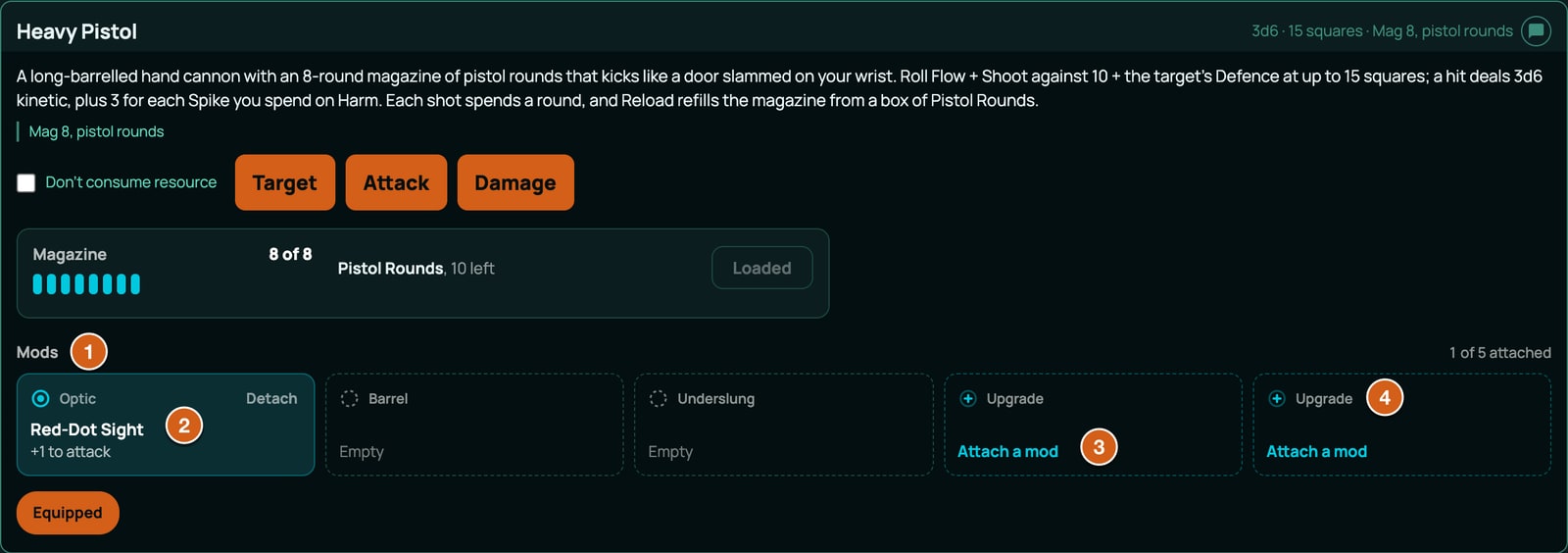
- A mod's row shows Attach to... with the items the character holds that it fits and that have room, each with the slot's label. Clicking one attaches it. Once attached, the row reads Attached to Harpoon Gun (Tip) with Detach, or Attached for good for an upgrade; an upgrade not yet attached says It cannot be taken off once attached.
- A mod with nowhere to go says why. When everything it fits has its slot full, it names the slot and what holds it: The Harpoon Gun's Tip slot holds the Barbed Tip. Detach it first. A slot of two names both and asks you to detach one, and a slot whose mods are all attached for good says so and asks for nothing. When nothing the character holds fits it at all: Nothing you hold takes this.
- An item with slots shows Mods, with a count such as 1 of 4 attached and a socket for each slot and each place in it. An empty socket offers Attach a mod, listing the mods held that fit it, each with Attach.
Anyone who can edit the sheet can attach and detach mods. When one can't be attached, the server says why:
| Message | Why |
|---|---|
| Brass Scrap is not a mod, so it does not attach to anything. | The row has no meta.mod. |
| Barbed Tip is a mod itself, so nothing attaches to it. | Mods can't take mods. |
| Barbed Tip is attached to the Harpoon Gun. Detach it first. | A mod sits on one item at a time. |
| The Harpoon Gun has no tip slot. | The item's modSlots doesn't list the mod's slot. |
| Barbed Tip does not attach to the Harpoon Gun. | One of the fits lists doesn't match. |
| The Tip slot on the Harpoon Gun is taken by Barbed Tip. | The slot's max is full. |
| Pressure Chamber is attached for good; it cannot be taken off. | It's permanent. The sheet offers no Detach for it, so you'd only meet this from another route. |
Field costs
A field cost adds to a value field each time something is pressed. There are three, with one shape, { "field", "amount", "label" }:
- An action's
fieldCostis paid each time a player presses that action. The Harpoon Gun's Fire costs 1 Strain. - A mod's
hostCostis paid each time one of the actions of the item it's attached to is pressed, for as long as it's attached. The Pressure Chamber adds 1 Strain to every shot. Switching the item on, or spending one of its uses some other way, isn't a shot and doesn't pay it. - An item's own
meta.fieldCostis paid each time the item is used, whichever way: one of its actions pressed, or aimed at a token through Target and Resolve or a node's button on the network block. It's for an item with no button of its own, such as a trick fired at a machine, or a cost that belongs to the whole item rather than one action. Driftglass's Short Out costs 1 Noise each time it's run (see Networks and ports):
"fieldCost": { "field": "NOISE", "amount": 1, "label": "Noise" }
So a Harpoon Gun with the Pressure Chamber costs 2 Strain a shot, and the shot's line in chat lists each: Harpoon Gun: +1 Strain; Pressure Chamber: +1 Strain. A shot aimed through Target and Resolve pays exactly what the Fire button pays.
| Field | Needed | What it does |
|---|---|---|
field |
Yes | The value field to add to, spelt exactly as declared, in this pack or the packs it builds on. Give it a plain number, not a formula. |
amount |
Yes | A whole number from -20 to 20, not 0. A negative amount takes away. |
label |
No | What the result calls the field, up to 40 characters. Without it, the field's ID. |
How it's paid:
- Like any change to the field. Your system's track overflow applies: when Strain is pushed past its limit, it resets and Scars gains 1, and a rule's
maxFieldis the limit. - Only on a press that goes ahead. A shot refused for want of ammunition costs nothing, and so does a press with Don't consume resource ticked.
- Once per shot. An action with a cost of its own that's pressed after the shot pays only that cost, never the mods' or the item's again.
- Wherever the item came from. An item made in the workshop, granted by a research node or added with + From pack keeps its costs.
An action's fieldCost can also sit on an action inside a choice's option: see Choices and grants.
Magazines and boxes of ammunition
Weapons and armour shows a bow that fires from a pool with meta.consumes. A weapon that also has meta.reload is a magazine weapon: it fires from its own magazine, and Reload fills the magazine from a box of ammunition. Three pieces make it work:
- The weapon names its magazine in
consumesand the ammunition that fills it inreload, as the Harpoon Gun does above:"consumes": { "poolId": "ammo.harpoonMag", "amount": 1 }spends one harpoon a shot, and"reload": { "fromPoolId": "ammo.harpoons", "amount": 3 }loads up to three. - A box is an item whose
meta.refillsPoolis the weapon'sreload.fromPoolId, and whose uses are its rounds:
{
  "kind": "inventoryItem",
  "key": "AMMO_HARPOONS",
  "spec": {
    "subType": "ammo",
    "name": "Harpoons (6)",
    "meta": { "loads": "Harpoon Gun", "refillsPool": "ammo.harpoons" },
    "maxUses": 6,
    "uses": 6,
    "actions": [],
    "effects": []
  }
}
- The pack declares both pools at its top level, the magazine with its size and the reserve empty:
"resourcePools": [
  { "id": "ammo.harpoonMag", "label": "Harpoon Gun magazine", "group": "ammo", "max": 3, "used": 0, "level": null },
  { "id": "ammo.harpoons", "label": "Harpoons (reserve)", "group": "ammo", "max": 0, "used": 0, "level": null }
]
The pools arrive on a sheet with the first item that draws on them, exactly as declared, so the gun comes loaded. Undeclared, a magazine would hold only one shot. Name the pools the way Driftglass does, ammo. and a word of your own, and keep each weapon's magazine its own.
At the table, for every system:
- Firing spends the magazine: every press of Fire is a shot, and a press that's refused spends nothing. With too little in it, the shot is refused: Reload first: Harpoon Gun magazine is empty.
- Reload binds the first box on the sheet whose
refillsPoolmatches and that has rounds left, and moves up toreload.amountrounds into the magazine, no more than it has room for or the box holds. The answer says what's left: Harpoon Gun reloaded: Harpoon Gun magazine 3/3, Harpoons (6) 3 left. With the magazine full, the button reads Loaded and is greyed out. - The next box. When the bound box runs dry or leaves the sheet, the next Reload moves on to the next box with the same
refillsPool, first in inventory order, and binds that one. - No box at all. The card says Nothing to reload from, and Reload is greyed out, titled Nothing to reload the Harpoon Gun from. A reserve pool that still holds rounds counts as something to reload from. Pressed another way, Reload is refused with the reserve's label without its brackets: No Harpoons to reload from.
- In the Form View, a magazine weapon has Reload on its card.
Every pool ID is compared letter for letter, and a box whose refillsPool doesn't match the weapon's fromPoolId is never found. The checker warns about the slips it can see, as Advice that doesn't block (RELOAD_INCOHERENT): a refillsPool or fromPoolId one letter from a pool that's in reach and that nothing else names, a key under reload other than fromPoolId and amount, and a meta key one letter from reload or refillsPool. It can't see a box or a weapon in another of your packs, and it takes an ID that looks like nothing in reach on trust, so test a new weapon with one box, then two.
When the checker refuses it
The message names the exact place, such as items[39].spec.meta.mod.slot. These are the checker's own words, with the values from a broken copy of Driftglass.
Mods and slots, ITEM_MOD_INVALID:
| What's wrong | What the checker says |
|---|---|
meta.mod isn't an object |
meta.mod must be an object { slot, fits, permanent?, hostCost? }: the slot it fills on the item it is attached to, which items it fits, whether it is attached for good, and what each shot of that item costs while it is attached |
A key it doesn't know, in meta.mod, fits or a slot (each names its own list) |
unknown key "uses" -- meta.mod reads only slot, fits, permanent, hostCost, so it would be ignored |
| A mod's slot with capitals or spaces | slot "barb tip" must be a slot id: 1-40 lower-case letters, digits, _ or -, the same id an item that takes it lists in its meta.modSlots |
permanent isn't true or false |
permanent "yes" must be true or false: true attaches the mod for good (an upgrade), so it cannot be detached and leaves the sheet with the item it is attached to |
No fits |
fits must be an object naming which items take this mod: any of categories (the item's meta.category), subTypes (its category id), itemKeys (item keys) and attackRanges (its meta.attackRange). An item fits when it matches every list given; give at least one |
fits with no list |
fits names no list, so the mod fits nothing. Give at least one of categories, subTypes, itemKeys, attackRanges |
A fits list that's empty or over 40 |
itemKeys must be a list of 1 to 40 entries |
| An empty or long entry | each entry of itemKeys must be a non-empty string of 60 characters or fewer |
| An entry twice | "WPN_HARPOON_GUN" is listed twice in itemKeys |
| An attack range with capitals | "Ranged" is not an attack range: an item's meta.attackRange is lower-case, such as "melee" or "ranged" |
| An attack range no item of the system can have | "rnged" is not an attack range an item here can have, so this mod would fit nothing by it -- an item's meta.attackRange is "melee", "ranged" or an attack kind a defence binding of this system declares (melee, ranged, wire) |
| An item key that names nothing | "WPN_SPEARGUN" names no inventory item in this pack or a pack it can refer to, so it fits nothing |
| A category no item in reach carries, or one in the wrong case | "Sprng gun" is no item's meta.category in this pack or a pack it can refer to, so it fits nothing |
| A kind of item the system doesn't declare | "weapons" is not a category this system declares, so it fits nothing |
| A mod with slots of its own | a mod does not take mods of its own: nothing attaches to a mod. Drop meta.modSlots here, or meta.mod if this item is the one that takes them |
meta.mod or meta.modSlots on a row that isn't an inventory item |
a mod is an inventory item; a valueField item's meta.mod is never read / only an inventory item takes mods; a valueField item's meta.modSlots is never read |
| No slots, or more than 8 | meta.modSlots must be a list of 1 to 8 slots { id, label?, max? } |
| A slot that isn't an object | a slot must be an object { id, label?, max? } |
| A slot ID with capitals or spaces | id "Tip" must be a slot id: 1-40 lower-case letters, digits, _ or -, the slot a mod names in its meta.mod |
| The same slot twice | the slot "tip" is listed twice; give it a max instead |
| A slot label over 40 characters | a slot label must be 40 characters or fewer |
A slot max outside 1 to 8 |
max 0 must be a whole number from 1 to 8: how many mods the slot holds (absent means 1) |
scope: "host" on an item that isn't a mod |
scope "host" counts an effect only on the rolls of the item a mod is attached to, and this item is not a mod (it has no meta.mod), so it is never attached to anything and the effect would never count. Give the item a meta.mod, or use scope "self" (only on this item's own rolls) or leave scope out. |
A pack that writes meta.attachedTo or meta.attachedSlot |
meta.attachedTo is written by the sheet when a player attaches a mod to an item, never by a pack: a pack cannot attach anything. Remove it. |
Other codes about mods:
| Code | What's wrong | What the checker says |
|---|---|---|
ACTIVE_GATE_INVALID |
A kind of item with a gate the sheet doesn't read (left out or empty, "", is no gate, and isn't refused) |
activeGate "wielded" is not a gate the sheet reads, so every item in the "mod" category would stay switched off for good. Use one of trait, equipped, prepared, attached: trait (always on, or on while toggled on when the item is toggleable), equipped, prepared, or attached (on while the item, a mod, is attached to another item on the sheet). Leave it out for a category whose items never switch on. |
ITEM_MOD_NOT_GATED (advice, doesn't block) |
A mod in a kind not gated attached |
this mod's category "mod" is gated "trait", so its effects count whether or not it is attached to anything (or never). Put mods in a category whose flags.activeGate is "attached": then a mod counts only while it is attached to an item on the sheet. |
EFFECT_SCOPE_ON_VALUE_FIELD |
scope: "host" on a value-field target |
scope "host" on an effect whose target "GRIT" is a value field. A value field is worked out once for the whole sheet, so scope is ignored there and this effect applies GLOBALLY, exactly as if you had not written it. self only means something when the target is a calculation or an action tag: then the effect counts only on rolls made from the item it belongs to. Point it at a calculation or an action tag if it must be limited to this item, or drop scope (or write scope: "global", the default) to say plainly that it is not. |
Field costs, ITEM_FIELD_COST_INVALID (the same messages for a hostCost, which says "a mod's hostCost", and for an item's meta.fieldCost, which says "an item's fieldCost"):
| What's wrong | What the checker says |
|---|---|
| A cost that isn't an object, such as a bare number | an action's fieldCost must be an object { field, amount, label? }: the value field it adds to, how much, and what the answer calls it |
| A key it doesn't know | unknown key "per" -- an action's fieldCost reads only field, amount, label, so it would be ignored |
| A field that isn't declared, or the wrong case | field "strain" names no value field in this pack or the packs it builds on, so the press would cost nothing (compared exactly: a field id must match its exact spelling) |
| An amount of 0, a fraction or past 20 | amount 0 must be a whole number from -20 to 20, not 0: what each press adds to the field (negative takes away) |
| A label over 40 characters | an action's fieldCost's label must be 40 characters or fewer |
Ammunition, RELOAD_INCOHERENT (Advice: it doesn't block, because the box for a weapon often lives in a pack the checker can't see):
| What's wrong | What the checker says |
|---|---|
A box's refillsPool one letter from a pool in reach |
refillsPool "ammo.harpoon" is one letter from "ammo.harpoons", and no weapon in scope loads or fires from "ammo.harpoon" (meta.reload.fromPoolId, meta.consumes.poolId) and no pack declares it (resourcePools), so Reload would never find this box -- write "ammo.harpoons" |
A weapon's reload.fromPoolId one letter from a pool in reach |
reload.fromPoolId "ammo.harpoon" is one letter from "ammo.harpoons", and no item in scope refills "ammo.harpoon" (meta.refillsPool) and no pack declares it (resourcePools), so Reload would find nothing to draw from -- write "ammo.harpoons" |
A meta key one letter from reload or refillsPool |
unknown key "refilsPool" -- it is one letter from "refillsPool", which is the key the sheet reads, so as written it would be ignored |
A key under reload it doesn't read |
unknown key "fromPool" -- meta.reload reads only fromPoolId, amount, so it would be ignored |
reload isn't an object |
meta.reload must be an object { fromPoolId?, amount? }: as written Reload finds nothing to do |
Two neighbouring letters swapped count as a slip too: the message then says the ID "swaps two letters of" the right one.
For the codes on other parts of a pack, see When a pack is refused.
Related
Weapons and armour · Effects · Recipes and crafting · Mods and upgrades · Ammunition and reloading