

Networks and ports
This page shows how to give a game system of your own a network: machines on the board that characters take control of with an attack of their own kind, and the ports that let them open doors, switch lights and stop machines once they have.
A network is a set of controllable things on the board, called nodes: a flood gate, a lamp, an engine. Each node is a creature token with a list of ports, the controls it offers. A character takes a node with an attack of a kind your system names, such as a wire tap, rolled against the node's own defence; a hit puts your system's control condition on the node, and from then on that character can run its ports from a panel on their sheet. Running a port changes the real board: doors near the node open or lock, lights near it go on or off, the node takes a condition, or the GM simply narrates. Each run can cost a value, such as Noise. A network is an engine piece any system can declare: Ninefold, RollQuest's near-future system, uses it for its Mesh, and the Ninefold packs show a full example. This page builds the wiring of Driftglass, a made-up system about a salvage crew diving a drowned city, whose divers tap into the pumps, gates and lamps the city left behind. It's for the Game Master (GM) writing the pack; what players see is in The network panel.
Plan: homebrew is on Pro, with up to 20 homebrew packs.
Read A game system of your own first: a network is declared in a system's base pack, beside its conditions and token bindings. Every example on this page is part of the Driftglass pack, which passes Check this pack as it stands.
How a network fits together
| Part | Where it goes | What it does |
|---|---|---|
systemRules.network |
The base pack's rules | Switches the network on: its name, the attack kind, the control condition, the meters, the default cost and the tools. |
| An attack kind of your own | A defence binding's appliesTo, and an item's meta.attackRange |
The attack that takes a node, and the defence it's rolled against. |
| The control condition | systemRules.conditions |
The badge that marks a node as taken. |
| Nodes | Creature rows with ports, in any pack of the system |
The machines, and what each port does. |
| Controls and links | A node's token on the board, set by the GM | The doors and lights its ports reach, and the nodes it's linked to. |
| The network block | The sheet's Form View | The nodes on the current scene, their ports as buttons, and the meters. |
Declare the network
"network": {
  "label": "Wiring",
  "attackKind": "wire",
  "controlCondition": "tapped",
  "meters": ["NOISE", "STRAIN"],
  "portCost": { "field": "NOISE", "amount": 1, "label": "Noise" },
  "tools": { "subTypes": ["trick"] },
  "portNoun": { "one": "Lever", "many": "Levers" },
  "shareLabel": "Pass the lead"
}
This goes inside systemRules. Its presence switches the network on.
| Field | Needed | What it does |
|---|---|---|
label |
No | The network's name, up to 40 characters: the block's heading and the name of its page in the Form View. Without it, Network. |
controlCondition |
Yes | The ID of a condition your system declares, spelt exactly. A node carrying it is controlled. |
attackKind |
No | The attack kind that takes a node: one a defence binding of your system answers. Items that make that kind of attack show in the block as the way in. |
meters |
No | Up to 6 value fields the block draws as gauges, such as Noise and Strain. |
portCost |
No | What running a port costs, unless the port says otherwise: { "field", "amount", "label" }, a whole amount from -20 to 20. 0 is free; a negative amount takes away. |
tools |
No | { "subTypes": [...] }: kinds of item your system declares whose items the block offers as actions against a node. |
portNoun |
No | { "one", "many" }, each 1 to 40 characters: what your system calls a port, one and several. The block heads a node's ports with many (Levers), and the refusals say one in lower case ("only they can share a lever with you"). Without it, the block says Controls and the refusals say "port". |
shareLabel |
No | Up to 40 characters: your word for sharing a port with an ally. The share button then reads Pass the lead: share a lever with an ally, and the button that sends it Pass the lead. Without it, Share a control with an ally and Share. |
Ninefold calls its ports Ports and its share Handshake, so its Mesh tab reads Handshake: share a port with an ally.
The attack that takes a node
A node is taken with an attack, rolled against a defence. Your system names its own kind of attack by giving a defence binding an appliesTo that isn't melee, ranged or any. Driftglass's divers attack the wiring, so its token bindings include a Seal against wire, beside an ordinary Guard against everything else:
"defenseBase": 10
{ "id": "guard", "label": "Guard", "kind": "number", "source": "GUARD", "role": "defense", "appliesTo": "any" },
{ "id": "seal", "label": "Seal", "kind": "number", "source": "SEAL", "role": "defense", "appliesTo": "wire" }
A wire attack has to reach 10 + Seal; a harpoon, with no wire, meets 10 + Guard. See Defences by range for defenseBase and how defences are picked.
An attack kind is 1 to 31 lower-case letters, digits, _ or -, starting with a letter. The checker refuses a near miss of a built-in word, one letter added, dropped or changed (range: write ranged) or two neighbouring letters swapped (meele: write melee), and a word that reads as a set of ranges, such as both or all (write any); a defence saved with both or all before that check answers every attack, as any does. Two defences can't answer the same kind.
The attack itself is an item whose meta.attackRange names the kind, and whose meta.applies puts the control condition on what it hits. Driftglass gives every diver Tap with autoApply (see Choices and grants):
{
  "kind": "inventoryItem",
  "key": "KNACK_TAP",
  "spec": {
    "subType": "knack",
    "name": "Tap",
    "autoApply": true,
    "meta": {
      "effect": "The machine is Tapped",
      "description": "Clip a lead onto a machine's wiring and make it yours. Roll Wits + Wire against 10 + its Seal: on a Clean or Messy it is Tapped, and on a Lost you are Jolted.",
      "attackRange": "wire",
      "countsAs": "WIRE_CHECK",
      "targets": { "max": 1 },
      "applies": [ { "kind": "condition", "conditionId": "tapped" } ]
    },
    "actions": [
      { "id": "ATK", "label": "Tap", "formula": "=(2+BOOST)d10kh1+WITS+WIRE", "damageType": "", "tag": "ATK_ROLL" }
    ],
    "effects": []
  }
}
On a hit, Tapped goes on the node, and it remembers whose attack put it there.
Driftglass reads its attacks into its roll outcome bands, so a hit is a band rather than a bare total. countsAs makes a Tap a Wire roll: it opens the pool builder, as a Wire roll does, and its total is read against 10 + the node's Seal. Clean and Messy take the node; Lost doesn't, and the system's rollOutcomes.attacks puts Jolted on the diver's own token. The resolution card says which, such as Sluice Gate hit (Messy), Tapped or Sluice Gate missed (9 vs 10 + Seal 2, Lost); Rook is Jolted. Without rollOutcomes.attacks, an attack hits when its total meets the number, and countsAs only opens the builder. See Attacks read into bands.
The control condition
The control condition is an ordinary condition of your system:
{ "id": "tapped", "name": "Tapped", "kind": "condition", "description": "A diver has clipped into this machine's wiring. Whoever tapped it can work its controls.", "color": "#1F6F8B", "iconColor": "#FFFFFF" }
Who can run a node's ports:
- The character whose attack put the condition on it. If several did, each of them.
- Anyone, when the condition was put on by hand, such as by you from the token's conditions: it names no character, so it holds for all.
- You, the GM, on any node, controlled or not.
- A character someone shared a port with. The controller picks an ally on the scene and one port; the ally can run it once, while the node stays controlled. The share is stored on the node's token, used up when it's run, and lapses if the node loses the condition.
The condition stays until something takes it off: you, by hand; a track overflow's endsCastConditions (see Meters, below); or your system's end of scene, a button for the GM that takes listed conditions off every token. Driftglass's End the dive takes Tapped off every machine on the board. See End of scene in A game system of your own.
Nodes: creatures with ports
A node is a creature row (see Creatures) with ports. Its values give it the numbers your token bindings read, the defence against your attack kind among them. Driftglass's three:
{
  "kind": "creature",
  "key": "NODE_SLUICE",
  "spec": {
    "name": "Sluice Gate",
    "values": { "HULL": 12, "HULL_MAX": 12, "GUARD": 3, "SEAL": 2 },
    "conditionImmunities": [],
    "notes": "A flood gate with a motor and a lock. Tap it to work the door beside it.",
    "ports": [
      { "id": "open", "label": "Open", "description": "The gate grinds open.", "effect": { "type": "door", "op": "open", "within": 1 } },
      { "id": "seal", "label": "Seal", "description": "The gate shuts and locks.", "effect": { "type": "door", "op": "lock", "within": 1 }, "cost": { "amount": 2 } }
    ]
  }
},
{
  "kind": "creature",
  "key": "NODE_LAMP_MAST",
  "spec": {
    "name": "Lamp Mast",
    "values": { "HULL": 6, "HULL_MAX": 6, "GUARD": 1, "SEAL": 1 },
    "conditionImmunities": [],
    "notes": "A harbour lamp on an iron mast, still wired to the grid.",
    "ports": [
      { "id": "douse", "label": "Douse", "effect": { "type": "light", "op": "off", "within": 3 } },
      { "id": "flood", "label": "Flood the quay", "effect": { "type": "light", "op": "on", "within": "scene" }, "cost": { "amount": 3 } }
    ]
  }
},
{
  "kind": "creature",
  "key": "NODE_PUMP_ENGINE",
  "spec": {
    "name": "Pump Engine",
    "values": { "HULL": 15, "HULL_MAX": 15, "GUARD": 2, "SEAL": 3 },
    "conditionImmunities": [],
    "notes": "The engine that keeps this street dry.",
    "ports": [
      { "id": "jam", "label": "Jam", "description": "The engine coughs and stops. The street starts to flood.", "effect": { "type": "condition", "conditionId": "jammed" } },
      { "id": "listen", "label": "Listen", "description": "You hear which other pumps it talks to. The GM tells you.", "effect": { "type": "note" }, "cost": { "amount": 0 } }
    ]
  }
}
A creature has up to 12 ports:
| Field | Needed | What it does |
|---|---|---|
id |
Yes | 1 to 40 lower-case letters, digits, _ or -, different for each port on the creature. |
label |
Yes | The port's button, up to 40 characters. |
description |
No | Up to 400 characters, shown with the port. For a note, it's also what the chat line says happened. |
effect |
Yes | What running it does (below). |
cost |
No | { "field", "amount", "label" } for this port only, in place of portCost. Leave field out to use portCost's field, as Driftglass does. "amount": 0 makes it free. |
The four effects:
effect |
What running the port does | Ops |
|---|---|---|
{ "type": "door", "op", "within" } |
Changes the doors whose line passes within within squares of the node. |
toggle (opens a shut door, unlocking it, and shuts an open one), open (and unlocks), close, lock (shuts and locks), unlock |
{ "type": "light", "op", "within" } |
Switches the lights placed within within squares of the node. |
toggle, on, off |
{ "type": "condition", "conditionId" } |
Puts a condition your system declares on the node's own token. | |
{ "type": "note" } |
Changes nothing on the board. The chat line says what happened, and you rule the rest. |
within is a whole number of squares from 0 to 60, counted from the edge of the node's own square: 0 reaches only the node's square, 1 the ring of squares around it. "scene" reaches the whole scene. On a square grid a diagonal counts as one square. A secret door is never reached, and neither is a light that follows a token, such as a carried lamp.
A node on the board can name its own doors and lights instead. In the node's Edit Enemy window (Edit NPC for an NPC), the GM opens the tab named by your network's label, Wiring for Driftglass, and ticks doors and lights under Controls: its door and light ports then reach exactly those, wherever they are, whatever within says. With none ticked, the ports reach the ones near it as above. A ticked secret door, or a light that follows a token, still isn't reached. The node's card on the network block then says what it controls, such as Controls the Side Door, and its ports name what they change. An adventure can arrive with its nodes' controls already set.
Driftglass's Sluice Gate sits beside a door on the map: Open opens it for the default 1 Noise, and Seal locks it for 2. The Lamp Mast's Douse puts out the lights within 3 squares; Flood the quay turns on every light on the scene for 3 Noise. The Pump Engine's Jam makes it Jammed, and Listen is free and leaves the rest to you.
A port that would change nothing is refused and costs nothing: Every door within 1 square of Sluice Gate is already open.
A creature that fights can have ports too
Ports aren't only for machines that stand still. Any creature row can carry them beside its fighting numbers: a drone, a guard with an implant, a vehicle. Once a character controls it, its ports are buttons like a node's, and a condition port puts the condition on that creature's own token. Driftglass's rival crews send an Eel Drone:
{
  "kind": "creature",
  "key": "DRONE_EEL",
  "spec": {
    "name": "Eel Drone",
    "values": { "HULL": 8, "HULL_MAX": 8, "GUARD": 2, "SEAL": 2, "INIT": 3 },
    "conditionImmunities": [],
    "visionCone": { "angle": 120 },
    "effects": [
      { "id": "DRONE_EEL_SONAR", "target": "SENSE_SONAR", "op": "setMin", "value": 30, "condition": "", "trigger": "" }
    ],
    "notes": "A rival crew's hunting drone, all fins and a shock prod. Its one lamp-eye sees a wedge ahead, and its sonar finds you there in the dark. Tap it and you can stop it dead, or send it home.",
    "printedActions": [
      { "section": "Actions", "name": "Shock Prod", "text": "Two d10s keeping the higher + 2, against 10 + Guard: 1d6 to Hull." }
    ],
    "ports": [
      { "id": "halt", "label": "Halt", "description": "Its fins lock. It drifts where it is.", "effect": { "type": "condition", "conditionId": "jammed" } },
      { "id": "home", "label": "Send it home", "description": "It turns and swims back to the crew that sent it. The GM says what they make of that.", "effect": { "type": "note" }, "cost": { "amount": 2 } }
    ]
  }
}
The drone fights as any enemy does, and starts a battle on its INIT of 3, because Driftglass's systemRules.initiative names INIT as the stat-block value Battle Setup reads. It sees only a wedge ahead of it, and finds divers there in the dark by sonar: visionCone and the SENSE_SONAR effect are explained in Creatures. A diver who Taps it gets Halt and Send it home under Levers. The stat block itself doesn't list ports, so mention them in notes or printedActions for the GM who reads it.
Costs, and who pays
- Each run costs the port's own
cost, elseportCost, else nothing. - The character who runs it pays, onto their own sheet. A shared port is paid by the character who shared it, not the ally, priced by the sharer's own system, and the ally's answer names who paid: Rook paid 1 Noise, now 4.
- When you, the GM, open a player's sheet and run a port from it, that sheet pays, and the block says so above the ports: Rook pays the cost of each one run from here. A port someone shared with that sheet is the exception: your run uses up the share, exactly as the ally's own run would, and the character who shared it pays. On a node with such a port the note reads Rook pays the cost of each one run from here, but a granted one is paid by the character who shared it.
- The cost is paid like any change to the field: your system's track overflow applies. Driftglass's Noise overflows into Strain once it passes Max Noise, so a careless diver strains themselves, and the overflow also takes Tapped off every machine that diver tapped (see Meters, below).
- A port that's refused, or whose effect fails, costs nothing. A run whose payer couldn't pay is refused before anything happens on the board.
Tools
tools.subTypes names kinds of item whose items the block offers as buttons against a node, under the kind's plural name from your vocabulary (Tricks for Driftglass), or Tools. An item is offered when it can aim at a token: it has meta.applies and isn't aimed at its wearer. Driftglass's Short Out, which the Quiet Hands chart grants, jams a machine the diver has tapped, for 1 Noise:
{
  "kind": "inventoryItem",
  "key": "TRICK_SHORT_OUT",
  "spec": {
    "subType": "trick",
    "name": "Short Out",
    "meta": {
      "effect": "Jammed",
      "description": "Cross two wires and the machine stops dead: it is Jammed.",
      "targets": { "max": 1, "controlled": true },
      "applies": [ { "kind": "condition", "conditionId": "jammed" } ],
      "fieldCost": { "field": "NOISE", "amount": 1, "label": "Noise" }
    },
    "actions": [],
    "effects": []
  }
}
A tool is fired at the node the way any item with meta.applies is aimed at a token. On its own, that's with or without control. Two keys make it a tool of the network:
"controlled": trueinmeta.targetsruns it only on a node its user controls: every target must carry your control condition, put on by that character or by hand. On a node the diver doesn't hold, the block greys the button and says why, in your attack item's name: Short Out runs only on a node you hold: Tap it first. Aimed another way, it's refused in the network's own words: You do not control Sluice Gate: it must be Tapped first. You, the GM, may aim it anywhere. The checker refusescontrolledin a system that declares no network.meta.fieldCostis the item's own cost, paid each time it's used, here 1 Noise, beside any port cost. It's paid like any change to the field, so Noise can overflow. See Mods, upgrades and field costs.
A tool without controlled, such as a trick that hurts a machine whoever holds it, can be fired at any node.
Reach through a link
The GM can link nodes on a scene, the way wiring runs from one machine to the next. In a node's Edit Enemy window, on the tab named by your network's label, Links lists the scene's other tokens: tick the ones it's linked to. A link works both ways. The node's card on the network block then says so, such as Links to Pump Engine, without naming a token you've hidden to the players.
An item whose meta.targets has "linkedToControlled": true reaches only a node linked to one its user controls. Driftglass gives every diver Follow the Line, which taps a machine through the wiring of one they've already tapped:
{
  "kind": "inventoryItem",
  "key": "KNACK_FOLLOW_THE_LINE",
  "spec": {
    "subType": "knack",
    "name": "Follow the Line",
    "autoApply": true,
    "meta": {
      "effect": "The machine is Tapped",
      "description": "Follow the wiring of a machine you have tapped to a machine it is linked to, and tap that one too. Roll and read it as a Tap, against the linked machine's Seal.",
      "attackRange": "wire",
      "countsAs": "WIRE_CHECK",
      "targets": { "max": 1, "linkedToControlled": true },
      "applies": [ { "kind": "condition", "conditionId": "tapped" } ]
    },
    "actions": [
      { "id": "ATK", "label": "Follow the Line", "formula": "=(2+BOOST)d10kh1+WITS+WIRE", "damageType": "", "tag": "ATK_ROLL" }
    ],
    "effects": []
  }
}
- On a scene where any node lists a link, Follow the Line aimed at a node that isn't linked to one the diver controls is refused, in the network's own words: Follow the Line cannot reach Pump Engine: it is not linked to a node that is Tapped by you. A node whose control condition was put on by hand counts for everyone, as it does for ports.
- On a scene with no links, it's aimed as usual, like Tap.
- You, the GM, may aim it anywhere.
Ninefold's Pivot works this way, through a node the hacker Owns. The checker refuses, with NETWORK_INVALID, a linkedToControlled that isn't true or false, and one in a system that declares no network: see When the checker refuses it, below.
Meters
meters lists value fields the block draws as gauges, by their labels. A gauge's limit is the maxField of the field's track overflow rule, else the max of a token binding that draws the field, else none. It warns from half full and again within one of full, when it reads 1 to go, then Full. Driftglass draws Noise against Max Noise and Strain against Max Strain:
"trackOverflow": [
  { "field": "NOISE", "into": "STRAIN", "resetTo": 0, "maxField": "NOISE_MAX", "endsCastConditions": ["tapped"] },
  { "field": "STRAIN", "into": "SCARS", "resetTo": 0, "maxField": "STRAIN_MAX", "addsCondition": "winded" }
]
endsCastConditions is what makes noise dangerous: when a diver's Noise overflows, every machine that diver tapped shakes them off, and Tapped comes off it. Machines another diver tapped, and any you marked by hand, stay tapped. addsCondition puts Winded on the diver's own token when their Strain overflows. Both are rules of track overflow: see Track overflow.
Where the network shows on the sheet
- A system of your own, with no sheet layout: the Form View gets a page of its own for the network, named by
label. Driftglass's is Wiring. - A sheet layout: in design mode, click + Add a block and choose Network. See Customise a sheet layout.
The block heads itself with label and draws the meters at the top. Below them it lists the nodes on the current scene, nearest to the character's token first: every token that isn't a player's and whose stat block has ports, or a number for your attack kind's defence. So a creature with a Seal is listed even without ports, ready to be tapped. A token you've hidden isn't listed for players, and they can't aim at it or share a port through it. Selecting a node shows what an attack must reach, on a row named after your first attack item (Tap, or Needs when the sheet has none), how far away it is (Distance), its ports under your portNoun.many (Levers for Driftglass, Controls without one) with their costs, your attack items as buttons until the node is yours, your tools, and the share button (Pass the lead: share a lever with an ally). The share form has With (the ally) and Lever (the port, under your portNoun.one), the line They can run it once., and Pass the lead to send it, or Cancel. A scene with no nodes says No Wiring nodes on this scene.
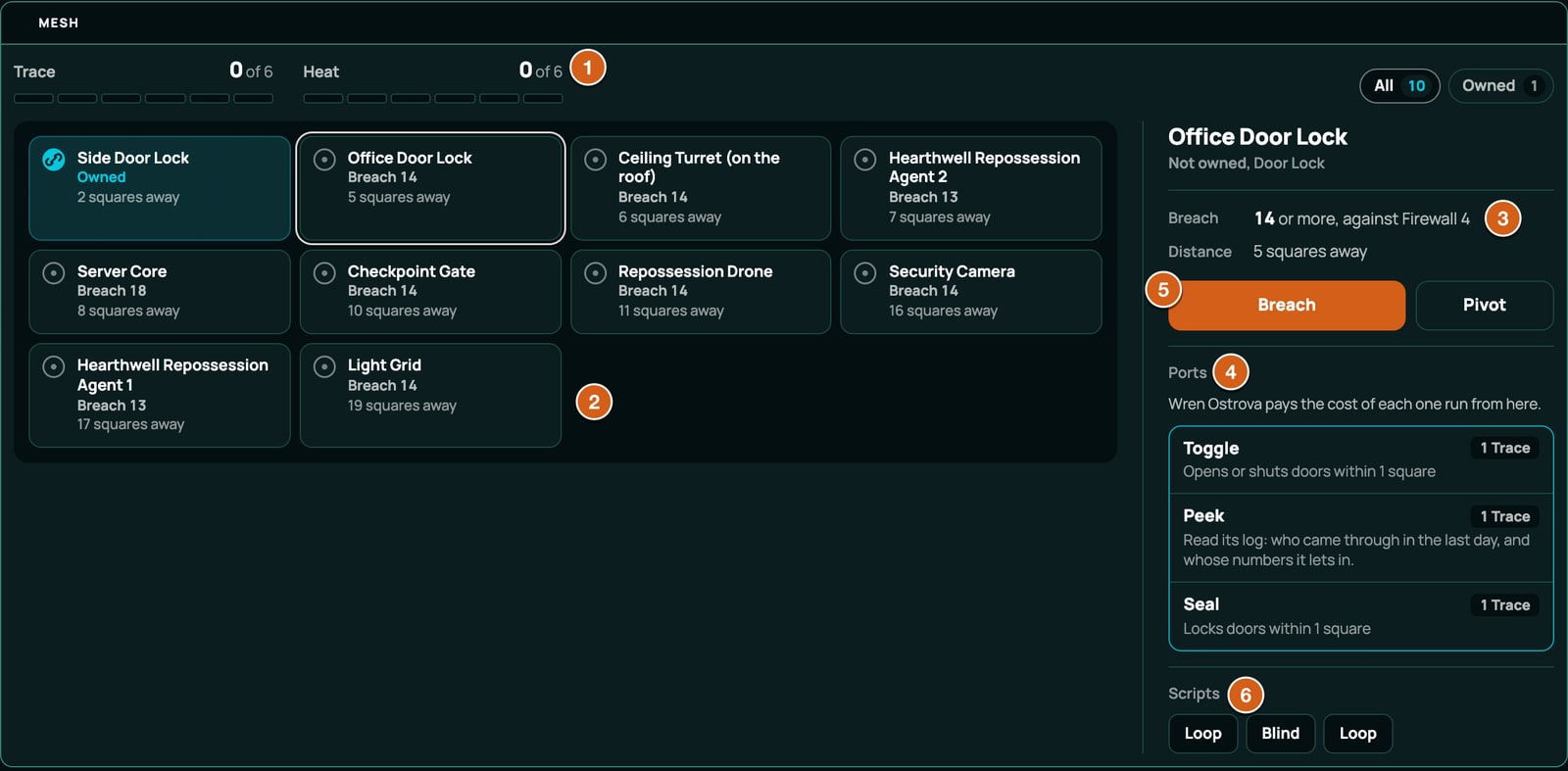
Put nodes on the board
Nodes are creatures, so they reach your game's creature library the way any creature row does: open the menu (three lines, top left), click Enemies, then + Add, choose From the library, find the node and click Create. Move the token next to the door or among the lamps it controls. See Creatures.
When a port can't run, the block says why. These help you test a node:
| Message | Why |
|---|---|
| You do not control Sluice Gate: it must be Tapped first | Nobody has taken the node. A tool with "controlled": true aimed at it is refused with the same words. |
| You do not control Sluice Gate: another character controls it, and only they can share a lever with you | Someone else's attack took it. The word is your portNoun.one, in lower case, or "port". |
| No door within 1 square of Sluice Gate | Move the token, or raise within. |
| Sluice Gate controls no door a port can reach | Every door ticked under Controls is a secret door. |
| The door Sluice Gate controls is no longer on the scene | The door ticked under Controls has gone. Tick another, or none. |
| There is no light on this scene | A "scene" light port, with no lights placed. |
| This table's condition list has no Jammed, so it cannot be put on Pump Engine | The game's condition list lacks the condition. |
| Pump Engine cannot be Jammed | The creature's conditionImmunities lists it. |
| This scene's map has no size, so distances on it cannot be measured | A door or light port on a scene without a map. |
| Sluice Gate has no place on the map | The token has no position. |
When the checker refuses it
Every problem with a network or its ports is refused with the code NETWORK_INVALID, and the message names the exact place, such as items[46].spec.ports[0].effect.op. These are the checker's own words, with the values from a broken copy of Driftglass:
| What's wrong | What the checker says |
|---|---|
network isn't an object |
network must be an object { label?, attackKind?, controlCondition, meters?, portCost?, tools?, portNoun?, shareLabel? } |
A key it doesn't know, in network, portNoun, a cost, tools, a port or an effect |
unknown key "range" -- network reads only label, attackKind, controlCondition, meters, portCost, tools, portNoun, shareLabel, so it would be ignored |
label empty, or too long |
label must be a non-empty string / label must be 40 characters or fewer |
portNoun isn't an object |
portNoun must be { one, many }: what one port is called and what several are |
portNoun without one or many, or one too long |
portNoun.many must be a non-empty string / portNoun.one must be 40 characters or fewer |
shareLabel empty, or too long |
shareLabel must be a non-empty string / shareLabel must be 40 characters or fewer |
| No control condition | controlCondition is required: name a condition this system declares (compared exactly), the one that marks a node as controlled; without it no port could ever be run |
| A control condition the system doesn't declare | controlCondition "owned" must name a condition this system declares (compared exactly): it is what marks a node as controlled, and without it no port could ever be run |
| An attack kind no defence answers | attackKind "hack" must be an attack kind a defence binding of this system defends (tokenBindings appliesTo), or a breach would meet no defence |
meters isn't a list, or has more than 6 |
meters must be a list of at most 6 value field ids |
| A meter that names no value field | "noise" names no value field in scope (compared exactly) |
| A meter twice | "NOISE" is listed twice |
| A cost that isn't an object, such as a bare number | portCost must be { field, amount } (label optional), not 1: write { "amount": 1 } |
portCost with no field |
portCost names no field, and the network declares no portCost to take one from, so running the port would cost nothing |
| A cost on a field that isn't declared | field "noise" names no value field in scope (compared exactly), so running the port would cost nothing |
| A cost past 20 either way | amount 21 must be a whole number from -20 to 20 (0 is free): what running a port adds to the field |
| A cost label over 40 characters | portCost's label must be 40 characters or fewer |
tools isn't an object |
tools must be an object { subTypes } |
tools.subTypes isn't a list |
subTypes must be a list of inventory categories this system declares |
| A tool kind the system doesn't declare | "tricks" is not an inventory category this system declares, so no item would ever be offered as a tool |
| Ports in a system with no network | this creature declares ports, and the system declares no network (systemRules.network), so they could never be run |
ports isn't a list, or has more than 12 |
ports must be a list of at most 12 { id, label, description?, effect, cost? } |
| A port that isn't an object | a port must be an object { id, label, description?, effect, cost? } |
| A port ID with capitals or spaces | port id "Open" must be 1-40 lower-case letters, digits, _ or - |
| Two ports with one ID | duplicate port id "open" |
| A port with no label, or a long one | a port label must be a non-empty string / a port label must be 40 characters or fewer |
| A description over 400 characters | description must be a string of 400 characters or fewer |
| An effect that isn't an object | effect must be an object { type, ... }: a door, a light, a condition or a note |
| An effect type it doesn't know | type "gate" must be one of door, light, condition, note |
| A door op it doesn't know | op "smash" must be one of toggle, open, close, lock, unlock for a door |
| A light op it doesn't know | op "dim" must be one of toggle, on, off for a light |
A within that isn't 0 to 60 or "scene" |
within 61 must be a whole number of squares from 0 to 60, or "scene" for the whole scene |
| A condition port naming a condition the system doesn't declare | conditionId "stalled" names no condition this system declares (compared exactly), so the port would put nothing on the node |
| A port's cost that isn't an object | a port cost must be { field, amount } (label optional), not 2: write { "amount": 2 } |
A port's cost with no field, and no portCost |
a port cost names no field, and the network declares no portCost to take one from, so running the port would cost nothing |
| A port's cost label over 40 characters | a port cost's label must be 40 characters or fewer |
linkedToControlled that isn't true or false |
linkedToControlled must be true or false, not "yes": the engine reads anything else as false, so the action would reach any node |
linkedToControlled in a system with no network |
linkedToControlled is true, and this system declares no network (systemRules.network), so nothing is ever controlled and the action could never be held to a node linked to one its user controls |
Attack kinds have codes of their own:
| Code | What's wrong | What the checker says |
|---|---|---|
DEFENCE_BINDING_INVALID |
A kind with capitals or spaces | appliesTo must be melee, ranged, any, or an attack kind of this system's own (lower-case letters, digits, _ or -, starting with a letter, at most 31) -- "Wire" would be read as "any" |
DEFENCE_BINDING_INVALID |
A word for a set of ranges | "both" reads as a set of ranges, not an attack kind -- a defence that answers every attack says "any" |
DEFENCE_BINDING_INVALID |
One letter from a built-in range | "range" is one letter from "ranged" -- as written it declares a new attack kind that no ranged attack would ever meet; write "ranged" |
DEFENCE_BINDING_INVALID |
Two neighbouring letters of a built-in range swapped | "meele" swaps two letters of "melee" -- as written it declares a new attack kind that no melee attack would ever meet; write "melee" |
DEFENCE_BINDING_INVALID |
appliesTo on a binding that isn't a defence |
binding "hull" declares appliesTo but is not a defence (role "defense") -- nothing reads it there |
DEFENCE_BINDING_INVALID |
Two defences for one kind | binding "seal2" and binding "seal" both defend against wire attacks; only the first is ever read |
ATTACK_RANGE_INVALID |
An item's attack kind no defence declares | meta.attackRange must be "melee", "ranged" or an attack kind a defence binding of this system declares (melee, ranged, wire) -- "wires" reads as no range, and a target whose system defends each range differently would go to the GM |
The checker only compares a kind with melee and ranged. A slip in a kind of your own, such as wier for wire, declares a second kind, and then an item that says wire is refused with ATTACK_RANGE_INVALID, so check the spelling where the two disagree.
Tools aimed only at a node their user controls have a code of their own, TARGETS_INVALID: "controlled": true in a system that declares no network is refused with controlled runs the action only on a node its user controls, and the system declares no network (systemRules.network) to say who controls what, so nothing would ever refuse it. See Who an action is aimed at for the rest of meta.targets.
For the codes on other parts of a pack, see When a pack is refused.
Related
A game system of your own · Creatures · Mods, upgrades and field costs · The network panel · Conditions