

Recipes and crafting
This page shows how to switch on crafting in a game system of your own and write recipes: what each one takes, the tools it needs, the roll that decides how well it went, and what it makes.
Crafting turns things a character holds into other things. A recipe is an item, often called a schematic or a plan, that lists its inputs (used up), its tools (held, not used up) and its outputs (items made, or a number on the sheet changed). It can carry a check, a roll RollQuest makes when the player presses the button, and the result decides whether the craft works, works with a flaw, or wastes parts. Crafting is an engine piece any system can declare: Ninefold, RollQuest's near-future system, uses it for its Workshop, and the Ninefold packs show a full example. This page builds the Workbench of Driftglass, a made-up system about a salvage crew diving a drowned city. It's for the Game Master (GM) writing the pack; what players see is in The Workshop.
Plan: homebrew is on Pro, with up to 20 homebrew packs.
Read A game system of your own first: crafting is switched on in a system's base pack. Every example on this page is part of the Driftglass pack, or an add-on to it, and each passes Check this pack as it stands.
How crafting fits together
| Part | Where it goes | What it does |
|---|---|---|
systemRules.crafting |
The base pack's rules | Switches crafting on and names it. |
| Recipes | Inventory items with meta.recipe, in any pack of the system |
What a craft takes, needs, rolls and makes. |
| Inputs, tools and outputs | Inventory items in your packs | The things a recipe names, by item key. |
| The workshop block | The sheet's Form View | The recipes the character knows, with a button to build each one. |
Switch crafting on
"crafting": { "label": "Workbench" }
This goes inside systemRules. Its presence is the switch: without it, no recipe is offered or built, and the checker refuses a recipe in the system. label, up to 40 characters, heads the block and names its page in the Form View. Without it, Crafting.
Write a recipe
Driftglass's diver learns to bend brass into a barbed harpoon tip. The recipe is an item of the system's plan kind:
{
  "kind": "inventoryItem",
  "key": "PLAN_BARBED_TIP",
  "spec": {
    "subType": "plan",
    "name": "Plan: Barbed Tip",
    "meta": {
      "makes": "Barbed Tip",
      "description": "Brass bent into a hook that does not let go.",
      "recipe": {
        "kind": "build",
        "inputs": [ { "itemKey": "PART_BRASS", "quantity": 2 } ],
        "tools": [ "TOOL_PLIERS" ],
        "outputs": [ { "itemKey": "MOD_BARBED_TIP", "quantity": 1 } ],
        "check": { "calculationId": "SALVAGE_CHECK", "target": 9 },
        "onPartial": "flawed",
        "onFailure": "keep",
        "flaw": "Soft brass: it bends after the first hit. Take it off after one fight.",
        "time": "An hour at the bench"
      }
    },
    "actions": [],
    "effects": []
  }
}
meta.recipe, field by field:
| Field | Needed | What it does |
|---|---|---|
kind |
No | build (the default), salvage or repair. It groups the recipe in the workshop and picks its button: Build, Break down or Repair. |
innate |
No | true: every character of the system knows it, with nothing to hold. false or left out: a character knows it by holding this item. |
inputs |
No | Up to 12 items the craft uses up, each { "itemKey", "packSlug", "quantity" }. Name each item once, with the whole quantity. |
tools |
No | Up to 6 items the character must hold, which the craft doesn't use up. Each is an item key, as "TOOL_PLIERS" is, or { "itemKey", "packSlug" }. |
outputs |
Yes | 1 to 12 things the craft makes: items, { "itemKey", "packSlug", "quantity" }, and changes to value fields, { "field", "amount" }. |
check |
No | { "calculationId", "target" }: the roll that decides how well it went. Without it, the craft always works. |
onPartial |
No | What a near miss does: success, flawed (the default) or lose-half. Only with a check. |
onFailure |
No | What a failure does: keep (the default), lose-half or lose-all. Only with a check. |
flaw |
With a flawed partial | The words a flawed item carries, 1 to 200 characters. |
time |
No | How long it takes, as words for the players, up to 80 characters. RollQuest doesn't count time. |
In an item reference:
itemKeyis the key of an inventory item.packSlugsays which pack the item is in. Leave it out for the recipe's own pack, as Driftglass does. Name another pack your system has, such as your base pack from an add-on, to reach its items.quantityis a whole number from 1 to 99. Left out, it's 1.
The rest of the recipe item is how it reads: name and meta.description show in the workshop, and Driftglass's meta.makes fills a column of its plan kind. Give recipes a kind of item of their own in systemRules.categories, with "activeGate": "trait", so they sit together on the sheet.
Inputs, tools and what's made
- Inputs are used up. A craft takes them from as many of the character's rows as it needs, unequipped rows first. A row that reaches 0 leaves the sheet exactly as a deleted row does: a mod attached to it is detached and stays on the sheet, and an upgrade attached for good leaves with it (see Mods, upgrades and field costs).
- Tools are held, not used. A row that counts as a tool isn't also used as an input.
- A row matches by its key and its pack. An item with the same key from another pack doesn't count.
- Items made arrive as new rows, with anything they grant with
autoInclude, and with their actions' field costs, so a made weapon costs its Strain a shot like any other. An item whose ownmeta.stackableistruejoins a stack the character already holds instead, if that stack is unequipped and unflawed. + From pack at the top of a sheet follows the same rule, so Brass Scrap added there twice is one row of 2. Driftglass's parts stack:
{ "kind": "inventoryItem", "key": "PART_BRASS", "spec": { "subType": "part", "name": "Brass Scrap", "meta": { "stackable": true, "notes": "Bent fittings, valve wheels, a door handle." }, "actions": [], "effects": [] } }
- A value-field output adds
amount(a whole number from -99 to 99, not 0) to the field, or takes it away, exactly as any change to the field made on the sheet: it's kept between the field's ownminandmax, your system's track overflow applies (with a rule'smaxFieldas the limit), the token's meter follows, and the chat says what changed. Point it at a field that stores a number: the checker refuses one whose value is a formula. A field with no overflow rule is capped only by its ownmax, so don't use an output to refill a meter whose real limit is a formula, such as Driftglass's Hull: Hull's ownmaxis 30, and a refill could take it past Max Hull.
Salvage and repair
Salvage takes something apart; repair puts the character right. Both are written the same way as a build. Driftglass's salvage recipe is innate, gives two kinds of part and 1 Lore, the currency of its research, and loses the pump on a failure:
{
  "kind": "inventoryItem",
  "key": "PLAN_STRIP_PUMP",
  "spec": {
    "subType": "plan",
    "name": "Strip a Drowned Pump",
    "meta": {
      "makes": "2 Brass Scrap, 1 Copper Wire, 1 Lore",
      "description": "Every diver knows how to take a pump apart.",
      "recipe": {
        "kind": "salvage",
        "innate": true,
        "inputs": [ { "itemKey": "LOOT_DROWNED_PUMP", "quantity": 1 } ],
        "outputs": [ { "itemKey": "PART_BRASS", "quantity": 2 }, { "itemKey": "PART_WIRE", "quantity": 1 }, { "field": "LORE", "amount": 1 } ],
        "check": { "calculationId": "SALVAGE_CHECK", "target": 8 },
        "onPartial": "success",
        "onFailure": "lose-all",
        "time": "Half an hour"
      }
    },
    "actions": [],
    "effects": []
  }
}
Its repair recipe has no check, so it always works, and lowers Scars, a track with a plain-number maximum of 3:
{
  "kind": "inventoryItem",
  "key": "PLAN_MEND_SCAR",
  "spec": {
    "subType": "plan",
    "name": "Mend a Scar",
    "meta": {
      "makes": "1 Scar fewer",
      "description": "New brass riveted over an old dent in your suit.",
      "recipe": {
        "kind": "repair",
        "innate": true,
        "inputs": [ { "itemKey": "PART_BRASS", "quantity": 1 }, { "itemKey": "PART_WIRE", "quantity": 1 } ],
        "outputs": [ { "field": "SCARS", "amount": -1 } ],
        "time": "An evening at the bench"
      }
    },
    "actions": [],
    "effects": []
  }
}
In the workshop, a build is titled by what it makes (Barbed Tip); a salvage or repair recipe by its own name (Strip a Drowned Pump).
The check
A check is rolled by RollQuest's server when the player presses the button, so nobody picks the dice. It evaluates the calculation against the character's values, then judges it into your system's roll outcome bands:
calculationIdnames a calculation your system has, spelt exactly.targetis the number the roll is judged against, a whole number from -999 to 999. RollQuest compares the rolled side of the formula with it, using the formula's own comparison (>=in Driftglass's=(2+BOOST)d10kh1+WITS+SALVAGE>=8), or>=when the formula has none. The right-hand side of the formula is never the bar, so a field a player sets for one roll can't make a craft easy.- Leave
targetout only when the formula is its own test, a comparison with dice on the left such as=1d100<=SALVAGE: then that comparison judges it. For a formula with no comparison, the checker asks for a target. - Extra dice don't apply. A craft isn't built in the pool builder, so its extra-dice field (Driftglass's
BOOST) counts as 0. - Whose numbers roll. On a character's own sheet, that character's. On a sheet the GM has shared with the party, such as a crew's workshop, the check rolls with the character of whoever pressed the button, their own calculation, values and bands, while the parts and tools still come off the shared sheet; the chat card reads, for example, Rook worked on Plan: Barbed Tip at The Bell. A GM with no character of their own rolls with the shared sheet's numbers.
The result's tone decides what happens:
| The band's tone | What happens | Driftglass's band |
|---|---|---|
crit or success |
Everything is made, and the inputs are used. | Clean |
partial |
What onPartial says. |
Messy: failed by 1 or 2 |
failure or fumble |
What onFailure says. |
Lost |
| Outcome | What it does | The workshop says |
|---|---|---|
success |
Everything is made; the inputs are used. | Works all the same |
flawed |
Everything is made, and each item made carries the recipe's flaw in its meta.flaw; the inputs are used. |
Made, with a flaw |
keep |
Nothing is made, and nothing is used. | Nothing made, nothing used |
lose-half |
Nothing is made, and half of each input is lost, rounded down but at least 1. | Nothing made, half the parts lost |
lose-all |
Nothing is made, and every input is lost. | Nothing made, every part lost |
With Wits 2 and Salvage 1, a diver building the Barbed Tip rolls two d10s, keeps the higher and adds 3 against 9. A total of 9 or more is Clean: a Barbed Tip, and 2 Brass Scrap gone. A 7 or 8 is Messy: a flawed Barbed Tip. Anything lower is Lost, and the brass stays in the bag.
A partial only happens if your system has a band with the tone partial. Without one, every roll is a success or a failure and onPartial is never read, so the checker doesn't ask for a flaw there either. With one, a flawed partial needs its flaw.
Who knows a recipe
- Innate recipes are known by everyone, from the first scene.
- Other recipes are known while the character holds the recipe's own row: buy it, find it, or have a research node grant it. Driftglass's Pump Lore chart grants the Barbed Tip plan with
autoInclude(see Research trees). - A recipe a research node grants shows in the workshop before it's known, folded away under a line such as 1 locked by research, with Unlock with Pump Lore on its card.
- Any other recipe the character doesn't know doesn't show at all.
A recipe in an add-on pack
An add-on built on your system can hold recipes too, and use the base pack's items by naming its slug. This one makes the base pack's Brass Sight:
{
  "name": "Driftglass Plans",
  "slug": "driftglass-plans",
  "system": "Driftglass (d10)",
  "category": "addon",
  "derivedFrom": "driftglass-core",
  "version": "0.1.0",
  "license": "USER_HOMEBREW",
  "description": "A plan for a brass sight, built from Driftglass's own parts.",
  "items": [
    {
      "kind": "inventoryItem",
      "key": "PLAN_BRASS_SIGHT",
      "spec": {
        "subType": "plan",
        "name": "Plan: Brass Sight",
        "meta": {
          "makes": "Brass Sight",
          "description": "A ring of brass and a wire cross-hair.",
          "recipe": {
            "kind": "build",
            "innate": true,
            "inputs": [
              { "itemKey": "PART_BRASS", "packSlug": "driftglass-core", "quantity": 1 },
              { "itemKey": "PART_WIRE", "packSlug": "driftglass-core", "quantity": 1 }
            ],
            "tools": [ { "itemKey": "TOOL_PLIERS", "packSlug": "driftglass-core" } ],
            "outputs": [ { "itemKey": "MOD_BRASS_SIGHT", "packSlug": "driftglass-core", "quantity": 1 } ],
            "check": { "calculationId": "SALVAGE_CHECK", "target": 10 },
            "onPartial": "lose-half",
            "onFailure": "keep",
            "time": "Two hours at the bench"
          }
        },
        "actions": [],
        "effects": []
      }
    }
  ]
}
Without the packSlugs, the checker would look for Brass Scrap in driftglass-plans itself, and refuse the recipe. Create the base pack first, then this one, then bind it to your game (see Put your pack on a table): its recipe is innate, so every diver can build the sight once the pack is bound.
Where crafting shows on the sheet
- A system of your own, with no sheet layout: the Form View gets a page of its own for the workshop, named by
label. Driftglass's is Workbench. - A sheet layout: in design mode, click + Add a block and choose Workshop. See Customise a sheet layout.
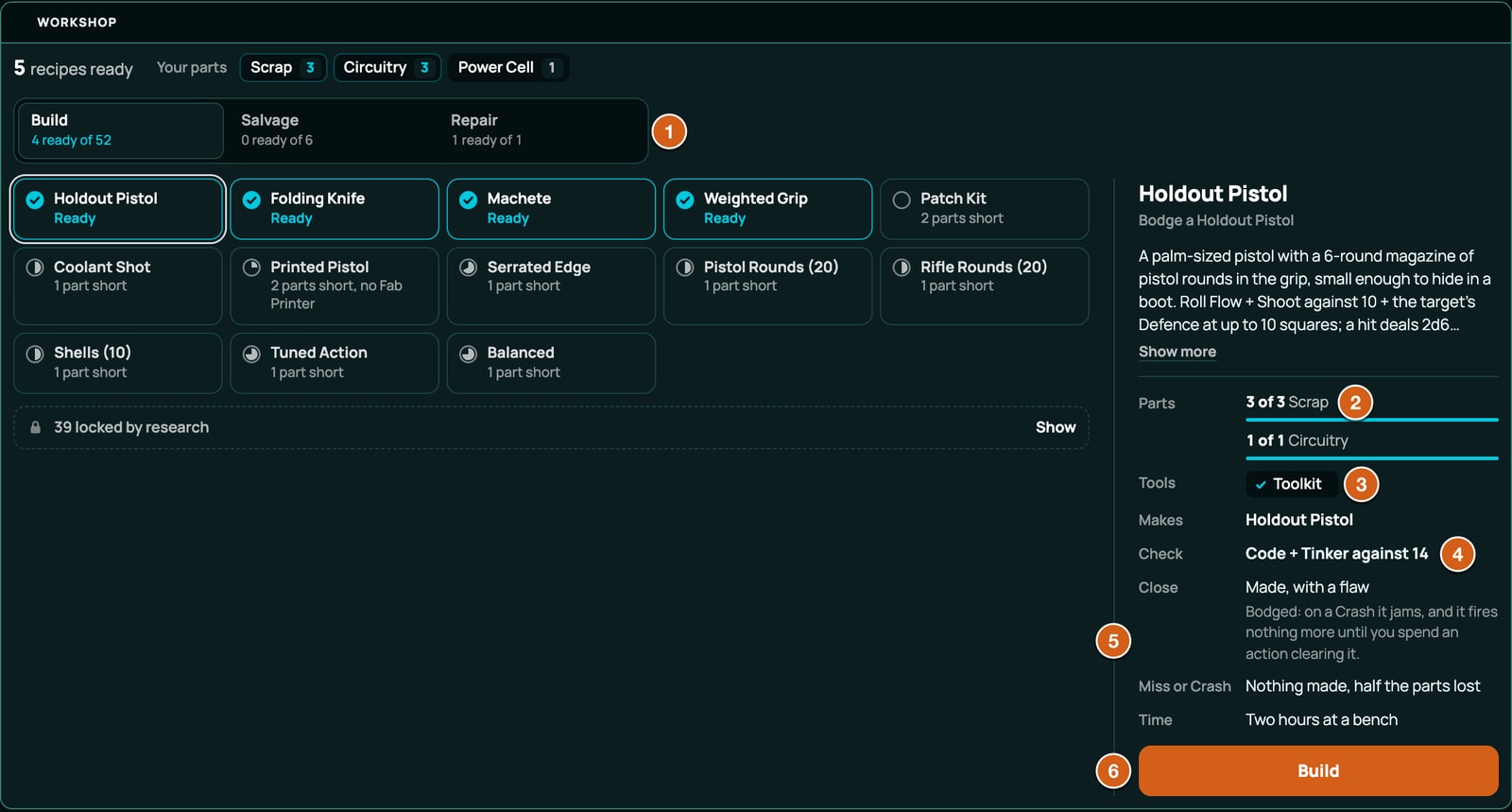
The block heads itself with label and says how many recipes are ready, such as 2 recipes ready, or Nothing ready yet. Your parts lists what the character holds of the inputs their recipes take. The recipes are grouped Build, Salvage and Repair, ready ones first. A recipe's card lists Parts (such as 1 of 2 Brass Scrap), Tools, Makes, Check (such as Wits + Salvage against 9, or None, it always works), a row each for a near miss and a failure, named by your bands (Messy: Made, with a flaw, and the flaw's words), and Time, then the button. A sheet that knows no recipes says No recipes known yet. Each craft also posts a card in chat: who worked on what, the dice and the result, what was used and what was made.
When the checker refuses it
Every problem with crafting is refused with the code CRAFTING_INVALID, and the message names the exact place, such as items[36].spec.meta.recipe.inputs[0].quantity. These are the checker's own words, with the values from a broken copy of Driftglass:
| What's wrong | What the checker says |
|---|---|
crafting isn't an object |
crafting must be an object { label? } -- its presence switches crafting on, and label is the workshop block's heading |
A key it doesn't know, in crafting, a recipe, an input, a tool, an output or the check |
unknown key "cost" -- meta.recipe reads only kind, innate, inputs, tools, outputs, check, onPartial, onFailure, flaw, time, so it would be ignored |
crafting.label empty, or too long |
crafting.label must be a non-empty string / crafting.label must be 40 characters or fewer |
| A recipe in a system with no crafting | this system declares no systemRules.crafting, so this recipe is never offered and never built -- declare "crafting": { "label": "..." } on the system, or drop meta.recipe |
| A recipe on a row that isn't an inventory item | a recipe is an inventory item (a schematic); a valueField item's meta.recipe is never read |
meta.recipe isn't an object |
meta.recipe must be an object { kind?, innate?, inputs?, tools?, outputs, check?, onPartial?, onFailure?, flaw?, time? } |
A kind it doesn't know |
kind "craft" must be one of build, salvage, repair -- the workshop groups recipes by it (absent means build) |
innate isn't true or false |
innate must be true (every character of the system knows it) or false (a character knows it by holding the schematic) |
inputs isn't a list, or has more than 12 |
inputs must be a list of at most 12 { itemKey, packSlug?, quantity? } |
| An input that isn't an object | an input must be { itemKey, packSlug?, quantity? } |
| A quantity of 0, a fraction or over 99 | quantity 0 must be a whole number from 1 to 99 (absent means 1) |
| An input, tool or output with no item key | itemKey must be the key of an inventory item |
| An item key that isn't in the pack | "PART_TIN" is not an item key in this pack (with no packSlug, an item is the recipe's own pack's), so the workshop would never find it |
| An item key that names a value, a roll or a creature | "LORE" is a valueField in this pack (with no packSlug, an item is the recipe's own pack's), not an inventory item |
An empty packSlug |
packSlug must be a pack slug (or absent, for this recipe's own pack) |
A packSlug out of reach |
packSlug "driftglass-loot" is not this pack, its system, or a pack it can refer to |
| The same input twice | "PART_BRASS" is already an input -- name it once, with the total quantity |
tools isn't a list, or has more than 6 |
tools must be a list of at most 6 item keys or { itemKey, packSlug? } |
| A tool that's neither a key nor an object | a tool must be an item key or { itemKey, packSlug? } |
| The same tool twice | this tool is already named -- a tool is held, so once is enough |
| No outputs, or more than 12 | outputs must be a list of 1 to 12 items { itemKey, packSlug?, quantity? } and value-field changes { field, amount } -- a recipe makes something |
| An output that isn't an object | an output must be { itemKey, packSlug?, quantity? } or { field, amount } |
| A value-field output naming no field | field "hull" names no value field in scope (compared exactly) |
| A value-field output on a formula field | field "STRAIN_MAX" is a formula field (its value is "=3+GRIT"), so the craft could never change it -- aim the output at a field that holds a plain number |
| An item output that grants an item asking a choice, a bundle or a class level | this recipe makes "MOD_BARBED_TIP", which grants "TRICK_SHORT_OUT", and that needs a choice or a builder (its own choices, a bundle or a class kit), so building it would be refused at the table -- what a recipe makes arrives with no picker; grant an item that needs none |
| A value-field output of 0 or past 99 | amount 0 must be a whole number from -99 to 99, not 0 -- what the craft adds to (or takes from) the field |
check isn't an object |
check must be { calculationId, target? } -- the roll that decides how well the craft went |
| A check on a calculation the system lacks | calculationId "TINKER_CHECK" names no calculation in scope (compared exactly), so the check could never be rolled |
| A target that isn't a whole number from -999 to 999 | target 1000 must be a whole number from -999 to 999 -- the number the roll is judged against |
| No target, on a calculation that isn't its own test | "BENCH_ROLL" is not its own test (its formula has no comparison with dice on the left, like =1d100<=SKILL), so this check needs a target: a whole number from -999 to 999 the roll is judged against |
onPartial or onFailure on a recipe with no check |
onPartial is read only when a check is rolled, and this recipe has no check |
An onPartial it doesn't know |
onPartial "keep" must be one of success, flawed, lose-half |
An onFailure it doesn't know |
onFailure "flawed" must be one of keep, lose-half, lose-all |
A flawed partial with no flaw, in a system with a partial band |
a check whose partial is "flawed" (the default) marks what it makes with a flaw -- write the flaw (1-200 characters), or set onPartial to "success" or "lose-half" |
| A flaw that nothing reads | flaw is written only on what a flawed partial makes (a check with onPartial "flawed"), so here it is never read |
| A flaw over 200 characters | flaw must be 200 characters or fewer |
A time over 80 characters |
time must be 80 characters or fewer |
For the codes on other parts of a pack, see When a pack is refused.
At the table
What the workshop says when a craft can't go ahead, to help you test a recipe:
| Message | Why |
|---|---|
| This character does not know that recipe. | It isn't innate, and the character doesn't hold its row. |
| Not enough to build this: Brass Scrap (have 1, need 2) | An input is short. Every short input is listed, each with what the sheet has and what the recipe needs. |
| A tool this needs is not held: Pliers. Not enough to build this: Brass Scrap (have 1, need 2) | A tool is missing too. One refusal names everything missing, the tools first; with two tools missing it starts Tools this needs are not held: and names both. |
| Mend a Scar would change nothing: Scars is already at 0. Nothing was used. | A recipe that makes no item, and whose value-field outputs are all at their limit already: a repair with nothing to repair. It's refused before anything is rolled or used. |
| Mend a Scar cannot be built on this sheet: this sheet has no SCARS to change. Nothing was used. | A value-field output names a field the sheet doesn't have. |
| This recipe makes "MOD_BARBED_TIP", which this sheet cannot reach | The output's pack isn't applied, bound or the system's own. Bind it. |
| This recipe's check cannot be rolled on this sheet | The check's calculation isn't on the sheet, in the recipe's pack or in the system's pack. |
| This character's values could not be read, so the check was not rolled. Nothing was used. Try again. | RollQuest couldn't work out the sheet's values. Nothing changes. |
Nothing is used up when a craft is refused. A refusal about an output's grants, such as one that needs a choice, comes before the roll as well.
What the checker doesn't check
| Rule | What happens if you break it |
|---|---|
Have a partial band before you rely on onPartial. |
Without one, the near miss never happens. |
| Make the items a recipe makes from another add-on simple. | The checker reads an output's grants only in this pack and the packs it builds on through derivedFrom. An output from another pack that grants an item with a choice, a bundle or a class level passes, and the craft is refused before the roll. |
Related
A game system of your own · Research trees · Mods, upgrades and field costs · The Workshop · When a pack is refused