

Research
The Research block on a character sheet is where you spend your game system's research currency to unlock nodes on its research trees, for lasting bonuses and new recipes.
Some game systems let a character learn and invent between adventures. Each thing they can learn is a node: a lasting bonus, such as 1 more Ward, or a schematic, a recipe the Workshop can build. Nodes sit on trees, one per field of study, and each node costs some of a currency the system names. A node can need other nodes first, its prerequisites, so a tree is a path you walk: cheap basics first, then what they open up. Research is a feature any game system can switch on. This page uses Ninefold, the near-future system, as the example: its currency is Insight, and its five trees are Firmware, Exploits, Fabrication, Biotech and Signal. To give your own system research trees, see Research trees.
Where it is
Research is a block in the Form View (see Form and Canvas views), on a phone too. In a Ninefold game it's the sheet's Research tab, with your unlocked nodes listed under it in Unlocked. The crew's Den sheet has a Research tab of its own (see Research on a shared sheet, below). The Canvas view doesn't show it.
How you earn the currency depends on the system. In Ninefold you earn Insight with a Research roll in downtime, by cracking loot at the bench, and when the Game Master (GM) hands it out: see Playing Ninefold.
The block, part by part
| Part | What it shows |
|---|---|
| What you hold | The currency you have, such as 7 Insight to spend, or No Insight to spend. |
| Tree tabs | One tab per tree, with how many of its nodes you've unlocked, such as Firmware and 2 of 8. Click one to show that tree. A system with one tree has no tabs. |
| The tree's line | What the tree covers, under the tabs. |
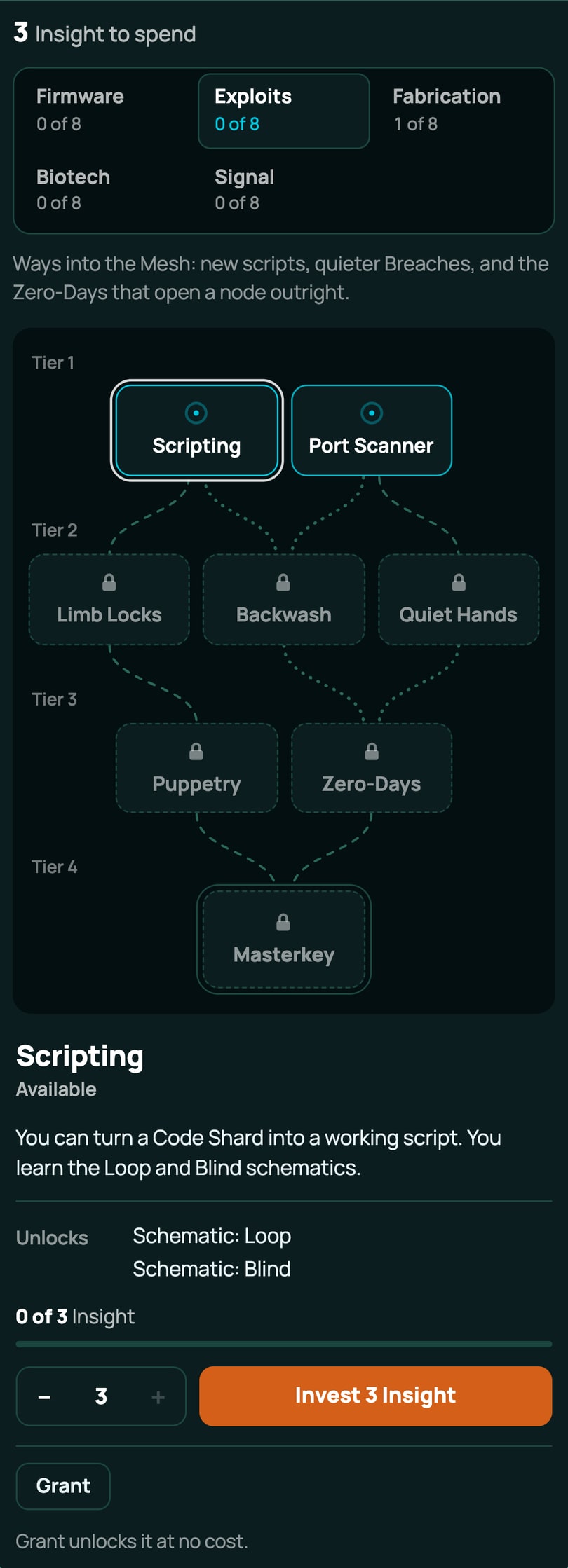
| The map | The tree's nodes in tiers, labelled Tier 1, Tier 2 and so on, joined by lines from each prerequisite to the node that needs it. A tree with no nodes yet says Nothing to research here yet. |
| The detail panel | The node you last picked: what it gives, what it needs, its cost and progress, and Invest. It opens on the tree's first node you can research, or its first node. |
Each node on the map is a tile with its name and a mark:
- A filled tick: Unlocked. You hold it, and its bonuses already count.
- A ring with a dot: Available. You have everything it needs, so you can invest in it. Once you've put something in, part of the ring fills to show how far along it is.
- A padlock, with a dashed edge: Locked. It needs a node you don't have yet.
The tiles in a tree's last tier, its capstones, have a second outline.
The lines show the path. A line from a node you've unlocked is lit: brightest where it leads to a node you can research now, steady where it leads to one you've unlocked too, and faint where the node it leads to still needs something else. A line from a node you haven't unlocked is dark and dashed. A dotted line is one of a "one of these" group (below). When a node unlocks while the block is open, the lines out of it light up once.
Prerequisites and tiers
A node's Needs can be:
- Every node listed. Ninefold's Version Zero needs Milspec Firmware and Shielded Bus.
- One of a group. Milspec Firmware needs one of Air-Gap or Ghost Protocol: either will do. The panel shows the group as one line, One of Air-Gap or Ghost Protocol, ticked once you hold any of them.
- Both kinds at once, on a system that writes them that way.
A tier is where a node sits on the map, nothing more. A node with no prerequisites is available at once, whatever its tier. A node can need one from two or more tiers back: its line runs between the tiles of the tiers in between, never behind them. A prerequisite on another tree draws no line, but the panel still lists it under Needs.
The detail panel
Click a node to open it in the panel.
| Part | What it shows |
|---|---|
| Name and state | The node's name, and Unlocked, Available or Locked. |
| Description | What the node is, in the system's words. |
| Gives | Its bonuses, as the sheet names them, such as Ward +1, Exposure −1 or Max Integrity bonus +3. A node that gives no bonus, such as a capstone whose description says what it does, has no Gives line. |
| Unlocks | What arrives on your sheet when it unlocks, such as Schematic: Loop. |
| Needs | Each prerequisite, with a tick once you hold it or an empty circle until you do. |
| Cost | For a locked node you haven't paid into, Costs and the price, such as Costs 6 Insight. Otherwise a bar and the progress, such as 2 of 6 Insight. An unlocked node shows neither. |
| Amount and Invest | On an available node: the amount, with − and + either side, and Invest with the amount, such as Invest 4 Insight. |
| Grant and Revoke | The GM's buttons, with a line under them saying what each will do: see below. |
| Error line | Why the last press didn't work, in red. |
Invest in a node
You can pay for a node a bit at a time: what you put in stays on the node until it's paid off.
- Open your sheet's Research tab and click the tree's tab.
- Click an available node (a ring with a dot). The panel shows its cost and how much is already in it.
- Set the amount with − and +, or type it. It starts at the most you can put in: the least of what the node still needs and what you hold. It can't go below 1 or above that.
- Click Invest (the button names the amount, such as Invest 4 Insight). The amount comes off your currency at once.
If that pays the node off, it unlocks: its tile gets its tick, and the lines out of it light up to show what you can research next. If not, the bar fills by what you put in, and you can come back with more later. You never spend more than a node still needs.
With none of the currency to spend, the button says only Invest and is greyed out, with You have no Insight to spend under it.
Every press posts a line to the game's chat for everyone, such as "Wren: Research: 4 Insight into Air-Gap (4/6)", and, when it pays a node off, "Wren: Research: Air-Gap unlocked".
What an unlock gives
An unlocked node is a row on your sheet, in Ninefold's Unlocked list:
- Its bonuses count at once, everywhere on the sheet: Ward +1 raises your Ward, and every roll that reads it.
- What it unlocks arrives: in Ninefold, the schematics it names land in your Schematics list, and the Workshop can build them straight away. See The Workshop.
- Some nodes have uses. Ninefold's three capstones, Masterkey, Regrowth and Citywide, work once a job, and Downtime gives the use back. Their panels have no Gives line: the description says what each does.
A bonus reads as the sheet's own field names it: Ninefold's Field Sutures gives Max Integrity bonus +3, Street Eyes Initiative bonus +1 and Ghost Protocol Max Trace bonus +2, the same names as on the sheet's Build block.
The GM's Grant and Revoke
The GM, the person who created the game, sees two more buttons under the panel on every sheet they open in the game. Players never see them, even on their own sheets.
- Grant unlocks the node for free: nothing comes off the currency, and anything already put into it is cleared. It's on any node the sheet doesn't hold yet. On a locked node it unlocks it anyway, without its prerequisites.
- Revoke takes an unlocked node away, or clears the progress on one that's part paid. Its bonuses stop at once. It doesn't give back the currency anyone invested, and it leaves on the sheet what the node unlocked, such as its schematics: take those off by hand if you need to.
Neither asks you to confirm, so a line under the buttons says what each will do before you press it:
| Line | When |
|---|---|
| Grant unlocks it without and the missing nodes, such as Grant unlocks it without Milspec Firmware and Shielded Bus. | A locked node. |
| Grant unlocks it at no cost. | An available node. |
| The 4 Insight invested is not given back., after the Grant line, with the amount put in | A node that's part paid. |
| Revoke clears the 4 Insight invested, and it is not given back., with the amount put in | A node that's part paid. |
| Revoke locks it again, and nothing spent on it is given back., then what stays, such as Schematic: Loop and Schematic: Blind stay on the sheet. | An unlocked node. |
The GM can also add a node from + From pack at the top of the sheet, where research nodes are offered to the GM only (see Inventory and money). A node added that way counts as unlocked. The schematics a research node teaches are offered to the GM only too, so a player learns them through research, or from the GM.
Chat says "taken away" for a revoke, such as "Wren: Research: Air-Gap taken away".
Research on a shared sheet
A sheet the GM has shared with the party, such as a Ninefold crew's Den, has its own currency, its own progress and its own unlocked nodes. Every player in the game can open it and invest the Den's currency in its trees. What a Den node unlocks lands on the Den sheet, so the crew builds those recipes at the Den's Workshop, not on a character. See Playing Ninefold for setting up the Den.
If two people press at once, the second press is refused with Someone else changed this research just now. It has been refreshed: try again., and the block shows what's stored.
With the keyboard
The map is one stop for the Tab key: the node open in the panel.
- The arrow keys move between nodes, and the panel follows. Where the tiers are columns, ← and → move to the nearest node in the tier before or after, and ↑ and ↓ move within the tier. Where they're rows, as on a phone, ↑ and ↓ move between tiers and ← and → within one.
- Home and End go to the tree's first and last node.
- On the tree tabs, ← and → switch trees, wrapping round at the ends.
A screen reader hears which node opened, its state and what it gives, a moment after you stop moving.
On a phone
On a phone, and wherever the block is narrow, the tiers stack as rows from top to bottom, up to three nodes a row, and the lines run downwards. The detail panel sits under the map: tap a node and the page scrolls down to its panel if it's off the bottom of the screen. On a wider screen the tiers are columns read left to right, and on a wide one the panel moves beside the map.
When research says no
| Message | What it means |
|---|---|
| Needs and the missing nodes, such as Needs Jailbreak or Needs one of Air-Gap, Ghost Protocol | You don't hold the prerequisites yet. |
| That node is already unlocked | Someone unlocked it while you had the sheet open. |
| The amount and the currency, such as 4 Insight is needed and you have 2 | You hold less than the amount. The block usually stops you first. |
| This sheet has no Insight to spend (with the system's currency) | The sheet has no box for the currency at all. |
| That node has been retired and can no longer be unlocked | The pack's author has withdrawn the node. One you already hold stays. |
| That is not a research node of this system | The node isn't in a pack this sheet uses. |
| Only the GM can grant or revoke | Grant and Revoke are the GM's. |
| Someone else changed this research just now. It has been refreshed: try again. | Another press landed first. |
| That sheet is busy. Try again. | Another change to the currency got there first, several times over. |
| This sheet's system has no research | The sheet's game system doesn't declare research. |
| Access denied | You can't change this sheet. See Who can see and change a sheet. |