

The Workshop
The Workshop block on a character sheet turns the parts you carry into gear: pick a recipe, press its button, and RollQuest checks what it takes, rolls its check and puts what you made on your sheet.
Some game systems let characters build their own kit: strip a wrecked drone for parts, hammer scrap into a blade, mix a stim, repair their own hardware. Each thing you can make is a recipe: what it takes (its parts, used up), the tools it needs (kept), an optional check (a roll that decides how well it went) and what it makes. The Workshop does the bookkeeping: it counts your parts, rolls the check for you and swaps the parts for the result, so a build at the table takes one press. The Workshop is a feature any game system can switch on. This page uses Ninefold, the near-future system, as the example. To give your own system recipes, see Recipes.
Where it is
The Workshop is a block in the Form View (see Form and Canvas views), on a phone too. In a Ninefold game it's the sheet's Workshop tab, with the schematics you hold listed under it in Schematics. The crew's Den sheet has a Workshop tab of its own (see Crafting on a shared sheet, below). The Canvas view doesn't show it.
Which recipes you know
A recipe is one of two kinds:
- Innate: every character of the system knows it, with nothing to hold. Ninefold's innate recipes are the everyday ones, such as Strip a Drone Wreck, Pack a Patch Kit, Recalibrate, Handload Pistol Rounds and Tune an Action.
- Learned: you know it while your sheet holds its schematic, such as Schematic: Loop. In Ninefold, research grants schematics: unlocking Scripting gives you Schematic: Loop and Schematic: Blind. See Research.
A learned recipe you don't know yet shows, locked, only when a research node would give it to you: its tile says Unlock with and the node's name, such as Unlock with Scripting. In a system without research, recipes you don't know don't show at all.
The block, part by part
| Part | What it shows |
|---|---|
| How many are ready | The recipes you could build right now, such as 3 recipes ready, or Nothing ready yet. With no recipes at all, the block says No recipes known yet. |
| Your parts | The parts you hold that your known recipes take, each with how many, such as Scrap 3. The parts the open recipe takes are lit. |
| Kind tabs | Build (make an item), Salvage (break loot down into parts) and Repair (fix something on your sheet), each with a count, such as 2 ready of 9. Only kinds that have a recipe show. |
| Recipe tiles | The kind's recipes, ready first, then short of something, then locked. Each tile shows what it makes (a build) or the recipe's name (salvage and repair), and its state: Ready, what's missing (such as 2 parts short or no Toolkit), or Unlock with a node. |
| Show / Hide | When a kind has more than four locked recipes and something else, they fold away behind one row, such as 12 locked by research. Show lists them. |
| The detail panel | The recipe you last picked, and its button. It opens on the kind's first ready recipe, or its first. |
A ready tile has a tick, one that's short has a small pie of how much of it you have, and a locked one a padlock.
The detail panel
| Part | What it shows |
|---|---|
| Name | What it makes, for a build, with the recipe's own name under it when that differs, such as Holdout Pistol over Bodge a Holdout Pistol. A salvage or repair shows the recipe's name. |
| Description | What you make, or what the recipe does. A long one has Show more and Show less. |
| Parts | Each part, with what you have against what it takes, such as 1 of 3 Scrap, and a bar. A part you have enough of is lit. |
| Tools | Each tool, with a tick when you hold it and a cross when you don't. |
| Makes | What you get, such as Holdout Pistol, 2 Circuitry, or a change on your sheet such as Glitches -1. |
| Check | The roll, in words: what it adds and the number to beat, such as Code + Tinker against 14. None, it always works when there's no check. |
| The near miss and the miss | One row for each, named by the system's results, such as Close and Miss or Crash, with what happens (below). A flaw shows under its row. |
| Time | How long it takes in the story, such as Two hours at a bench. RollQuest doesn't keep time for you. |
| What's missing | When you can't build it, what you're short of, such as 2 Scrap short, no Toolkit. |
| The button | Build for a build, Break down for a salvage, Repair for a repair. It's greyed out until you have every part and tool. A locked recipe shows Unlock with and its node instead. |
Build something
- Open the sheet's Workshop tab and click Build, Salvage or Repair.
- Click the recipe's tile. The panel shows what it takes.
- Click Build, Break down or Repair.
RollQuest takes it from there. It finds the parts on your sheet, rolls the check, uses the parts, adds what you made and posts a card in chat. The panel shows the result: the dice settling (a die that doesn't count is dimmed), the result, such as Clear, and the total against the target, such as 21 against 14, then what was made and used.
Parts and tools
- A part counts only when it's the same item from the same pack the recipe names: a homebrew "Scrap" from another pack isn't Ninefold's Scrap.
- Parts can come from several stacks. Stacks you haven't equipped are used first.
- A stack that reaches 0 leaves the sheet.
- Tools are kept. A tool can't also be one of the parts.
The check
You don't roll a Workshop check yourself: RollQuest rolls it, with your sheet's numbers as they stand (on a sheet shared with the party, your own character's: see Crafting on a shared sheet, below), when you press the button. The dice can't be changed, rerolled or rolled with options, and a system's extra dice don't apply: in Ninefold, no Edge dice. The number to beat is the recipe's own, such as 14, whatever your sheet's own Difficulty is set to. Penalties on your sheet still count.
What the result does
The result is read with the system's own bands, the named results its rolls land on. In Ninefold a Jackpot or any Clear is a full success, a Close is a near miss and a Miss or a Crash is a miss. Each recipe says what its near miss and its miss do:
| Result | What can happen | What the panel says |
|---|---|---|
| Full success | Every part is used and you make everything the recipe makes. | |
| Near miss | It works all the same; or it works with a flaw, written on what you make, such as "Bodged: on a Crash it jams"; or half the parts are lost and nothing is made. | Works all the same, Made, with a flaw or Nothing made, half the parts lost |
| Miss | Nothing is used and you can try again; or half the parts are lost; or every part is lost. Nothing is made. | Nothing made, nothing used, Nothing made, half the parts lost or Nothing made, every part lost |
"Half the parts" is half of each part, rounded down, and at least one: a recipe that takes 3 Scrap loses 1, one that takes 1 Circuitry loses that one. A recipe with no check always works.
A system's worst result counts as a miss even when the total beats the target: in Ninefold, a Crash (two 1s) is a miss whatever the total.
In Ninefold almost every build makes a flawed item on a Close, and most builds lose half their parts on a Miss; salvage works all the same on a Close. Each recipe's own rows say which.
What you make
- Items arrive on your sheet as new rows, ready to use. Something that stacks, such as Scrap, adds to a stack you already carry, if you haven't equipped it and it has no flaw. A box of rounds always arrives as a box of its own.
- A flawed item carries its flaw, and never joins a stack. The flaw is written in the result and on the chat card: the Game Master (GM) rules what it does.
- Changes on your sheet: some recipes move a number instead of making an item. Ninefold's Recalibrate, a repair, takes 1 off your Glitches; cracking a Server Blade gives 2 Code Shards and 1 Insight. The result says what moved, such as Glitches 2 to 1. The change is made exactly as any other change to that number: it stops at its limits, a track the system lets overflow, such as Ninefold's Heat, overflows, your token's bars follow, and chat says what changed. If RollQuest can't write it, the result says Not applied: and what, and the build itself still stands: change the number on the sheet by hand.
- A recipe that would change nothing is refused before anything is rolled or used, such as a repair with nothing to repair: Recalibrate would change nothing: Glitches is already at 0. Nothing was used.
- What you build works like what you buy. A gun built in the Workshop, or one a research node gives you, keeps its costs: a Rail Rifle still marks its 2 Heat a shot. A gun with a magazine, such as the Holdout Pistol, arrives loaded, as one added with + From pack does, and reloads from a box of its rounds. See Ammunition and reloading.
The chat card
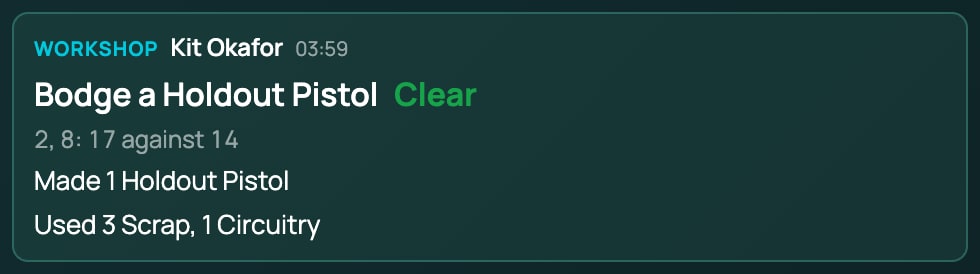
Every build posts a card to chat: the system's name for its Workshop, who built it, the recipe and its result, the dice and the total against the target (such as 7, 9: 21 against 14), what was made (with any flaw), what was used and any number that moved. On a miss that keeps the parts it says Nothing was used up, and on one that loses them Nothing was made.
Only the people who can see the sheet get the card: its player and the GM, and, on a sheet shared with the party, every player in the game.
Crafting on a shared sheet
A sheet the GM has shared with the party, such as a Ninefold crew's Den, has a Workshop of its own, and every player in the game can build there. The Den builds with its own parts, its own tools and its own schematics, and the check rolls with the hands of whoever presses the button:
- The parts are the ones in the Den's own stash.
- A schematic on your character doesn't let you build at the Den: the Den learns its own through its own research.
- The check rolls with your own character's numbers, such as your Code and Tinker in Ninefold: your character is the one you play in the game. The GM, with no character of their own, rolls with the shared sheet's numbers.
- The chat card names you and the sheet, such as Kit Okafor worked on Handload Pistol Rounds at The Den.
- The Den's upgrades bring its tools. In Ninefold, the Fab Bench brings a Fab Printer, the Surgery Room a Surgery Kit and a Chem Kit, the Server Rack a Code Forge and the Hidden Garage a Toolkit.
See Playing Ninefold for setting up the Den.
When the Workshop says no
The button stays greyed out while something's missing, so most of these show only when the sheet changed in another window first.
| Message | What it means |
|---|---|
| A tool this needs is not held: and the tool, such as Toolkit (Tools this needs are not held: for more than one), then Not enough to build this: and each part short, such as Scrap (have 1, need 3) | The tools or parts went somewhere else since the panel last looked. One message names everything that's missing, tools first. |
| The recipe's name and would change nothing:, then why, and Nothing was used., such as Recalibrate would change nothing: Glitches is already at 0. Nothing was used. | A repair with nothing to repair. Nothing was rolled or used. |
| The recipe's name and cannot be built on this sheet:, then why, and Nothing was used. | What it changes isn't a number this sheet can change. |
| This character does not know that recipe. | The sheet no longer holds the schematic. |
| This sheet changed somewhere else just now. It has been refreshed: try again. | Another change to the sheet landed first. The block shows what's stored now. |
| This character's values could not be read, so the check was not rolled. Nothing was used. Try again. | RollQuest couldn't read the sheet's numbers. Nothing happened. |
| This recipe's check cannot be rolled on this sheet | The roll the recipe names isn't on this sheet or its system. |
| This recipe makes an item which this sheet cannot reach | What it makes is in a pack this sheet doesn't use. |
| That is not a recipe in this pack | The recipe has gone from its pack. |
| That pack is not available to this sheet | The recipe's pack isn't on this sheet or in this game. |
| This character's system has no crafting | The sheet's game system doesn't have a Workshop. |
| Access denied | You can't change this sheet. See Who can see and change a sheet. |