

Playing Ninefold
How to play Ninefold in RollQuest, the near-future 2d10 game of a city sold to five companies: make a Blank, roll with Edge dice, run hot on Heat, and hack the board itself.
Ninefold is one of RollQuest's own game systems, the sets of rules a game can play by. This page takes you from the first click to a full job: starting a game on the adventure that comes with it, building a character step by step, reading the sheet, rolling and reading the dice, Heat and Trace, getting hurt, and the things that make Ninefold different, hacking on the same board as the fight and the crew's shared Den. It's for players and for the Game Master (GM), the person who runs the game; the parts only the GM does say so. You don't need to know the rules first: each term is explained the first time it comes up. For the other systems, see Game systems.
Plan: Ninefold is on every plan, like RollQuest's other systems, and so is its adventure, The Repo Yard. So are the Research, Workshop and Mesh tabs, mods and ammunition, adding a card to a sheet after the builder with + From pack, and putting the Den layout on the crew's sheet. Changing a layout itself is design mode, on Starter and Pro.
Ninefold in brief
It's 2094, Year 33 of the Tenancy. Ninefold is a coastal city that went bankrupt and was sold at auction, in nine lots, to five companies called the Providers: Hearthwell (housing and power), Mercy Line (healthcare and leased implants), Passage (transit and roads), Bastion Assurance (private policing and insurance) and Chorus (the network, identity and media). Everything is a subscription, including the implants inside people's bodies and the firmware that runs them: miss a payment and your arm throttles or your front door stays shut. You play Blanks, people who cut the Terms out of their own bodies and walked off the register, and who work jobs in a crew from a hideout called the Den: stealing back what was repossessed, breaking Provider locks, fixing what the Providers won't. The city's network, the Mesh, runs everything: doors, lights, cameras, turrets, drones, and the implants in a guard's eyes.
Every roll is two ten-sided dice (2d10) plus an Attribute and a Skill from your sheet, against a Difficulty the GM calls. Edge dice are extra d10s for help, gear and pushing yourself: you roll them all and keep the best two. The result is one of seven named bands, from Crash to Jackpot, with Close for "you get it, at a cost". Heat is how hard your hardware is running: you spend it to Overclock, and when it overflows you burn out and take a lasting Glitch. Hackers watch Trace, how close the network is to finding them. Your body is Integrity, a pool of points that a hit takes away after your armour's Plate. The loop is the job, the loot, and what you make of it: loot feeds research and the Workshop, which make better gear for a bigger job.
Ninefold comes with an adventure: The Repo Yard, a content pack (a ready-made game someone has published) that sends a crew into a Hearthwell repossession yard at night to take back a prosthetic arm before it is wiped at dawn.
The full rules, the city and the GM's chapters are in the free Ninefold rulebook (PDF). This page follows the app: where the two differ, the app is what your table sees.
Start a Ninefold game (GM)
- On your dashboard, click New Game. The Create New Game window opens.
- Choose Use Content Pack, then Campaign if the window asks.
- Find The Repo Yard. Click Preview (the four arrows in the top-right corner of its card) to look inside it first, then Use this pack.
- Check that Game System says Ninefold Core. The pack is written for Ninefold but carries no system of its own, so the window asks, starting on the system it works best with, and says so under the list: Works best with Ninefold (2d10). You can pick any system, or None. A link under it, Read the Ninefold rulebook, opens the rules. Keep Ninefold: pick None (generic HP) and the game has no rules at all, and no Ninefold sheets.
- Change the name if you like: it starts as The Repo Yard - Copy.
- Click Create Game. You go straight into the new game.
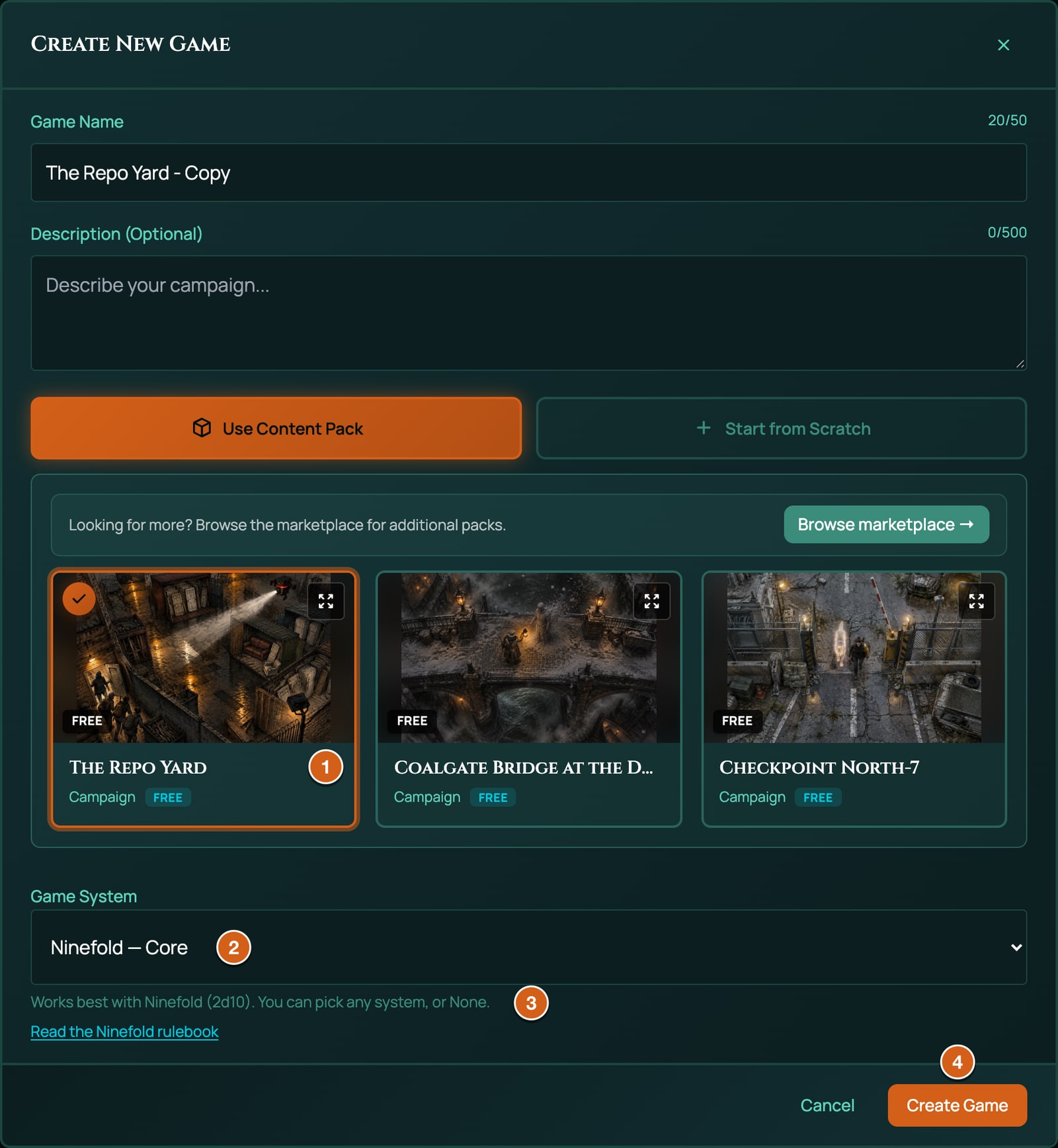
You can also start a Ninefold game from scratch: choose Start from Scratch and pick Ninefold Core under Game System (see Create a game). Settle the system before anyone makes a character: once a game has a character sheet, its system is fixed.
What's in The Repo Yard
The Repo Yard is one scene: one map, 30 by 20 squares, with no phases. It's a walled Hearthwell repossession yard in Hearth Commons, at night after rain, wet concrete under six amber sodium lamps. The West Rows hold the vehicle gate, the guard booth and three open containers of repossessed doors, fridges and sofas; the Middle Rows hold more containers either side of a cross aisle, and at their south end the rust-red container with Teo Marsh's arm inside; a low concrete Office sits in the north-east corner; the dark East Yard runs down the east wall; and outside it is the Back Alley. The crew starts in the East Yard, just inside the battered side door from the alley.
Between the crew and the arm stand a Hearthwell Repossession Agent by the guard booth and a second in the Office, a Repossession Drone over the West Rows, a Ceiling Turret on the Office roof and a Security Camera on the pole by the booth. The pack has no characters: your players make their own (below). It brings the board and its tokens; the GM's notes for the job are in its description, which Preview shows.
The rest of the yard's network has no tokens: place each one yourself when the crew goes for it (see Adversaries and Mesh nodes, below):
- the side door, a Door Lock jailbroken long ago, so it's Open: set its Firewall to 1, and a Breach meets 11;
- the container's Door Lock (Secured, a Breach meets 14);
- the vehicle gate, a Checkpoint Gate, and the booth's Alarm Panel (both Secured, 14);
- the Light Grid (Secured, 14), whose box is by the booth: its Kill puts out every light on the scene, the six lamps, the booth, the Office and the ring round the gate;
- the Office's Server Core (Hardened: set its Firewall to 8, and a Breach meets 18), with a Warden asleep in it.
The job has one clock, which the pack doesn't start for you: open Clocks and add The Wipe with 6 segments. Tick it once an hour and once for every loud thing the crew does. When it fills, the wipe van arrives. The crew wins by getting the arm out of the rust-red container and away before then.
Make a character
A Ninefold character is a Blank. The builder makes one in five steps.
Open the builder
The character builder walks you through a character one step at a time. Players and the GM start it in different places:
- As a player, click Character Sheets on your dashboard, then + Create under My Character Sheets. Type a Name (the empty box reads Your character's name), choose Ninefold Core as the Game system and click Create & open. When the character is finished, click Bring to game on it and pick your GM's game. If your GM sent you Build my character, use that instead: it builds straight into their game.
- As the GM, click Character Sheets on the tool rail (the column of icons down the right edge), then New Sheet, Build your own, a Title, and Assign to Player (optional) if it's for a player. Click Create Sheet.
The builder's frame works as it does in every system: the header counts the steps (Step 1 of 5), Next saves the step and moves on, Back goes back and Start Again starts over. No Ninefold step can be skipped. See Create a character for the frame, control by control.
The steps
| Step | What it asks | How it ends |
|---|---|---|
| Name your Blank | "You stripped the Terms out of your body and walked off the register. The city has a Tenant number for who you were. What does the crew call you now?" Type the Character Name, or keep the one the sheet already has. There's no level to pick: Ninefold has none. | Next |
| Choose a Trade | "What do you do on a job? Your Trade brings its Signature, a starting kit, one research node, and a suggested set of skills." Click one of the ten Trade cards. | It's added at once, and the builder moves on by itself. |
| Set your Attributes | Spend 7 points over your five Attributes, each starting at 1, none above 4. | Next |
| Set your Skills | Spend 14 points over seventeen skills, none above 3. Use the suggested build fills in your Trade's set. | Next |
| Choose a Spec | "Pick one Spec from your Trade: the trick you are known for." The step shows only your Trade's five. | Click one: it's added, and you stay on the step. Click Finish. |
If you go back and pick a different Trade, the new one replaces the old.
Choose a Trade
Your Trade is what you do on a job. It brings four things: a Signature, a trick only that Trade has, which arrives as a card on your sheet; a starting kit; one tier-1 research node, free (see Research, below); and a suggested set of skills for the next steps. The card shows the Trade's description; on the sheet, the Trade's row shows its Niche and Key skills.
| Trade | Niche | Signature | Starting kit | Free research node |
|---|---|---|---|---|
| Breaker | The hacker | Chain: an Edge down the line; a free Port at three | Burner Rig, the Loop and Blind scripts, Holdout Pistol, a box of Pistol Rounds, Lined Jacket, a Code Shard | Scripting (Exploits), with the Loop and Blind schematics |
| Hardcase | Hired protection | Redline: Overclock to 3 Edges; Redline Vent clears 5 Heat | Heavy Pistol, a box of Pistol Rounds, Machete, Weave Vest, Heat Sink implant, Coolant Shot | Thermal Tuning (Firmware): Cooling +1 |
| Wrench | Builder and drone-maker | Jury-Rig: builds take minutes; once a job, build one tool short | Toolkit, Scrap, Circuitry, Service Pistol, a box of Pistol Rounds, Lined Jacket | Printing (Fabrication), with the Printed Pistol schematic |
| Stitch | Back-alley surgeon | Triage: +3 Integrity a Spike on a Patch; install and air-gap implants | Surgery Kit, Patch Kit, Biogel, Taser, Lined Jacket | Field Sutures (Biotech): Max Integrity +3 |
| Lens | Auditor and streamer | Live Feed: allies in your feed get an Edge on one roll a scene | Scout Drone, Holdout Pistol, a box of Pistol Rounds, Lined Jacket, Optics | Street Eyes (Signal): Initiative +1 |
| Suit | Rogue middle manager | Expense Account: once a job, 500 Cred of kit; a Provider Port each scene | Holdout Pistol, a box of Pistol Rounds, Lined Jacket, Skull Comms implant, Focus Stim | Port Scanner (Exploits), with the Mark and Spoof schematics |
| Badge | Defected claims enforcer | Claims Backdoor: once a job, pull a Bastion file; an Edge reading a fight | Service Pistol, a box of Pistol Rounds, Shock Baton, Weave Vest, Patch Kit | Jailbreak (Firmware): Ward +1 |
| Plug | The connect | The Connect: buy for 20% less, sell for 20% more; once a job, find a part | Holdout Pistol, a box of Pistol Rounds, Lined Jacket, Polymer, Power Cell, Weapon Parts | Weaves (Fabrication): Plate +1 |
| Rover | Smuggler and driver | The Ride: your own vehicle, an Edge on Pilot, and Ram for 3d6 | Machine Pistol, a box of Pistol Rounds, Lined Jacket, Toolkit, Power Cell | Printing (Fabrication), with the Printed Pistol schematic |
| Spark | Pirate broadcaster | Rally: once a scene, an Edge for every ally who hears you | Burner Rig, Shock Baton, Lined Jacket, Smoke Charge | Pirate Band (Signal), with the Jammer schematic |
The kit gives one of each item. Its weapons, armour, implants, rigs and drones arrive Equipped, so a Weave Vest's Plate and a Heat Sink's Cooling count from the start; its ammunition, parts, tools and consumables don't need to be. A Trade's free node also gives its schematics, which wait in the Workshop.
Set your Attributes
Attributes are the five broad things your character is good at. Each starts at 1, can be raised to 5 later with Marks, and to 6 with implants.
| Attribute | What it's for | What's built on it |
|---|---|---|
| Frame | Strength, toughness, bulk and taking punishment. | Brawl, Haul, Endure; Max Integrity is 15 + Frame x 3. |
| Flow | Speed, reflexes, aim and balance. | Shoot, Melee, Pilot; Defence and Initiative start from it. |
| Code | Technical mind: logic, machines, systems. | Intrusion, Tinker, Patch, Dig; Firewall starts from it. |
| Poise | Composure, awareness, patience and nerve. | Spot, Sneak, Steel. |
| Pull | Influence, charm, reading people and presence. | Talk, Front, Lean, Streets. |
The step gives you 7 Attribute points, one point a rank:
- The box at the top counts what's left, such as Attribute points 7 left of 7.
- Each Attribute's row shows Attribute points, 1 per rank, the Attribute as it will be out of its cap, such as 3 / 4, then − and + with the points you've put in between them. The number between the buttons is the points (0 to 3); the number before them is the Attribute (1 to 4).
- Spend more than 7 and a line under the box says That is 1 point more than there is to spend., and Next waits until it's fixed.
- While points are left, a line under the box says so, such as Attribute points left to spend: 2. It never holds Next, but nothing keeps the points for later, so spend all seven.
Your Integrity starts full, at 15 + Frame x 3 (18 at Frame 1, 27 at Frame 4) plus anything your Spec adds, such as Scar Tissue's 5: it's filled when you spend these points, and again when you click Finish. That happens only the first time the character is finished: running setup again later doesn't refill it.
Set your Skills
Skills are what you've trained. Each one is rolled with its Attribute, and each is rated 0 to 5: no more than 3 at creation.
| Attribute | Skills |
|---|---|
| Frame | Brawl (fists, elbows, grapples and throws), Haul (climbing, lifting, swimming and jumping), Endure (pain, toxins, cold, staying on your feet) |
| Flow | Shoot (anything that fires), Melee (blades, batons, whatever's to hand), Pilot (cars, bikes, boats and drones) |
| Code | Intrusion (the Mesh: breaching nodes, running Ports, covering your tracks), Tinker (repairing, building and crafting), Patch (medicine, first aid, implant surgery), Dig (research, records and investigation) |
| Poise | Spot (noticing what's there), Sneak (stealth, shadowing, sleight of hand), Steel (holding your nerve under fear, pressure and interrogation) |
| Pull | Talk (persuading, negotiating, calming things down), Front (lying, disguise, playing a part), Lean (intimidation), Streets (contacts, rumours, the black market) |
The step gives you 14 Skill points, one point a rank.
- The box at the top counts what's left, such as Skill points 14 left of 14.
- The step's prompt says how to start: "Press Use the suggested build to start from your Trade's set, then change anything you like." Use the suggested build fills in your Trade's set in one click: every Trade's set spends all fourteen. The step starts with every skill at 0, so press it if you want the suggestion.
- While points are left, a line says so, such as Skill points left to spend: 14. It never holds Next.
- Each skill's row shows Skill points, 1 per rank, its rating out of 3, such as 2 / 3, and − and +.
- A skill above 3 shows a line such as Brawl would be 4; the most it can be now is 3., and Next waits until it's fixed. So does spending more than 14.
Choose a Spec
A Spec is the trick you're known for, and every Trade has five. The step shows only your Trade's, under Specs, each card with its description. Click one to add it: it's marked added, a message says so, such as Added Soft Touch., and you stay on the step to look it over. Click Finish to finish the character. Your Signature is a Spec too, so the sheet lists two cards under Trade and Specs: the Signature and the Spec you picked. The Spec's row shows its Trade and Effect.
Specs are on your sheet for your table to play: most add a number or an action you can use (Soft Touch makes a Close Breach cost 1 Trace instead of 2, Scar Tissue adds 5 to Max Integrity), and a few are rules you apply yourself, such as the Hardcase's Step In, "Take a hit meant for an ally beside you".
The rules let you buy another Spec from your Trade with Marks, 5 a Spec, in Downtime. Once the character is finished, + From pack at the top of the sheet lists your own Trade's Specs under Ninefold Specs, as the builder did: a Breaker sees the Breaker Specs. Click + Add on the one you bought, and it sits beside the Spec you have. Take the 5 Marks off in Edit mode yourself: RollQuest doesn't charge them. If your table lets a character take a Spec from another Trade, add it from the sheet's Items panel, on Pro, which lists every Trade's (see Inventory and money).
While the GM has Freeze characters on, a player can still add a Spec they've bought this way, because buying one is part of play. Removing or swapping the Spec they already have is a rebuild, and it's refused: Characters are frozen in this game.
When the builder's done
The sheet opens in the Form View, the sheet's tabbed layout. Your Trade's kit is in the Gear page, its free research node is unlocked on the Research page, and any schematics it gives are in the Workshop. Before your first job:
- On the Main page, check Integrity is full and no Heat box is ticked, and on the Mesh page that no Trace box is.
- Set your Cred in the Cred block on the Gear page: a new Blank starts with none, so ask your GM what you have.
Gear you add later, with + From pack or from the Workshop, arrives unequipped: open it on the Gear page and switch on Equipped, since only equipped gear counts, such as armour's Plate.
If you cancel the builder part-way, your picks are kept and the sheet stays a Draft in the Character Sheets list. To carry on, open the sheet, click Edit, then Re-run character setup.
The character sheet
A Ninefold sheet uses the Form View, in seven pages: Main, Skills, Gear, Mesh, Research, Workshop and Notes. In in-game mode, where the sheet floats over the board, a dropdown of the pages takes the place of the tabs. Anything that rolls, such as a skill, an Attribute tile or a row with a small die, rolls when you click it. Numbers worked out from others, such as Max Integrity and Defence, are never typed: change what they're built from. Other numbers, such as Marks, are changed in Edit mode: click Edit at the top, change them, and click Done. Edit isn't on the sheet that floats over the board: open the sheet from your token's menu with Open Character Sheet, or from Character Sheets. A few work in play on every sheet, without Edit: Heat, Trace and Glitches are rows of boxes you tick (click a box to fill up to it, or the last filled box to clear one), and Difficulty has its own − and +, which step between the named Difficulties (see Make a check, below). See Form and Canvas views.
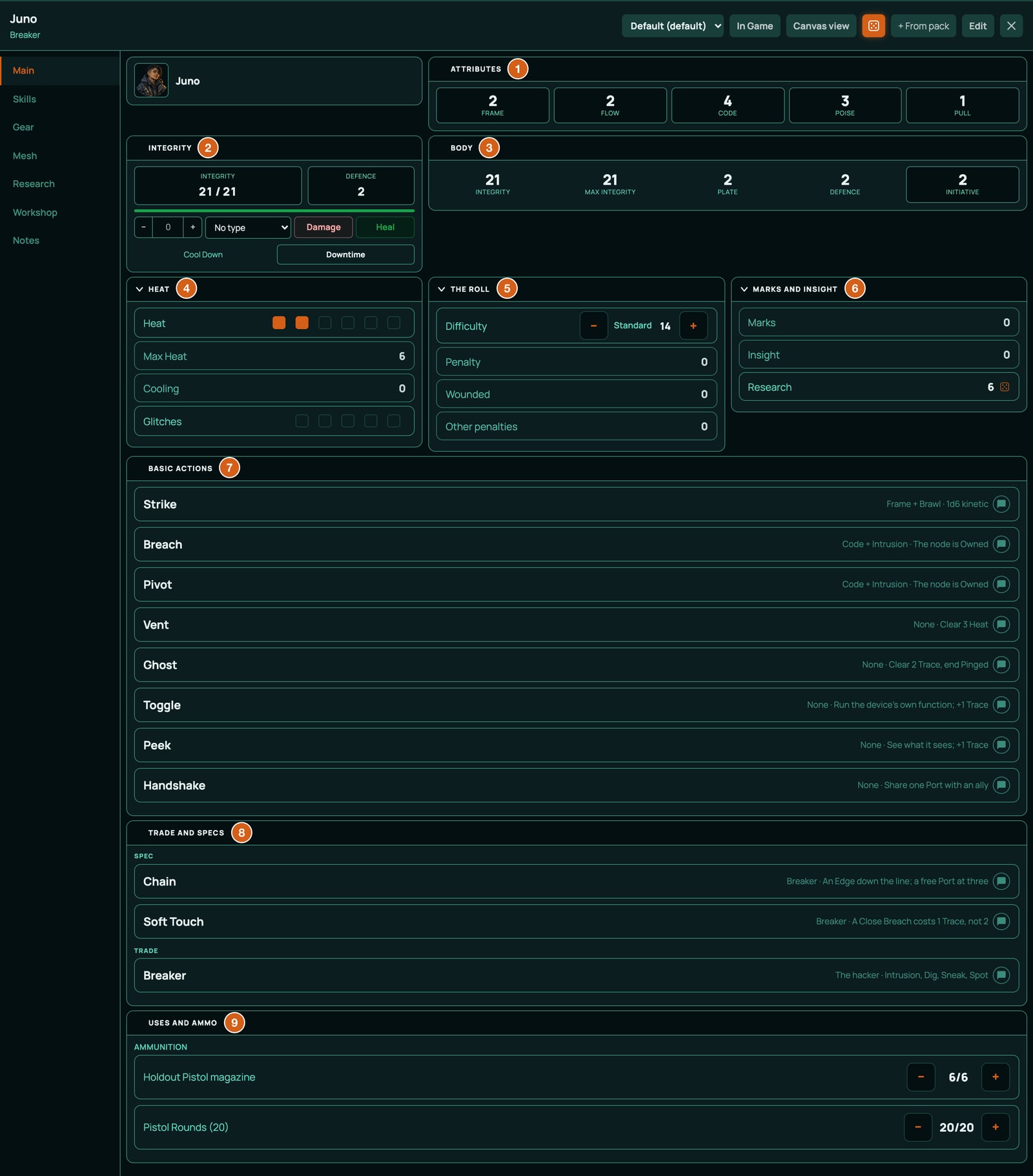
The header
| Control | What it does |
|---|---|
| Name | The character's name. In Edit mode, click it to rename. |
| Layout list | Which layout the sheet wears: Default (default) for a character, Den for the crew's sheet. Shown outside Edit mode when there's a choice, to the GM and the sheet's player, on every plan. |
| + From pack | Adds a card from Ninefold's own packs, or homebrew the GM has bound to the game, on every plan: a piece of gear, an implant, a script, or one of your own Trade's Specs once the character is finished. A part that stacks, such as Scrap, adds to the stack you hold. Your Trade isn't offered: it comes from the builder. Research nodes, and the schematics research teaches, are offered to the GM only. See Inventory and money. |
| Edit | Edit mode, for changing numbers and renaming. Done turns it off. |
Main
| Block | What's in it | What it does |
|---|---|---|
| Portrait | The character's picture. | Change picture, for the GM and the sheet's player. |
| Attributes | Frame, Flow, Code, Poise and Pull, as tiles. | Click one to roll it on its own: 2d10 + the Attribute. To raise one, change its points in the Build block on the Skills page. |
| Integrity | Integrity, such as 21 / 21, and Defence, with a bar; an amount box with a type list, Damage and Heal; then Cool Down and Downtime. | Your body and the hardware in it (see Integrity and harm, below). Cool Down and Downtime are the rest buttons (see Cool Down and Downtime). |
| Body | Integrity, Max Integrity (15 + Frame x 3, plus implants and research), Plate (armour, taken off every hit), Defence (Flow plus armour and implants: an attack has to meet 10 + it) and Initiative. | Click Initiative to roll d10 + Initiative. |
| Heat | Heat, as a row of boxes, one for each point of Max Heat; Max Heat (6 + Cooling, less 1 a Glitch); Cooling; and Glitches as five boxes. | See Heat and Glitches, below. Tick Heat and Glitches in play: click a box to fill up to it, or the last filled box to clear one. Heat's boxes stop at Max Heat, so when a Glitch lowers it, there's one box fewer. |
| The Roll | Difficulty, with the name of the level it's on beside it, such as Standard 14, and − and +; Penalty (2 while Wounded, plus Other penalties); Wounded (0 or 1); and Other penalties. | Every roll reads against Difficulty and takes Penalty off, except an attack aimed at a target, which reads against the target's own number. In play, − and + step from one named Difficulty to the next (see Make a check, below). |
| Marks and Insight | Marks (experience), Insight (the research currency) and Research (Code + Dig). | Click Research for a Research roll (see Research, below). |
| Basic Actions | Strike, Breach, Pivot, Vent, Ghost, Toggle, Peek and Handshake, each with its roll and effect. | Click one to open its card and its buttons. Toggle, Peek and Handshake are reminders: you run them from the Mesh page. |
| Trade and Specs | Your Trade, its Signature and your Spec. | Open a row to read it in full and use its buttons, if it has any. |
| Uses and Ammo | Every magazine, box of rounds and use budget, such as a Taser's cartridges, as remaining/max with − and +. | See Ammunition and reloading, below. |
Skills
Skills lists the seventeen skills. Each row shows the skill's name, its Attribute, such as Frame, and its rating as five dots, two filled for a rating of 2: click a row to roll it, 2d10 + the skill's Attribute + the rating. To raise a skill with Marks, click Edit and click the dot for its new rating, up to 5, then click Done.
Build holds the numbers your Attributes are built from: Frame points to Pull points (what you've spent above the starting 1), then what implants, Specs, gear and research add, filled in by their effects: Frame from implants to Pull from implants, Max Integrity bonus, Defence from gear, Initiative bonus and Max Trace bonus. To raise an Attribute with Marks, click Edit and add 1 to its points here.
Gear
Cred, your money, with − and + and a box. Then the gear lists, each row showing the item's name and its details, such as a weapon's damage, range and notes, and a button to share it in chat:
| List | Holds |
|---|---|
| Weapons, Ammo, Mods and Armour | Grouped as Weapon, Ammunition, Armour and Mod. |
| Implants | Each with its Exposure and effect. |
| Kit | Grouped as Consumable, Drone and Tool. |
| Components and Loot | The parts the Workshop builds from. |
Open a row for its card: its description, Target for something you aim, its buttons (such as Attack and Damage on a weapon), Reload on a gun, its mods, and Equipped on a weapon, armour, implant, rig or drone. Only equipped gear counts: armour's Plate, an implant's bonus and its Exposure.
Mesh
The Mesh panel (see Hacking on the board, below), then Trace: your Trace as a row of boxes, one for each point of your Max Trace, ticked in play like Heat's. Then Your numbers: Firewall (Code + Ward - Exposure: a Breach against you has to meet 10 + it), Ward, Exposure and Breach (Code + Intrusion, what a Breach adds to its dice). The Breach row doesn't roll: its note says to pick the node in the panel and press Breach there. Then Rigs and Scripts.
Research, Workshop and Notes
Research holds the research map and Unlocked, the nodes you have. Workshop holds the Workshop and Schematics, the recipes you know. Notes holds Rules, with How Ninefold Plays, the rules in one card.
On the board
Your token shows your Integrity as a bar, and Heat and Trace as two rows of pips, from the start. To hide one, open the character's Edit Character window and, under Status, switch off On the board for it. Each character's token shows its own sheet's numbers, so a GM running the whole crew, or a player with two characters, sees each token's own Heat and Trace. A token no sheet is assigned to shows the player's primary character's (see Who can see and change a sheet). Conditions show on the token as badges.
Rolling the dice
Make a check
A check is any roll where the outcome is in doubt: climbing the yard wall, talking the agent round, spotting the camera in the vent.
- As the GM, say which Attribute and Skill it uses, and call the Difficulty from the ladder below.
- If the Difficulty isn't the one on the sheet already, set it with the − and + beside Difficulty in The Roll block on the Main page. Each click moves to the next named Difficulty in the ladder below, and its name shows beside the number: Routine 10, Standard 14, Hard 18, Severe 22 and Extreme 26. − is greyed out at Routine and + at Extreme. They work on every sheet, the one that floats over the board and a popped-out one included, without Edit. It stays there until you change it again.
- Click the skill on the Skills page, or an Attribute tile on the Main page when no skill fits. The pool builder opens: add any Edge dice, then click Roll.
The same goes for the Research row on the Main page. Attacks and Breaches open the pool builder too and land on a band, but they're read against the target's own number instead of the Difficulty (see Attacks, below).
| Difficulty | Target | Use it for |
|---|---|---|
| Routine | 10 | Something a trained Blank does without thinking, under a little pressure. |
| Standard | 14 | The usual: real risk, a fair chance. The sheet starts on 14. |
| Hard | 18 | Professional opposition, bad conditions, or very little time. |
| Severe | 22 | The best in the city would sweat. |
| Extreme | 26 | Barely possible. Bring every Edge you can. |
For a number between the steps, such as 16, click Edit: there − and + move it by 1, from 0 to 40. In play, a Difficulty between steps shows only its number, and − and + take it to the step below or above.
Bad circumstances raise the Difficulty a step rather than taking dice away. What does come off every roll is your Penalty: 2 while you're Wounded, plus your Other penalties, 2 for each condition that bears on this roll (Blinded on a shot, Hobbled on a sprint).
The pool builder, part by part
The pool builder is the window where you gather the dice before you throw them. Its heading is the skill or Attribute you clicked, or for an attack what you pressed, such as Strike, Breach or the weapon's name.
| Part | What it does |
|---|---|
| Base | The roll's name and 2 dice, such as Shoot and 2 dice: every roll starts with two dice, whatever the skill. The skill and Attribute are added to the total, not to the dice. |
| Extras | The seven Edge chips (below), each with a line saying what it's for. A counter beside the heading says how many extra dice count, such as 1 of 3 extra dice. |
| Summary | How many dice you'll roll, such as Rolling 3 dice. |
| Roll and Cancel | Roll throws the pool. Cancel, the cross or Esc closes the window without rolling or paying anything. |
Edge dice
Each Edge chip adds one d10. You roll them all and keep the best two, so an Edge never makes a roll worse on the total. At most three Edge dice count on one roll: tick a fourth and it shows not counted, adds no die and costs nothing.
| Chip | What it says | Cost |
|---|---|---|
| Overclock | "Push your hardware: one more die for 1 Heat. Anyone may Overclock twice on one roll." | 1 Heat, taken once the dice have rolled |
| Overclock again | "Overclock a second time on the same roll: one more die for 1 more Heat." | 1 Heat |
| Redline (Hardcase) | "Only with the Hardcase Signature, Redline: a third Overclock on the same roll, one more die for 1 more Heat." Only a Hardcase's sheet shows it. | 1 Heat |
| Assist | "An ally lends a hand, a voice or a second pair of eyes. One more die; they take 1 Heat." Choose who under Who is helping?, from the other player characters on the board: the die counts only once someone is chosen. With no one else there it says No other player characters are here. | 1 Heat to the helper, with a button on the roll's chat card |
| Kit | "The right tool for exactly this job. One more die: name it." Type the gear under Name the gear: the die counts only once something is typed, and the text goes on the chat card. | None |
| Position | "The GM says you have the upper hand: height, surprise, cover, time. One more die." | None |
| Overwatch | "A camera your crew Owns, or a live feed, has eyes on it for you. One more die." | None |
The app takes the Heat for Overclock, Overclock again and Redline by itself, as the dice land. It offers Redline (Hardcase) only to a character with the Hardcase Signature. It doesn't check the rest: nobody may Overclock while Burnt Out, and the GM says when Kit, Position and Overwatch apply. The helper's Heat waits for a button on the chat card, Take 1 Heat for helping, which the helper or the GM presses once.
Reading the result
The dice land on the board, and the result shows on the sheet and in chat with its band, the named result a roll lands on. Read the first band that fits:
| Band | When | What it means |
|---|---|---|
| Crash | Two or more of the dice you rolled show 1, whatever the total. | It goes wrong, badly. RollQuest adds 1 to your Marks (experience) for you: you learn the hard way. |
| Jackpot | Two or more of the dice you rolled show 10, whatever the total. | The best there is. Counts as 2 Spikes. A Jackpot hit leaves the target Wounded. |
| Clear, 2 Spikes | You beat the Difficulty by 10 or more. | Done, with 2 Spikes. |
| Clear, 1 Spike | You beat it by 5 or more. | Done, with 1 Spike. |
| Clear | You meet or beat it. | Done. |
| Close | You miss it by 1, 2 or 3. | You get it, at a cost the GM names. |
| Miss | You miss it by more. | It doesn't work. |
The chat card names the roll, the Difficulty (or, for an attack, the number it had to meet) and the band, with a chip for each Edge, and the dice with the two that count, such as 3d10 [9, 2, 7], highest 9, 7. The bands count every die you rolled, kept or not: that's why Edge dice make both a Jackpot and a Crash likelier. Overclocking is a gamble, on purpose.
| Dice rolled | Average of the best two | Crash | Jackpot |
|---|---|---|---|
| 2 (no Edge) | 11 | 1% | 1% |
| 3 (1 Edge) | 13.5 | 3% | 3% |
| 4 (2 Edges) | 15 | 5% | 5% |
| 5 (3 Edges) | 16 | 8% | 8% |
flowchart TD
  set["Set Difficulty on the Main page"] --> click["Click a skill or an Attribute"]
  click --> builder["The pool builder: 2 dice plus up to 3 Edge dice"]
  builder --> roll["Roll them all, keep the best two, add Attribute and Skill, take off Penalty"]
  roll --> ones{"Two or more 1s?"}
  ones -->|"yes"| crash["Crash: mark 1 Marks"]
  ones -->|"no"| tens{"Two or more 10s?"}
  tens -->|"yes"| jackpot["Jackpot: 2 Spikes"]
  tens -->|"no"| total{"Total against the Difficulty"}
  total -->|"10 or more over"| c2["Clear, 2 Spikes"]
  total -->|"5 to 9 over"| c1["Clear, 1 Spike"]
  total -->|"met, or up to 4 over"| c0["Clear"]
  total -->|"1 to 3 under"| close["Close"]
  total -->|"4 or more under"| miss["Miss"]
Spikes
A Spike is a little extra on a good roll. Spend each one on one of these: +3 Harm on a hit, a second target, moving after you act, doing it quietly (no Trace), doing it fast (a second small thing in the same action), or learning something extra. The band tells you how many you have.
Harm is the one the sheet adds for you: a damage roll offers Spike (+3) and Spike again (+3), so tick Spike for one Spike spent on Harm and both for two, the most a roll can spend. They're on the damage card after a hit (see Attacks, below), and on the roll options of a weapon's Damage (right-click it, or press and hold on a phone). They don't show on any other roll. The damage card offers only what the hit's band earned: Spike and Spike again on a Jackpot or a Clear, 2 Spikes, Spike alone on a Clear, 1 Spike, and neither on a plain Clear or a Close. A weapon's Damage rolled on its own knows no band, so its roll options always offer both: tick only what you earned. RollQuest doesn't count your Spikes for you, and the other ways to spend them are your table's to play out.
Attacks
An attack is a roll too: Frame + Brawl for a Strike (every Blank's fists, 1d6 kinetic), Flow + Shoot for a gun, Flow + Melee for a blade, against 10 + the target's Defence. A Breach is the same against 10 + the node's Firewall (see Hacking on the board, below). Aim it with Target and Resolve, and RollQuest reads the band against that number, Edge dice and all, and applies the hit.
- Open the weapon on the Gear page (or Strike in Basic Actions) and click Target. The target list opens.
- Click the target in the list, or select its token on the board and click Select.
- Click Resolve (it names the attack, such as Resolve Heavy Pistol on 1). The pool builder opens, headed with what you pressed, its Base reading such as Heavy Pistol and 2 dice. Add any Edge dice and click Roll. Cancel stops the attack with nothing spent, not even the round. The target list steps out of the pool builder's way while it's open, and comes back as you left it if you Cancel.
- The dice land, and the card names the attack, the number it had to meet (10 + the target's Defence, such as 13) and the band. A Jackpot, any Clear and a Close hit; a Crash and a Miss miss. Overclock's Heat is taken and a Crash marks 1 Marks, as on any roll.
- On a hit, a card at the bottom right, headed with the attack's name, asks you to roll the damage. On a band that earns Spikes, tick Spike for a Spike spent on Harm, and Spike again for a second, then click Roll. A hit that earned none, such as a Close, shows neither. The damage goes through the target's Plate and off its Integrity by itself.
The resolution card in chat says how it went, such as Officer hit (Jackpot), took 16 (3 stopped by Plate), Wounded, or Guard missed (9 vs 10 + Defence 3, Miss). The number after took is what the target lost, and the brackets say what its Plate stopped: a hit its Plate stops whole reads took 0 (3 stopped by Plate). A Close lands, at the cost the GM names. A Jackpot hit with a weapon, a Strike, a driven drone or the Rover's Ride leaves the target Wounded (see Integrity and harm, below).
The weapon's own Attack, pressed with nothing targeted, opens the pool builder too and posts your total, with no band: use it when the GM tells you the number to beat.
The Canvas view's Target and Resolve open the same pool builder, and the chat card names the band and offers any Trace to take, such as Take 2 Trace. So does a Canvas sheet popped out into a window of its own: keep the pop-out open until the card is in chat, because one closed first leaves the card to post a minute later with the total only.
A weapon that fires ammunition spends a round on every attack, and costs its Heat too, such as the Rail Rifle's 2 (see Ammunition and reloading, below). Adversaries' attacks are printed on their stat blocks for the GM to roll (see Adversaries and Mesh nodes, below).
Initiative
When a fight starts in RollQuest's battle tracker, each character's initiative is a d10 plus their Initiative: Flow, plus what implants and research add. Click Roll Initiative in the tracker, or click Initiative in the Body block on your sheet while the tracker shows Rolling. Enemies and NPCs roll a d10 plus the Initiative their stat block prints. In Battle Setup, a creature's bonus box starts empty with that number in grey, such as +3 (hover over it: Initiative bonus: +3 from its stat block. Type a number to use your own.). Leave it and the creature rolls with its stat block's number; type one, 0 included, and yours is used instead. See Start a battle. A square is 2 metres and a round is 6 seconds; on your turn you get a move and an action.
Heat, Trace and harm
Heat and Glitches
Heat is how hard your hardware is running. It sits in the Heat block on the Main page as a row of boxes, one for each point of Max Heat: 6, plus your Cooling (from heat sinks and research), less 1 for every Glitch. Your token shows it as a row of pips.
Heat goes up from:
- Overclock, Overclock again and Redline (Hardcase) in the pool builder, 1 each, taken by themselves after the roll;
- Assist, 1 to the helper, when they press Take 1 Heat for helping on the chat card;
- gear that runs hot: the Rail Rifle's 2 Heat a shot, the Hot Loads upgrade's 1 and the Hardcase's Piston Fist's 1 a punch, marked by the sheet with each shot, and a Focus Stim's 1;
- feedback: a hit of the Feedback damage type, such as a Warden's Lash, goes on Heat instead of Integrity;
- Trace overflowing (below), 1.
Burning out. When one of those pushes Heat past its maximum, it overflows:
- Heat clears to 0 (what went past the maximum is lost), and Glitches goes up by 1.
- Chat says so: Heat overflowed: Glitches +1.
- You're Burnt Out until the end of your next turn: your implants are offline and you can't Overclock. RollQuest puts the Burnt Out condition on your token; the pool builder still offers Overclock, so leave it alone until it comes off.
That goes for every way Heat can go up, a Feedback hit included: 3 Feedback at Heat 5 of 6 leaves you at Heat 0, a Glitch up and Burnt Out. A hit's card says so too, such as Wren took 3, Heat overflowed: Glitches +1.
Each Glitch lowers your Max Heat by 1, so a character who burns out keeps burning out sooner, until a bench repair clears it: the Workshop's Recalibrate recipe takes 1 off Glitches (see The Workshop, below). With five Glitches the track is full, and Max Heat is down to 1.
Ticking the boxes yourself never overflows: the last box is your Max Heat, and a tick can't go past it. To mark a cost the sheet doesn't take for you, such as the Exo-Frame's, tick a box. If it would take Heat past its maximum, mark it as Feedback damage instead, in the Integrity block (see Integrity and harm, below), and it overflows as a cost does.
To bring Heat down, use Vent (clears 3, and takes your action), Cool Down at the end of a scene (clears it all), or Downtime between jobs. To Vent, open Vent in Basic Actions and click its Vent button: 3 Heat comes off, through your token when it's on the board, or straight off your sheet when it isn't. Ghost works the same way, with its Ghost button.
Trace and getting Burned
Trace is how close the network is to finding a hacker. It's on the Mesh page, as the first gauge of the Mesh panel and as the row of boxes under it, titled Trace, and as pips on the token, so the whole table watches it climb. Max Trace is 6, plus what research and scripts add: there's one box for each point of it. Tick a box to mark Trace by hand; as with Heat, a tick never goes past the last box, so mark a cost that would overflow as Trace damage in the Integrity block.
Trace goes up from:
- a Breach that lands Close (2), Miss (1) or Crash (3). Its result offers a button for it, such as Take 2 Trace, beside the result on the sheet for a few seconds and on the chat card, which you or the GM press once;
- running a port on a node from the Mesh panel, 1 each, paid with the press (the Server Core's Dump Data costs 2);
- running a script, such as Loop or Blind, 1 each, paid with the press;
- a hit of the Trace damage type.
When Trace goes past its maximum, you're Burned: Trace clears to 0, Heat goes up by 1 (chat says Trace overflowed: Heat +1), and if that takes Heat past its maximum, you burn out as well. You lose every node you Own: RollQuest takes your Owned off those tokens, though a node someone else holds, or one the GM marked by hand, stays. The rest is the GM's: a countermeasure, such as a lockdown (every node's Firewall 4 higher for the scene), a Ping, reinforcements, or a Warden.
To bring Trace down, use Ghost (clears 2, ends Pinged, and takes your action), the Spoof script (clears 3), Cool Down or Downtime.
Integrity and harm
Integrity is your body and the hardware in it: 15 + Frame x 3 at most, plus what implants and research add. A hit takes the target's Plate off first (Plate isn't used up: it comes off every hit), and the rest off Integrity. At 0 you're Down: RollQuest puts the Down condition on the token. Unless someone stabilises you with a Standard (14) Patch roll within three rounds, you die; a Jackpot on that roll has you awake again on 1 Integrity. RollQuest counts neither the rounds nor the death: that's your table's.
A Jackpot hit leaves the target Wounded: -2 on every roll until a Patch roll treats it or Downtime lets it heal. When the hit was aimed with Target and Resolve, RollQuest puts the Wounded condition on the target's token, and the card says so. The -2 is yours to set: Wounded to 1 in The Roll block, as the condition's text says. Put the condition on by hand for any other Jackpot hit, such as an adversary's.
The Integrity block on the Main page changes your own tracks in play, without Edit: type an amount (or use − and +), pick a type, and click Damage or Heal. The card it posts gives what got through as its big number: 6 Kinetic against Plate 2 shows −4, with the line 2 stopped by Plate under it. Apply Damage on a token shows the same.
| Type | What Damage does |
|---|---|
| No type, Kinetic, Energy, Shock, Toxic | Takes Plate off, then the rest off Integrity. |
| Feedback | Adds to Heat. Past Max Heat it overflows: you burn out. |
| Trace | Adds to Trace. Past Max Trace it overflows: you're Burned. |
So the block is also the quick way to mark Heat or Trace by hand, such as a Breach's Trace nobody took with its button: 2, Trace, Damage. Damage from this block or from Apply Damage overflows exactly as a cost does (see Heat and Glitches, and Trace and getting Burned, above).
As the GM, hurt a token with Apply Damage on its menu: type the amount, pick its type, and click Apply (see Damage and healing). A Warden's Lash is Feedback, so it goes on the hacker's Heat.
Conditions
Conditions go on the token, from its Conditions (see Conditions). A Breach puts Owned on a node by itself, and scripts and ports put theirs on their target the same way. RollQuest also puts on Burnt Out when your Heat overflows, Pinged when your Breach Crashes, Wounded on a Jackpot hit and Down at 0 Integrity, and takes off Pinged when you Ghost and a Burned hacker's Owned. The rest the GM or the player puts on. They don't change numbers on the sheet: for a condition that takes 2 off a roll, add 2 to Other penalties in The Roll block while it applies (or set Wounded to 1).
| Condition | What it does |
|---|---|
| Owned | A hacker has breached this node and holds it: they, and anyone they Handshake, can run its Ports. It lasts until the hacker is Burned, someone takes it back, or the scene ends, when the GM's End scene button takes it off. |
| Looped | A camera or sensor shows what it showed a minute ago, and sees nothing new until the loop is cut, or until the scene ends: End scene takes it off. |
| Blinded | Optics dark or eyes full of flash: -2 on anything that needs sight, and attacks at range miss on anything but a Clear. |
| Seized | A limb, a turret mount or a drone's motors have locked until the end of its next turn: -2 on anything that needs it. |
| Hobbled | Legs or wheels won't answer: half movement, and -2 on anything that needs footing. |
| Puppeted | A drone, a turret or a wired limb acts for someone else, one action a round of their choosing, until the end of the hacker's next turn. |
| Marked | Painted for the crew: allies who can see the mark gain an Edge against it until the scene ends, when End scene takes it off. |
| Pinged | The network knows where you are: security comes to you, and every node's Firewall counts 2 higher against you until you Ghost or leave the area. |
| Burnt Out | Your hardware overheated: until the end of your next turn your implants are offline and you can't Overclock. |
| Wounded | A Jackpot hit opened you up: -2 on every roll until a Patch roll treats it or Downtime lets it heal. Set Wounded to 1 on your sheet while it lasts. |
| Stunned | On your next turn you get a move or an action, not both, and no reaction until then. |
| Prone | On the ground: melee attacks against you gain an Edge, and shots from range take -2. Standing takes your move. |
| Down | Integrity 0: you're out (see Integrity and harm, above). |
Cool Down and Downtime
Ninefold's two rest buttons are in the Integrity block on the Main page.
| Button | When | What it does |
|---|---|---|
| Cool Down | "The scene is over and the noise dies down." | Heat and Trace clear to 0, and Burnt Out and Pinged come off your token. Every once-a-scene use comes back, such as a Spec's or the Smart Module's. |
| Downtime | "Between jobs, back at the Den." | Heat and Trace clear to 0, Integrity fills to its maximum, Wounded goes back to 0, and every condition on your token ends. Every once-a-job use comes back too, such as the capstones', and the Taser's cartridges and the drones' batteries. |
Click one: a preview shows what will change, and nothing happens until you click the button's name again to confirm, or Cancel. Everyone rests on their own sheet, and the conditions come off only the resting character's own token, so a GM resting one member of a crew they run leaves the others' tokens alone. Ammunition and charges never come back on a button. See Hit points and rests.
Cool Down doesn't take Owned, Looped or Marked off. They last until the scene ends, for the whole table, so the GM ends them all at once with End scene (below).
End scene (GM)
When a scene is over, such as when the crew is out of the yard, end it. End scene takes Owned, Looped and Marked off every token on the board at once, whoever put them on, and tells the table what ended where. Nothing else changes: other conditions stay, and so do Heat and Trace, which each player clears with Cool Down.
- Hover over the Mode menu, the tab at the top centre of the board, and click End scene, on its own row at the bottom, under Battle (End Battle while a battle is on). Only you, the GM, have it.
- A box asks End Scene?, with the line Owned, Looped and Marked come off every token, whoever put them on. Click End scene, or Cancel to leave everything as it is.
- The three come off the tokens, for everyone, and a message says what ended where, such as Owned and Looped ended on Security Camera, Side Door Lock. Chat gets a card headed END SCENE · GM, with the same line in bold.
A token you've hidden doesn't give itself away. The players' card leaves it out, and if it's the only token with one of the three, they get no card at all. Your own message names it with (hidden) after its name, such as Sniper (hidden), and so does a second card that only you see, marked GM only in its heading (hover over it: Only you see this card. The players' card leaves out hidden tokens.).
If no token on the board has any of the three, the message says Nothing to end: no Owned, Looped or Marked on the board. and nothing is posted. If it can't be done, it says The scene could not be ended: try again.
End scene is there in any game whose system has an end of scene, and Ninefold is the first. A homebrew system can have one too: see A game system of your own.
Hacking on the board
In Ninefold the hacker never leaves the table's turn order. Every networked thing in a scene is a token on the board, called a node: a camera, a door lock, a turret, the lights, a drone, the optics in a guard's eyes. On your turn you break into one, and from then on you can work it: the door opens, the lights die, the turret turns. Everyone sees it happen on the same board as the fight.
- A node's Firewall. A Breach has to meet 10 + the node's Firewall, as an attack has to meet 10 + Defence. Nodes come in grades: Open (Firewall 1, so a Breach meets 11), Secured (4, meets 14), Hardened (8, meets 18) and Black-site (12, meets 22). Every Mesh node in Ninefold Adversaries comes Secured, but the Server Core, which is Hardened.
- Breach is a basic action: Code + Intrusion against 10 + the node's Firewall. By the rules you need line of sight within your rig's range, or a Tap, your hand on it, for an Edge. Jackpot or Clear: the node is Owned, a condition on its token. Close: Owned, and you take 2 Trace. Miss: 1 Trace. Crash: 3 Trace, and you're Pinged: the network knows where you are.
- Pivot breaches a node linked to one you Own, at any range. A node's stat block says what it links to.
- Owned nodes have Ports: Toggle (the device's own function: open or shut, on or off), Peek (see what it sees, read what it holds) and the node's own, such as a camera's Loop or the Light Grid's Kill. Each costs 1 Trace (the Server Core's Dump Data, 2), paid when it runs. People, drones and the Warden have Ports too, such as a guard's Optics: Blind.
- Handshake shares one port with an ally, who runs it once on their own turn, rig or no rig. The Trace is still yours.
- Scripts are the hacker's loadout, such as Loop, Blind and Seize: items on the Mesh page that you fire at a node or a wired person. Most run only on a node you hold, and each costs 1 Trace, paid when it runs.
- Being hacked. Every wired implant adds to your Exposure, which comes off your own Firewall: Code + Ward - Exposure. An enemy sysop breaches you against 10 + that.
All of it is on your sheet's Mesh page: your Trace and Heat as gauges, the scene's nodes as tiles, nearest first, each saying what a Breach must meet, and, for the node you pick, its Ports with their cost, your Breach and Pivot buttons, your Scripts, and Handshake: share a port with an ally. A node the GM has hidden isn't on a player's Mesh page until the GM shows it. The network panel explains it part by part. The engine behind it is generic: any game system can declare a network of its own, and a homebrew pack can give nodes their ports (see Networks and ports).
Breach a node
- On the Mesh page, click the node's tile. Its panel says what the Breach must meet, such as Breach: 14 or more, against Firewall 4.
- Click Breach (or Pivot). The pool builder opens, headed with the one you clicked: add any Edge dice and click Roll, or Cancel to stop with nothing spent. After a Cancel the panel says nothing, because nothing rolled.
- The dice land and the card names the Breach, the number it had to meet and the band.
On a Jackpot, any Clear or a Close, RollQuest puts Owned on the node in your name, and its tile turns Owned at once. A Close, a Miss or a Crash offers its Trace as a button, beside the result on the sheet for a few seconds and on the chat card: Take 2 Trace, Take 1 Trace or Take 3 Trace, which you or the GM press once. A Crash also marks 1 Marks and puts Pinged on your token, and the card says so, such as Office Door Lock missed (16 vs 10 + Firewall 4, Crash); Wren Ostrova is Pinged.
The Breach row in Your numbers shows what a Breach adds to its dice, Code + Intrusion. It doesn't roll: Breach from the node's panel, so the roll knows what it's aimed at.
Open a door from the Mesh page
- As the GM, put a Door Lock node next to the door you want hacked (see Adversaries and Mesh nodes, below). Its port Toggle "Opens or shuts doors within 1 square".
- As the hacker, open your sheet and go to the Mesh page. Click the Door Lock tile: it says Breach 14 and how far away it is, such as 4 squares away.
- Click Breach, then Roll in the pool builder. The panel says Breach rolled against Door Lock: the result is in the chat. On a Jackpot, Clear or Close the node's token shows Owned, and so does the tile. On a Close, press Take 2 Trace beside the result, or on the Breach's chat card.
- Under Ports, click Toggle. The door opens on the board for everyone, your Trace goes up by 1, and the panel says what changed, such as Wren Ostrova ran Toggle on Door Lock: 1 door opened.
Research, the Workshop, mods and ammunition
These four are RollQuest engine features that any game system can declare; Ninefold is the first to use them all. Each has its own page, written for any system with Ninefold as the example, and homebrew authors build their own from the homebrew pages. Here they are in short, as Ninefold uses them.
Research
Insight is what you've worked out, and it's the currency of research. You earn it two ways:
- A Research roll in downtime: click Research in the Marks and Insight block on the Main page. It's Code + Dig against the Difficulty the GM sets, and the band adds the Insight by itself: Close 1, Clear 2, Clear, 1 Spike 3, Clear, 2 Spikes or Jackpot 4. A Miss or a Crash adds none.
- Cracking loot at the bench: some Workshop recipes, such as Crack a Server Blade and Reverse a Prototype, put Insight on the sheet.
You spend it on the Research page, a map of five trees: Firmware, Exploits, Fabrication, Biotech and Signal, eight nodes each in four tiers. A node costs 3 Insight at tier 1, 6 at tier 2, 10 at tier 3 and 15 for the capstone at tier 4, and most need one or two nodes before them. Pick a node, choose how much to put in, and click Invest: you can pay over several sessions, and the node unlocks when it's paid in full. An unlocked node gives a bonus (Firmware's Jailbreak, +1 Ward), or the schematics for new gear (Exploits' Scripting, the Loop and Blind scripts), or both. Every Trade starts with one tier-1 node free.
The GM can Grant a node without cost, or Revoke one, and a line under the two buttons says what each will do first. See Research for the page part by part.
The Workshop
The Workshop page is where you build gear from the components you loot. Recipes are grouped Build, Salvage and Repair, each with its parts and how many you have, the tools it needs, its check and what it makes. Nineteen recipes are known to every Blank, such as Strip a Drone Wreck, Handload Pistol Rounds and Recalibrate; the rest come from schematics, which research and your Trade give you. When you have everything, click the recipe's Build (or Break down for salvage, Repair for a repair): RollQuest rolls the check for you, usually Code + Tinker against 10 or 14, and shows the dice. On a Close most builds come out with a named flaw; on a Miss the recipe says whether you keep, half-lose or lose the parts. A card in chat records the build. A repair with nothing to repair, such as Recalibrate with no Glitches, is refused before anything is rolled or used. See The Workshop.
Mods and upgrades
Ninefold's guns have slots for an Optic, a Barrel and an Underslung mod, its blades and batons an Edge and a Grip, and every weapon takes two Upgrade kits. A mod or upgrade counts only on the weapon it's attached to, and comes off again with the weapon and the mod both staying on your sheet. Open the weapon on the Gear page and click Attach a mod on an empty slot. Ninefold ships eight mods (Red-Dot Sight, Long Scope, Suppressor, Laser Module, Smart Module, Serrated Edge, Shock Coil and Weighted Grip) and five upgrades (Tuned Action, Hot Loads, Balanced, Honed and Mastercraft). The Hot Loads upgrade adds 1 Heat to every shot, which the sheet marks for you. See Mods and upgrades.
Ammunition and reloading
Each gun fires from its own magazine and reloads from a box of its ammunition: Pistol Rounds, Rifle Rounds, Shells or Rail Slugs. Every Attack is a shot and spends its round. An empty magazine won't fire: the sheet says Reload first, spends nothing, and Reload on the weapon's card fills it from the box. With no box to reload from, Reload is greyed out. When a box runs dry, the next Reload takes the next box of the same rounds. The Machine Pistol spends three rounds an attack. Grenades, stims, Coolant Shots and Zero-Days are single uses that leave the sheet when spent, the Patch Kit holds three patches, and the Taser's two cartridges and a drone's three-charge battery come back at Downtime. Ammunition and charges never come back on a button: you buy them, build them or loot them. Everything with a count shows in Uses and Ammo on the Main page. See Ammunition and reloading.
The Den (GM)
The Den is the crew's hideout, and it has a sheet the whole crew shares: how much attention the Den draws, the crew's shared Insight and research, its stash and purse, its own Workshop, and its upgrades. It's a character sheet like any other, made by the GM, worn in the Den layout, with the Den pack, Ninefold Den, added and shared with the party.
- Click Character Sheets on the tool rail, then New Sheet, Build your own. Give it the Den's name as its Title and leave Assign to Player (optional) on None (GM reference sheet).
- Tick Shared with the party: "Every player in this game can open and play this sheet: use it for one the whole party keeps together, such as a crew. It skips the character builder." Only the GM sees it, and only in a game whose system has party sheets, as Ninefold does. Ticked, it adds the steps still to come: open the sheet, press Edit and add the Den pack, press Done, and pick its layout in the menu at the top of the sheet. Click Create Sheet. No builder opens.
- Open the sheet in the Form View. In the layout list at the top, choose Den. The sheet now has four pages: Den, Stash, Research and Workshop. Choosing one of Ninefold's own layouts works on every plan.
- Click Edit. In the Edit toolbar, click the Add button that names the Den pack. A message says it was added to this sheet, and Den Heat and Priced appear, at 0. Only the GM sees this button, and only until the sheet has the pack.
- Click Done. To buy the Den an upgrade, click + From pack at the top of the sheet and + Add it from the Ninefold Den group: its price comes out of the Den's purse.
In the In Game list the sheet shows Party, and Shared with the party where a player's name would be. It counts towards your plan's character sheet limit like any other sheet. Made the sheet without the tick? Share it afterwards: in Character Sheets, open the sheet's menu in the In Game list, choose Edit sheet, tick Shared with the party and click Save Changes.
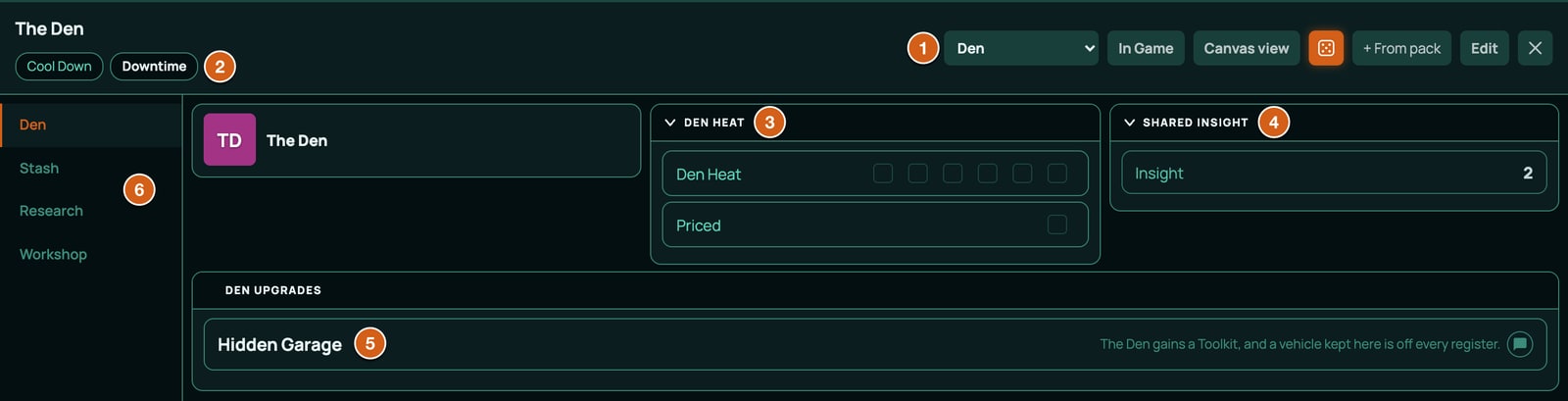
Opening the Den as a player
Every player in the game can open the Den and play it: tick Den Heat, spend the crew's Cred, invest the shared Insight, build at its Workshop.
- On a computer, it has a tab of its own at the bottom left, named after the sheet, beside the tab with your character's name. A player with no character of their own still gets it.
- On a phone, open your sheet: the party's sheets are buttons in its header, and on the screen you see when you have no sheet yet.
It opens in the Form View, in the layout the GM chose. Players can't change its layout, and only the GM buys upgrades with + From pack.
What's on the Den
| Page | Block | What it holds |
|---|---|---|
| Den | Den Heat | Den Heat, 6 boxes: how much attention the Den draws, from 0 (nobody knows it's there) to 6 (Bastion has it on a map). The GM ticks it when a job is loud close to home, a fence talks, or a Provider audits the block. Priced, 1 box: tick it when Den Heat fills. Before the crew's next job a repossession team comes for the Den, unless the crew moves out, pays someone off, or makes the Den vanish from the Mesh. When that's dealt with, untick it and set Den Heat to 3. |
| Den | Shared Insight | The crew's own Insight, which anyone can invest in the Den's research. |
| Den | Den Upgrades | The upgrades the crew has bought (below). |
| Stash | Crew Purse, Components and Loot, Tools, Shared Gear, Uses and Ammo | What the crew keeps together. A Workshop build on the Den uses the Den's parts and tools. |
| Research | The research map and Unlocked | The crew's research, separate from each character's. |
| Workshop | The Workshop and Schematics | The Den's own bench. |
| Upgrade | Price | What it gives the Den |
|---|---|---|
| Fab Bench | 2,000 Cred | A Fab Printer. |
| Surgery Room | 3,000 Cred | A Surgery Kit and a Chem Kit. |
| Server Rack | 2,500 Cred | A Code Forge, and 1 Insight at each Downtime on the Den sheet. |
| Hidden Garage | 1,500 Cred | A Toolkit, and a vehicle kept here is off every register. |
| Signal Mast | 1,200 Cred | Den Heat clears by 1 at each Downtime on the Den sheet. |
The Den layout has no Integrity block, so the Den's rest buttons, Cool Down and Downtime, sit in its header, under its name. Press Downtime on the Den sheet between jobs: that's when the Server Rack adds its Insight and the Signal Mast clears 1 Den Heat. A preview shows what will change first, as on a character.
A Workshop build on the Den uses the Den's parts and tools, and rolls with the Code and Tinker of the character who presses the button: your own character's. Chat names both, such as Kit Okafor worked on Handload Pistol Rounds at The Den. The GM, with no character of their own in the game, rolls with the Den sheet's numbers, which start at Code 1 and Tinker 0.
Adversaries and Mesh nodes (GM)
Ninefold comes with a bestiary, Ninefold Adversaries: twelve people, drones and programs a crew meets on a job, and twelve Mesh nodes to put on the board. Both go on the board the same way:
- Open the menu (three lines, top left), click Enemies, then + Add.
- Choose From the library and search for the name, such as
Door LockorRepossession Drone. Ninefold's creatures have no challenge rating, so there's no CR range. - Click it, then Create. The token appears in the middle of your view with its stat block attached: drag it into place. For a node, put it on or next to the thing it controls: a Door Lock works the doors within 1 square of it, a Checkpoint Gate the doors within 2, and a Light Grid every light in the scene.
See Enemies and the creature library. Right-click a token and choose Stat block to read it: its numbers, what it Cannot be, and its actions, traits, Ports, links and loot.
To change a node's grade, set its Firewall on the token: 1 for Open (a Breach meets 11), 4 for Secured (14), 8 for Hardened (18), 12 for Black-site (22). A lockdown adds 4 until the scene ends.
| Who | Kind | Integrity | Plate | Defence | Firewall | Initiative | Actions |
|---|---|---|---|---|---|---|---|
| Bastion Patrol Officer | Person, Bastion Assurance | 22 | 3 | 3 | 2 | 3 | Service Pistol, Shock Baton |
| Bastion Response Specialist | Person, Bastion Assurance | 27 | 5 | 3 | 3 | 4 | Smart Carbine, Flash Charge |
| Bastion Exo Enforcer | Person, Bastion Assurance | 36 | 6 | 1 | 4 | 2 | Riot Cannon, Frame Fist |
| Hearthwell Repossession Agent | Person, Hearthwell | 20 | 2 | 3 | 3 | 3 | Stun Darts, Holdout Pistol |
| Mercy Line Orderly | Person, Mercy Line | 24 | 2 | 2 | 2 | 2 | Sedative Jab, Shock Baton |
| Chorus Sysop | Person, Chorus | 18 | 1 | 2 | 5 | 3 | Breach, Feedback, Ghost, Lockdown, Holdout Pistol |
| Sevens Tough | Person, the Sevens | 22 | 2 | 3 | 3 | 3 | Machete, Holdout Pistol |
| Sevens Boss | Person, the Sevens | 30 | 4 | 4 | 4 | 5 | Heavy Pistol, Hand Blades |
| Passage Tollman | Person, Passage | 22 | 3 | 2 | 3 | 2 | Pump Shotgun |
| Repossession Drone | Drone, Hearthwell | 14 | 3 | 4 | 4 | 4 | Grapple Claw, Stun Darts |
| Sentry Drone | Drone, Bastion Assurance | 16 | 3 | 5 | 4 | 5 | Machine Pistol, Overwatch |
| Warden | Program, Chorus | 12 | 0 | 0 | 8 | 6 | Lash, Seek |
An attack on one of them has to meet 10 + its Defence, and a Breach 10 + its Firewall. Their Initiative is what Battle Setup adds to their d10 (see Initiative, above). Their own attacks are printed on the stat block, such as "Ranged 15: 2d10 + 5 against Defence. A hit deals 2d6+2 kinetic.": roll them yourself, compare with 10 + the Blank's Defence, and apply the hit with Apply Damage (see Damage and healing). The Warden's Lash deals Feedback, which goes on the target's Heat. A person's implants, a drone's systems and the Warden have Ports of their own, such as a guard's Optics: Blind, an enforcer's Arm: Seize and Legs: Hobble, or a drone's Toggle, Peek and Retarget or Rewrite Order: once a hacker Owns one, they're buttons on the Mesh page like a node's.
| Node | Usually | Integrity | Plate | Defence | Ports on the Mesh page |
|---|---|---|---|---|---|
| Security Camera | Any Provider | 6 | 1 | 2 | Toggle, Peek, Loop (makes it Looped) |
| Door Lock | Hearthwell | 12 | 4 | 0 | Toggle (opens or shuts doors within 1 square), Peek, Seal (locks doors within 1 square) |
| Checkpoint Gate | Passage | 20 | 5 | 0 | Toggle (opens or shuts doors within 2 squares), Peek, Wave Through |
| Ceiling Turret | Bastion Assurance | 14 | 4 | 3 | Toggle, Peek, Retarget (makes it Puppeted) |
| Light Grid | Hearthwell | 8 | 1 | 1 | Toggle (every light on the scene flips), Peek, Kill (every light goes dark), Restore (every light comes back on) |
| Alarm Panel | Bastion Assurance | 8 | 2 | 0 | Toggle, Peek, Silence, Trigger |
| Lift | Hearthwell | 20 | 4 | 0 | Toggle, Peek, Stop Between Floors |
| Server Core | Any Provider | 16 | 3 | 0 | Toggle, Peek, Dump Data (2 Trace). Hardened: Firewall 8, a Breach meets 18 |
| Street Kiosk | Chorus | 10 | 2 | 0 | Toggle, Peek, Screen |
| Autocab | Passage | 24 | 4 | 1 | Toggle, Peek, Divert |
| Comms Relay | Chorus | 10 | 2 | 2 | Toggle, Peek, Relay |
| Med-Dispenser | Mercy Line | 10 | 2 | 0 | Toggle, Peek, Dose |
Every node is Secured as written, Firewall 4, but the Server Core, Hardened at 8. Ports with no board effect, such as Peek or the Alarm Panel's Silence, post a line in chat and leave the rest to you: the stat block says what they do. A light switched by a port stays as it was left until someone switches it again.
What cameras and turrets see. A Security Camera token sees a 90-degree wedge and a Ceiling Turret a half circle, both pointing the way the token faces, which is the top of the map until you turn it. To aim one, hold Ctrl and scroll over its token, 5 degrees a notch, or set Facing under Vision cone on the Vision tab of its Edit Enemy window. Both have Night vision, which sees its full reach whatever the light: 12 squares for the camera, 20 for the turret. Night vision counts only with Dynamic fog, and a camera keeps it when you switch to another scene and back. A camera clears no fog for the crew on its own: to let a hacker who holds one watch through it, tick their player under Player Perspective View on the camera's Access tab, and they see its wedge, even with the yard's lights out. See Token vision and The network panel.
What your table rules on
The rulebook has rules RollQuest leaves to you. Some are printed on the cards as rules text because the app has no way to apply them; others the rulebook calls table rulings. Keep this list handy:
| Rule | What to do |
|---|---|
| Movement and cover | A move is 5 squares (2 metres each), half while Hobbled or climbing. Partial cover takes 2 off ranged attacks; full cover can't be shot. RollQuest doesn't count squares or cover for you. |
| Spikes | Tick Spike (and Spike again) on the damage roll for each Spike spent on Harm. The damage card after a hit offers only the ones the band earned; a weapon's Damage rolled on its own offers both, so tick only what you earned there. Play out the others (a second target, moving after you act, and so on). |
| Wounded | A Jackpot hit aimed with Target and Resolve puts the Wounded condition on the token; set Wounded to 1 on the sheet for its -2. Put the condition on yourself for an adversary's Jackpot. |
| Burnt Out and Pinged | RollQuest puts them on, and Ghost takes Pinged off, but their effects are yours: nobody Overclocks while Burnt Out, and the Mesh panel doesn't add Pinged's 2 to a node's number, so a Pinged hacker adds 2 to Other penalties instead, which comes to the same. |
| Getting Burned | RollQuest takes the hacker's Owned off their nodes; the GM picks a countermeasure. |
| Who may do what | Nobody Overclocks while Burnt Out; a Breach needs a rig and line of sight within its range, a Tap, or (for a Pivot) a link. The app doesn't check these. (It does offer Redline (Hardcase) only to a Hardcase.) |
| A Close's cost | An attack or Breach that lands Close hits; the GM names its cost (a Breach's 2 Trace is the Take 2 Trace button). |
| Ignoring Plate | The Plasma Cutter, the Rail Rifle and the Feedback script ignore some or all of Plate, but the app takes Plate off every hit: the GM gives back what the weapon ignores. |
| Heat a scene | The Exo-Frame costs 1 Heat a scene: mark it yourself. |
| Conditional bonuses | The Smartlink's +2 with smart weapons, the Smart Rifle's Kit Edge, the Shock Baton's Stun on a Spike, Spray's second target, the shotgun's halved damage past 6 squares and the Laser Module's +1 within 5 squares are yours to add, with Situational modifier or a chip. |
| Once a job | The capstones Masterkey, Regrowth and Citywide have a use that Downtime gives back, and the rest is the table's. |
| Bursts and charges | A grenade or a burst hits everyone within 2 squares of where it lands: the GM picks the targets. |
| Reloading | Reloading takes your move, by default. |
| Treating a wound | A Patch roll against 14 with a Patch Kit or a surgeon's bench, 18 in the field. Set Wounded back to 0 and take the Wounded condition off the token when it works. |
| Dying | At 0 Integrity a character is Down. Unless someone makes a Standard (14) Patch roll within three rounds, they die; a Jackpot on it has them awake on 1 Integrity. RollQuest counts neither the rounds nor the death. |
| Marks | You gain 1 by yourself on every Crash, and the GM gives 2 at the end of a job (3 for one that changed the city). In Downtime, a skill rank costs the new rank, an Attribute rank twice the new rank, and another Spec from your Trade 5. Take them off in Edit mode by hand, then raise the skill's dots or the Attribute's points there, or add the Spec with + From pack. |
| Scene's end | Owned, Looped and Marked last until the scene ends, but Cool Down doesn't clear them. The GM decides when a scene is over and presses End scene, which takes all three off every token. |
| Watching through a camera | A camera's Peek posts a line in chat, and what the camera shows is the GM's to describe, unless the GM shares its view with Player Perspective View (see Adversaries and Mesh nodes, above). A shared view keeps showing the camera's wedge, Looped or not, and after the hacker loses the camera, until the GM takes the player off. |
Good to know
- No levels, classes or spells. A Blank changes through Marks, Specs, research, implants and gear.
- Roll from the sheet. Only a roll made from the sheet opens the pool builder, lands on a band, takes its Heat and marks its Marks or Insight. A
/rolltyped in chat rolls dice but names no band. - Macros. A Ninefold game is offered two ready-made macros: Roll 2d10 (
#2d10) and Secret check (#secret), which asks for a bonus and rolls 2d10 plus it for you and the GM only. Neither adds Edge dice or names a band. See Ready-made macros. - Initiative, in RollQuest's battle tracker, is a d10 plus your Initiative (Flow, plus what implants and research add). See Start a battle.
- A square is 2 metres, and a round is 6 seconds. Weapon ranges are in squares. Every distance on the board is in metres too: the ruler and a move's path, a light's radius (Bright Radius (m) in the light editor, where a Torch starts at 8 m and 16 m) and a token's sight. A new character sees 24 m in bright light, 12 m in dim light and 6 m in darkness: 12, 6 and 3 squares. See Token vision.
- Money is Cred, in the Cred block on the Gear page.
- Homebrew. A homebrew pack can build on Ninefold with new Trades, Specs, gear, scripts, research nodes, recipes and nodes with ports. See Research trees, Recipes, Mods and upgrades, Networks and ports and The pack file.
Related
Game systems · Playing Tidewrack · Playing Brightline · Start from a content pack · Create a character · The network panel · Research · The Workshop · Conditions · Glossary