

Playing Tidewrack
How to play Tidewrack in RollQuest, the d6 dice pool game of a sinking canal city: make a character, roll a pool, carry Pressure, and keep clocks and a crew sheet.
Tidewrack is one of RollQuest's own game systems, the sets of rules a game can play by. This page takes you from the first click to a full session: starting a game on the adventure that comes with it, building a character step by step, reading the sheet, rolling and reading the dice, getting hurt and recovering, and the two tools only Tidewrack has, its clocks and the sheet the whole crew shares. It's for players and for the Game Master (GM), the person who runs the game; the parts only the GM does say so. You don't need to know the rules first: each term is explained the first time it comes up. For the other systems, see Game systems.
Plan: Tidewrack is on every plan, like RollQuest's other systems. So are adding a card to a sheet after the builder, such as a Fracture or a second ability, with + From pack at the top of the sheet, and putting Tidewrack's own Crew layout on the crew's sheet. Changing a layout itself is design mode, on Starter and Pro. See The crew sheet.
Tidewrack in brief
Tidewrack is a canal city built on the back of a drowned god, Old Maer, and every year it sinks a hand's width deeper into the estuary. It's the 412th Turning, the city's name for a year. The god's dreams harden in the silt as Wakeglass, glowing shards that light a room for a month or make a gambler lucky, and the whole city runs on dredging and trading them. The Sluice Guild works the great locks that decide which districts flood. You play a crew of scoundrels in the gaps between the powers: thieves, smugglers, talkers and the Wake-touched, people who carry a splinter of Maer's dream and pay for its power in pieces of their own memory. You take on scores (jobs) for coin, and spend what's left of your nerve between them.
Every roll is a pool of six-sided dice (d6s): one die for each dot in the Knack you're using, plus dice you add for your character's written traits, for pushing yourself and for help. You read the single highest die, never the total: a six is Clean, a four or five a Snag (it works, at a cost), anything lower Sunk, and two sixes a Flood. There are no hit points and no levels. What wears a character down is Pressure, the strain of pushing yourself and taking blows, which overflows into lasting Fractures, and named harms such as "cracked ribs" with a tier from 1 to 4. The crew shares one sheet, and clocks track everything that takes time.
Tidewrack comes with an adventure: The Drowned Market, a content pack (a ready-made game someone has published) that puts a crew on a flooded canal junction on the night the Sluice Guild means to drown a strike.
Start a Tidewrack game (GM)
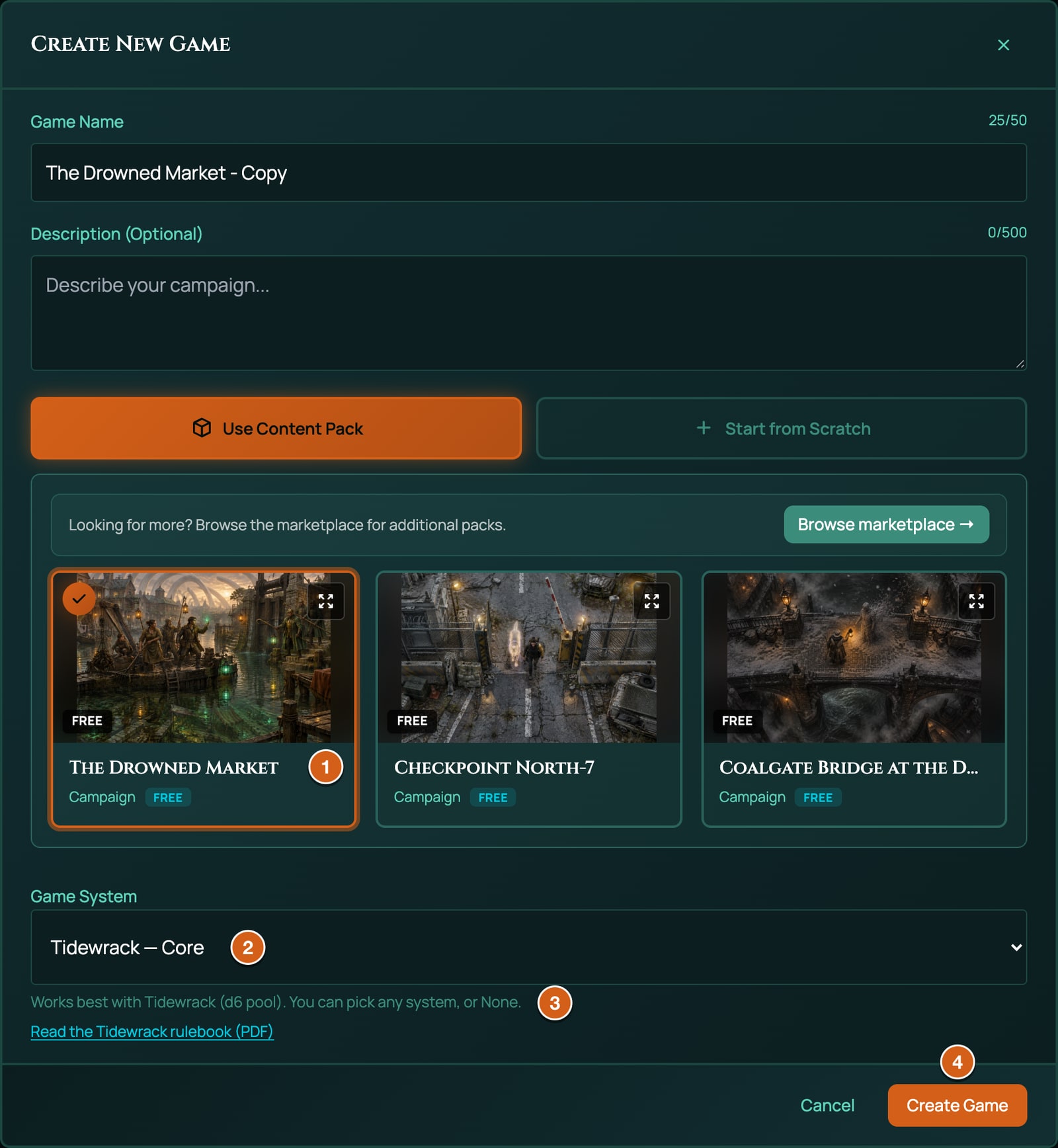
- On your dashboard, click New Game. The Create New Game window opens.
- Choose Use Content Pack, then Campaign if the window asks.
- Find The Drowned Market. Click Preview (the four arrows in the top-right corner of its card) to look inside it first, then Use this pack.
- Check that Game System says Tidewrack (the list shows it with Core after the name). The pack is written for Tidewrack but carries no system of its own, so the window asks, starting on the system it works best with, and says so under the list: Works best with Tidewrack (d6 pool). You can pick any system, or None. A link under it, Read the Tidewrack rulebook (PDF), opens the rules. Keep Tidewrack: pick None (generic HP) and the game has no rules at all, and no Tidewrack sheets.
- Change the name if you like: it starts as the pack's title followed by - Copy.
- Click Create Game. You go straight into the new game.
You can also start a Tidewrack game from scratch: choose Start from Scratch and pick Tidewrack under Game System (see Create a game). Settle the system before anyone makes a character: once a game has a character sheet, its system is fixed.
What's in The Drowned Market
The Drowned Market is one scene: one map, with no phases. It's the junction of two canals in the Sunk, the district that has already gone under, late on a rainy day, with a dredge platform moored over a sunken market square. Two Sluice Wardens hold the North Pontoon and the dredge crane, Lock-Keeper Dorran Fisk works the sluice wheel inside the Lock-house to the south, and on the Balcony Docks waits the Stranger in the Diving Harness, a diver who brought a glowing shard up from the drowned market and lost her name to it. The crew starts on the South Pontoon, beside the platform's open deck: characters the GM adds stand on the party start there, each one after the first on the next free square round it. The Wardens, Fisk and the Stranger start hidden, for you to reveal when the crew meets them. Tidewrack ships no stat blocks for its people, so they arrive as plain tokens.
The pack has no characters: your players make their own (below). It brings the board, its tokens, and the GM's notes for the adventure, which a new game puts in its campaign journal. Its two clocks aren't in the pack: start them yourself in the Clocks panel (see Clocks), Close the Sunk Sluice with 8 segments and The Sluice Shuts with 4.
Make a character
Open the builder
The character builder walks you through a character one step at a time. Players and the GM start it in different places:
- As a player, click Character Sheets on your dashboard, then + Create under My Character Sheets. Type a Name, choose Tidewrack as the Game system and click Create & open. When the character is finished, click Bring to game on it and pick your GM's game. If your GM sent you Build my character, use that instead: it builds straight into their game.
- As the GM, click Character Sheets on the tool rail (the column of icons down the right edge), then New Sheet, Build your own, a Title, and Assign to Player (optional) if it's for a player. Click Create Sheet.
The builder's frame works as it does in every system: Next saves the step and moves on, Back goes back, Skip passes an optional step, and the last step's button says Finish. See Create a character for the frame, control by control.
The steps
| Step | What it asks | Required? |
|---|---|---|
| Name Your Character | "Everyone in Tidewrack has a name they were born with and a name the canals gave them. Which one do you answer to?" Type the Character Name, or keep the one the sheet already has, which is filled in. There's no level to pick: Tidewrack has none. | Yes |
| Choose a Calling | "What do you do for the crew, and how does the city know you? Your Calling brings its own gear." Click one of the seven Calling cards. It's added at once, with its two pieces of Calling gear, and the builder moves on by itself. | Yes |
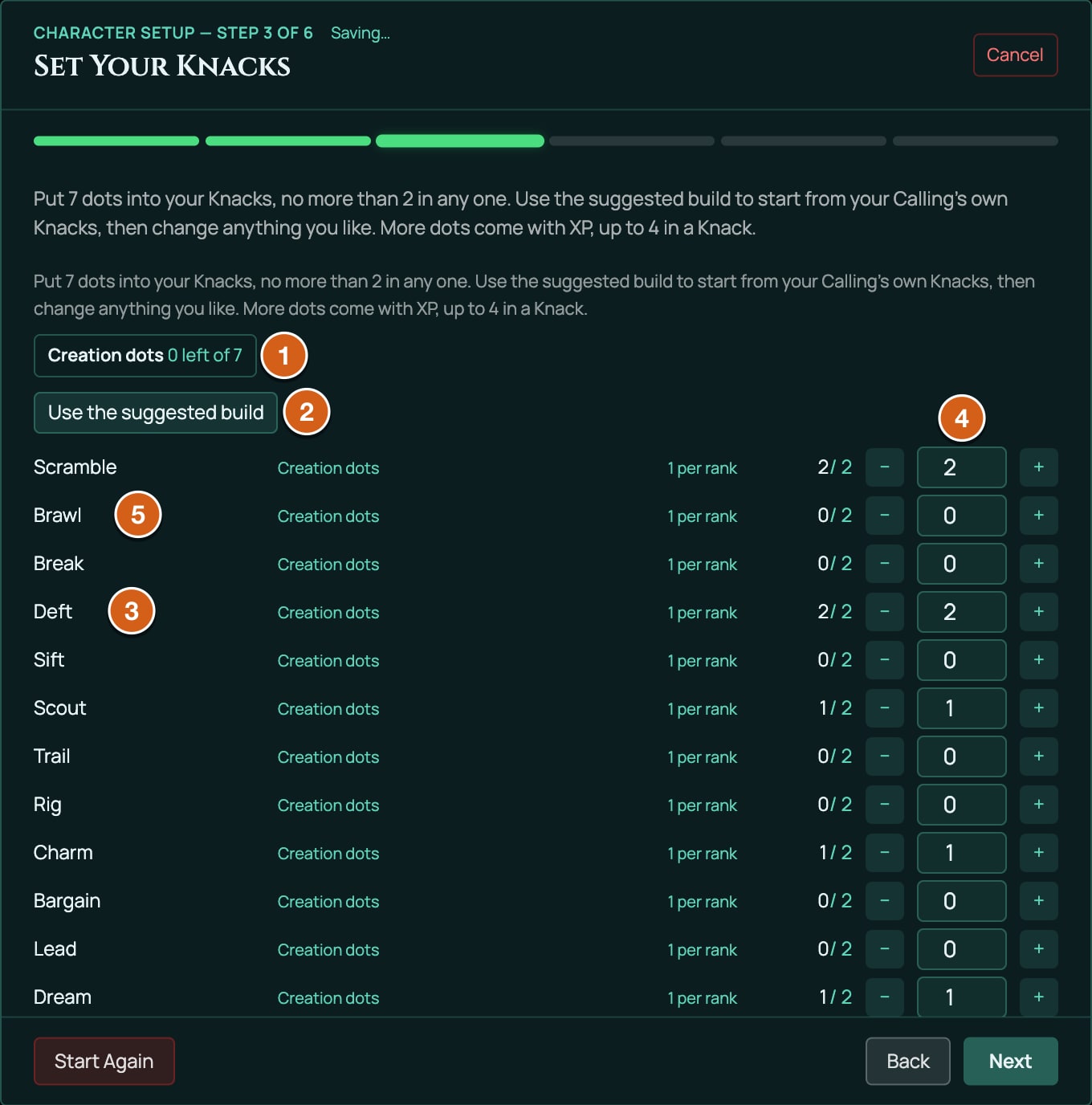
| Set Your Knacks | Put 7 dots into your twelve Knacks, no more than 2 in any one. Use the suggested build fills in your Calling's own build. | Yes |
| Choose an Ability | "Pick one special ability from your own Calling. More come with Calling XP." The step shows only your Calling's eight abilities. Click one to select it, then Add 1 & Continue. | No: Skip |
| Choose an Undertow | "Everyone in Tidewrack lets the Pressure out somehow. What pulls you under when the score is done?" Click one of the seven Undertow cards; the builder moves on by itself. | Yes |
| Starting Gear | "Your Calling's own gear is already in your coat. Take whatever else you would carry onto the canals." Click as many cards as you like, then the button that counts them, such as Add 2 & Finish. | No: Skip |
On the two optional steps you select cards first: each one you click shows selected, a line above the cards counts them, and nothing is added until you click the button under them, which says how many it will add, such as Add 1 & Continue or Add 2 & Finish. If you go back and pick a different Calling, the old Calling's gear, and the ability you took from it, come off with it.
Choose a Calling
Your Calling is what you do for the crew and how the city knows you. Each character has one. It brings two pieces of Calling gear, suggests a Knack build, and says what earns you Calling XP, the marks that buy new abilities (see XP and getting better).
| Calling | Role | Suggested build (7 dots) | Calling gear | Mark Calling XP when you... |
|---|---|---|---|---|
| Knuckle | Muscle and minder | Brawl 2, Break 2, Scramble 1, Scout 1, Lead 1 | Knuckle's Boathook, Knuckle Irons | stood between the crew and harm, or made someone back down without saying a word. |
| Ferret | Second-storey thief | Deft 2, Scramble 2, Scout 1, Charm 1, Dream 1 | Ferret's Picks, Eel Grease | got somewhere you were not meant to be, or out of somewhere you should not have left. |
| Gull | Lookout and long gun | Trail 2, Scout 2, Scramble 1, Sift 1, Charm 1 | Gull's Crossbow, Spyglass | found what was hidden, or hit what was far away. |
| Lampwright | Tinker of glass and fire | Rig 2, Sift 2, Deft 1, Break 1, Dream 1 | Lampwright's Tool Roll, Slow Fuses | solved a problem with a machine, a mixture, or a very loud noise. |
| Silvertongue | Talker and charmer | Charm 2, Bargain 2, Scout 1, Deft 1, Lead 1 | A Fine Coat, Calling Cards | talked your way in, out, or up. |
| Ledger | Planner and fence | Sift 2, Lead 2, Bargain 1, Scout 1, Deft 1 | Tide-Tables, Forger's Kit | won because you planned it, or because you knew something nobody else did. |
| Dreamer | Wake-touched seer | Dream 2, Sift 2, Scout 1, Charm 1, Scramble 1 | A Shard of Wakeglass, The List | leaned on Maer's dream, or paid for it. |
On the sheet, the Calling's row shows its Role, its Suggested Knacks and its XP. Suggested Knacks shows only the dots the Calling itself names, such as "Brawl 2, Break 1" for a Knuckle (the Dreamer's reads "Dream 2, and 1 dot anywhere"): the suggested build in the table above starts from those and places the rest.
Set Your Knacks
Knacks are the twelve things your character can be practised at, each rated from 0 to 4 dots. They sit in three Currents of four: Hand (your body against the city), Mind (your wits) and Voice (your nerve). When you roll a Knack, you roll one die per dot.
| Current | Knack | What it's for |
|---|---|---|
| Hand | Scramble | Climb, swim, leap a canal, run the slate roofs: getting somewhere before the water does. |
| Hand | Brawl | Fighting up close with fists, boathooks and whatever the tide left lying about. |
| Hand | Break | Force against things: stave in a hull, wrench open a sluice, pry a grate off a drowned cellar. |
| Hand | Deft | Quick, careful hands: lift a purse, palm a shard, slip a knot, pick a lock. |
| Mind | Sift | Sift a ledger, a wound, a tide-table or an archive for what matters. |
| Mind | Scout | Watch from a distance and see what's really there: the patrol's timing, the way out. |
| Mind | Trail | Follow a quarry through the canals by wake and rumour, or put a bolt exactly where you meant it. |
| Mind | Rig | Build, mend and sabotage: pumps, lock-gears, diving bells, lamps, slow fuses. |
| Voice | Charm | Win someone over with warmth, wit or the right lie told kindly. |
| Voice | Bargain | Trade, haggle, bribe, and make a deal stick. |
| Voice | Lead | Give orders and have them followed: rally a crew, face down a crowd. |
| Voice | Dream | Reach into Maer's dream: read Wakeglass, hear the drowned bells. The god dreams back. |
The step gives you 7 dots, Creation dots, to spread over the twelve, with no more than 2 in any one. Later, XP can raise a Knack to 4.
- The box at the top counts what's left, such as 3 left of 7.
- Use the suggested build fills in your Calling's build from the table above in one click. Change anything from there.
- Each Knack's row shows Creation dots, 1 per rank (each dot costs one) and how many of its 2 it has, such as 2/2, then − and + buttons with the number of dots between them.
- A line under the box says what's wrong, such as Deft would be 3; the most it can be now is 2. or That is 1 point more than there is to spend., and Next waits until it's fixed.
- Next works with dots still unspent, but nothing keeps them for later.
Leave at least one dot in each Current. A Current with no dots in any of its Knacks rates 0, and a Brace with it (see Bracing) is the worst roll there is. Every suggested build has a dot in all three.
Choose an Ability
An ability is a special trick of your Calling. Each Calling has eight, and the step offers only your own Calling's. You take one now; Calling XP buys more later. The last of each Calling's eight, Old Hand (with the Calling's name after it, such as Old Hand (Ferret)), lets you take an ability from another Calling instead. Those later abilities go on with + From pack at the top of the sheet, on every plan: every Calling's abilities are listed under Tidewrack Calling Abilities, and + Add puts one on.
| Calling | Its abilities (a star marks one that adds a die) |
|---|---|
| Knuckle | Hold the Line*, Boathook Dancer, Iron Knuckles, Brine-Tough*, Stand Between, Crack the Hull*, Unbowed, Old Hand |
| Ferret | Light Fingers, Roofrunner*, Under the Waterline, Lockwhisper, Never There, Second Skin, Gutter Sense, Old Hand |
| Gull | Eye of the Flock, Long Shot, Read the Wake, Rooftop Nest, Steady Hands, Weather-Wise, Quarry*, Old Hand |
| Lampwright | Glass-Cutter, Slow Fuse, Pump and Bellows*, Lamp of Many Colours, Diving Bell, Tinker's Pockets, Volatile Mixtures, Old Hand |
| Silvertongue | Honeyed*, Lantern-Mile Regular, The Silver Lie, Read the Room, Ballroom Ready, A Friend in Every Tavern, The Last Word, Old Hand |
| Ledger | It Was Always the Plan, Paper Trail*, Leverage, An Ear at the Exchange, To the Minute, Ringleader, Contingency, Old Hand |
| Dreamer | Shardreader, Sleepwalker, Lucid*, Keeper of Names, Dream-Speech, Slack-Born*, Ward of Silt, Old Hand |
Abilities are written in words for your table to play out, and RollQuest doesn't apply them for you, with one exception: the ten starred ones promise an extra die in some situation (Crack the Hull on a Break roll against something built, say), and you add it yourself by ticking Ability in the pool builder (see The pool builder). An ability that changes a cost changes nothing in the app: with Stand Between or Ringleader, the backer simply doesn't press the button that takes their Pressure, and with Steady Hands the GM gives a Pressure back.
Choose an Undertow
Your Undertow is the habit you go back to when the score is done, to let the Pressure out. It's a story: RollQuest records it on your sheet and leaves the rest to your table.
| Undertow | How you go under |
|---|---|
| Mudlarking | Alone on the silt at low tide with a lamp and a hook, combing for whatever the city dropped. |
| The Lamp-Dens | A cushion in a den off the Lantern Mile while the coloured lamps burn down. Someone will be along with the bill. |
| Night Swimming | Into the black canals after the last bell, until the cold empties your head. |
| Tending the Drowned | A ledge under a bridge for someone the water took: candle stubs, their name in the stone, an hour of talk. |
| Bell-Ringing | Up a drowned church's tower to ring its bells until your arms burn. |
| The Ferry-Inn Chorus | Singing with strangers in the ferry inns until the first boat leaves. |
| Glass-Gazing | Staring into a sliver of Wakeglass until Maer's dream rises to meet you. Each time it keeps a little more. |
Starting Gear
Your Calling's two pieces of gear are on the sheet already. This step offers the general gear, and shows your Calling's own pieces as added. There are no prices: take what your character would carry. Gear has a load, which counts against how much you bring onto a score (see Load).
| Gear | Load | What it's for |
|---|---|---|
| Short Steel | 1 | A short sword, a gutting knife, a hook. |
| Heavy Weapon | 2 | A maul, a boarding axe, a capstan bar. |
| Flintlock Pistol | 1 | One shot, a lot of smoke, and a slow reload. |
| Rope and Grapple | 1 | Forty feet of tarred line and a three-pronged hook. |
| Hooded Lantern | 1 | A shuttered Wakeglass lantern. |
| Disguise Kit | 1 | Wigs, paint, a dredger's cap, a borrowed badge. |
| Breathing Reed | 0 | Lie under a canal's surface for as long as you dare. |
| Skiff | 3 | A small, quick boat: no load while you're in it, a lot when you carry it. |
| Oilskin Coat | 1 | Bracing gear, 2 uses: steps a Hurt from cold, water or a glancing blow down a tier. |
| Cork Vest | 1 | Bracing gear, 1 use: steps a Hurt from drowning or a fall into water down a tier. |
| Steel-Boned Jacket | 2 | Bracing gear, 2 uses: steps a Hurt from a blade or a blow down a tier. |
| Smelling Salts | 0 | Bracing gear, 1 use: steps a Shaken (fear or shame) down a tier. No use against the Drowse. |
Bracing gear softens harm: each use steps one status down a tier, the coat, vest and jacket a Hurt and the Smelling Salts a Shaken (see Harm and Boons). Which harm a piece of gear fits, cold or a blade, is your table's call. Downtime brings every use back.
When the builder's done
Click Finish and the sheet opens in the Form View, the sheet's tabbed layout. Before your first score:
- Write your Strands on the Strands page (see Strands and tags). The builder doesn't ask for them.
- On the Gear page, check what you're bringing. Your Starting Gear picks arrive Equipped, ticked as brought; your Calling gear and anything added later don't. Open a piece and click Equipped to bring it, or again to leave it behind: that's how the sheet knows what you brought.
- On the Main page, set Load Limit for the score (see Coin and Load).
If you cancel the builder part-way, your picks are kept and the sheet stays a Draft in the Character Sheets list. The builder doesn't open again straight away, but it opens by itself the next time you load the game and open the sheet. To carry on sooner, open the sheet, click Edit, then Re-run character setup.
The character sheet
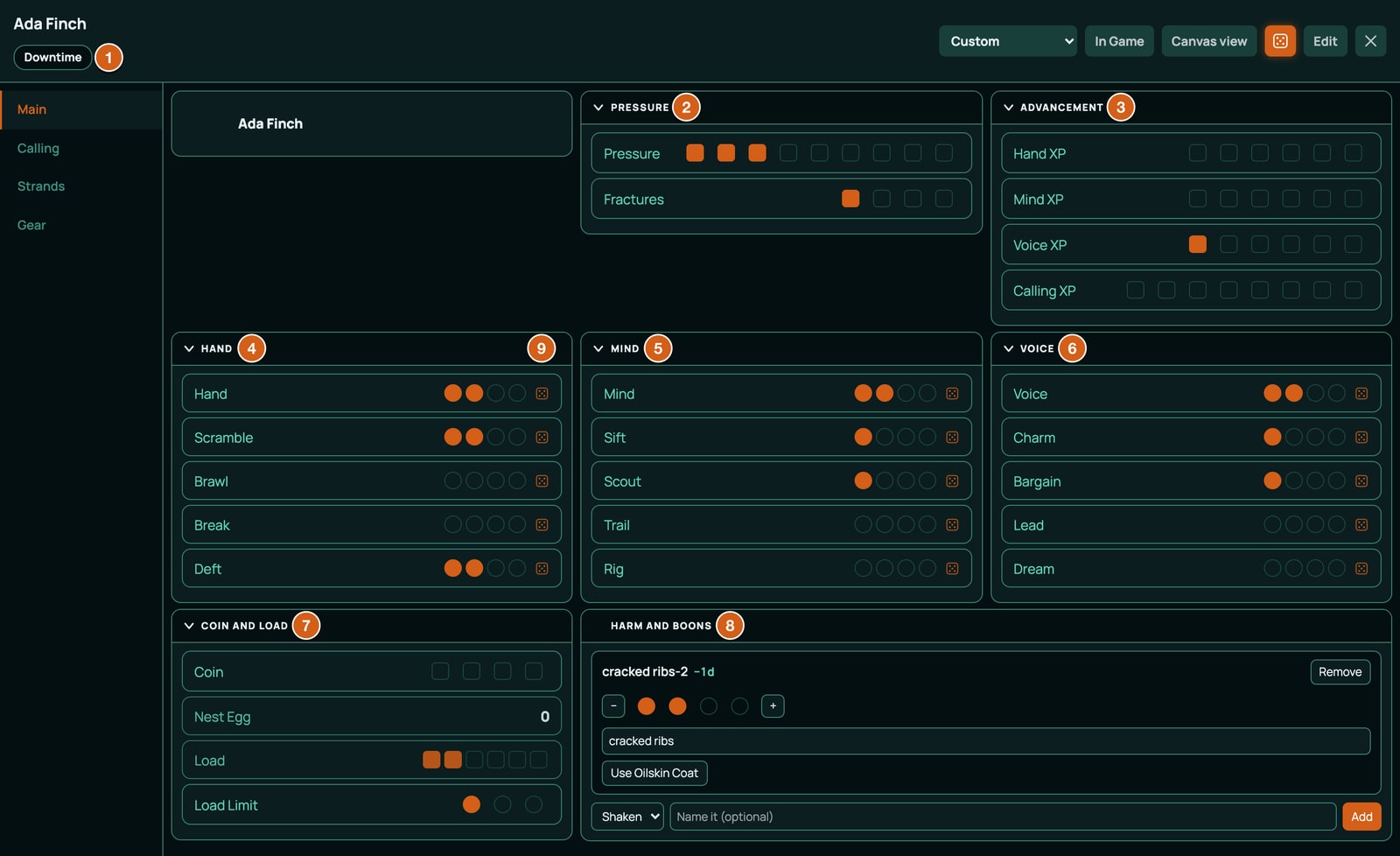
A Tidewrack sheet uses the Form View, in four pages: Main, Calling, Strands and Gear. It has no Canvas artwork. Values that have boxes or dots, such as Pressure, are ticked straight on the sheet in play: click a box to fill up to it, or click the last filled box to clear one. Knack dots are set in Edit mode (Edit at the top), because clicking a Knack rolls it.
The header
| Control | What it does |
|---|---|
| Name | The character's name. In Edit mode, click it to rename. |
| Downtime | Tidewrack's rest button, for between scores. See Downtime. |
| Layout list | Which layout the sheet wears, when it has more than one. A character wears the default; the crew's sheet wears Crew. The sheet's player and the GM can pick one on every plan. |
| + From pack | Shown whenever Tidewrack's own packs, or homebrew the GM has bound to the game, offer something the sheet doesn't have yet, on every plan: takes a card, such as an ability, a Fracture or a piece of gear. Your Calling and Undertow aren't offered: they come from the builder, or from Edit and Re-run character setup. See Inventory and money. |
| Edit | Edit mode, for setting Knack dots, writing Strands and renaming. Done turns it off. |
Main
| Block | What's in it | What it does |
|---|---|---|
| Pressure | Pressure, 9 boxes; Fractures, 4 boxes | Pressure is strain: pushing yourself, backing a friend and Bracing all cost it. When it overflows, you take a Fracture. See Pressure and Fractures. |
| Advancement | Hand XP, Mind XP and Voice XP, 6 boxes each; Calling XP, 8 boxes | Six marks in a Current buy a dot in one of its Knacks; eight Calling XP buy an ability. A roll at Sinking Footing marks its Current's XP by itself. |
| Hand, Mind, Voice | The Current's rating, then its four Knacks, as dots | Click a Knack to roll it. Click the Current's own row (such as Hand) to Brace with it. A Current's rating is worked out: how many of its four Knacks have at least one dot, 0 to 4. |
| Coin and Load | Coin, 4 boxes; Nest Egg, a number up to 30; Load, 6 boxes; Load Limit, 3 dots | Money and what you carry. See Coin and Load. |
| Harm and Boons | The named statuses on your token, each with a tier | See Harm and Boons. |
The rows you can roll show a small die after their dots.
Coin and Load
- Coin is the money in your purse, counted in fat purses rather than pennies. Four is all you can carry without someone noticing.
- Nest Egg is Coin put by somewhere dry. At 30 you can buy your way out of the life. Change it in Edit mode.
- Load Limit is how much you bring onto a score: one dot is Light (2 load), two Laden (4), three Swamped (6). It starts at one dot. Swamped, you swim like a stone.
- Load fills by itself with the load of every piece of gear ticked Equipped. You can't click it. Keep it within your limit.
The Gear page's Load bar shows the same total against your limit, such as 2 / 2 load, with What's carrying weight to list each piece.
Calling
The Calling page lists the cards your character carries, each a row you can open to read in full:
| List | Columns | Holds |
|---|---|---|
| Calling | Role, Suggested Knacks, XP | Your one Calling. |
| Abilities | Calling, Effect | The abilities you've taken. |
| Fractures | Effect | The Fractures you've taken (see Pressure and Fractures). |
| Undertow | How you indulge | Your Undertow. |
Strands
The Strands block holds your Strands, Pull and Fray boxes included. See Strands and tags.
Gear
The Load bar, then Gear with each piece's Load and Effect. Open a piece to tick Equipped (you're bringing it) and, on bracing gear, to see its uses left.
On the board
Your token shows two rows of pips: Pressure and Fractures. They're on from the start. To hide either, open the character's Edit Character window and, under Status, switch off On the board for it. They follow the sheet of the player's primary character (Primary character in the sheet's Edit Sheet form, see Who can see and change a sheet). Named statuses show on the token as condition badges, such as "cracked ribs-2".
Strands and tags
A Strand is a part of who your character is, written by you as short tags. Each tag is a fact you can lean on in a roll for an extra die: "Knows when the tide will turn", "Owes the Tallymen", "Every barkeep on the Mile knows me". A character has up to four Strands, of two kinds:
- Wake: a fragment of Maer's dream lodged in you, power from the drowned god paid for in pieces of your own memory.
- Root: the life you had before the Wake and keep beside it: a trade, kin, an oath, a debt, a street, a haunt.
Each kind has books, ready-made themes that come with questions to answer as tags:
| Kind | Books |
|---|---|
| Wake | Tidecaller, Bellmouth, Saint of the Silt, Lantern-Eel, Gull-Speaker |
| Root | Trade, Kin, Oath, Debt, Street, Haunt |
Write a Strand
- Open your sheet, click Edit, and go to the Strands page.
- Click New Strand, then Wake or Root, then one of its books. The Strand appears with the book's name as its title.
- Type a title if you want one of your own.
- Type a tag in New tag and click Add. The book's questions show beside the tags: answer them, one tag each. Write at least three tags; a Strand holds up to eight.
- Under Leak, write the Strand's weakness, the way it lets you down. The book's questions for it show beside the box.
- Click Done.
In Edit mode, Remove takes a Strand off, after asking Remove this Strand?, and the book list beside its kind changes its book.
Pull, Fray, Leak and Pawn
Each Strand has two rows of 3 boxes, which you tick in play:
| Part | What it does |
|---|---|
| Leak | The Strand's weakness. When it gets in the way of a roll, tick it in the pool builder: it takes a die away, and marks a box of Pull on that Strand by itself. |
| Pull | When its third box fills, the Strand says Pull is full: add a new tag to clear it, and a New tag box appears: write what the trouble taught you, and Pull clears. |
| Fray | When you betray what the Strand says about you, tick a box of Fray yourself. When the third fills, a Wake says Fray is full: rewrite this Strand as Root (a Root says as Wake), with Rewrite: the Strand turns to the other kind, keeps its tags, drops its book, and Fray clears. |
| Pawn | In the pool builder you can pawn one tag a roll: its die is a guaranteed six. The tag is then spent, and can't be used again until you click Recover beside it on this page. When you recover a pawned tag is your table's call. |
Rolling the dice
Two kinds of roll
- A Knack roll is for doing something whose outcome is uncertain and where something is at risk: climbing to the balcony before the warden turns, talking Fisk away from the wheel. Click the Knack on the Main page.
- A Brace is for taking what the city throws at you: a blow, a fall, a lungful of canal, the pull of Maer's dream. Click the Current that fits, Hand for your body, Mind for your wits, Voice for your nerve. You roll as many dice as the Current's rating, and the result says how much Pressure it costs you.
Either way the pool builder opens instead of rolling at once.
The pool builder, part by part
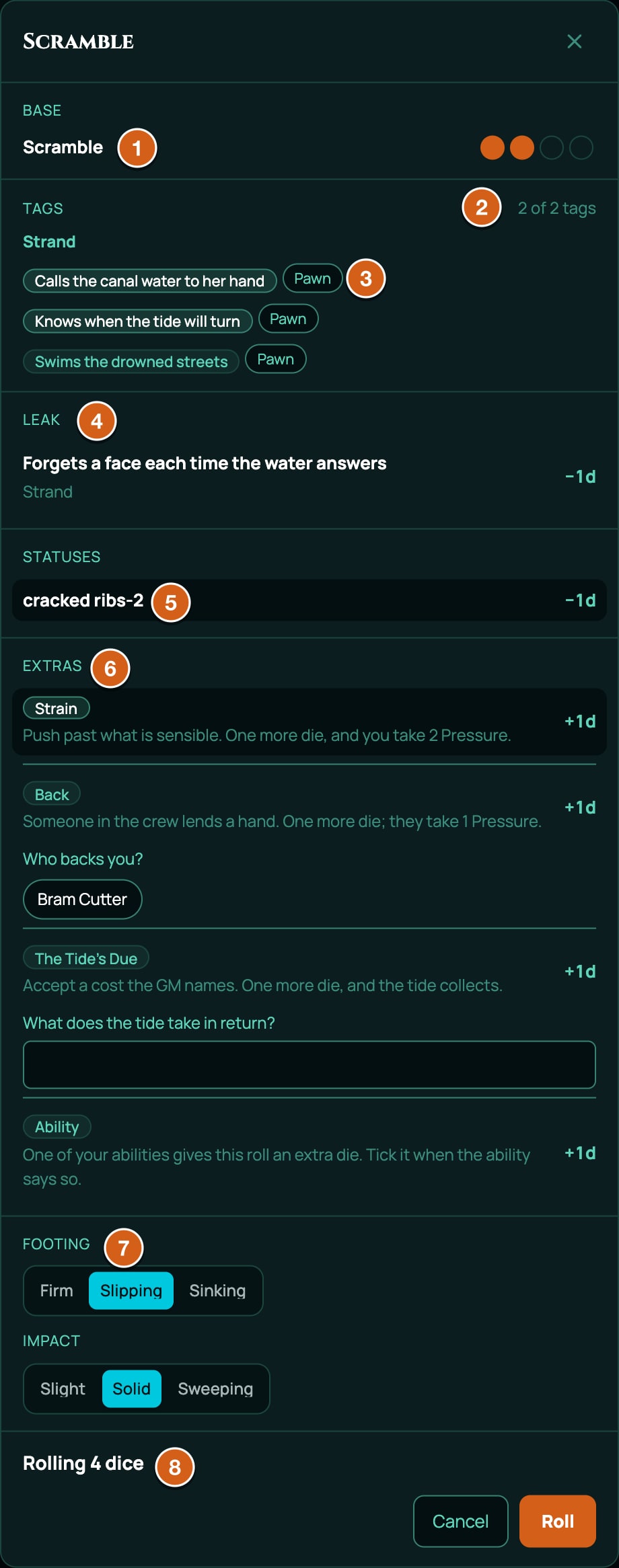
The pool builder is the window where you gather the dice before you throw them. Its heading is the Knack or Current you clicked.
| Part | What it does | On a Brace? |
|---|---|---|
| Base | The Knack's dots (or the Current's rating): one die each. | Yes |
| Tags | Your Strands' tags, under each Strand's title. Click each tag that helps: one die each. A counter says how many count, such as 1 of 2 tags: only two tags count on one roll, and a third shows not counted. A tag you've pawned isn't offered until it's recovered. | Yes |
| Pawn | The button beside each tag. Pawn one tag a roll: it counts as one of your two, and its die is fixed at six. | No |
| Leak | Each Strand's Leak. Tick one when the weakness gets in the way (the GM's call): −1d, and that Strand marks Pull. | Yes |
| Statuses | The named statuses on your token (see Harm and Boons). Tick the ones that matter to this roll: a Hurt or Shaken at tier 2 or 3 is −1d, a Boon or Cover at tier 2 or 3 is +1d, tier 1 is +0d. With none, it says None on this character. | Yes |
| Extras: Strain | "Push past what is sensible." +1d, and you take 2 Pressure once the dice have rolled. | No |
| Extras: Back | "Someone in the crew lends a hand." +1d: choose who under Who backs you?, from the other player characters (the die counts only once someone is chosen). They take 1 Pressure, with a button on the roll's chat card. With no one else on the board it says No other player characters are here. | No |
| Extras: The Tide's Due | "Accept a cost the GM names." +1d: type what the tide takes under What does the tide take in return?. The die counts only once something is typed, and the text goes on the chat card for the GM to collect. | No |
| Extras: Ability | "One of your abilities gives this roll an extra die." +1d. Tick it when a starred ability says so. | Yes |
| Footing | Firm, Slipping or Sinking: how much danger you're in. Starts on Slipping. | No |
| Impact | Slight, Solid or Sweeping: how much you can achieve. Starts on Solid. | No |
| Summary | How many dice you'll roll, such as Rolling 4 dice, or Rolling 4 dice, 1 fixed at 6 with a Pawn. | Yes |
| Roll and Cancel | Roll throws the pool. Cancel, the cross or Esc closes the window without rolling or paying anything. | Yes |
If the GM has set Footing or Impact for this roll, it's already chosen, greyed out, and says Set by the GM.
Reading the result
You never add the dice up: you read the single highest. The dice land on the board, and the result shows on the sheet and in chat with its band, the named result a roll lands on.
| Band | When | On a Knack roll | On a Brace |
|---|---|---|---|
| Flood | Two or more dice show 6 (never on a roll of no dice) | The best there is: you do it, and more. | Clear 1 Pressure |
| Clean | The highest die is a 6 | You do it. | No Pressure |
| Snag | The highest die is a 4 or 5 | You do it, at a cost the GM names. | Take 1 Pressure on a 5, 2 on a 4 |
| Sunk | The highest die is 1, 2 or 3 | It goes wrong. | Take 3, 4 or 5 Pressure |
On a Brace the cost is always 6 minus the highest die.
No dice at all. If your pool comes to nothing (a Knack with no dots and nothing added, or more dice taken away than you had), you still roll: the summary says Rolling 0 dice (the zero-dice rule applies), and RollQuest rolls two dice and keeps the lower. It can be Clean at best, never a Flood.
flowchart TD
  click["Click a Knack, or a Current to Brace"] --> builder["The pool builder: base dice, tags, extras, statuses, Leaks"]
  builder --> count{"How many dice?"}
  count -->|"none"| zero["Roll 2, keep the lower"]
  count -->|"1 or more"| pool["Roll them all"]
  pool --> sixes{"Two or more sixes?"}
  sixes -->|"yes"| flood["Flood"]
  sixes -->|"no"| high{"Highest die"}
  zero --> high
  high -->|"6"| clean["Clean"]
  high -->|"4 or 5"| snag["Snag"]
  high -->|"1 to 3"| sunk["Sunk"]
More dice make a good result likelier, not bigger. How often each band comes up:
| Dice | Sunk | Snag | Clean | Flood |
|---|---|---|---|---|
| 0 (roll 2, keep the lower) | 75% | 22% | 3% | never |
| 1 | 50% | 33% | 17% | never |
| 2 | 25% | 44% | 28% | 3% |
| 3 | 12% | 45% | 35% | 7% |
| 4 | 6% | 42% | 39% | 13% |
| 5 | 3% | 37% | 40% | 20% |
| 6 | 2% | 32% | 40% | 26% |
The chat card shows the band, the Footing and Impact (such as Footing: Slipping), a chip for each thing that went into the pool (the Knack and its dots, each tag, a pawned tag marked (Pawn), the extras), what you typed for The Tide's Due, and the dice with the one that counts, such as 4d6 [6, 1, 6, 4], highest 6.
Footing and Impact
Footing and Impact don't change the dice. They're how the GM frames the roll before it's made, and they're printed on the result so everyone remembers what was at stake:
- Footing is how much danger you're in. On Firm a Snag costs little and a Sunk is a setback; on Sinking a Snag hurts and a Sunk is serious.
- Impact is how much you can achieve if it works: Slight a little, Solid what you meant, Sweeping more than you'd hoped.
One rule is RollQuest's: a Knack roll made at Sinking marks one box of XP on its Current (Hand XP for a Hand Knack, and so on), by itself. It's how characters learn: by getting in over their heads.
Bracing and Pressure
A Brace always works: you take the blow, and the dice say what it costs you. Click Hand, Mind or Voice, build the pool (tags, Leaks, statuses and Ability count; Strain, Back, The Tide's Due and Pawn aren't offered), and roll.
The result offers a button with the cost, such as Take 3 Pressure, beside the result on the sheet for a few seconds, and on the chat card. The roller and the GM can press it, once: after that the card shows Taken beside the cost, such as Taken · Take 4 Pressure. A Clean costs nothing, so there's no button, and a Flood offers Clear 1 Pressure. What the Brace saves you from (a harm landing a tier lower, say) is the GM's to say.
What the GM does with a roll (GM)
- Before the roll, say which Knack fits and set the Footing and Impact out loud. To set them for the player, open the command palette (Ctrl+K, or Cmd+K on a Mac) and type
/stakes, the character's name and the options, such as/stakes Ada sinking slight. A unique start of the name is enough. That player's next pool builder opens with them chosen and locked, and you see a confirmation such as Ada Finch's next roll: Footing: Sinking · Impact: Slight./stakesis only for the GM, and only works on a character a player plays. - When the dice land, read the band and say what happens. A Snag gets the thing done with a cost: Pressure, a harm, a clock ticking, a worse position. A Sunk goes wrong in a way that matches the Footing.
- Make it stick: put a named harm on the token (see Harm and Boons), tick a clock, ask for a Brace, or collect what the player offered for The Tide's Due.
Tidewrack's opponents, such as the Sluice Wardens, don't roll. The GM sets how dangerous they are through the crew's Footing, Impact and harms, and the adventure's notes give each one its numbers.
Pressure, harm and recovery
Pressure and Fractures
Pressure is your character's strain. It fills from three things RollQuest applies for you: Strain (2, after the roll), backing someone (1, when the backer or the GM presses Take 1 Pressure for backing on the roll's card) and a Brace (6 minus the highest die, when Take is pressed). Anything else, such as a flashback to "Earlier..." that your table prices in Pressure, you tick by hand.
When one of those pushes Pressure past 9, it overflows:
- Pressure clears to 0 (what went past 9 is lost), and Fractures goes up by 1.
- Chat says so: Pressure overflowed: Fractures +1.
- RollQuest counts the Fracture, but you choose it: add the Fracture card to the sheet (below), one you don't have yet.
- Your character leaves the scene to pull themselves together and comes back in the next with a clear head. The GM can mark it with the Withdrawn condition on the token.
Boxes you click never overflow: if a cost you tick by hand would take you past 9, clear Pressure and add the Fracture yourself.
With four Fractures there's no room for another. Pressure fills to 9 and stays there, chat says Pressure cannot overflow: Fractures is full, and it's time for your character to retire from the life while they still can.
A Fracture is a lasting crack in a character, written for the table to play:
| Fracture | What it does to you |
|---|---|
| Floodsick | Deep water undoes you. |
| Saltmouth | The bitter, true word is out before you can stop it. |
| Silted | Names, faces and promises settle out of you. |
| Bellstruck | A sudden sound stops you dead. |
| Moorless | You can't tie up anywhere or stay still. |
| Drowned Hours | You lose whole hours and come to somewhere else. |
| Rust-Handed | Your hands betray you under strain. |
| Tide-Deaf | Warnings reach you only after it's too late. |
To add the card, click + From pack at the top of the sheet (you don't need Edit, and it works on every plan), find the Fracture under Tidewrack Fractures and click + Add. See Inventory and money.
Harm and Boons
Tidewrack's harms are named statuses with a tier from 1 to 4, such as "cracked ribs" at tier 2, shown as "cracked ribs-2". There are four kinds:
| Status | Kind | What it is |
|---|---|---|
| Hurt | Penalty | An injury with a name: cracked ribs, a gashed hand, half-drowned. |
| Shaken | Penalty | Fear, shame or doubt with a name: spooked, humiliated. |
| Boon | Bonus | Something going your way: the crowd on your side, a guard who owes you. |
| Cover | Bonus | Protection with a name: behind the lock-gate, in the fog. |
| Tier | Effect |
|---|---|
| 1 | No dice: it shapes what you can do, and drops your Impact a step when it matters. |
| 2 and 3 | One die: a penalty takes one away, a bonus adds one, when you tick it in the pool builder. |
| 4 | Taken out. RollQuest puts Taken Out on the token: you're out of the action until the scene changes or someone hauls you clear. |
The Harm and Boons block on the Main page holds them, for the character's token. The player and the GM can change them there:
- Add puts one on at tier 1: choose Hurt, Shaken, Boon or Cover, type a name in Name it (optional), and click Add.
- + and − raise and lower the tier, or click the dots.
- The name box renames it.
- Use followed by a piece of bracing gear's name, such as Use Oilskin Coat, steps the status down one tier and spends one of the gear's uses. It shows only on the status that gear braces (the coat, vest and jacket on a Hurt, the Smelling Salts on a Shaken), and only for gear that's Equipped with a use left.
- Remove takes it off.
With no token on the board, the block says This character has no token on the board, so it carries no statuses. The GM can also set them from the token's Conditions, where these four have a tier and a name (see Conditions).
Tidewrack has three more conditions, which the GM puts on a token from Conditions:
| Condition | When |
|---|---|
| Taken Out | Out of the action: knocked cold, swept under, pinned. Comes by itself at tier 4. |
| Withdrawn | Pressure overflowed: the character has left the scene, and returns in the next with Pressure cleared. |
| Drowsed | The Drowse, the city's sleep-haze, has its hooks in them: by morning the strange thing they saw will feel like a dream, unless they write it down or sleep holding Wakeglass. |
How harms land and fade, and when a Brace lowers one, is up to your table. RollQuest changes a tier only when you or your GM do, or when you use bracing gear.
Downtime
Downtime is the time between scores, and Downtime is Tidewrack's only rest button, under the character's name.
- Click Downtime. A preview opens: "Between scores. Bracing gear is mended and restocked: every use comes back." It lists what will change, such as each piece of bracing gear's uses.
- Click Downtime at the bottom of the preview to do it, or Cancel.
It restocks every piece of bracing gear on the sheet, Equipped or not. That's all it does. Pressure, statuses, pawned tags and XP don't change: clearing Pressure with your Undertow, mending harms and recovering tags are things your table plays out, and you tick them on the sheet.
XP and getting better
- Hand XP, Mind XP and Voice XP mark themselves on a Sinking roll. You also mark them at the end of a session, as your table decides. Six marks buy a dot in one of that Current's Knacks: in Edit mode, add the dot (up to 4) and clear the six boxes.
- Calling XP is marked at the end of a session when you lived up to your Calling (the XP column on your Calling's row says how). Eight marks buy a new ability: add it with + From pack at the top of the sheet.
Clocks
A clock is a circle of 4, 6, 8 or 12 segments that fills as something comes closer: a faction's plan, a guard's patience, the water rising. Everyone in a Tidewrack game can open the Clocks panel. The GM runs every clock and can hide one from the players; a player can start clocks of their own and tick, edit or delete only those.
- Click Clocks on the tool rail. (The GM also finds it in the menu, under Game Master tools.) The panel opens over the board; drag it by its header. With no clocks yet it says No clocks yet.
- Type a name in New clock, choose how many segments, and, as the GM, Everyone or GM only. Click Add.
- Tick it with + beside it, or by clicking the clock's face. − takes a tick back. Each tick posts a card in chat, such as "The Sluice Shuts: 1 → 2 of 4".
| Control | What it does | Who |
|---|---|---|
| Clock face | Shows the segments filled. Click it to tick +1. | The GM, or the player who started it |
| Name and count | Such as 2 of 4, with GM only on a hidden clock. | Everyone who can see it |
| + and − | Tick it on, or take a tick back. Greyed out when it's full or empty. | The GM, or the player who started it |
| Edit | Change its name (up to 60 characters) or segments, then Save or Cancel. | The GM, or the player who started it |
| Hide / Show | Hides it from the players, or shows it again. A hidden clock never reaches a player's screen, and nor do its chat cards. | The GM |
| Post to chat | Posts a card with the clock and a Tick +1 button, so a player can tick it from chat. | The GM |
| Delete | Asks to be sure (Delete The Sluice Shuts?, with the clock's name), then removes it for everyone. Cards already in chat stay. | The GM, or the player who started it |
A chat card's Tick +1 button shows only for someone who could tick that clock in the panel, and only while it isn't full. Filling a clock doesn't do anything by itself: what happens when it fills is the story's. A game can hold up to 50 clocks.
In The Drowned Market, start Close the Sunk Sluice (8 segments), the Sluice Guild's plan, and The Sluice Shuts (4), which ticks each round Lock-Keeper Fisk is left alone at the wheel. When it fills, the gates seal and the water rises over the Lamp Ledge and the docks.
The crew sheet (GM)
The crew shares one sheet: its standing in the city, its shared Coin, how much attention it's drawing, and what kind of crew it is. It's a character sheet like any other, made by the GM, worn in the Crew layout, with the Crews pack added and shared with the party.
- Click Character Sheets on the tool rail, then New Sheet, Build your own. Give it the crew's name as its Title and leave Assign to Player (optional) on None (GM reference sheet).
- Tick Shared with the party: "Every player in this game can open and play this sheet: use it for one the whole party keeps together, such as a crew. It skips the character builder." Only the GM sees it, and only in a game whose system has party sheets, as Tidewrack does. Click Create Sheet. No builder opens.
- Open the sheet in the Form View. In the layout list at the top, choose the one whose name ends in Crew. The sheet now has a Crew page and a Gear page. Choosing one of Tidewrack's own layouts works on every plan; changing a layout itself is design mode, on Starter and Pro.
- Click Edit. In the Edit toolbar, click the Add button that names the Crews pack. The crew's tracks appear, all at 0. Only the GM sees this button, and only until the sheet has the pack.
- Click Done, then add the crew's kind, such as Divers: click + From pack at the top of the sheet and + Add it from the Tidewrack Crews group, on any plan. The group is there once the sheet has the Crews pack.
In the In Game list the sheet shows Party, and Shared with the party where a player's name would be. It counts towards your plan's character sheet limit like any other sheet. New character sheets never get the Crews pack, so only this sheet has the crew's tracks.
Made the sheet without the tick? Share it afterwards: in Character Sheets, open the sheet's menu in the In Game list, choose Edit sheet, tick Shared with the party and click Save Changes. A Sheet updated message confirms it and the form stays open.
Opening the crew sheet as a player
Every player in the game can open the crew sheet and play it: tick Notice, spend the crew's Coin, add a Moorings box.
- On a computer, it has a tab of its own at the bottom left, named after the sheet, beside the tab with your character's name. A player with no character of their own still gets it.
- On a phone, open your sheet: the party's sheets are buttons in its header, and on the screen you see when you have no sheet yet.
It opens in the Form View, in the layout the GM chose. Players can't change its layout or rebuild it: only its owner and the GM can.
The crew's tracks
| Block | Track | Boxes | What it means |
|---|---|---|---|
| Standing | Reach | 4 dots | How far the crew's arm reaches across the city, from 0 (a rumour) to 4 (a power). Rolls against bigger factions are harder. |
| Standing | Steady Keel | 1 box | Ticked while the crew rides steady at its Reach; unticked when it's listing, and one bad score could cost it. |
| Standing | Renown | 12 boxes | What the canals say about the crew, earned by scores. Twelve marks, and the crew can stretch its Reach, with the coin to pay for it. |
| Standing | Coin | 16 boxes | The crew's shared Coin, for upgrades, bribes and stretching its Reach. |
| Standing | Moorings | 6 boxes | Streets, moorings and businesses the crew controls. |
| Notice and Warrant | Notice | 9 boxes | How much the city's powers are paying attention: loud scores raise it, laying low lowers it. At 9, something comes for the crew. |
| Notice and Warrant | Warrant | 4 boxes | How badly the Harbour Assize, the city's courts, wants the crew. When Notice fills, Warrant rises and Notice clears: tick both by hand. |
The Crew list below them holds the crew's kind, with its Role and Foothold; the Gear page holds Shared Gear.
The six crews
Each crew has three abilities and three upgrades to work towards, written for the table, a first foothold in the city and the waters it works.
| Crew | Role | First foothold | Its waters |
|---|---|---|---|
| Bargemen | Night-canal runners | A mooring in the Sunk nobody else knows the way to | The canals between the Silt Flats and the open estuary |
| Lockpicks | Thieves | A fence's back room in the Rib Arches | The Dry, and the counting-houses of the Lantern Mile |
| Collectors | Enforcers | A tavern on the Lantern Mile that pays you to keep the peace | The Lantern Mile and the poorer canals of the Sunk |
| The Drowned Choir | A congregation of the drowned god | A drowned chapel in the Sunk, dry at low tide | Bellwater and the drowned streets around it |
| Divers | Salvagers | A wreck in the Sunk only you can reach | The Sunk and the deep water off Bellwater |
| Fixers | Brokers | A back table at a counting-house on the Lantern Mile | Wherever the factions meet: Sluicegate, the Mile and the Dry |
Good to know
- No hit points, levels, classes or spells. A Tidewrack character changes through XP, abilities, Strands and Fractures.
- Roll from the sheet. Only a roll made from the sheet lands on a band, opens the pool builder and offers its costs. A
/rolltyped in chat or the command palette rolls dice but names no band. - Pressing and holding a Knack opens quick roll options instead of the pool builder: Footing, Impact and who sees the roll, and the roll goes at once, with no tags or extras. Its Situational modifier adds to the number, not to the dice, so leave it at +0.
- The Shortcut Bar has no Tidewrack rolls to hold: no Tidewrack card has a roll of its own. The ready-made macros offered in a Tidewrack game are Roll a d20 and Secret check. See Ready-made macros.
- Initiative, if you start a battle in RollQuest's combat tracker, is a single d6. Tidewrack has no turn order of its own, so use the tracker only if your table wants to.
- The calendar is the Turning: thirteen tides of 28 days (Firstebb to Lowmere) and Slack Day, with the week running Ebbsday to Lampsday, in the year 412 AF. The world clock and the campaign journal use it.
- Homebrew. A homebrew pack can build on Tidewrack with new Callings, abilities, gear, Fractures, Undertows and crews. See What your pack can refer to and Shaping character creation.
Related
Game systems · Playing Brightline · Start from a content pack · Create a character · Conditions · Glossary