

A tour of the table
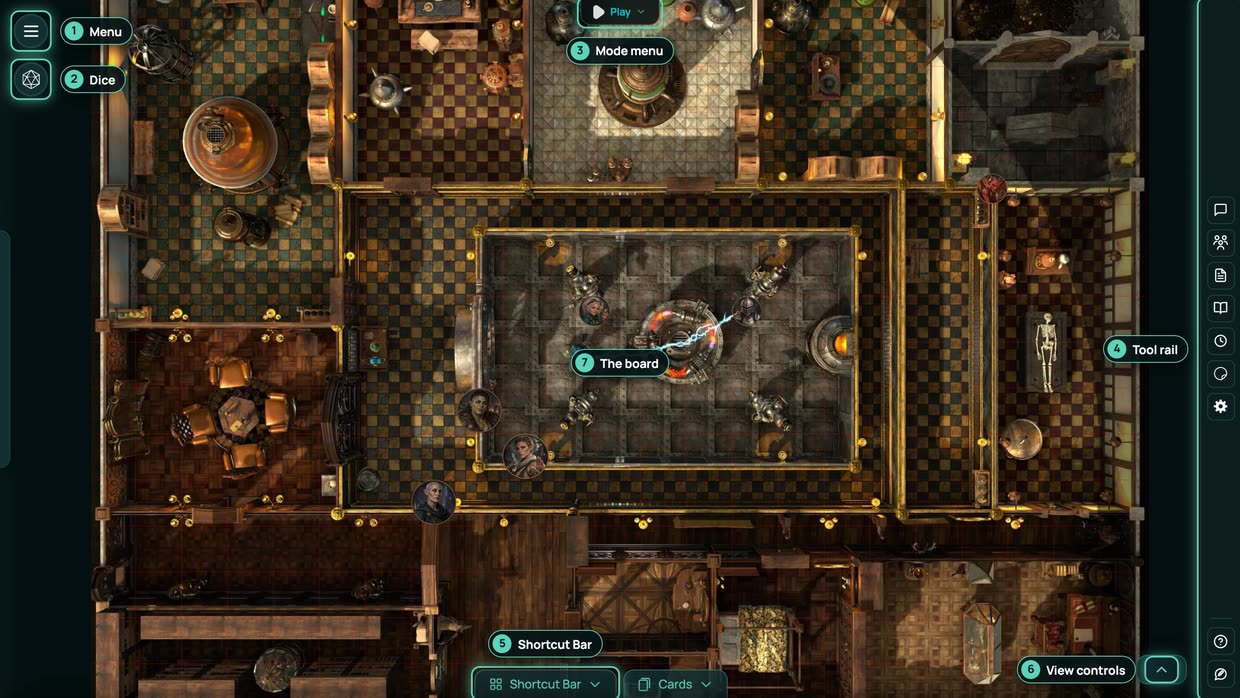
Everything in a game happens on one screen. This page names each part of it, so the rest of the docs make sense.
The board
The map in the middle is the board. Tokens (characters, creatures and NPCs), lights, doors and anything else you place sit on it. Scroll to zoom, and drag with the right mouse button to pan.
Top left: the menu and the dice
- The menu button (three lines) opens the sidebar drawer. It holds your account, the GM View switch, and the Game Master tools: Characters, Enemies, NPCs, Background, Scenes, Assets, Lights, the sound and music libraries and the rest. At the bottom are Create Game, Invite Player, Dashboard and Logout.
- The dice button (a d20) opens the dice tray. See Roll dice.
Top centre: the Mode menu
The tab at the top of the board shows the mode you are in. Hover over it to open the Mode menu:
| Group | Modes | Who |
|---|---|---|
| Play, Spell FX | Everyone | |
| Table | Measure, Area Effects | Everyone |
| Scene | Fog of War, Environment | GM |
| Build | Walls, Doors, Draw, Grid | GM |
Pick a mode and its settings show underneath. The GM also has Battle here, to start a fight. Play is the everyday mode: move tokens and open doors.
Right edge: the tool rail
A column of icons for the tools everyone uses: Chat, Characters, Character Sheets, Journal, World clock, Sticker Album and Game Settings, with Help and Feedback at the bottom. Hover over an icon to see its name.
Bottom: the Shortcut Bar and cards
- Shortcut Bar opens your quick actions: up to 24 slots for sounds, assets, effects and spells you fire in one click.
- Cards opens your hand, and the GM's decks.
- Players on a computer also get a tab with their character's name. It opens their sheet.
Bottom right: the view controls
Hover over the small handle in the corner for Zoom In, Zoom Out, Fit to Screen, Cover Screen and Reset Zoom. The GM also gets Pause Game, Mute all audio and Lock token movement here.
Shortcuts
- Cmd+K (Mac) or Ctrl+K (Windows) opens the command palette, where you can type commands such as
/roll 1d20+5. - J opens the journal.